Santa Monica, CA (May 4, 2023)—The diminutive jamX is the most recent digital audio interface from Apogee Electronics. Unveiled on the current NAMM Show, the brand new jamx builds on the unique jam interface from 2010, permitting customers to attach a guitar to a pc or iOS machine with an interface that’s sufficiently small to slot in a guitar case compartment.
Updating the unique, the brand new jamX provides a brand new function—a built-in analog compressor, permitting customers to benefit from tone-shaping compression from the beginning.
jamX’s built-in analog compressor options three presets that reply to how a lot the person drives the enter acquire. By making use of compression earlier than a digital amp sim, gamers will add to their guitar tone in new methods.
jamX’s compressor lets customers form your clear tone, it provides maintain and balances dynamics. It can be utilized to fatten up single-coil pickups or tame humbuckers, as properly. With three modes—Smooth Leveler, Purple Squeeze, and Vintage Blue Stomp—gamers have the choice to go from refined to excessive.
Users can keep within the rhythmic pocket with Blend mode, permitting them to file with out latency. To pay attention solely by way of digital amp software program, flip off Blend with a click on of a button.
Whether recording a monitor or streaming music, jamX is meant to bolster audio playback attributable to its pattern charges as much as 96 kHz and ample headroom.
Anaheim, CA (April 14, 2023)—IK Multimedia has entered the interface race with Axe I/O ONE, an interface designed for guitar and bass gamers.
Axe I/O ONE options IK’s unique Z-Tone impedance management, JFET enter for heat sound, devoted Amp Out for practising or reamping, pickup selector, exterior quantity/wah pedal or change controller inputs, and consists of AmpliTube and TONEX software program with entry to hundreds of presets, amp and pedal rig tones on ToneNET.
Axe I/O One’s Z-Tone enter circuit permits customers to dial in a tone for recording by altering the impedance of the guitar enter to go from a tighter/sharper tone to a thicker/bolder tone on the identical instrument.
The Class A JFET enter buffer provides the midrange focus, whereas an energetic/passive pickup selector permits exact enter settings on the flip of a change whereas, distinctive to Axe I/O household, the One options exterior controller inputs to attach switches or quantity pedals to manage the included software program hands-free.
The Amp Out permits gamers to attach on to a guitar amplifier or a guitar rig, o it may be used for reamping, the strategy of recording a dry guitar sign and utilizing exterior gear for processing, and even to seize one’s personal actual rig and switch it right into a plug-in utilizing the included synthetic intelligence software program.
With each AmpliTube 5 SE and TONEX SE included, customers have prompt entry to a library of of drugs fashions and presets to document and play proper out of the field.
Axe I/O ONE is transport now and out there worldwide for $129.99, together with AmpliTube 5 SE, TONEX SE and Ableton Live Lite.
Anaheim, CA (April 13, 2023)—Avid has launched its new Pro Tools merchandise, the MTRX II audio interface, and has launched the brand new MTRX Thunderbolt 3 Module, on the 2023 NAMM Show.
MTRX II gives customers with higher IO capability, a bigger routing matrix and extra immersive monitoring capabilities. The addition of the brand new Thunderbolt 3 module brings the ability of MTRX II and MTRX Studio interfaces to native audio purposes, which can be utilized concurrently with Pro Tools | HDX.
“We’re excited to introduce Pro Tools | MTRX II and the Thunderbolt 3 module to supply our person neighborhood with the perfect instruments that totally unleash the artistic capability of Pro Tools software program of their music and audio post-production workflows,” mentioned Rich Nevens, senior director, audio product administration at Avid. “The Thunderbolt 3 Option Card is a pivotal growth that opens multi-platform and native capabilities to our MTRX II and MTRX Studio customers. MTRX II gives even higher flexibility and expandability than MTRX, additional empowering customers with extra built-in IO, extra mixing, and extra monitoring functionality.
Furthermore, he says, “The introduction of Matrix II will allow us to scale back the backlog in our audio-integrated options from the second quarter of 2022.”
The optionally available MTRX Thunderbolt 3 Module delivers 256 channels of native connectivity on each Mac and PC machines. It connects to any DAW, increasing workflows to seamlessly route audio between Core Audio DAWs through Thunderbolt 3 to Pro Tools over DigiLink.
With 256 built-in Dante channels, customers can join any MTRX II audio supply to any Dante community. This delivers a extra versatile bi-directional workflow that leverages an Ethernet infrastructure to route audio between rooms and units.
Eight choice card slots could also be utilized in any mixture with Avid’s IO playing cards, together with DigiLink, 8-channel mic/line, 8-channel line, 2-channel line, 8-channel DA, Madi, AES, Dante 128 and SDI.
Integrated SPQ processing permits customers to calibrate their monitor system and proper for acoustic anomalies within the room. SPQ gives as much as 16 filters per monitor channel as much as 128 channels with adjustable delay and filters.
With a summing mixer of 512 x 64, the unit handles monitoring wants from easy stereo mixes and cues to theatrical Atmos configurations.
The Thunderbolt 3 Option Card brings Native connectivity to each Mac and PC machines. Users can join their workstation to their current MTRX Studio or MTRX II to leverage DADMan with Pro Tools or another software. For methods that already leverage a DigiLink connection, Thunderbolt 3 opens up new workflows. Users can route from Pro Tools | HDX to a different DAW over the Thunderbolt connection, compose in a single DAW and file to Pro Tools. Users can stand up to 256 channels with the interface and as much as 64 channels with MTRX Studio.
Digital Audio Denmark AX Center Thunder|Core Audio Interface.
Gentofte, Denmark (March 28, 2023)—NTP Technology’s Digital Audio Denmark model has unveiled the AX Center Thunder|Core Audio Interface—a 1U modular 19” rack unit supposed to be used within the studio, location recording setups and touring rigs.
The AX Center is a devoted Thunderbolt modular audio interface with twin mic and instrument inputs, twin headphones and displays outputs, built-in PRO|MON monitor management with speaker EQ and two slots for DAD growth playing cards. It comes with 256 Thunderbolt 3 channels, 256 Dante I/O channels, as much as 192 MADI I/O channels and 16 ADAT channels, in addition to onboard summing and processing.
The AX Center presents built-in DAD AD/DA conversion and mic preamps, in addition to versatile DADman routing, monitor management, DSP-processing and the choice so as to add much more I/O flexibility through two growth slots.
AX Center has two options that enable it to even be used for monitor management: the PRO|MON part of the complimentary DADman management software program, which provides entry to a 512×64 channel summing processor, and the unit’s built-in SPQ processing that gives 128 channels with a complete of 1024 EQ filters, in addition to delay, making it able to correct speaker correction within the studio.
The inner routing matrix of the DADman software program spans 984×984 channels, permitting any enter to be routed to any output, and even duplicating and routing to a number of completely different locations concurrently.
The Thunder|Core connection has a Hardware latency of 9 samples, 32 bit floating level decision, and is able to dealing with as much as 256 bidirectional channels at 48 and 96 kHz, 128 at 192 kHz, and 64 channels at 384 kHz. It additionally helps Apple Silicon processors, macOS Big Sur and ahead with a Core Audio driver, in addition to Windows 10 and ahead with an ASIO Thunder|Core driver.
Expected to be launched within the fourth quarter of 2023, the AX Center Thunder|Core Audio Interface will listing for $3,999 US.
The new replace provides immersive audio monitoring assist to the UA Apollo x16 Thunderbolt audio interface.
Scotts Valley, CA (March 21, 2023)—Universal Audio has launched the most recent model of its UAD Software, V10.2.3, including a variety of new options and bug fixes, however probably the most distinguished arrival with the replace is the addition of immersive audio monitoring assist to the UA Apollo x16 Thunderbolt audio interface.
The 10.2.3 software program for Apollo and UAD accelerators, now downloadable from the corporate’s website, consists of quite a lot of additions for various merchandise, however for the Apollo x16—Universal Audio’s flagship unit, providing 16 channels of A/D and D/A conversion in a rackmount Thunderbolt 3 audio interface—the brand new replace permits the unit for use as an all‑in‑one monitoring hub for mixing codecs as much as 9.1.6, dealing with 16‑channel immersive audio mixes for Dolby Atmos, Auro‑3D, Sony 360 Reality Audio and different codecs.
Other new additions and fixes embrace:
Console – New massive resizable Console Output Meters pop-out window.
Mac – High-resolution Retina show graphics for Cooper Time Cube MkII delay.
UAD-2 – Resolved offline authorization points.
Hitsville Chambers – Improved load instances.
MDWEQ – Resolved key press situation on Apple silicon methods.
Hitsville EQ Mastering – Mid/Side swap place not locked in mono situations.
THE TAKEAWAY: “The Audiobox Go is a capable and exceptionally portable interface that’s an excellent value.”
COMPANY: PreSonus • www.presonus.com PRICE: $79.95 PROS:
• Extreme portability.
• Great ease of use.
• Amazing value. CONS:
• Only one line input.
• Can’t record stereo-miked sources.
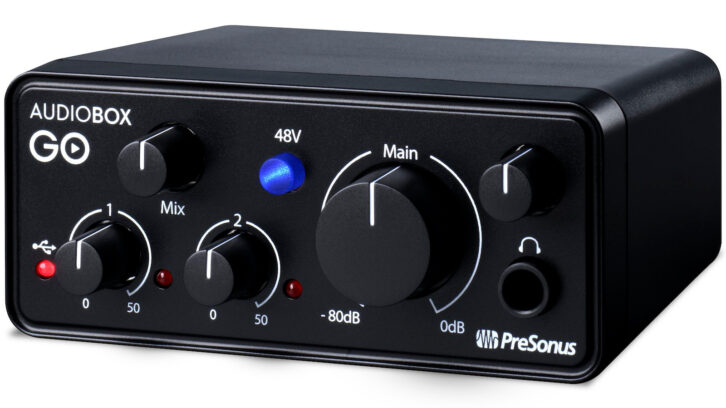
I’m not sure which is more notable: the price of the AudioBox Go or its size. It costs $79.95 and is a mere 4.25 inches wide—a quarter the width of a standard rack device. It only weighs about half a pound and can fit in the palm of your hand.
The AudioBox Go is USB-bus-powered with Mac and Windows computers, iOS phones and tablets and many Android devices, making it even more potent as a mobile interface. It’s also USB- class-compliant and supports up to 24-bit/96 kHz audio.
PreSonus markets the AudioBox Go as “designed to meet the needs of those new to recording, as well as those looking for a flexible, mobile solution.” Considering that most Mix readers aren’t recording newbies, I’ll focus here on the “flexible mobile solution” aspect.
The AudioBox Go is a 2-in/2-out interface—sort of. It has only one mic input, which is on an XLR/1/4-inch mic/line combo jack with switchable phantom power. The second input is 1⁄4- instrument. On the output side, the unit features a pair of TRS balanced outs for feeding monitors and a 1⁄4-inch TRS headphone out.
You make all adjustments from the front panel and access all connections—except the headphone output—on the back. The front panel sports input gain knobs for channels 1 and 2.
Because it’s so compact, there’s not a lot of room on the AudioBox Go for meters and indicators. What’s there consists of an LED power indicator, LED overload indicators for each channel, and a blue 48V phantom-power button that lights up when you turn it on.
To avoid latency when recording, the AudioBox Go features a Mix knob that lets users dial in the ratio of audio returning from a DAW and the direct signal being recorded. The front panel houses a large knob for controlling the level of the main outputs and a smaller one for the headphone volume.
PreSonus also includes a USB-C-to-USB-B cable and four stick- on rubber feet in the box. Make sure you attach the latter to the bottom of the interface immediately. The AudioBox Go is so light that it slides around way too easily without the feet.
Software includes PreSonus’ generous Studio Magic bundle, which features Studio One Prime, a feature-reduced version of the company’s flagship sequencer, and a selection of processor and instrument plug-ins from Brainworx, iZotope, Lexicon and others. Some are feature-reduced, while others are full versions.
Considering the price of the AudioBox Go, I was impressed with the sound quality. The preamp is an XMAX-L, a variation of the company’s proprietary preamp design. One of the ways I tested it was to record acoustic guitar, banjo, mandolin and vocals, and then use the same mic to record similar parts through a significantly more expensive preamp. The AudioBox Go held its own when I compared the tracks; It did not sound like an entry-level unit.
That said, the unit does have some limitations. Despite being a two-channel interface, there’s only one preamp, so you can’t record stereo-miked sources. It also has only one line input, so a stereo recording off the board at a live show isn’t possible either.
But if those restrictions aren’t problematic for your workflow, the Audiobox Go is a capable and exceptionally portable interface that’s an excellent value.
New York, NY (December 1, 2022)—While it has been a cornerstone of the high-end pro-audio world for decades, Solid State Logic turned heads a few years ago with the introduction of its SSL 2 and SSL 2+ interface models, which put gear bearing some of the company’s acoustical and technological hallmarks into the hands of many pros on a budget for the first time. Now Solid State Logic has bolstered its interface lineup with the introduction of the SSL 12, which expands not only its Audio Creation Products product line, but also the capabilities offered at what it terms a “value-based” price.
The SSL 12 is a 12-in 8-out USB bus-powered, desktop audio interface intended for a home or project-based studio control room. The portable unit is centered around four SSL-designed microphone preamplifiers (with Mic/Line and HPF); a pair of Hi-Z instrument inputs for guitars, bass or vintage instruments; and dual headphone outputs along with 32-bit /192 kHz AD/DA converters. The SSL 12 offers a variety of routing and monitoring options, combined with ADAT input supporting eight additional channels of digital audio, for a total of 12 tracks of simultaneous recording and eight channels of playback.
The interface ties into the SSL 360° software mixer, which offers detailed I/O metering, assignable functions for SSL 12’s three front-panel switches, including key monitor controls; Alternative Monitor Switching; Mono Sum; Invert Phase Left; Dim; Cut; and access to an on-board talkback microphone. Users can create up to four independent, near zero-latency foldback mixes using SSL console-style routing; recalling sessions is handled via a Save/Load function. Three modes (Standard, High Impedance, High Sensitivity) are offered to best suit different headphone types or create additional line outputs via re-purposing the headphone outs.
Producers and content creators needs are addressed with a Producer Toolkit. Users can configure where SSL 12’s Loopback feed is taken from, allowing them to, for example, record the output of a media player (e.g. via Playback 1-2) or create a custom sub-mix of their content via one of the Aux Busses (e.g. Line 3-4). Both headphone mixes and line outputs 3-4 are also accessible. Also included is the SSL Production Pack, a suite of software instruments, sounds, plug-ins and DAW that includes the Vocalstrip and Drumstrip 2 plug-ins as well as 3-month access to SSL’s Complete subscription and other 3-month licenses from the likes of Antares and Output.
SPL Marc One Monitoring and Recording ControllerFela Davis is a 2019 Hall of Fame inductee at Full Sail University. She also owns 23dB Productions and One of One Productions Studio, which specializes in podcasting, video, and music production. Clients include the Holding Court with Eboni K. Williams podcast, Sirius XM, Atlantic Records, iHeart Radio and numerous Grammy award-winning musicians. www.oneofoneproductions.com
New York, NY (April 30, 2021)—The SPL Marc One Monitoring and Recording Controller is a beast, providing high-end quality whether you’re listening back or putting down tracks. It offers three monitoring modes, a 32-bit AD/DA converter and a smart, user-friendly design.
For this review, we connected it to our Kali IN-8s and Neumann KH 120s studio monitors via USB to the DAW, but it was impressing us before we even turned it on. First of all, its heavy-duty metal frame body and actual weight give you a hint of the quality you’re about to hear. All knobs and toggle switches are weighted, supporting the impression of a high-end product.
The first toggle switch on the left side of the device controls the two sets of studio monitors and has an off position in the middle. Position A on the toggle includes the subwoofer if you have one, while the off position is silent. There’s no bleed into your monitors in any switch position.
Next is the volume knob. It takes up a lot of real estate but it’s ultimately the reason I love this controller. It provides lots of ways to tweak your outputs that we will get into later. You’ll use this knob the most, and the even volume response sounds amazing.
The second toggle switch gives you the option to listen in mono, stereo or channel swap, which reverses the stereo image so you can hear everything that’s going on with your mix. There are light indicators for left and right monitor distortion to help protect your monitors.
When the monitor knob is centered, all input signals are equally loud; turn to the left and the analog stereo inputs get louder while the USB input signal gets quieter. Turning from the center to the right does the opfeposite, all helping to tweak your system to deliver the perfect volume for mixing. There’s also a headphone volume knob and a cross-feed knob so you can blind-hear the studio monitors and headphones together for more listening options. The amount of depth from the headphone amp to our studio headphones, Sennheiser HD 800s, opened my ears to new things in our mixes.
Now to the back of the unit. First is a heavy-duty on/off switch that looks like it can stand up to years of use. Next to it are two dip switches: 1 provides a 10 dB pad on your studio monitor sources, while 2 is a Rec 1+2, which mixes together both line inputs and allows you to record them together via USB in mono. Both dip switches are easy to flip without requiring a tool or a long fingernail to use.
All of the TS and TRS inputs and outputs on the back of the unit stick out for better grounding. The USB connection is class-compliant, which means that all Mac computers and iOS devices like iPads and iPhones can use the full performance bandwidth of the 32-bit AD/DA converter without driver installation. (iOS devices will need the camera adapter to connect, however.) For Windows, you’ll only have to install a driver (downloadable on the SPL site) if you need higher sample rates. The USB connection will connect to your DAW for superb studio monitor playback at very high resolutions— for example, DSD4 and DSD256 (11.2 MHz) are supported.
Over the course of our review period, we found the amazing resolution and high-quality build combined perfectly in use as we toggled seamlessly between studio monitors and headphones to listen to mixes. Used as a monitor controller, SPL got the layout perfect for muscle-memory mixing, with the monitor toggle switch and volume knob ideally located for quick adjustments while listening. When you consider that it’s also an interface for recording, able to record high-resolution audio from 10 Hz to 200 kHz, the $799 price tag is worth it. The SPL Marc One is now a staple in our studio and workflow.
Fela Davis is a 2019 Hall of Fame inductee at Full Sail University. She owns 23dB Productions and One of One Productions Studio, which specializes in podcasting, video, and music production. Clients include the Holding Court with Eboni K. Williams podcast, SiriusXM, Atlantic Records, iHeartRadio and numerous Grammy Award-winning musicians. www.oneofoneproductions.com.
New York, NY (April 30, 2021)—When COVID-19 shut down the world last spring, multi-Platinum rapper Meek Mill and Anthony Cruz, his engineer since 2013, were in the Bahamas realizing that the way they recorded together wouldn’t be the same going forward. Once the pair returned to a closed-up United States, it didn’t take long before the artist couldn’t deal with how the pandemic-induced lockdown was preventing him from emptying his thoughts into songs. Cruz recalls, “It got to a point where he was like, ‘I understand things are real, but I really need to get going.’ My back was to the wall and I had to find a solution.”
Once Cruz found it, they never looked back—Meek Mill and Cruz were able to record, mix and release the four-track Quarantine Pack EP in late November 2020, closing out an eventful year. Cruz recapped it all for Pro Sound News in this interview, lightly edited for length and clarity.
Q: After getting back from the Bahamas as the pandemic was ramping up, how did you and Meek adjust to the lockdown?
We’d been in-person vibing for seven years by that time, so it was a very dramatic change of workflow. It was just too dangerous at the time to jump out and do the regular in-person workflow, so when I was digging into potential solutions and testing different options, I was like, “How are we going to be able to work?” I ended up finding an amazing solution for the time.
Q: That involved a home studio?
Before the pandemic, we were able to store equipment at Meek’s house. He had never really used the space because he likes to leave the house to go to work, so we typically would lock-in the studios. We’d already built out a proper home studio for him—we have Genelec 1234A speakers with 18-inch subs on either side, a Universal Audio Apollo interface, and his mic chain is a BAE 1073 mic preamp that goes into a Tube-Tech CL 1B. He uses a Slate VMS microphone, which is basically a mic that mimics all the classic mics—it’s like a tool belt where, depending on who you’re recording or what the vibe of the song is, you can change the texture to match some of the vintage classic mics that we’re used to that cost tens of thousands of dollars. It does a really good job of matching the tone, and it just became our go-to over time.
Q: How were you able to record Meek remotely?
People are using Zoom to control the computer and then they use one of these audio streaming companies that basically allow you to get a clean signal on your side as the engineer and you control the workflow of who you’re recording. It’s interesting because it allowed me to really see what the opportunities were in this space, because it was never a necessity before to have to be ready for remote recording. You have to use Zoom and you have to use a plug-in and stream it, too—it’s not efficient—and it’s basically like he had a ghost engineer. Meek would be like, “Oh my god! Cruz isn’t even in the room and he’s recording me.”
Anthony Cruz (center) recorded a feature by Meek Mill (right) on the Ed Sheeran (left) track “1000 Nights” in 2018.
Q: Did you observe a difference in the creative process between you and Meek working remotely as opposed to when you two have been together?
What you notice when you’re working remotely compared to in-person is that it’s all about trying to maintain the energy as if you’re still in the room. I had to find multiple ways of making the process efficient enough where it didn’t interrupt his workflow. We kept the same level of speed, but there were so many things I had to do on my end—I had to have an account that had all the beats that I was gathering from producers, copy a link, send it over to his computer while I’m streaming the audio. Then, after the session, I had to find a program that could back up all the files so I could send them to myself without it taking up too much time because maybe the internet wasn’t strong enough. We would be on a FaceTime call during the session, so we could still have that interaction and I could hear what the energy was in the room. That was a big thing. We had a separate iPad [for FaceTime] that was the communication between me and him live on the spot. Besides the streaming link, I was hearing him on the mic, but when he jumped off the mic, I had to mute the signal so we didn’t get feedback, any blasts of music or whatever. I needed a source of communication, so that was FaceTime.
It’s actually amazing the things we were able to get done. The Quarantine Pack EP he put out in late November is exactly what it’s titled—we did it all remotely. I would hit [producer] Nick Papz and bounce ideas. We got nothing but time on our hands, so it’s like your mind’s going crazy—“we’ll make this a bigger record!” Being in tune with the mixer live, you guys are both able to collaborate on a mix. They can be like, “Yo, let me try something different here,” and they’re able to control your computer and do their thing, and then you’re like, “Oh, hold on—let me try something.” So it’s this live collaboration. It still feels like we could potentially be in the same room. We were able to do some incredible things and still impact with the music.
Q: I saw you guys got back to the studio in November. How was it being back in person?
It was interesting. It was still nerve-wracking for me, because my biggest thing was, I’m in the house with my baby girl and I got wifey, and I just felt like it was something I’ve never had to deal with before. It was a genuine fear of not about me, but how I would affect somebody else if something were to happen on this trip. It got to a point where we took all the precautions we needed in terms of constant testing and making sure everybody was safe and masked and everything. The first time, Meek actually ended up in New York and we were able to link up in person. That’s in my backyard, so that was a no-brainer. We had a couple of sessions there, and then the next sessions in person were actually back in the Bahamas again. Once the vaccine came out, I felt a little more confident once I was in that groove.
Q: Do you feel that you’ve gotten better as an engineer over the last year?
I think it’s really helped me creatively. I’ve really tapped in on another level on a creative side. Before, I would put somewhat of a limit on myself. Now I’m trying more things and putting myself out there more creatively. I think that’s the biggest thing— that it’s helped me a lot that way. Once I actually got our workflow together, it actually inspired fellow industry people to come up with really cool innovative technologies of their own, and I’m working with [Jay-Z’s engineer Young] Guru on solutions as well. We’re coming up with how we can innovate this space and make it more efficient.
Allen & Heath’s DT164-W and DT168 I/O shown with laptop running the new DT Preamp Control App.
New York, NY (March 8, 2021)—Allen & Heath’s new DT Preamp Control app now allows the company’s Dante I/O expanders to be used within any Dante audio network, not just ones involving Allen & Heath mixing systems.
The free application, compatible with Windows and macOS, allows control of multiple DT168 and DT164-W expanders connected to Dante-equipped third-party digital mixers and sound management systems, allowing their use in a variety of systems in live, broadcast, install and studio applications.
The portable DT168 with carry handle and the wall-mount DT164-W are intended for use in distributed networks where high-channel-count Dante or AES67 I/O is required. The IEC armored cable or DC power options for the DT164-W also allow it to be used for in-wall mounting and stage pockets in permanent installations.
“Since the launch of these products, we have received numerous requests for extending their use beyond Allen & Heath mixing systems,” says Martijn Verkerk, technical marketing manager at Allen & Heath. “Houses of worship, university campuses, and arenas have all showed an interest in deploying our Dante solutions alongside their existing audio system, and DT Preamp Control enables that.”