
World News
Install Realtek Audio Driver Failure error code No driver supported on this driver package deal
Install Realtek Audio Driver Failure error code No driver supported on this driver package deal
Realtek’s audio drivers have been among the many most well-known causes of Windows points. If you obtain Install Realtek Audio Driver Failure error code No driver supported on this driver package deal message adopted by error codes like 0x00005b3, 0002, 0x000000FF, and so forth. you won’t be able to put in the required drivers to your Realtek sound card.
There are a number of situations through which this drawback can come up and a number of potential causes. Just a few options have been profitable for customers who’ve tried totally different approaches to fixing the difficulty. If the difficulty impacts you, proceed studying to discover ways to set up the drivers and repair the difficulty.
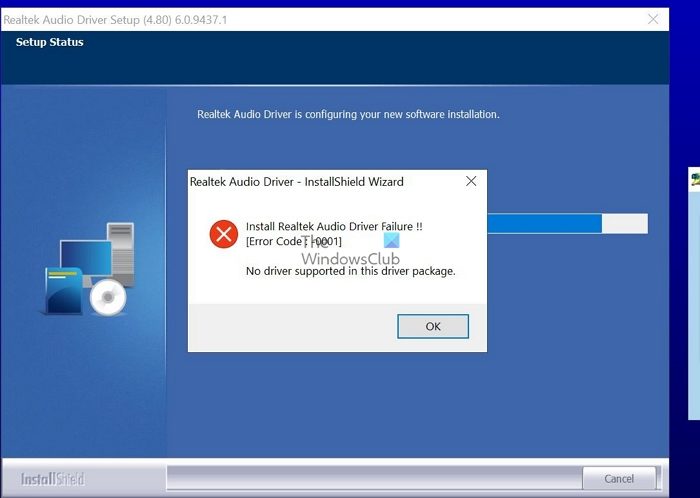
Why does the error happen?
There might be a number of causes for the Realtek HD Audio Driver Failure error, together with conflicts with laptop drivers, inadequate disk house, incompatible working techniques or system structure, interference from third-party software program, and {hardware} points with the sound card.
What is necessary is to determine when this began occurring. Was it proper after putting in an replace, a driver, or a system subject?
Sometimes, a lifeless sound card might trigger this error. You should change your sound card as there is no such thing as a software program repair for this subject. Windows is not going to help you set up the drivers for the reason that {hardware} system is lifeless, and you’ll not see any errors or gadgets within the Device Manager with a yellow exclamation level or query mark. If that’s the case, not one of the strategies talked about under will perform.
Install Realtek Audio Driver Failure error code No driver supported on this driver package deal
To repair Install Realtek HD Audio Driver Failure error codes 0x00005b3, 0002, 0x000000FF, and so forth. in your Windows 11/10 laptop, comply with these options:
- Reinitialize the Driver
- Check for malfunctioning drivers and replace manually
1] Reinitialize the Driver
There is probably going corruption within the driver set up. As a consequence, we’ll reinitialize the driving force set up on this technique:
- Open Device Manager.
- Scroll down and double-click the Sound, video, and recreation controllers class to develop it.
- Right-click the Realtek(R) Audio driver and choose Uninstall system from the context menu.
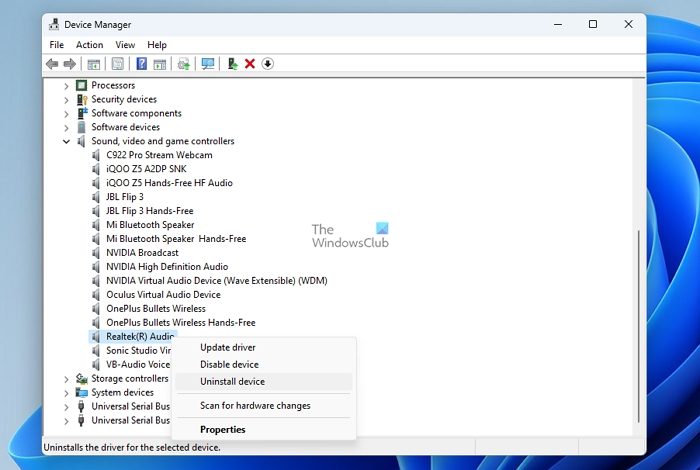
- Select Yes and comply with the on-screen instructions when prompted to take away the driving force out of your laptop.
- In the highest menu, click on the Action tab after which choose Scan for {hardware} adjustments from the context menu.
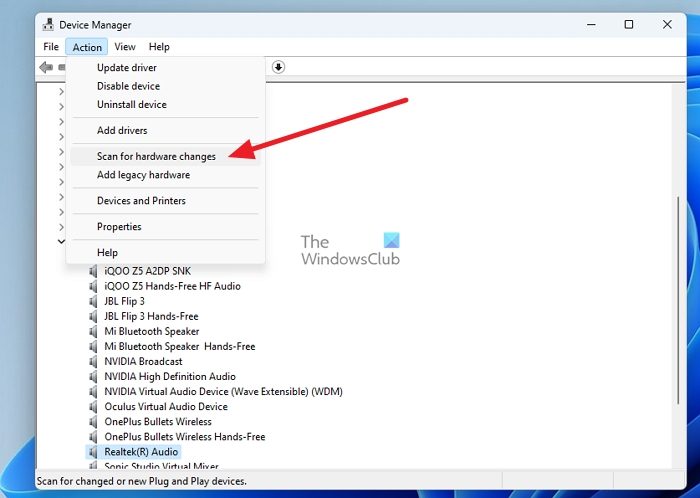
- Windows will start trying to find and putting in the lacking driver by itself. After it’s performed, confirm whether or not the issue nonetheless exists.
Related: How to obtain and reinstall Realtek HD Audio Manager.
2] Check for malfunctioning drivers and replace manually
You can discover the malfunctioning sound driver by opening Device Manager, increasing the Sound, video, and recreation controllers class, and checking for an exclamation mark or a query mark subsequent to the Realtek sound driver. You can attempt updating the malfunctioning sound drivers if Windows doesn’t allow you to set up them.
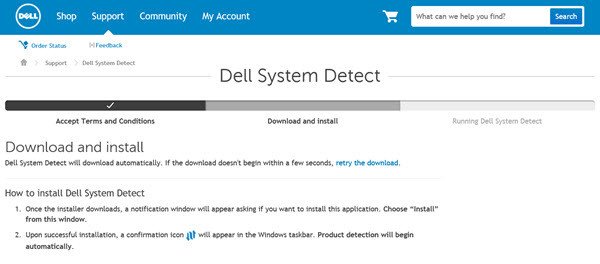
It is feasible that the driving force put in in your PC will not be the latest. We advocate that you simply get the driver instantly from the OEM web site.
However, take away any present OEM software program and driver associated to it.
I hope the publish and considered one of these strategies helped resolve the difficulty.
Similar errors:
Why is my PC exhibiting a file system error?
The error message you is perhaps seeing might consequence from corrupted exhausting drives, broken system information, or unhealthy sectors. You can open Windows Terminal as an Administrator and run the sfc /scannow command to resolve the difficulty.
What is driver set up error 0x00000002?
The error 0x00000002 means the printer’s driver put in on the pc is corrupted. The driver for the printer could also be corrupted as a consequence of a number of causes. The error code has an outline and a numerical error quantity. Try uninstalling this driver from the driving force retailer first (should you obtain an error code of 0x00000057).
HI-FI News
by way of The Windows Club https://ift.tt/0VNGTMe
February 16, 2024 at 11:00PM
-
Product on sale
 Audiophile Vinyl Records Cleaning BundleOriginal price was: €69.90.€59.90Current price is: €59.90. incl. VAT
-
Product on saleEasy Start Vinyl Records Cleaning KitOriginal price was: €69.90.€59.90Current price is: €59.90. incl. VAT
-
Vinyl Records Cleaner Easy Groove Concentrate€34.95 incl. VAT
-
Easy Groove Super Set€199.00 incl. VAT
-
Easy Groove Enzycaster – vinyl records prewash cleaner€34.95 incl. VAT
-
Easy Groove Extreme MK. II- vinyl records prewash cleaner€45.00 incl. VAT
-
Vinyl Records Cleaner – Easy Groove Virgin Concentrate€35.00 incl. VAT
-
Easy Groove Spray&Wipe vinyl records cleaner€34.95 incl. VAT


