
World News
The Linux audio stack demystified (and extra)
The Linux audio stack demystified (and extra)
Introduction
Digital audio processing is a fancy but fascinating topic. Linux, identified for its sturdy and versatile system structure, runs a complicated audio stack that may be significantly daunting to grasp. Grasping it correctly requires data in a number of technical disciplines, together with physics, electrical/electronical engineering, and software program engineering particular to the Linux ecosystem. This article goals to demystify the Linux audio stack by explaining the fundamentals of sound, how people understand sound, and the workings of digital audio. We will then delve into the elements that make up the Linux audio system and discover how these work together. Buckle up; it’s going to be an extended and informative learn.
Exclaimer
In this text, I’ll simplify ideas and concepts to offer you the fundamental data wanted to observe alongside. Each chapter may simply be expanded right into a devoted, prolonged weblog submit. However, for simplicity’s sake, I’ve shunned doing so. If you prefer to additional particulars a few particular chapter, please be happy to contact me or go away a remark. I’ll be pleased to delve into extra element if wanted.
Understanding Sound and Sound Waves
Before delving into the technicalities of audio processing, it’s important to grasp what sound is. In a nutshell, sound is a vibration that propagates as an acoustic wave by a medium akin to air. These waves are created by vibrating objects (akin to audio system, headphones, piezo buzzers, and many others.), inflicting fluctuations in air strain that our ears can decide up and understand as sound. Audio waves can have many shapes, the most typical waveform is the sine wave. It is the elemental constructing block for all different waves present, and thus it’s vital to study in regards to the sine wave first.

All waveforms have 2 basic key properties:
Period (length): The time it takes the wave to carry out a single oscillation.Amplitude: This represents the wave’s energy or depth, which we understand as quantity. Higher amplitudes typically correspond to louder sounds.
We can derive the Frequency from the interval length of a wave kind. The frequency is measured in Hertz (Hz), and it represents the variety of oscillations (waves) per second. Higher frequencies correspond to higher-pitched sounds. In different phrases, the shorter the interval length, the upper the pitch. The increased the frequency the upper the pitch. Thus, the frequency is the inverse of the interval length, or in mathematical phrases:
f = 1 / (interval length[s]) = (interval length[s])⁻¹.
Amplitudes may be measured because the strain variation within the air – the so referred to as Sound Pressure Level (SPL). The normal unit for strain is Pascal (Pa). In audio contexts, we frequently take care of very small pressures, so micropascals (µPa) are usually used. However, the most typical approach of describing amplitude is Decibels (dB). Decibels are a logarithmic unit used to explain the ratio of a selected sound stage to a given reference stage. Decibels are the popular unit, as a result of the human ear perceives sound strain ranges logarithmically.
dB SPL: Sound strain stage in decibels. In air, the reference strain is usually 20 µPa (usually known asP0), the brink of human listening to. It is calculated utilizing the componentsSPL = 20 * log₁₀(P/P0), the placePis the measured strain andP0 is the reference strain (20 µPa).dBVanddBu: When sound is transformed into {an electrical} sign by a microphone, the amplitude may be measured in volts (V). This is widespread in audio tools and recording.dBVanddBUare models for voltage measurements in audio methods, referencing 1 volt for dBV or 0.775 volts for dBu. Similarily todb SPL,dbV and dBumay be calculated utilizing the identical components, simply alternate the reference strain with a reference voltage. dBV = 20 * log₁₀(V/V0), the placeVis the measured voltage andV0` is the reference voltage.
You would possibly marvel how a sine wave really feels like? Here’s an instance of a sine wave at a frequency of 440 Hz. Please examine your quantity earlier than you play!
How people course of sound waves
Sound waves are captured by the pinna, the seen a part of the outer ear. The pinna helps direct sound waves into the ear canal. The sound waves journey by the ear canal and attain the eardrum (tympanic membrane). The sound waves trigger the eardrum to vibrate (similar to sound waves convey microphone membranes to vibrate). These vibrations correspond to the frequency and amplitude of the incoming sound waves. The vibrations from the eardrum are transmitted to the three tiny bones within the center ear, referred to as the ossicles (malleus, incus, and stapes). The ossicles amplify the vibrations and transmit them to the oval window, a membrane-covered opening to the internal ear. The vibrations move by the oval window and enter the cochlea, a spiral-shaped, fluid-filled construction within the internal ear. Inside the cochlea, the vibrations create waves within the cochlear fluid, inflicting the basilar membrane to maneuver. The motion of the basilar membrane stimulates tiny hair cells situated on it. These hair cells convert mechanical vibrations into electrical alerts by a course of referred to as transduction. Different frequencies of sound stimulate totally different components of the basilar membrane, permitting the ear to differentiate between varied pitches. The hair cells launch neurotransmitters in response to their motion, which generates electrical impulses within the auditory nerve. These electrical alerts journey alongside the auditory nerve to the mind. The auditory alerts attain the auditory cortex within the mind, the place they’re processed and interpreted as recognizable sounds, akin to speech, music, or noise.
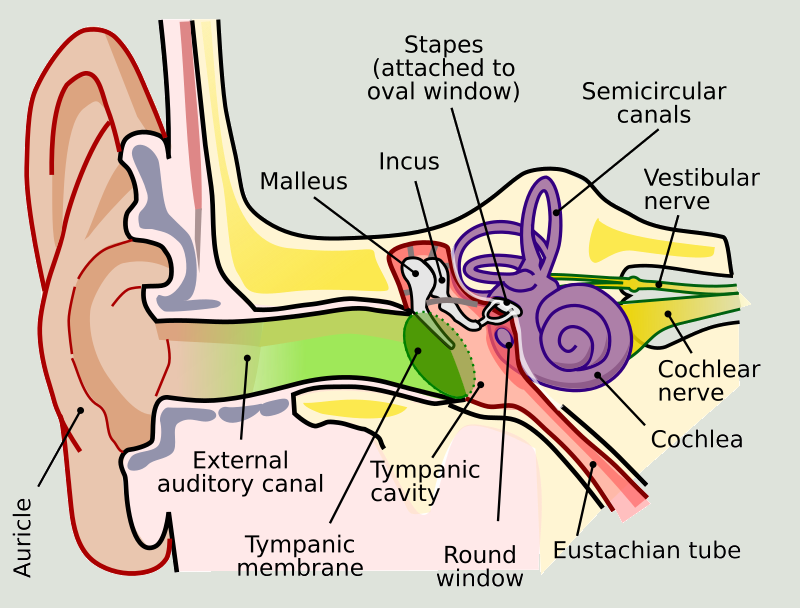
Hard information to higher perceive the scale of sound waves:
- The typical frequency vary of human listening to is from ~20 Hz to ~20.000 Hz (20 okayHz). This vary can differ with age and publicity to loud sounds.
- The frequency of people talking usually falls inside the vary of ~300 Hz to ~3.400 Hz (3.4 okayHz).
- Human ears are most delicate to frequencies between 2,000 Hz and 5,000 Hz.
- The quietest sound that the typical human ear can hear is round 0 dB SPL (sound strain stage), equal to twenty micropascals.
- The loudest sound that the typical human ear can tolerate with out ache is round 120-130 dB SPL. Sounds above this stage could cause instant listening to harm.
- The vary between the brink of listening to and the brink of ache is called the dynamic vary of human listening to, which is roughly 120 dB.
How Digital Audio Works
Now, that we received a rudimentary understanding of sound waves within the analog world work, let’s proceed with sound waves in a world of zeroes and ones.
When we discuss audio in a digital context, we’re referring to sound that’s been captured, processed, and performed again utilizing computer systems.
Audio-Input and Sampling
Sampling to computer systems is what listening to is to people. Sampling is the method of changing analog sound waves into digital knowledge that a pc can course of. This is finished by taking common measurements of the amplitude of the sound wave at fastened intervals. The charge at which these samples are taken is named the sampling charge and is measured in samples per second (Hz). Common sampling charges embody 44.1 okayHz (CD high quality) and 48 okayHz (skilled audio).

Each lollipop on the sine wave represents a single discrete pattern/measurmeent. The first oscillation has the next pattern charge, the second oscillation has a decrease pattern charge for demonstration functions solely. Typically, the pattern charge is fixed, and greater than double of the very best frequency people can hear.
Nyquist-Shannon
The Nyquist-Shannon Sampling Theorem is a basic precept within the discipline of digital sign processing. It gives a criterion for figuring out the minimal sampling charge that permits a steady sign to be completely reconstructed from its samples. A continuous-time sign that has been bandlimited to a most frequency fmax (which means it comprises no frequency elements increased than fmax) may be utterly and completely reconstructed from its samples if the sampling charge fs is larger than twice the utmost frequency of the sign.
Mathematically, this may be expressed as: fs > 2 * fmax
This properly explains why widespread sampling charge are usually slightly bit greater than double of the human listening to vary (e.g. 44.1 okayHz for CD high quality).
Quantization
In the analog world, alerts have infinite precision. For instance, when you zoom in on a sine wave, you’ll be able to all the time discover extra element — the waveform continues to be easy and exact regardless of how carefully you study it. However, within the digital world, precision is proscribed. To perceive this limitation, contemplate this query: “How many numbers are you able to characterize between 0 and 1?” If you employ 0.1 because the smallest potential increment worth, you’ll be able to solely characterize 10 discrete values between 0 and 1. If you refine the smallest increment to 0.01, you get 100 values between 0 and 1. In the analog realm, there’s no smallest potential increment; values may be infinitely exact. But in digital methods, precision is constrained by the variety of bits used to characterize the sign. Digital audio makes use of a set variety of bits to encode every pattern of sound. For occasion, in a standard 16-bit audio system, there are 65,536 discrete ranges out there to characterize the amplitude of every pattern. This implies that the smallest distinction between two ranges, or the smallest potential increment, is roughly 0.000030518.
The means of approximating every pattern’s amplitude to the closest worth inside these discrete ranges is called quantization. The variety of discrete ranges will depend on the bit depth of the audio. For instance:
- 16-bit audio gives 65.536 potential amplitude values.
- 24-bit audio gives 16.777.216 potential amplitude values.
Quantization is crucial as a result of it permits us to characterize analog alerts with a finite variety of discrete values, making digital storage and processing possible, regardless that we sacrifice some stage of precision in comparison with the analog world. For all of the audiophiles studying this: 24-bit decision is sufficient! No, you don’t hear the distinction between analog alerts and 24-bit digital alerts.
Storing Digital Audio alerts?
With an understanding of sampling and quantization, we will now discover how digital audio may be saved. For illustrative functions, let’s contemplate designing a fundamental audio format to retailer digital audio, utilizing the simplicity of the CSV (Comma-Separated Values) format as our basis. Although this proposed format can be inefficient in comparison with established audio codecs like MP3, WAV, or FLAC, it serves as a helpful train in understanding the rules behind audio file storage. CSV information are a well-known format for a lot of, used to retailer tabular knowledge in a simple, readable method. They include rows and columns separated by commas, making them a great place to begin for conceptualizing audio storage. The key right here is to acknowledge {that a} sampled audio sign may be represented equally to a desk in a spreadsheet, the place every row corresponds to a discrete pattern in time.
Let’s outline a CSV-based audio format with the next construction:
- Sample Index: Each row represents a discrete pattern level. For instance, within the case of a sine wave, every row corresponds to a selected level alongside the waveform. Typically the pattern index is only a self-incrementing quantity.
- Quantized Value: The second column comprises the quantized amplitude worth for every pattern.
- for simplicity sake, we assume that the pattern charge is 44.1 okayHz (this data is required for later playback) and the bit depth is statically set to 16 bit.
a easy CSV file may like this:
Sample Index, Quantized Value
1, 0.32767
2, 0.32780
3, 0.32809
4, 0.32853
...
While CSV is after all not a sensible selection for real-world audio storage because of its inefficiency and lack of help for metadata, compression, a number of channels, and different crucial options, this train helps illustrate the elemental ideas of how digital audio knowledge may be organized and saved. Real-world codecs like MP3, WAV, and FLAC make the most of extra refined methods to deal with audio knowledge effectively, like
- Compression, for decreasing file measurement whereas sustaining audio high quality.
- Metadata, for storing extra details about the audio file, akin to title, artist, and length, pattern charge, bit-depth
- Error Correction for guaranteeing knowledge integrity throughout storage and playback.
- in addition to help for a number of channels (e.g. for stereo alerts)
Mono and Stereo
Mono (quick for monaural) refers to audio that’s recorded and performed again by a single channel. In a mono audio setup, all sounds are mixed into one channel, and this single channel is then performed by a number of audio system or headphones. The major benefit of mono audio is its simplicity and the uniformity it gives — sound is uniformly distributed no matter what number of audio system are used. This makes mono appropriate for purposes the place spatial sound just isn’t essential, akin to phone conversations or sure kinds of spoken-word recordings. Even audio on larger venues is typical in mono.
On the opposite hand, stereo (quick for stereophonic) includes two audio channels: left and proper. Stereo recording captures sound from two distinct channels, creating a way of spatial separation between sounds. This permits for a extra immersive listening expertise as a result of totally different sounds may be directed to totally different audio system or headphones. For occasion, in a stereo combine, you would possibly hear a guitar predominantly by the left speaker and a vocal by the best speaker. This spatial separation mimics the way in which people naturally hear sounds in actual life, making stereo significantly efficient for music, films, and different purposes the place a sensible sound discipline enhances the expertise.
Audio-Output
We’ve realized rather a lot about audio waves, and the way audio waves may be captured and saved. Now it’s time to maneuver ahead and take into consideration how digitally saved audio is performed again. As we’ve mentioned within the earlier article, digital audio knowledge is usually saved as a sequence of discrete samples that characterize the amplitude of a sound wave at varied factors. This knowledge is then streamed to your computer systems sound card. A DAC (Digital-To-Analog) converter converts these digital values right into a steady analog sign. This conversion course of usually includes 2 steps. First, the digital samples are mapped to discrete voltage ranges. In case your sound card outputs line-level, the very best potential digital representable worth would map to 0.447V (447 mV). To easy out the discrete steps and reconstruct a steady waveform, the DAC makes use of a low-pass filter. This filter removes high-frequency artifacts (also known as “sampling noise”) that outcome from the discrete nature of the digital knowledge. Finally, the filtered analog sign is shipped to the output stage, which drives the audio system or headphones.
The Role of a Sound Card / Audio Interface
A sound card is a vital element in a pc’s audio system. It handles the enter and output of audio alerts, changing between analog and digital kinds. Sound playing cards usually embody ADCs for recording, DACs for playback, and extra circuitry for audio processing.
Typical Components of a Sound Card:
- ADCs (Analog-to-Digital Converters): Converts analog alerts from microphones or different enter units into digital knowledge.
- DACs (Digital-to-Analog Converters): Converts digital audio knowledge into analog alerts for playback by audio system or headphones.
- Amplifiers: Boosts the audio sign to a stage that may drive audio system or headphones.
What makes a very good Sound Card / Audio Interface?
Often occasions I get the query what audio interface is an efficient audio interface. Typically I don’t wish to advocate a selected model, however clarify folks what they need to search for when evaluating audio interfaces. Here’s a brief and opinionated set of features you must look out for.
- Signal-to-Noise Ratio (SNR): A excessive SNR signifies that the sound card produces clear audio with minimal background noise. Look for a sound card with a excessive SNR, usually 100 dB or increased.
- Total Harmonic Distortion (THD): Low THD implies that the sound card introduces minimal distortion to the audio sign. Good sound playing cards usually have THD scores under 0.01%.
- Dynamic Range: A large dynamic vary permits the sound card to precisely reproduce each very quiet and really loud sounds with out distortion or noise.
- Sampling Rate: The next sampling charge permits for extra correct illustration of audio. Common high-quality sound playing cards help charges as much as 192 okayHz or increased.
- Bit Depth: The next bit depth allows higher decision of audio particulars. Good sound playing cards help 24-bit depth, offering a broader vary of amplitudes and finer element.
- Low Latency: Good sound playing cards have low latency, which is crucial for real-time purposes like gaming, reside recording, {and professional} audio manufacturing. Latency is the delay between enter and output, and decrease latency ensures extra instant audio responses.
The Stairstep Fallacy
Source: Invidious on yt.artemislena.eu supplied by artemislena
The Linux Audio Stack
Now that we’ve lined the fundamentals, let’s delve into how Linux manages audio. The Linux audio system employs a modular and layered structure to deal with audio processing, which gives each abstraction and adaptability. Layering in Linux audio permits for a structured method to audio administration. By separating considerations into totally different layers, the system abstracts the complexities of lower-level operations, akin to direct {hardware} interactions. This separation implies that user-space purposes don’t have to take care of the specifics of {hardware} configurations, streamlining improvement and enhancing compatibility. Modularity enhances this layered method by permitting particular person elements to be swapped or reconfigured with out disrupting the whole system. This implies that totally different layers or elements may be changed or up to date as wanted. For instance, when you plug in a headset, the system can dynamically change from speaker output to headset output due to its modular design. Similarly, when you change your sound card or audio driver, the modular system can adapt with out requiring intensive reconfiguration.
ALSA (Advanced Linux Sound Architecture)
Let’s begin with the muse of all Linux methods in the case of audio. ALSA is the core layer of the Linux audio stack. It gives low-level audio {hardware} management, together with drivers for sound playing cards and fundamental audio performance. ALSA gives a standardized interface for audio {hardware}, permitting purposes to work together with sound playing cards and different audio units while not having to know the specifics of the {hardware}. It features a set of drivers for several types of sound playing cards and audio interfaces. These drivers translate the high-level audio instructions from purposes into low-level directions understood by the {hardware}.
ALSA operates within the kernel area, which means it interacts instantly with the Linux kernel. This place permits it to handle {hardware} sources and carry out low-level audio operations effectively. To enable the person area from taking advantage of ALSA, ALSA gives libraries and instruments in person area, akin to libasound (the ALSA library), which purposes use to interface with the ALSA kernel drivers. This library gives capabilities for audio playback, recording, and management.
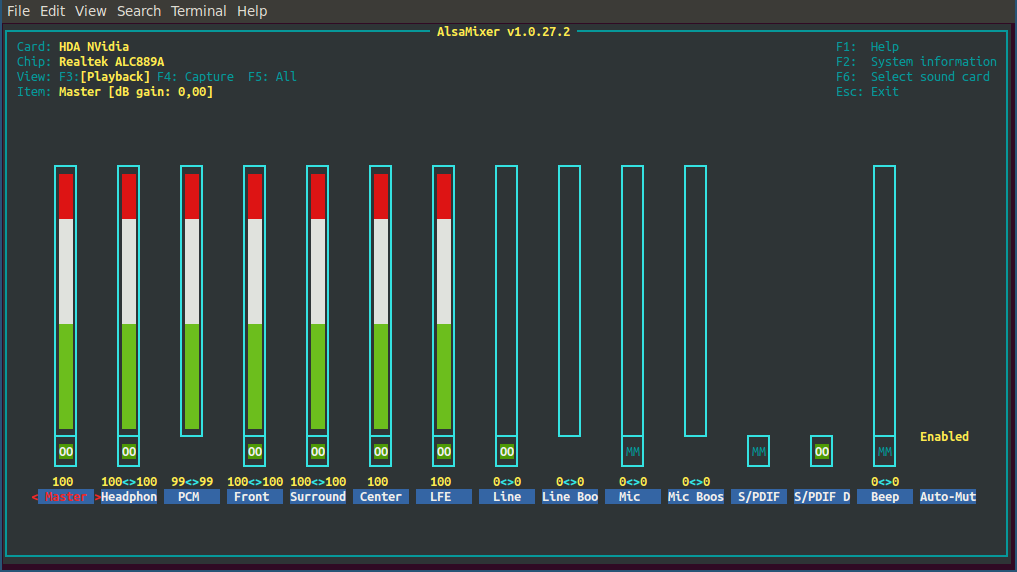
ALSA helps multi-channel audio, enabling configurations like 5.1 or 7.1 encompass sound. Additionally, it’s designed to supply low-latency audio processing, which is crucial for real-time purposes like music manufacturing. Further, ALSA features a mixer interface that permits customers to manage audio ranges and settings, akin to adjusting quantity or muting channels.
JACK
JACK (the Jack Audio Connection Kit) is a professional-grade audio server designed for Unix-like working methods, together with Linux. It is tailor-made for real-time, low-latency audio processing and is broadly utilized in skilled audio manufacturing environments. JACK is designed to supply low-latency, real-time audio processing. This is crucial for purposes the place timing and synchronization are crucial, akin to reside music efficiency, recording, and audio manufacturing. It permits a number of audio purposes to attach and talk with one another. This implies that the output of 1 software may be routed to the enter of one other, enabling advanced audio processing chains.
JACK excels in delivering minimal latency, which is essential for real-time audio duties. This ensures that audio alerts are processed and transmitted with minimal delay, sustaining synchronization and responsiveness. It gives sample-accurate synchronization between audio streams, guaranteeing exact timing and part alignment throughout totally different audio purposes and units. JACK makes use of a client-server mannequin, the place the JACK server manages audio knowledge and purchasers (purposes) hook up with it for audio processing. This modular method permits for flexibility and scalability in audio setups. JACK contains transport management options that enable customers to synchronize playback and recording throughout a number of purposes, making it simpler to handle advanced audio tasks. JACK builds on high of ALSA and requires ALSA to be put in and configured appropriately.
PulseAudio
PulseAudio is a sound server for Linux and different Unix-like working methods that sits on high of lower-level sound methods akin to ALSA (Advanced Linux Sound Architecture). It gives a higher-level interface for audio administration, providing extra options and adaptability past what is obtainable instantly by ALSA. PulseAudio acts as an middleman between purposes and the underlying sound {hardware}. It handles audio streams, mixing, and routing, permitting a number of purposes to supply sound concurrently and handle their audio independently. One of PulseAudio’s key options is its capacity to stream audio over a community. This permits customers to play audio from one machine on one other machine or machine related to the identical community.
PulseAudio allows the blending of a number of audio streams right into a single output. This means you’ll be able to hearken to music whereas receiving notifications from different purposes, all blended seamlessly into your audio system or headphones. Additionally, it permits for impartial quantity management of every software. This means you’ll be able to alter the amount of your music participant individually out of your net browser or different purposes. PulseAudio helps varied audio results and processing options, akin to equalization, sound enhancements, and echo cancellation. Further, it manages audio units and permits straightforward switching between them. For occasion, you’ll be able to change audio output from audio system to headphones or to an exterior Bluetooth machine with out disrupting playback.
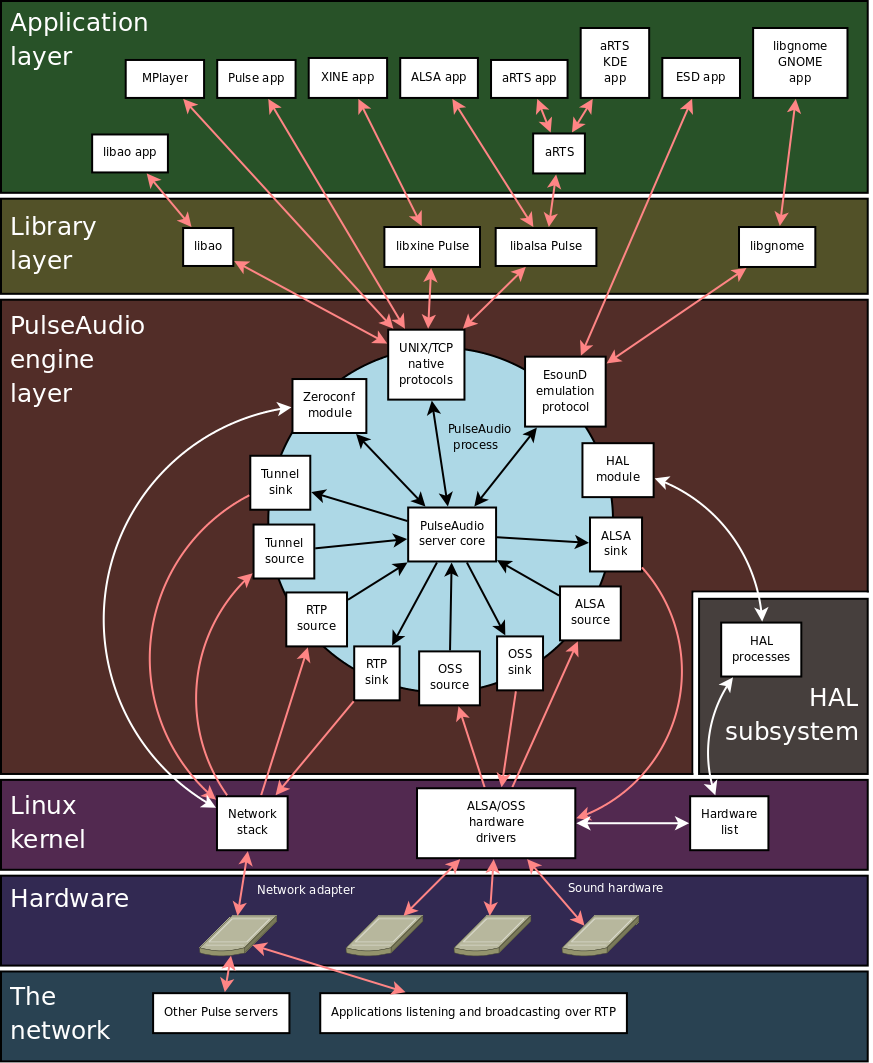
PulseAudio gives a extra intuitive and user-friendly approach to handle audio in comparison with working instantly with ALSA. Its capacity to deal with varied audio sources and outputs concurrently, together with community capabilities, makes it versatile for various audio wants and setups. By offering superior options akin to audio mixing, machine switching, and community streaming, PulseAudio contributes to a richer and extra versatile audio expertise on Linux methods – significantly the Linux Desktop. While it’s slightly little bit of a meme, PulseAudio made “the yr of the Linux desktop” much more probably.
PipeWire
PipeWire is a contemporary multimedia framework designed for Linux methods that goals to unify and improve the dealing with of each audio and video streams. Developed as a substitute for each PulseAudio and JACK, PipeWire gives a versatile and environment friendly infrastructure for managing advanced multimedia duties. PipeWire combines the capabilities of audio servers like PulseAudio and low-latency audio servers like JACK right into a single framework. It additionally helps video processing and seize, making it a complete answer for managing each audio and video streams. Like JACK, PipeWire gives low-latency audio processing, which is essential for skilled audio purposes akin to reside music manufacturing and sound design.
PipeWire is designed to be extremely versatile, accommodating varied use instances starting from client audio and video to skilled audio manufacturing and video conferencing. It gives a unified API that may deal with each audio and video streams, simplifying improvement and integration for purposes that have to course of multimedia content material.Further, PipeWire is engineered from the bottom as much as ship low-latency audio and real-time efficiency, making it appropriate for high-performance audio duties and sophisticated multimedia workflows. Finally, PipeWire contains options for improved safety and sandboxing, permitting purposes to entry solely the sources they want and defending towards potential safety vulnerabilities.
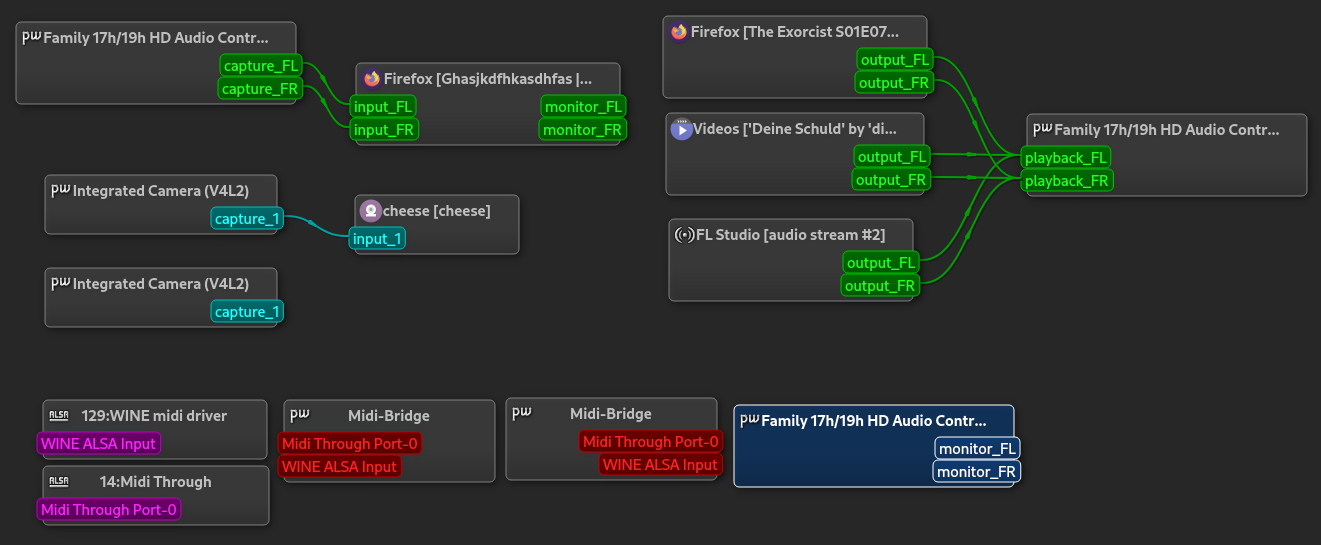
By combining audio and video administration right into a single framework, PipeWire gives a extra built-in and cohesive method to dealing with multimedia content material. Its design incorporates trendy necessities and use instances, together with enhanced safety, higher real-time efficiency, and help for a variety of multimedia purposes. PipeWire additionally gives compatibility with present audio and video servers, easing the transition from older methods and permitting for gradual adoption. To give an instance, even when one in every of your purposes is constructed to make use of PulseAudio, PipeWire helps a PulseAudio appropriate enter API, in order that an software doesn’t must care if it’s PulseAudio or PipeWire. An identical enter API exists additionally for JACK – PipeWire will emulate the Sound Server API of JACK. Ulike PuleAudio and JACK, PipeWire doesn’t require ALSA on a system, the truth is if ALSA is put in the output of ALSA may be very probably pushed by PipeWire.
So what’s it a sound server does?
Mixing a number of enter streams
In essence, a sound server acts as an middleman that takes a number of audio enter streams with various pattern charges and bit depths, mixes them right into a single output sign, and sends it to the sound card. For instance, think about one software producing a sine wave and one other producing an oblong wave. In as we speak’s world, it will be unimaginable not to have the ability to watch a video whereas concurrently receiving notification sounds out of your messenger (or extra typically to obtain audio from a number of enter sources). This is the place the sound server implementations akin to PipeWire, JACK and PulseAudio are available in — a sound server combines the 2 (or extra) enter alerts into one output sign and outputs it to the sound card. The sound server achieves this by summing every pattern of the enter alerts, successfully merging a number of inputs right into a single output. The operation carried out is sample-wise addition. In case a sooner sampled sign must blended with a lower-sampled sign, the audio server may also must interpolate the values for the sign with the decrease pattern charge. All that is taking place in actual time with little to no latency launched (relying on the buffer measurement of the mixer buffer).
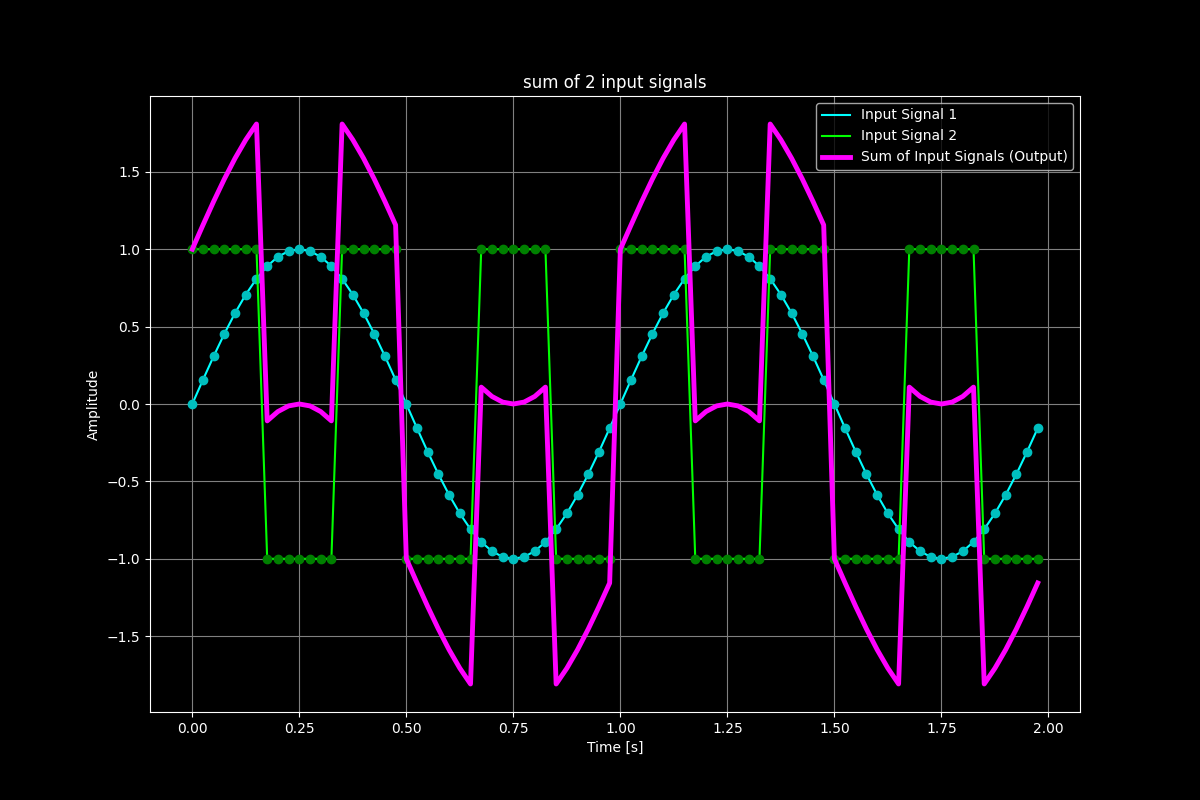
Multiple Output Streams/Mixes
If you personal a laptop computer, there’s excessive probability you may have 2 audio output units. One Headphone output when you join your headphones to the audio output jack. And one for the built-in audio system in your laptop computer. A sound server may output audio to a number of outputs on the similar time. Let’s say you favor listening to music by your headphones, and a good friend is in your room and also you’d like to indicate them a cool monitor you get pleasure from. So you determine to activate output on each units on the similar time.
Volume Control per enter stream
Typically every enter stream comes from totally different purposes in your Linux Desktop. And generally you’d wish to individually management quantity for every of your purposes. Let’s say you’re watching a film and also you’d wish to mute all messengers in the mean time. You can configure the sound server to scale back/mute the amount of the corresponding enter streams.
Virtual Outputs
Not each sign must be routed to an precise output. Think about your microphone. Most of the time the microphone just isn’t outputted in your audio system/headphones, but the enter stream is supplied to purposes akin to your favourite VOIP/conferencing instrument. The idea of digital outputs means that you can create an arbitrary variety of output streams that purposes can devour.
Sound results for streams
A sound server permits to use varied results to particular person enter streams or output streams utilizing impact plugins. These plugins, out there in codecs akin to LADSPA, CLAP, VST2, VST3, AU, and RTAS, help you combine software program results into your audio routing chain seamlessly.
Example: Using a Compressor
One sensible instance of an impact plugin is a compressor. If you usually end up adjusting the amount whereas watching films—turning it down throughout loud motion scenes and again up for quieter dialogue—a compressor may help. By including a compressor to the enter stream of your media participant or browser, you’ll be able to cut back the amount of the loud components with out affecting the quieter sections. Most compressors embody a make-up achieve function to extend the general quantity after compression, guaranteeing a balanced listening expertise.
Example: Adding Reverb
Another use case is enhancing your microphone enter with a vivid reverb impact, making it sound as if you’re talking in a big room. This can add a way of area and presence to your voice.
Example: Applying an Equalizer
You may additionally wish to use an equalizer to regulate your output stream. For occasion, in case your audio system produce a muddy bass round 200Hz, you should use an equalizer to scale back the achieve in that frequency vary, leading to clearer sound.
Example: Denoising
If your microphone has quite a lot of background noise, you’ll be able to apply a denoising impact to scrub up the sign earlier than it reaches your VOIP instrument. This ensures that your voice comes by clearly throughout calls.
Combining Multiple Effects
For extra superior setups, you’ll be able to mix a number of results like reverbs, delays, compressors, and equalizers into your audio chain. Whether you want easy changes or advanced processing, a strong sound server within the Linux audio stack gives the pliability and management you want.
The modular and layered design of the Linux audio stack, mixed with the big range of obtainable plugins, means that you can customise your audio expertise to fit your particular wants. Whether you’re trying to improve your media playback, enhance your microphone enter, or create a singular sound atmosphere, the Linux audio stack has the instruments to make it occur.
Providing an API for software builders
A vital side of a sound server is to supply a handy API for software builders to devour. The following Python script demonstrates how the ALSA API can be utilized to playback a *.wav file.
import audioop
import alsaaudio

# Initialize ALSA-Audio-Output
audio_output = alsaaudio.PCM(alsaaudio.PCM_PLAYBACK)
audio_output.setchannels(1) # mono
audio_output.setrate(44100) # 44.1 okayHz
audio_output.setformat(alsaaudio.PCM_FORMAT_S32_LE)

with open('example-audio-file.wav', 'rb') as wav_file:
    attempt:
        audio_output.setperiodsize(160)
        knowledge = wav_file.learn(320)

        whereas knowledge:
            # Write learn bits of audio file to sound card
            audio_output.write(knowledge)
            knowledge = wav_file.learn(320)

    besides Exception as exc:
        print(exc)
Which sound server is best for me?
To assist you perceive which sound server fits your wants the most effective, I attempted to gather some use-cases and rated the corresponding implementations functionality to meet these use-cases. Note, that the score could be a really opinionated score, and also you would possibly disagree. Let’s talk about within the remark part under!
| Use Case | JACK | PulseAudio | PipeWire |
|---|---|---|---|
| Professional Audio Production | ★★★★★ | ★★★ | ★★★★☆ |
| Real-Time Audio Processing | ★★★★★ | ★★ | ★★★★☆ |
| Low-Latency Audio | ★★★★★ | ★★ | ★★★★☆ |
| Live Music Performance | ★★★★★ | ★★ | ★★★★☆ |
| General Desktop Audio | ★★ | ★★★★★ | ★★★★★ |
| Network Audio Streaming | ★★★★ | ★★★ | ★★★★☆ |
| Bluetooth Audio Devices | ★★ | ★★★★ | ★★★★★ |
| Video Conferencing | – | – | ★★★★★ |
| Screen Recording | – | – | ★★★★★ |
| Audio Routing Between Apps | ★★★★★ | ★★★ | ★★★★★ |
| Multi-User Audio Management | ★★★ | ★★★★ | ★★★★★ |
| Security and Sandboxing | ★★★ | ★★★ | ★★★★★ |
| Ease of Configuration | ★★ | ★★★★★ | ★★★★☆ |
| Compatibility with Consumer Apps | ★ | ★★★★★ | ★★★★★ |
| Handling MIDI | ★★★★★ | ★★★ (requires FluidSynth) | ★★★★☆ |
| High-Performance Gaming Audio | ★★ | ★★★★ | ★★★★☆ |
| Podcasting and Broadcasting | ★★★★☆ | ★★★★ | ★★★★★ |
| Remote Audio Processing | ★★★★☆ | ★★★ | ★★★★☆ |
| Developing Audio Applications | ★★★★★ | ★★★ | ★★★★★ |
| Effect Support (LADSPA, and many others. …) | ★★★★☆ | ★★★ | ★★★★★ |
PipeWire is rising as a flexible and highly effective choice that integrates the most effective options of each JACK and PulseAudio, making it appropriate for a variety of use instances from normal desktop audio to skilled audio and video manufacturing. JACK stays your best option for specialised skilled audio duties requiring the bottom latency and real-time efficiency. PulseAudio continues to excel typically desktop and client audio purposes, providing ease of use and broad compatibility.
The Linux distribution you’re utilizing probably employs both PipeWire or PulseAudio. RHEL-based are on PipeWire already (e.g. Fedora), most Debian-based are nonetheless on PulseAudio, however PipeWire is installable. If you’re glad together with your present audio stack, there’s no want to vary it. However, when you search lower-latency capabilities, contemplate upgrading to PipeWire. Generally talking I’d not advocate transitioning to JACK until you’re already aware of its configuration and setup. PipeWire will finally utterly substitute PulseAudio and JACK, as from an architectural and technical view it’s much more succesful.
HI-FI News
by way of Hacker News https://ift.tt/3dhoKtH
July 23, 2024 at 08:21AM
-
Product on sale
 Audiophile Vinyl Records Cleaning BundleOriginal price was: €69.90.€59.90Current price is: €59.90. incl. VAT
-
Product on saleEasy Start Vinyl Records Cleaning KitOriginal price was: €69.90.€59.90Current price is: €59.90. incl. VAT
-
Vinyl Records Cleaner Easy Groove Concentrate€34.95 incl. VAT
-
Easy Groove Super Set€199.00 incl. VAT
-
Easy Groove Enzycaster – vinyl records prewash cleaner€34.95 incl. VAT
-
Easy Groove Extreme MK. II- vinyl records prewash cleaner€45.00 incl. VAT
-
Vinyl Records Cleaner – Easy Groove Virgin Concentrate€35.00 incl. VAT
-
Easy Groove Spray&Wipe vinyl records cleaner€34.95 incl. VAT







