
World News
Error 0xE0000246, Install Realtek HD audio driver failure
Error 0xE0000246, Install Realtek HD audio driver failure
While putting in or updating the audio driver, in the event you get an Install Realtek HD Audio Driver Failure error message with an error code 0xE0000246, right here is how one can repair the problem on Windows 11 or Windows 10. We have discovered among the widespread causes and options to be able to eliminate this drawback inside moments.

The complete error message reads:
Install Realtek HD Audio Driver Failure !!
[Error Code : 0xE0000246]
Realtek HD Audio Driver is the sound driver that your Windows PC requires to play audio easily. If you utilize an exterior audio card, you won’t want it, however in the event you depend on the in-built one, you have to have this driver put in and up to date.
Error 0xE0000246, Install Realtek HD audio driver failure
If you get Install Realtek HD Audio Driver Failure with error code 0xE0000246 in your Windows 11/10 laptop, observe these directions:
- Reinstall the machine
- Download driver from official web site
- Add legacy {hardware}
To study extra about these options, proceed studying.
1] Reinstall the machine
It is the very very first thing you have to do to resolve this drawback in your laptop. This answer works within the following conditions:
- When you attempt to replace the corresponding driver.
- If you have got just lately put in Windows Updates.
- If you have got made some {hardware} modifications.
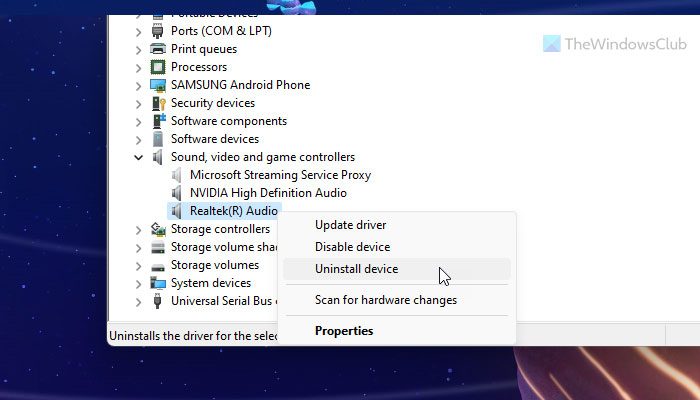
To reinstall the machine, you want to uninstall it first. For that, press Win+X and choose the Device Manager possibility.
Next, develop the Sound, video and sport controllers part and right-click on the machine that has “Realtek” within the title. In most circumstances, it seems as Realtek(R) Audio. Select the Uninstall machine possibility.
Click on the affirmation message. Next, you want to restart your laptop and restart the driving force set up course of.
Read: Realtek Audio Console doesn’t assist for this machine
2] Download the driving force from the official web site
Drivers are probably the greatest and best methods for attackers to inject malware and viruses into your laptop. Countless third-party web sites present duplicate drivers that will or might not work. However, we extremely advocate you obtain drivers solely from the official web site of the {hardware} producer solely.
In this case, you have to head to realtek.com, the official web site offering the driving force you want. You can observe this detailed information to discover ways to obtain and set up the Realtek audio driver on a Windows PC. You should obtain the driving force as per the system structure.
Read: This machine sort just isn’t supported, say Realtek
3] Add legacy {hardware}
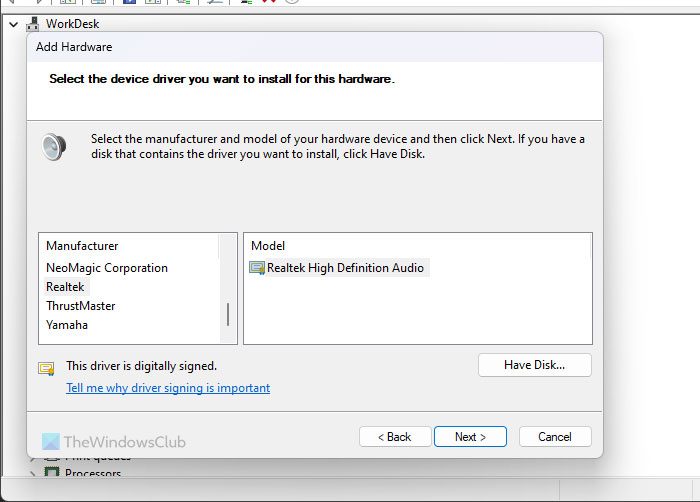
To add or set up Realtek High Definition Audio machine as legacy {hardware}, observe these steps:
- Open the Device Manager > choose Action > Add legacy {hardware}.
- Select Install the {hardware} that I manually choose from an inventory possibility and click on the Next button.
- Choose the Sound, video and sport controllers possibility.
- Select Realtek because the producer and click on the Next button.
- Click the Next button to begin the set up.
Once carried out, you want to restart your laptop.
I hope these options labored for you.
Read: Install Realtek HD Audio Driver Failure, Error 0xC0000374
How do I repair Realtek audio driver failure?
There are some things you could possibly do with the intention to troubleshoot this problem. First, you possibly can uninstall the machine and reinstall it. Then, you possibly can obtain the most recent model of the driving force from the official web site and set up it accordingly. You should obtain the driving force based on the system structure (32-bit/64-bit). Finally, you possibly can add the Realtek High Definition Audio machine as legacy {hardware} by way of Device Manager.
How do I repair no Realtek HD Audio Manager?
If there is no such thing as a Realtek HD Audio Manager in your laptop, you must undergo a guidelines. First of all, you have to know that this audio supervisor must be put in manually. For that, you possibly can obtain the respective driver from the official web site, realtek.com. At occasions, it may very well be hidden as effectively. In such conditions, you want to use the Show hidden units possibility. If nothing works, you possibly can add it as legacy {hardware}.
Read: Realtek HD audio supervisor not working.
HI-FI News
through The Windows Club https://ift.tt/E7hoG1I
December 12, 2023 at 05:27AM
-
Product on sale
 Audiophile Vinyl Records Cleaning BundleOriginal price was: €69.90.€59.90Current price is: €59.90. incl. VAT
-
Product on saleEasy Start Vinyl Records Cleaning KitOriginal price was: €69.90.€59.90Current price is: €59.90. incl. VAT
-
Vinyl Records Cleaner Easy Groove Concentrate€34.95 incl. VAT
-
Easy Groove Super Set€199.00 incl. VAT
-
Easy Groove Enzycaster – vinyl records prewash cleaner€34.95 incl. VAT
-
Easy Groove Extreme MK. II- vinyl records prewash cleaner€45.00 incl. VAT
-
Vinyl Records Cleaner – Easy Groove Virgin Concentrate€35.00 incl. VAT
-
Easy Groove Spray&Wipe vinyl records cleaner€34.95 incl. VAT


