
World News
Best Warzone Audio Settings (2025)
Best Warzone Audio Settings (2025)
Audio performs a big function in Warzone, because it’s largely answerable for bolstering your situational consciousness. Just like different BR video games, you’ll want sound cues for footsteps, close by gunfire, enemy parachutes, and extra to continuously pay attention to what’s occurring round you. Not solely is that this important for remaining aggressive, but it surely additionally helps you keep away from getting shocked by enemy assaults. Depending on who you ask, Warzone’s audio is both missing or satisfactory. However, most gamers will agree that it must be tweaked manually for the perfect expertise. With this in thoughts, we determined to compile the perfect Warzone audio settings you should utilize to listen to each footstep clearly.
How to Change Warzone Audio Settings
Before you start truly altering the Warzone audio settings, right here’s a mini-guide for folk who don’t understand how. So, launch Warzone and observe the steps under:
- Use your controller or your mouse to click on the Settings cog within the prime proper nook.
- Once there, hover down and click on on Audio to open the sport’s audio settings.
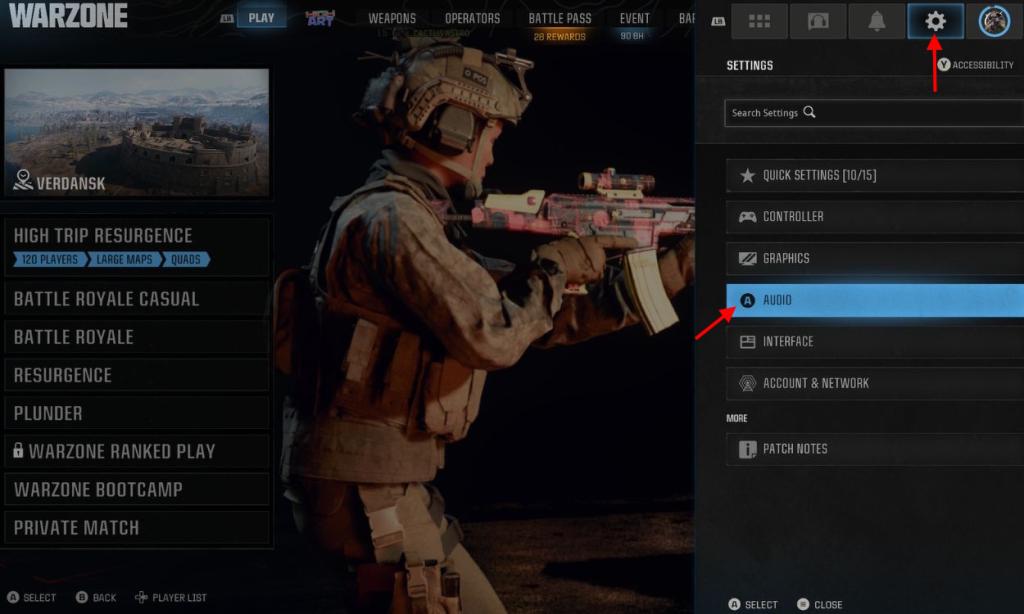
From right here on, you’ll be able to customise all of the audio settings simply.
Best Audio Settings for Warzone
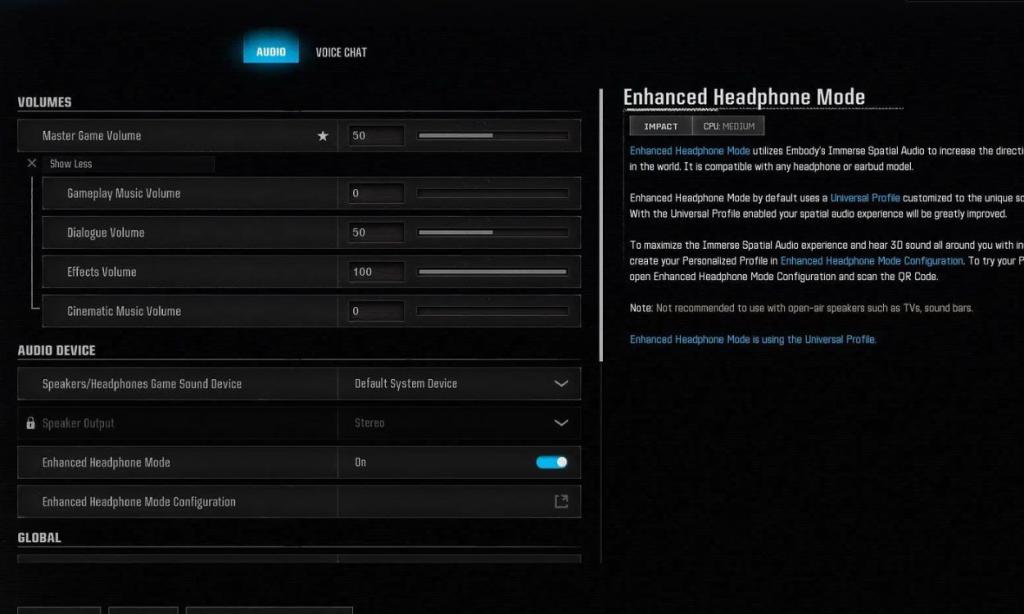
The Warzone audio settings talked about under are optimized to focus on vital sounds, corresponding to footstep audio, door interactions, and the self-revive cue, extra audibly. Of course, the finest Warzone settings for you is likely to be totally different relying in your audio setup, however these suggestions work properly on stereo audio system and headsets alike. With that, let’s start.
Volumes
- Master Game Volume: 80
- Gameplay Music Volume: 0
- Dialogue Volume: 50
- Effects Volume: 100
- Cinematic Music Volume: 0
Audio Device
- Enhanced Headphone Mode: Off
The Enhanced Headphone Mode setting gives a number of choices, together with a paid, customized audio profile created by Embody. It additionally contains a Universal profile that goals to enhance the spatial audio expertise, however can truly muffle some sounds as a substitute. This is why we suggest turning the setting off, however it’s best to attempt it and see if it enhances your audio expertise.
Global
- Audio Mix: Treyarch Mix
- Speakers/Headphones Game Sound Device – Default System Device
- Mono Audio: Off
- Mute Licensed Music: Personal desire
- Asymmetrical Hearing Compensation: Off
Functionality
- Reduce Tinnitus Sound: On
- Hitmarker Preset: Classic
Voice Chat
- Voice Chat Volume: 40/ Off
- Voice Chat: On/Off
- Proximity Chat: On
- Body Shield Chat: On
- Last Words Voice Chat: On
- Game Voice Channel: Party Only
- Voice Chat Output Device: Default
Microphone
- Microphone Level: 100
- Open Mic Sensitivity: 70 (Adjust as wanted)
How to Use Warzone Audio Focus (PS5 Only)
Audio Focus is a brand new characteristic obtainable on the PS5 that enhances important audio cues corresponding to footsteps in video games, and it seems to be doing wonders for Warzone gamers. It’s tremendous simple to allow and gives 4 distinct settings for various audio setups. But do be aware this feature solely works with headphones. We suggest experimenting with all 4 to resolve which choice works finest for you. With that out of the way in which, right here’s easy methods to allow it:
- From the PS5 homescreen, choose the Settings cog within the prime proper of the display.
- In the Settings menu, navigate to the Sound choice.
- Once there, choose Volume after which Audio Focus.
- Finally, toggle Audio Focus on after which choose Focus Type.
And these are the perfect Warzone audio settings it’s best to use. If these suggestions helped your audio, make sure to tell us within the feedback.

An enormous gaming nerd who’s been writing stuff on the web since 2021, Aryan covers single-player video games, RPGs, and live-service titles corresponding to Marvel Rivals and Call of Duty: Warzone. When he is not clacking away at his keyboard, you will discover him firing up one other playthrough of Fallout: New Vegas.
HI-FI News
by way of Beebom https://beebom.com/
May 6, 2025 at 10:39AM
-
Product on sale
 Audiophile Vinyl Records Cleaning BundleOriginal price was: €69.90.€59.90Current price is: €59.90. incl. VAT
-
Product on saleEasy Start Vinyl Records Cleaning KitOriginal price was: €69.90.€59.90Current price is: €59.90. incl. VAT
-
Vinyl Records Cleaner Easy Groove Concentrate€34.95 incl. VAT
-
Easy Groove Super Set€199.00 incl. VAT
-
Easy Groove Enzycaster – vinyl records prewash cleaner€34.95 incl. VAT
-
Easy Groove Extreme MK. II- vinyl records prewash cleaner€45.00 incl. VAT
-
Vinyl Records Cleaner – Easy Groove Virgin Concentrate€35.00 incl. VAT
-
Easy Groove Spray&Wipe vinyl records cleaner€34.95 incl. VAT


