
World News
Enhancing WebRTC audio high quality with Web Audio API
Enhancing WebRTC audio high quality with Web Audio API
Introduction to Web Audio API
The Web Audio API is a strong instrument that enables builders to manage and manipulate audio inside internet purposes. From enhancing sound high quality in video calls to including dynamic sound results in web-based video games, the API presents flexibility and energy. In this weblog, we’ll stroll by way of tips on how to modify microphone streams utilizing the Web Audio API, with sensible real-world examples for situations like video conferencing, reside streaming, and on-line gaming.
We’ll cowl three phases:
- Creating a supply node from the microphone stream utilizing the AudioContext interface.
- Modifying the observe with Web Audio options similar to achieve adjustment, filters, and compressors.
- Creating a vacation spot node and changing the unique stream with the modified one.
Stage 1 Creating a supply node from the microphone stream –
To start modifying audio, we have to create an AudioContext and procure a microphone stream. By utilizing getUserMedia(), we will seize the microphone enter and convert it right into a supply node that may be manipulated by the Web Audio API.
Cross-Browser Compatibility
Different browsers might deal with supply creation in a different way. For instance, Firefox requires the usage of createMediaStreamTrackSource() as a substitute of createMediaStreamSource(). This variation must be dealt with when constructing purposes throughout a number of platforms.
For chrome/safari –

creating supply node in chrome
For Mozilla Firefox –

creating supply node in mozilla firefox
Stage 2 Modifying the observe –
Now that we’ve the microphone stream, let’s discover tips on how to modify it for real-world situations, similar to reside streaming and noise discount in audio calls.
Example 1: Increasing Volume for Live Streaming
If you’re constructing a live-streaming platform like Twitch or YouTube Live, you may want to regulate the microphone quantity. For occasion, customers may need to enhance the quantity in the event that they’re talking softly or in the event that they need to mission their voice extra clearly.
Here’s how you should use a AchieveNode to extend the microphone quantity:

creating achieve node and making use of a 150% enhance to the unique quantity
Use the createGain() methodology to create a AchieveNode from the AudioContext interface. By utilizing this AchieveNode, you’ll be able to dynamically modify the microphone quantity in your live-streaming software. However, watch out with achieve values above 5, as this may increasingly trigger audio distortion. Once values are set, join the achieveNode to the supply node object created in stage 1.
Example 2: Reducing Background Noise for Clearer Calls
In real-world situations like video calls or on-line school rooms, decreasing background noise can drastically enhance the readability of the audio. You can use a highpass filter to take away low-frequency noises and a lowpass filter to dam high-frequency sounds.
Here’s an instance that applies each filters to concentrate on human voice frequencies (100Hz–9000Hz):
For this goal, we have to create two filters – highpass and lowpass filter. Highpass will act as a barrier to dam audio above a sure frequency and low cross filter will block audio under a sure frequency. Create a biquad filter object utilizing an audio context interface object
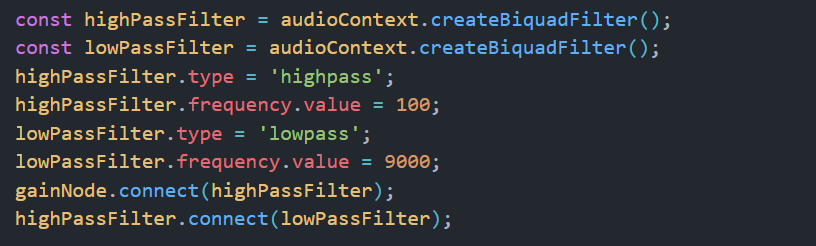
Create High cross and low cross filter utilizing createBiquadFilter() methodology and apply sort and frequency to every considered one of them to create a frequency vary
This setup can considerably enhance communication in convention apps like Zoom or Google Meet by eliminating background noise and specializing in voice readability.
There are many extra biquad filters that can be utilized for quite a lot of functions. Mdn documentation offers detailed use circumstances for every considered one of them. Check out the MDN Web Audio Biquad Filter documentation
Example 3: Balancing Audio for Podcasting or Streaming
In podcasting or live-streaming situations, balancing audio is important. A compressor is usually used to make sure that audio ranges stay constant, decreasing loud sounds and amplifying quiet ones.
Here’s how one can implement a compressor:
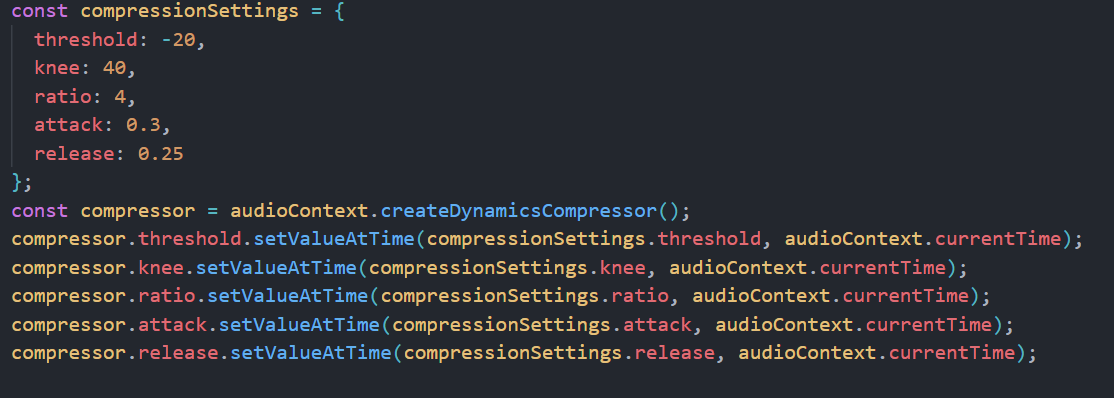
including compressor node with parameters utilizing setValueAtTime() methodology
Compressor parameters defined:
Threshold (-20db): This is the quantity stage the place compression begins. Sounds louder than -20 dB will probably be turned down.
Knee(40db): This softens how rapidly compression kicks in, making the quantity discount smoother and fewer abrupt.
Ratio (4:1): For each 4 dB above the brink, only one dB will get by way of. This controls how a lot loud sounds are decreased.
Attack (0.3 seconds): This is how rapidly the compressor begins working after the sound will get too loud. A brief delay retains the preliminary influence of the sound.
Release (0.25 seconds): This is how lengthy the compressor takes to cease after the sound drops under the brink, guaranteeing clean transitions again to regular quantity.
This sort of compression is good for making a balanced, professional-quality audio stream in real-time. Although be happy to play with these values to realize an audio high quality as per your necessities.
Additional Filters to Explore –
Convolver Node: Besides achieve and frequency changes, you should use the Convolver Node so as to add reverb results. This can simulate completely different acoustic environments, like making your voice sound as in the event you’re in a big corridor or a small room.
Peaking Filter: Another possibility is the Peaking Filter, which lets you enhance or reduce a particular frequency band. This might help emphasize sure vocal tones or scale back drawback frequencies in your audio.
For extra detailed data on these and different filters, you’ll be able to discover the MDN Web Audio API Documentation.
Stage 3 Creating a vacation spot node and changing the unique observe –
Once you have got utilized your modifications, the following step is to create a vacation spot node to output the modified stream. This is important in WebRTC purposes the place you need to ship the modified stream as a substitute of the unique one.
Once you have got made modifications to the audio observe utilizing audio context, we now want to attach the supply with the vacation spot. For that, use createMediaStreamDestination() methodology to create a vacation spot node and join the final modified filtered node with the vacation spot node.
Get the record of native senders(audio observe being despatched out) and use the replaceTrack() methodology to switch it with the modified stream observe
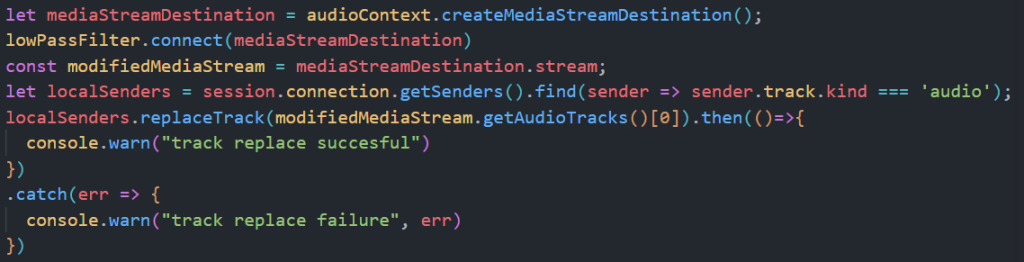
connecting the final modified filter node with the vacation spot node and changing the unique observe with modified observe
Potential Pitfalls and Cross-Browser Compatibility
- Audio Distortion: Over-boosting the achieve may end up in distortion. Always check your achieve ranges to keep away from audio clipping, particularly when working in high-volume environments.
- Latency Issues: Applying a number of audio results similar to filters, compressors, and achieve changes might introduce latency, particularly in real-time communication. Test your software on completely different networks to make sure minimal delay.
- Browser Compatibility: The Web Audio API has some inconsistencies throughout browsers. As famous earlier, Firefox requires createMediaStreamTrackSource(), whereas Chrome and Safari use createMediaStreamSource(). Make certain you deal with these variations to keep away from breaking your app on particular browsers.
- Tools like Modernizr might help detect the browser’s capabilities and guarantee clean cross-browser performance.
Conclusion :
The Web Audio API presents a strong toolkit for enhancing and manipulating audio in actual time, making it excellent for video conferencing, reside streaming, and gaming purposes. By understanding tips on how to create supply nodes, apply results like achieve, filters, and compressors, and deal with cross-browser compatibility, you’ll be able to construct immersive and professional-grade audio experiences.
Platforms like Discord, Twitch, and Google Meet closely depend on the Web Audio API to offer customers with clear and dynamic audio experiences. As internet applied sciences proceed to evolve, the Web Audio API will stay important in crafting partaking, sound-rich internet purposes.
For extra in-depth studying, take a look at the MDN Web Audio API documentation.
FOUND THIS USEFUL? SHARE IT
HI-FI News
by way of TO THE NEW Blog https://ift.tt/zBw2MnS
September 14, 2024 at 09:43AM
-
Product on sale
 Audiophile Vinyl Records Cleaning BundleOriginal price was: €69.90.€59.90Current price is: €59.90. incl. VAT
-
Product on saleEasy Start Vinyl Records Cleaning KitOriginal price was: €69.90.€59.90Current price is: €59.90. incl. VAT
-
Vinyl Records Cleaner Easy Groove Concentrate€34.95 incl. VAT
-
Easy Groove Super Set€199.00 incl. VAT
-
Easy Groove Enzycaster – vinyl records prewash cleaner€34.95 incl. VAT
-
Easy Groove Extreme MK. II- vinyl records prewash cleaner€45.00 incl. VAT
-
Vinyl Records Cleaner – Easy Groove Virgin Concentrate€35.00 incl. VAT
-
Easy Groove Spray&Wipe vinyl records cleaner€34.95 incl. VAT


