
World News
Google Gen AI Python SDK: A Complete Guide
Google Gen AI Python SDK: A Complete Guide
Generative AI fashions are altering how we create content material, whether or not it’s textual content, pictures, video, or code. With Google’s Gen AI Python SDK, now you can entry and work together with Google’s generative AI fashions in your Python functions extra simply, along with utilizing the Gemini Developer API and Vertex AI APIs. That means builders can extra readily create functions, together with chatbots, content material turbines, or artistic instruments. In this text, we’ll cowl every thing it’s good to know to get began utilizing the Google Gen AI Python SDK.
Also learn: Build an LLM Model utilizing Google Gemini API
What is the Google Gen AI Python SDK?
The Google Gen AI Python SDK is a consumer library for builders to make use of Google’s generative AI skills simply utilizing Python. It offers:
- Support for Gemini Developer API (Google’s superior textual content and multimodal generative fashions)
- Integration with Vertex AI APIs for enterprise-scale AI workloads
- Support for producing textual content, pictures, movies, embeddings, chat conversations, and extra
- Tools for file administration, caching, and async help
- Advanced operate calling and schema enforcement options
This SDK additionally abstracts a lot of the complexity round API calls and lets you concentrate on constructing AI-powered functions.
Installation
Installing the SDK is straightforward. Run:
pip set up google-genaiThe above command will set up the Google Gen AI Python SDK package deal utilizing pip. This command downloads every thing you want for the Python atmosphere to begin up the Google generative AI providers, together with the sources and all dependencies.
Imports and Client Setup
Once you’ve gotten put in the SDK, create a Python file and import the SDK:
from google import genai
from google.genai import varieties
The SDK has two modules – genai and kinds. The genai module creates a consumer used for API interplay, whereas the categories module has knowledge buildings and lessons that function helpers used to construct requests and configure request parameters.
You will create an occasion of the consumer for every interplay with the Google generative AI fashions. You will instantiate the consumer with completely different strategies relying on the API you’re utilizing.
For the Gemini Developer API, you possibly can instantiate the consumer by passing alongside your API key:
consumer = genai.Client(api_key='YOUR_GEMINI_API_KEY')You instantiate the consumer you possibly can work together with the Gemini Developer API by passing in your API key. This consumer will care for the entry token and request administration.
Optional: Using Google Cloud Vertex AI
consumer = genai.Client(
   vertexai=True,
   undertaking='your-project-id',
   location='us-central1'
)
If you’ll use Google Cloud Vertex AI, you’ll initialise the consumer in a different way by specifying the undertaking ID and the placement.
Note: Using Vertex AI is non-obligatory. You can create your undertaking ID right here.
If you don’t use Vertex AI, you possibly can merely use the API key methodology above.
API Version and Configuration
By default, the SDK makes use of beta endpoints to entry beta options. However, if you wish to use secure APIs, you possibly can specify the API model utilizing the http_options argument:
from google.genai import varieties

consumer = genai.Client(
   vertexai=True,
   undertaking='your-project-id',
   location='us-central1',
   http_options=varieties.HttpOptions(api_version='v1')
)
It is as much as you the way you wish to proceed to stability stability with cutting-edge options.
Using Environment Variables (Optional)
Instead of immediately passing keys, we should always first set atmosphere variables:
Gemini Developer API:
export GEMINI_API_KEY='your-api-key'Vertex AI:
export GOOGLE_GENAI_USE_VERTEXAI=true
export GOOGLE_CLOUD_PROJECT='your-project-id'
export GOOGLE_CLOUD_LOCATION='us-central1'
Then, initialize the consumer merely with:
consumer = genai.Client()Google Gen AI Python SDK Use Cases
Here are the assorted methods you possibly can put Google Gen AI Python SDK’s capabilities to make use of as soon as arrange.
Content Generation
The major operate of the SDK is to generate AI content material. You present prompts in varied varieties, comparable to easy strings, structured content material, or advanced multimodal inputs.
Basic Text Generation
response = consumer.fashions.generate_content(
   mannequin='gemini-2.0-flash-001',
   contents='Why Does the solar rises from east'
)
print(response.textual content)
Output

This sends a immediate to the mannequin and returns the generated reply.
Structured Content Inputs
You can insert structured content material throughout varied roles, like person or mannequin for chatbot, conversational, or multi-turn contexts.
from google.genai import varieties


content material = varieties.Content(
   function='person',
   components=[types.Part.from_text(text='Tell me a fun fact about work.')]
)
response = consumer.fashions.generate_content(mannequin='gemini-2.0-flash-001', contents=content material)
print(response.textual content)
Output

The SDK internally interprets many various enter varieties to a structured knowledge format for the mannequin.
File Upload and Usage
The Gemini Developers API lets you add information for the mannequin to course of. This is nice for summarization, or content material extraction:
file = consumer.information.add(file='/content material/sample_file.txt')
response = consumer.fashions.generate_content(
   mannequin='gemini-2.0-flash-001',
   contents=[file, 'Please summarize this file.']
)
print(response.textual content)
Output

This is a perfect method for including AI performance to document-based duties.
Function Calling
A novel functionality is the power to move Python capabilities as “instruments” for the mannequin to invoke mechanically whereas producing the completion.
def get_current_weather(location: str) -> str:
   return 'sunny'


response = consumer.fashions.generate_content(
   mannequin='gemini-2.0-flash-001',
   contents='What is the climate like in Ranchi?',
   config=varieties.GenerateContentConfig(instruments=[get_current_weather])
)
print(response.textual content)
Output

This permits dynamic, real-time knowledge integration inside AI responses.
Advanced Configuration
You have the power to customise technology with parameters comparable to temperature, max_output_tokens, and security settings to handle randomness, size, and filter dangerous content material.
config = varieties.GenerateContentConfig(
   temperature=0.3,
   max_output_tokens=100,
   safety_settings=[types.SafetySetting(category='HARM_CATEGORY_HATE_SPEECH', threshold='BLOCK_ONLY_HIGH')]
)


response = consumer.fashions.generate_content(
   mannequin='gemini-2.0-flash-001',
   contents='''Offer some encouraging phrases for somebody beginning a brand new journey.''',
   config=config
)
print(response.textual content)
Output

This can present granularity over content material high quality and security.
The SDK lets you generate and edit pictures and generate movies (in preview).
- Generate pictures utilizing textual content prompts.
- Upscale or regulate pictures generated.
- Generate movies from textual content or pictures.
Example of Image Generation:
response = consumer.fashions.generate_images(
   mannequin='imagen-3.0-generate-002',
   immediate='A tranquil seashore with crystal-clear water and colourful seashells on the shore.',
   config=varieties.GenerateImagesConfig(number_of_images=1)
)
response.generated_images[0].picture.present()
Output

Example of Video Generation:
import time
operation = consumer.fashions.generate_videos(
   mannequin='veo-2.0-generate-001',
   immediate='A cat DJ spinning vinyl records at a futuristic nightclub with holographic beats.',
   config=varieties.GenerateVideosConfig(number_of_videos=1, duration_seconds=5)
)


whereas not operation.completed:
   time.sleep(20)
   operation = consumer.operations.get(operation)
video = operation.response.generated_videos[0].video
video.present()
Output:
This permits for artistic, multimodal AI apps.
Chat and Conversations
You can begin chat periods that protect context all through your messages:
chat = consumer.chats.create(mannequin='gemini-2.0-flash-001')
response = chat.send_message('Tell me a narrative')
print(response.textual content)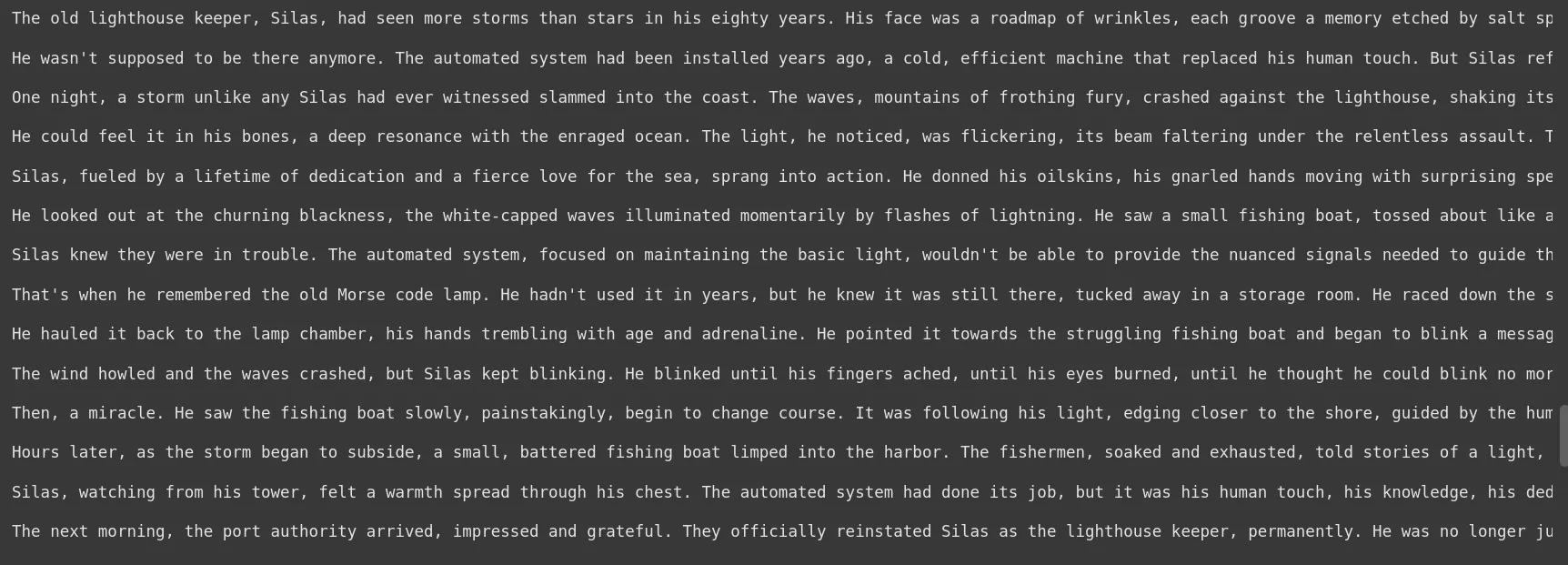
response = chat.send_message('Summarize that story in a single sentence')
print(response.textual content)
This is helpful for creating conversational AI that remembers earlier dialogue.
Asynchronous Support
All most important API strategies have async capabilities for higher integration into async Python apps:
response = await consumer.aio.fashions.generate_content(
   mannequin='gemini-2.0-flash-001',
   contents='Tell a Horror story in 200 phrases.'
)
print(response.textual content)
Token Counting
Token counting tracks what number of tokens (items of textual content) are in your enter. This helps you keep inside mannequin limits and make cost-effective choices.
token_count = consumer.fashions.count_tokens(
   mannequin='gemini-2.0-flash-001',
   contents='Why does the sky have a blue hue as a substitute of different colours?'
)
print(token_count)
Embeddings
Embeddings flip your textual content into numeric vectors that signify its which means, which can be utilized for search, clustering, and AI analysis.
embedding = consumer.fashions.embed_content(
   mannequin='text-embedding-004',
   contents='Why does the sky have a blue hue as a substitute of different colours?'
)
print(embedding)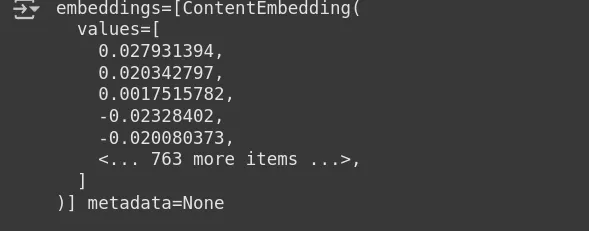
Using the SDK, you possibly can simply rely tokens and make embeddings to enhance and improve your AI functions.
Conclusion
The Google Gen AI Python SDK is a sturdy, versatile device that permits builders to entry Google’s prime generative AI fashions of their Python initiatives. From textual content technology, chat, and chatbot, to picture/video technology, operate calling, and way more it offers a strong function set with easy interfaces. With a straightforward package deal set up, easy consumer configuration course of, and help for async programming and multimedia, the SDK makes constructing functions that leverage AI considerably simpler. Whether you’re a newbie or seasoned developer, utilizing the SDK is comparatively painless however highly effective in terms of incorporating generative AI into your workflows.
Frequently Asked Questions
It’s a Python library for utilizing Google’s Gen AI providers and fashions in Python code
You run pip set up google-genai. If you wish to use the SDK asynchronously, run pip set up google-genai[aiohttp].
On consumer creation, you possibly can move in an API Key or set the atmosphere variables GEMINI_API_KEY or set Google Cloud credentials for Vertex AI.
Yes, the SDK can carry out operations the place pictures and information are involved, add and edit them, and use them in structured content material.
generate_content takes plain strings, lists of messages, structured prompts the place you assign roles, and multipart content material (textual content together with pictures or information).
The operate calling function permits the mannequin to name Python capabilities dynamically in the course of the session. Therefore, permitting you to have a workflow that calls exterior logic or computing.
Yes, on generate_content, you need to use the generation_config parameter with arguments comparable to temperature (to regulate randomness), and max_output_tokens (to restrict the mannequin response).
Hi, I’m Janvi, a passionate knowledge science fanatic at the moment working at Analytics Vidhya. My journey into the world of knowledge started with a deep curiosity about how we will extract significant insights from advanced datasets.
Vinyl
through Analytics Vidhya https://ift.tt/on7c3Ly
August 17, 2025 at 10:34AM
-
Product on sale
 Audiophile Vinyl Records Cleaning BundleOriginal price was: €83.88.€73.88Current price is: €73.88. incl. VAT
-
Product on saleEasy Start Vinyl Records Cleaning KitOriginal price was: €83.88.€73.88Current price is: €73.88. incl. VAT
-
Vinyl Records Cleaner Easy Groove Concentrate€41.94 incl. VAT
-
Easy Groove Super Set€238.80 incl. VAT
-
Easy Groove Enzycaster – vinyl records prewash cleaner€41.94 incl. VAT
-
Easy Groove Extreme MK. II- vinyl records prewash cleaner€54.00 incl. VAT
-
Vinyl Records Cleaner – Easy Groove Virgin Concentrate€42.00 incl. VAT
-
Easy Groove Spray&Wipe vinyl records cleaner€41.94 incl. VAT







