
World News
PCI audio notes (flaterco.com)
PCI audio notes (flaterco.com)
PCI audio notes
Last modified: 2023-08-05 15:31
This just isn’t a survey of PCI audio basically however one which focuses on the
issues that had been created in the course of the migration of sound playing cards and built-in
audio from ISA to PCI circa 1998. The most necessary questions are "Does it
work with DOOM?" and "Does it mangle 44.1 okayHz music?"
For PCI playing cards the previous query is inextricably sure to the motherboard
chipset, and a nasty alternative of motherboard for testing will imply that the majority
playing cards simply will not work. OTOH, it is practically pointless to check PCI audio on the
gold commonplace of compatibility (440BX) as a result of that normally comes with ISA
slots. Back within the day, the newer PCI sound playing cards had been in fact represented
as being upgrades over the older ISA ones, but it surely was a blunder to simply accept
them as such and set up them in methods with working ISA slots.
Background
Taxonomy of PCI audio
AudioPCI by way of Audigy
Aureal Vortex and Vortex 2
Everything else
Detailed write-ups
Playing MIDI information to OPL3, GUS, EMU8000, ES137x, or EMU10K1 on baremetal DOS
Playing MIDI information to OPL2/3, EMU8000, or EMU10K1 on Linux/ALSA
Background
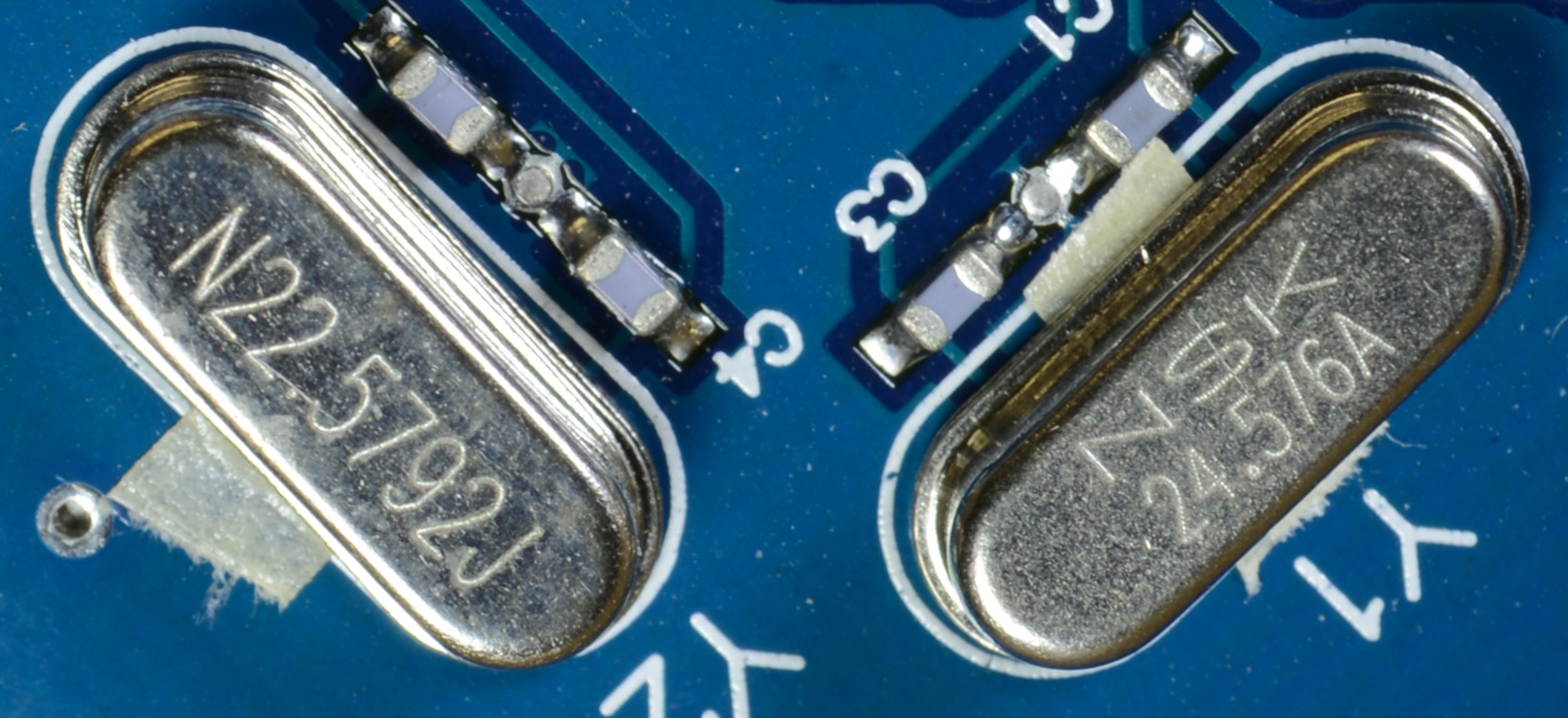
24.576 MHz = 512 × 48 okayHz.
Most music information use a 44.1 okayHz pattern price and many of the sound results
in DOS video games use some a number of of that (e.g., 22050 Hz or 11025 Hz). ISA
sound playing cards had been constructed round that actuality, however early PCI sound playing cards as an alternative
made a tough swap to 48 okayHz for no good purpose
(ES1370
AudioPCI playing cards being a notable exception).
There are three completely different ranges of assist for the 44.1 okayHz pattern price
and its multiples in PCI sound playing cards and chips:
- Hardware clock: Ideally, a sound card or chip can have a {hardware} clock
that immediately helps the 44.1 okayHz frequency in order that music may be performed
with out resampling. In the early PCI days, just a few excellent client
playing cards had this. Cards focused towards audio manufacturing in fact had
a number of {hardware} clocks however they care much less about compatibility with DOS
video video games. - Internal resampling: Less good options can have just one {hardware}
clock, which is 48, 96, or 192 okayHz, however will implement a resampling algorithm
internally. They will seem to perform the identical means as playing cards that immediately
assist the 44.1 okayHz frequency however sound high quality will probably be compromised to an
extent that relies on the resampling algorithm. - Garbage: The worst ones have solely a 48 okayHz clock and will not settle for any
enter that’s not already resampled to 48 okayHz someway. The resampling is
caught into drivers that introduce important lag into operating
purposes.
Similarly, there are 4 completely different ranges of compatibility with legacy
DOS purposes that use ISA DMA for sound (hereafter referred to easily as
"legacy audio"):
- Hardware: Using PC-PCI
(a.okay.a. SB-Link) or an analogous mechanism, ISA DMA indicators are routed to the
PCI chip. Sound high quality is likely to be negatively impacted by resampling, however
there must be no efficiency or compatibility influence on purposes.
Hardware compatibility is
an industrial possibility for Intel 8xx
chipsets, a {hardware} hack for 9xx by way of 9 collection, and inconceivable after
that. - DOS driver: Legacy audio is enabled by heavyweight drivers that do
intelligent/onerous/unreliable issues to reroute ISA requests to the PCI bus.
An EMM is normally
required, and efficiency is negatively impacted to a higher or lesser
extent. More typically than not, the drivers will not even load. If they’ll,
some video games nonetheless will not work. What success there may be is commonly restricted to a
particular vary of motherboard chipsets. - Windows driver: Legacy audio is supported solely in a DOS field throughout the
Windows surroundings. The video games nonetheless should run in digital 8086 mode, solely
as an alternative of only a easy EMM on the skin they now have Windows and
every part else that Windows is operating. Windows might resample all audio
streams to 48 okayHz for mixing comfort whatever the capabilities of
the {hardware}. When they work, Windows drivers can present enhanced options
that aren’t sensible in DOS, however the success price for legacy audio is low.
Common modes of failure are cannot initialize sound, no sound, sound breaking
up, lock-ups, spontaneous reboots, and blue screens. - None: DOS purposes will not work.
Taxonomy of PCI audio
AudioPCI by way of Audigy
A variety of frequent Ensoniq and Creative sound playing cards are united by their use
of .ECW (Ensoniq Concert Wavetable) information and Ensoniq’s DOS driver expertise
for legacy audio.
| Chips examined | Wikipedia says |
|---|---|
| (Never seen an S5016) | S5016 predates ES1370. |
| ES1370 playing cards have a 44.1 okayHz {hardware} clock. | Creative 5507 is similar chip. |
| ES1371 and ES1373 playing cards are 48 okayHz with inside resampling. Drivers cannot inform the distinction between them. | The solely distinction is that ES1373 has S/PDIF. CT5880 is similar as ES1371. EV1938 is a later variant with AC97 in-built. |
| EMU10K1 and EMU10K1X (Sound Blaster Live!) playing cards are 48 okayHz with actually poor inside resampling. |
|
| (Never had an Audigy) | DOS drivers nonetheless use ECW soundfonts. |
Although the {hardware} synth on Live! and Audigy playing cards actually works with
arbitrary SF2 soundfonts, the DOS drivers for all of those playing cards will solely
settle for ECW soundfonts. There are three canonical ECW soundfonts and few
others in existence.
- The 8 meg file, EAPCI8M.ECW, has extra realistic-sounding devices and
good drums however the guitars fade an excessive amount of. - I examined EAPCI4M.ECW solely sufficient to ascertain that it was lots like EAPCI8M.ECW.
- The 2 meg file, EAPCI2M.ECW, is extra artificial-sounding than the
others. The guitars loop as an alternative of fading, so it really works higher
for DOOM E1M1.
None of those playing cards has an OPL3 implementation in {hardware}. For the
earlier playing cards, FM is emulated poorly utilizing the synth. For the Sound
Blaster Live! the emulation is credible, however it’s laggy and causes sound
results to glitch.
In most instances there are a number of driver units which are relevant to a
given card. Sometimes there may be one from Ensoniq and one from Creative;
typically there’s a VxD one
and a WDM
one; typically there are separate DOS drivers and typically there
aren’t. The emulation supplied for legacy audio can differ from T2 (outdated
SBPro) to T4 (SBPro 2.0) or T6 (SB16). The nomenclature from Creative
was messy sufficient that it’s typically tough to inform which drivers are
relevant a lot much less optimum for a given card.
Available detailed write-ups:
ES1370 (Magitronic DCS S727-SB)
ES1373 (CT5803 Sound Blaster AudioPCI 64 Dell/Gateway)
EMU10K1-SEF (CT4830 Sound Blaster Live! Value OEM)
EMU10K1-NGF (SB0100 Sound Blaster Live! 5.1)
Aureal Vortex and Vortex 2
Aureal playing cards are a pleasant various to AudioPCI and SB Live!. They
are 48 okayHz and their OPL3 continues to be solely an emulation, however their resampling is
higher they usually include a distinct soundfont. Interestingly,
though the DOS driver is accessible solely as a part of a W98 drivers
distribution, it seems to not require an EMM.
In addition to Vortex (AU8820) and Vortex 2 (AU8830) there was Advantage
(AU8810), however I’ve but to come across the latter.
Available detailed write-ups:
Vortex (AU8820)
Vortex 2 (AU8830, Montego II A3D)
Everything else
Yamaha YMF724 (unknown Labway DS-XG
card): glorious synth and soundfont in addition to an built-in OPL3,
however the obtainable DOS drivers have by no means labored.
ForteMedia FM801 (one other unknown Labway card):
it has an built-in OPL3 clone, however the XG is a lie!
CMI8738 (Diamond Extreme Sound 5.1 (XS51)
SC3000): additionally has an built-in OPL3 clone.
CS4622/24 on-board audio (with 4297 AC’97
codec): has promising DOS drivers, not but examined with DOOM.
ICE1712 / VIA Envy24 (M-Audio Delta DiO 2496):
It’s severe about sound high quality however has no legacy audio.
Realtek ALC662 (ASRock 4CoreDual-SATA2 R2.0
on-board audio): HD Audio, would not even assist W98 not to mention DOS.
Detailed write-ups
CS4622/24 on-board audio (with 4297 AC’97 codec)

The Cirrus Logic Preliminary Product Bulletin (June 30, 1998) for the
CS4622/24 claims Sound Blaster Pro compatibility and advertises "High Quality
Hardware Sample Rate Conversion," "PC/PCI Legacy Support," "DDMA Legacy
Support," and "CrystalClear Legacy Support (CCLS)" as options. It thus
seems to have {hardware} assist for legacy audio however resamples
internally to 48 okayHz. The CS4624 is a reduced-cost model of the
CS4622 with no adjustments to the compatibility options.
In any given motherboard that has the CS4622/24 on-board, {hardware} assist
for legacy audio might or might not be related. The picture and most
of the next expertise report had been contributed by Owen Hann of Australia
based mostly on an IBM Thinkpad T22 (440BX chipset), 2014-01.
Chip: Cirrus Logic, Crystal Clear Sound Fusion CS4624 (Vendor ID=1013, Product ID=6003)
To get sound beneath DOS, solely 3 information are required (the ZIP is 10 MB):
| File | Size (B) | Description |
|---|---|---|
| CWCDATACWCDOS.EXE | 57,939 | Required. CrystalWare SoundFusion Initialization Utility. |
| CWCDATACWCAUDIO.WCM | 6 | Required. Created when Windows 98 installs the PV2885.ZIP drivers. It just isn’t within the ZIP! |
| CWCDATACWCPCPCI.OSP | 45,108 | Optional. Used if no command line possibility is specified. |
| CWCDATACWCDDMA.OSP | 44,380 | Optional. Used if the command line possibility /P is used. |
| CWCDATACWCDGAME.OSP | 44,756 | Optional. Used if the command line possibility /L or /X is used. |
[PV2885.ZIP is the package for Windows 95 and Windows 98 initial
release that was available
from Cirrus.
Packages for W98SE etc. can be found by searching on CS4624, but the W98SE
package PW3041.ZIP doesn’t include CWCDOS.EXE!]
The CWCAUDIO.WCM created on the system beneath take a look at accommodates (in hex):
20 02 88 03 05 01
AUTOEXEC.BAT must include at a minimal
CWCDATACWCDOS. With no choices, it makes use of PCPCI assist
and masses the CWCPCPCI file. Options:
| /H or /? | Output flawed descriptions of choices |
| /V | Be verbose because the sound chip is being initialised |
| /L | Use CCLS assist, load the CWCDGAME file |
| /X | Use CCLX (?) assist, load the CWCDGAME file |
| /P | Use DDMA assist, load the CWCDDMA file |
Based on testing with Mpxplay, the Thinkpad T22 seems to implement DOS
assist by way of PCPCI and DDMA:
CWCDATACWCDOS /Xoffers garbled output. The audio velocity is just too excessive and doubtless misses chunks.CWCDATACWCDOS /Lcauses a tough lockup after the primary audio chunk.CWCDATACWCDOSandCWCDATACWCDOS /Pwork.
Mpxplay doesn’t assist this chip natively however detects it as Sound
Blaster Pro 2.0 as soon as all is configured.
>cwcdatacwcdos /v /P

CrystalWare(tm) SoundFusion(tm) Initialization Utility, Version 2.80
Copyright (c) 1998 Crystal Semiconductor Corp.  All Rights Reserved.
    *  Found PCI Bios.
    *  Initializing the VCPI interface.
    *  Found a CS4624 Revision H.
    *  INTEL Chipset Found.
    *  DDMA assist Used.
    *  Loading DOS recreation activity from C:CWCDATACWCDDMA.OSP.
    *  Initializing.
    *  Resetting SP.
    *  Downloading DOS Game Tasks.
    *  Starting DOS Game Tasks.
    *  GPIO Pins Used for ISA interrupts.
    *  Blaster utilizing Port: 220 Irq: 5 Dma 1.
    *  Uninitializing the VCPI interface.
    *  Editing dosstart.bat.
    *  Found cwcdos.exe dosstart.bat
    *  Terminating and staying resident.

>mpxplay -sct
SBp card detected : SET BLASTER=A220 I5 D1 T4
Untested: DOOM and DN3D.
M-Audio Delta DiO 2496
This card is designed for sound, not for gaming. For as soon as we now have a PCI
card that does not suck at taking part in music:
- 44.1 okayHz, 48 okayHz, and 96 okayHz pattern charges are supported by {hardware} clocks and may be locked in.
- 24-bit DAC.
- 32-bit digital mixer.
- Optical and coaxial S/PDIF inputs and outputs.
- RCA jack analog out.
What’s lacking:
- No analog enter (ouch).
- No MIDI.
- No recreation port or Sound Blaster compatibility.
The DiO 2496 has been overshadowed by
the Audiophile
2496, which trades the optical S/PDIF connections for analog inputs and
MIDI I/O. The analog jacks are on the bracket whereas the S/PDIF and MIDI
connections are on a breakout cable.
Linux
The related module is snd_ice1712. The controls for
this card may be fairly complicated in alsamixer, however there’s a higher
means: envy24control, included in alsa-tools. Just edit the
top-level makefile to take away every part else from the checklist of subdirs and
kind make.
The configuration as initialized by Alsa sends regular output to the analog
jacks whereas the S/PDIF outputs are related to a separate PCM known as
iec958.
bash-4.2$ aplay -l
**** List of PLAYBACK Hardware Devices ****
card 0: M2496 [M Audio Delta DiO 2496], system 0: ICE1712 multi [ICE1712 multi]
  Subdevices: 0/1
  Subdevice #0: subdevice #0

bash-4.2$ aplay -L
null
    Discard all samples (playback) or generate zero samples (seize)
default:CARD=M2496
    M Audio Delta DiO 2496, ICE1712 multi
    Default Audio Device
sysdefault:CARD=M2496
    M Audio Delta DiO 2496, ICE1712 multi
    Default Audio Device
entrance:CARD=M2496,DEV=0
    M Audio Delta DiO 2496, ICE1712 multi
    Front audio system
surround40:CARD=M2496,DEV=0
    M Audio Delta DiO 2496, ICE1712 multi
    4.0 Surround output to Front and Rear audio system
surround41:CARD=M2496,DEV=0
    M Audio Delta DiO 2496, ICE1712 multi
    4.1 Surround output to Front, Rear and Subwoofer audio system
surround50:CARD=M2496,DEV=0
    M Audio Delta DiO 2496, ICE1712 multi
    5.0 Surround output to Front, Center and Rear audio system
surround51:CARD=M2496,DEV=0
    M Audio Delta DiO 2496, ICE1712 multi
    5.1 Surround output to Front, Center, Rear and Subwoofer audio system
iec958:CARD=M2496,DEV=0
    M Audio Delta DiO 2496, ICE1712 multi
    IEC958 (S/PDIF) Digital Audio Output
To route the default PCM to all analog and digital outputs concurrently,
configure thusly in envy24control (and optionally save the configuration with
alsactl retailer):
- In the Patchbay/Router tab, set S/PDIF Out L and R to Digital Mix L and
R. - In the Monitor PCMs tab, PCM Out 1 is your left channel and PCM Out 2 is
proper. So set the left quantity of PCM Out 1 and the proper quantity of PCM Out 2 to most and mute the others.
Sample price locking is on the Hardware Settings tab.
W98SE
The equipped drivers are VxD and there’s no legacy audio or MIDI
assist for DOS video games.
Labway Yamaha DS-XG (YMF724F-V)
2014-03: I do not know what Labway really known as this card, however
it is a Yamaha DS-XG kind. It is meant to have the ability to emulate a Sound
Blaster Pro 2.0. Cool options embody real OPL3 (built-in within the
YMF724F), a formidable XG synth, an 18-bit DAC (WM9701A), and PC/PCI
assist. The single 48 okayHz clock sucks, however the inside
resampling just isn’t unhealthy. Anachronistically, line-level output should be
chosen by jumpers for the one output jack.
2014-09: The AOpen AW724 Audio Phantom is functionally related however
extra cheaply made. It omits the PC/PCI header and its analog audio
headers are an older kind that modular plugs will not match.
I didn’t take a look at it on the jinxed PT880 Ultra chipset.
Linux
Module snd-ymfpci allows PCM sound however disables the sport port, OPL3, and
MPU-401 gadgets by default. To repair, create a file /lib/modprobe.d/alsa.conf
containing:
choices snd-ymfpci joystick_port=0x201 fm_port=0x388 mpu_port=0x330
The sbiload + aplaymidi combo works to get music out of the OPL3, but it surely
glitches.
DOS
AFAICT, the very best consequence in pure DOS is Sound Blaster Pro 2.0
emulation with OPL3 (i.e., no XG synth), but it surely by no means works. I have never tried
the PC-PCI but.
Labway and their drivers have gone to the ash heap of historical past. I attempted
the ultimate model (v. 3.16) of Yamaha’s generic DOS drivers
from Yamaha’s
personal site. These drivers want the DOS4GW.EXE extender however it isn’t
included.

When testing on a 440BX motherboard I obtained this error, "Can not detect
Interrupt," regardless which IRQ quantity I selected:
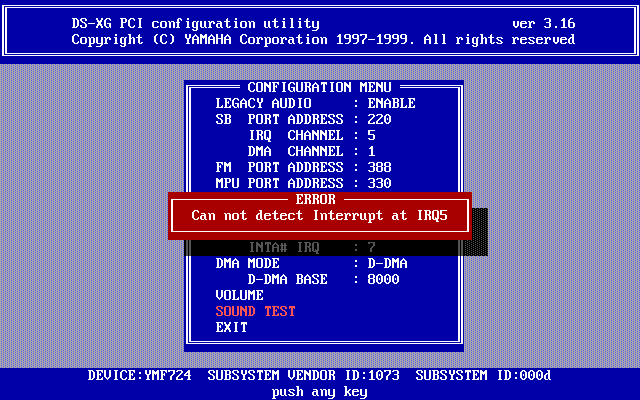
On an MVP3 motherboard, the entire choices had been grayed out, DMA did not
work, and it was hopeless. In each instances, the native mode sound take a look at
and FM sound take a look at nonetheless labored.
2015-12-05: Yuki Saitou reported SB Pro emulation working in pure
DOS with DOOM and different video games on an Asus TUSL2-C board (815EP chipset):
"The setup device nonetheless has many choices greyed out and I am unable to take a look at SB
emulation from inside nonetheless if I select save and exit then run loadtsr.bat
it efficiently initialises and shows the Port/IRQ/DMA particulars on
display."
W98SE
In Windows 98 this card can lastly shine, however the legacy audio is
nonetheless difficult.
Yamaha supplied each VxD
and WDM
driver units right here.
Each model has its personal quirks.
| VxD | WDM |
|---|---|
| yamaha_dsxg_driver.exe installs simply and the cardboard is detected after a reboot. |
dsxgwdm.exe installs simply, however two reboots are wanted (just one is prompted) earlier than the cardboard is detected. |
| Sound font put in as ydsxg.dat | Sound font put in as Dsxgwave.tbl |
| T4 Sound Blaster Pro 2.0 emulation | T4 Sound Blaster Pro 2.0 emulation |
| Must flip MIDI as much as most within the mixer to stability with Wave. It likes to revert to the default setting after an unclean shutdown. | Must flip Wave right down to 50% within the mixer to compensate for actually quiet MIDI. |
| DOOM works. | DOOM works however sound results are glitchy (as all the time with WDM?) |
| DN3D crashes Windows. | DN3D works. |
Although the file names are completely different, the two.5 MB sound font within the two
driver units is bit-for-bit equivalent. Overwriting it with the 4 MB
sxgwave4.tbl waveset used with the Yamaha softsynth would not work.
Untested: PowerYMF.
A Wikipedia
contributor wrote, "WDM drivers… present subjectively unacceptable XG
MIDI synthesis (General MIDI synthesis is taken into account acceptable)."
Without doing a cautious side-by-side comparability utilizing a local XG mid file, I
have not encountered drastic issues with the WDM drivers recognized
above. However, with an older model of the WDM driver set (the Yamaha
DS-XG Audio Config app declares itself to be model 4.10.2223) I might
describe the MIDI rendering as "mangled." The older model nonetheless has
SONDIUS-XG on the Synthesizer tab, however enabling it causes Windows to lock up
when DOOM runs.
I just like the XG sound font. Unlike most, it may be used as a drop-in
substitute for Sound Canvas with out messing up the timing of every part, and
the drums are higher than SC. It makes DOOM E1M1 and the DN3D theme sound most glorious.
Labway/ForteMedia Xwave QS3000A (FM801)

Despite the XG emblem and robust bodily resemblance to the YMF724 card, there is no such thing as a XG synth right here. OEMs
bundled the Yamaha S-YXG50 softsynth with the drivers you can now not
get. ForteMedia had generic
drivers (with out the softsynth) on the net for a short time.
On the great aspect, it does have an built-in OPL3 clone that is not too
unhealthy.
I didn’t take a look at it on the jinxed PT880 Ultra chipset.
Linux
snd-fm801
In the mixer there are three quantity controls that have an effect on wav sound
output: Master, PCM, and Wave. All three should be set to 60% or
decrease to keep away from noisy output.
sbiload + aplaymidi works with out glitching.
Joystick assist is in a separate module, fm801-gp.
DOS
(Tested on MVP3 chipset.)
The installer in Dos202.zip, ForteMedia’s generic "Base Driver for DOS,"
is refreshingly easy and direct, prompting for assets after which asking,
"Is this OK to your DOS Games?" Unfortunately, it causes
% symbols to vanish from AUTOEXEC.BAT.
SET BLASTER=A220 I5 D1 T4
C:LOCALSNDCARDSFM801CFG801
C:LOCALSNDCARDSFM801DOS801
The executables CFG801.EXE and DOS801.EXE may be moved out of the basis
listing, however the paths to config information C:DOSGAME.CFG and C:VOLUME.CFG are
hard-coded.
An EMM just isn’t required, however DOS801 is a TSR.
The mixer settings in VOLUME.CFG are at most solely preliminary values. As
quickly as you run a recreation, the quantity will get cranked up and is left that means after
the sport exits.
The channels are reversed in DOOM and DN3D. SET does yield stereo (reversed) OPL3 music in
DMXOPTION=-opl3
DOOM.
W98SE
I scrounged up the next information, which I consider to be from the
long-gone ForteMedia generic assortment:
- base117e.zip, final identified launch of the bottom driver (VxD).
- q3d205.zip, launch 205d of the Q3D driver (VxD). Last identified launch 205f was not discovered.
- ezaudio300.zip, final identified launch of the EzAudio app from ForteMedia.
With the bottom drivers you get a typical mixer (double click on on quantity
widget), legacy audio, and joystick driver. MIDI performed to the "FM801
Internal FM" synth sounds very like the terrible "Creative Music Synth."
Vanilla DOOM and DN3D run however the quantity continues to be wonky and the channels are
nonetheless reversed.
The Q3D driver set is unusable. It installs a model of the bottom
audio system driver that does not work.
EzAudio is simply one more CD/MIDI/WAV participant.
Diamond Extreme Sound 5.1 (XS51) SC3000 (CMI8738)

The CMI8738 presents as a high-end audio chip with assist for each
44.1 and 48 okayHz pattern charges, which is enigmatic provided that the 14.318 MHz
clock supply is a good a number of of neither one.
Linux
snd_cmipci
Port    Client title                      Port title
16:0    C-Media CMI8738                  C-Media CMI8738 MIDI
17:0    OPL3 FM synth                    OPL3 FM Port
sbiload + aplaymidi works with out glitching however the channels are
reversed.
Header J3 matched up with the CD audio enter.
Like snd-ymfpci, this module doesn’t allow the joystick until
requested. Add to /lib/modprobe.d/alsa.conf:
choices snd-cmipci joystick_port=1
W98SE
The examined drivers got here from the Diamond Installation CD Version 1.0 for
Windows 2000/XP/MCE. Although the autorun setup helps solely the
indicated later variations of Windows, manually installable Windows 98 drivers
had been "hidden" in subdirectory Drivers. Included had been audio driver
v. 5.12.01.0046.5.1 (WDM) and Diamond Multimedia 3D Audio Configuration
v. 1.0.41.24.
2015-10: I’ve now examined this card on three completely different
chipsets. With PT880 Ultra, Windows locked up each time DOOM or DN3D
tried to initialize sound results. With KT133E and 440BX this didn’t
happen; nonetheless, the slower CPU on the 440BX board led to horrible lag.
At finest, all PCM output was breaking apart, and if the Universal VESA/VBE driver was
put in, merely transferring the mouse precipitated music to decelerate.
In a DOS field, BLASTER=A220 I5 D1 T4 P330, however they did not trouble to make
the OPL3 work. Music despatched to OPL3 goes right into a black gap.
General MIDI is supplied by the Microsoft GS softsynth. Using that,
DOOM and DN3D can be playable if not for the sound results breaking
up. The channels are usually not reversed.
Absolutely nothing is finished for real-mode DOS.
DOS
2015-10, 440BX, FreeDOS: DOS drivers for some card utilizing the
identical or related chip appeared on Vogons.
They initialized efficiently precisely as soon as:
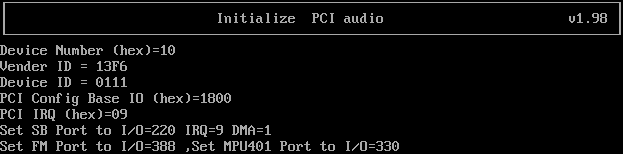
That time I managed to get OPL3 music in DOOM although the IRQ was flawed for
sound results. Unfortunately, that success was random and
irreproducible. Every different time, this occurred:

The installer added a line to AUTOEXEC.BAT setting BLASTER=A220 I5 D1 H5
T4, which (a) specifies a excessive DMA that doesn’t apply to T4 and (b)
disagrees with the IRQ reported by SETAUDIO.
There is a mixer app (C3DMIX.COM), however it’s inconceivable to unmute FM and
wave if SETAUDIO hasn’t initialized efficiently.
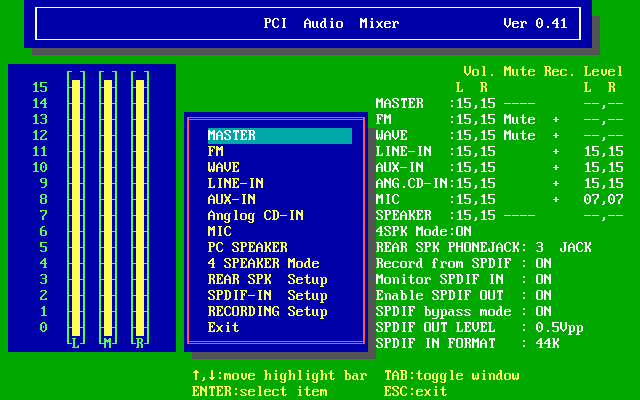
C3DMIX is run in AUTOEXEC.BAT with an extended checklist of cryptic, undocumented
switches. Running C3DMIX interactively causes it to change the magic
numbers in AUTOEXEC.BAT!
C:LOCALSNDCARDSCMI8738C3DMIX /MFF000 /FFF000 /WFF000 /L00100 /E00100 /A00100 /C00100 /P00000 /400000 /R0f0ff /D040ff
FWIW, MPXPLAY helps this card immediately and it sounds nice.

Vortex (AU8820)
I’ve no clue what model and mannequin this card was bought as. Tested 2015-09
utilizing 440BX motherboard and 450 MHz Pentium 2 CPU (Dell R450).
Linux
The module is snd_au8820. There isn’t any synth. There is,
nonetheless, a profusion of subdevices showing by way of ALSA to assist {hardware}
mixing.
Card 0, ID `au8820', title `Aureal Vortex au8820'
  Device 0, ID `Aureal Vortex ADB', title `au8820 adb', 16 subdevices (16 obtainable)
    1..2 channels, sampling price 5000..48000 Hz
    Sample codecs: U8, S16_LE, MU_LAW, A_LAW
      Subdevice 0, title `subdevice #0'
      [...]
      Subdevice 15, title `subdevice #15'
  Device 3, ID `Aureal Vortex WT', title `au8820 wt', 32 subdevices (32 obtainable)
    1..2 channels, sampling price 8000..48000 Hz
    Sample codecs: S16_LE
      Subdevice 0, title `subdevice #0'
      [...]
      Subdevice 31, title `subdevice #31'
ADB = Audio Data Bus, the traditional PCMs. WT = WaveDesk, a set of PCMs
that assist the W98 softsynth. The latter have mysterious further
options, however in a short, easy take a look at they appeared to work the identical because the
PCMs on system 0.
Sound appears to work, however these sort of messages seem within the system log
every time SDL is used:
snd_au8820 0000:00:10.0: BUG: , pos = 2048, buffer measurement = 2048, interval measurement = 1024
snd_au8820 0000:00:10.0: BUG: , pos = 2051, buffer measurement = 2048, interval measurement = 1024
W98SE
Version 4.05.0110 drivers are supplied in drivers/audio/aureal on the
W98SE set up CD, however they do not work proper in any respect. Instead, I used
model 4.06.1189 from VOGONS,
put in by the Browse methodology.
Sound Blaster emulation is T4 (Sound Blaster Pro 2.0). Neither music
nor sound results has the reversed channels downside.
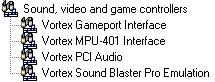
Some sort of stereo enhancement is enabled by default beneath the Advanced
tab of the mixer. There’s additionally A3D.
The quantity of Wave Out must be lowered to round 50% of Wavetable in
the mixer for General MIDI to be loud sufficient. For the emulated OPL3, it
needs to be decrease but.
"Restart in MS-DOS mode" is proscribed to utilizing the OPL3 emulation, which is
not excellent. With music despatched to General MIDI, DOOM and DN3D run properly
sufficient in DOS containers; nonetheless, sound results are glitchy in DOOM, and
typically the synth will get hosed and you need to reboot.
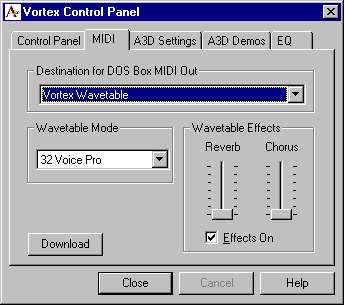
The put in sound font known as AUREALGM and is 5188936 B. The FAQ says
"Windows 9x 4.06.1187 or later reference drivers assist DownLoadable Sounds
1.0 and any Soundfonts 2.0 information with do not use ROM samples." There is
a Download button on the MIDI tab of the Vortex Control Panel, but it surely solely
desires information known as *.arl, *.dls, or AurealGM. Overwriting AUREALGM with
Scc1t2.sf2 precipitated damaged music (looping drum samples).
By default, the driving force assigns DMA 3 for legacy audio and DMA 1 for
one thing unexplained. Switching to "Basic configuration 0007" assigns
DMA 1 to legacy audio and surrenders the opposite DMA. The affected fields
in VORTEX.INI are SBFMDMA (legacy audio) and SBFMDMA2 (???).
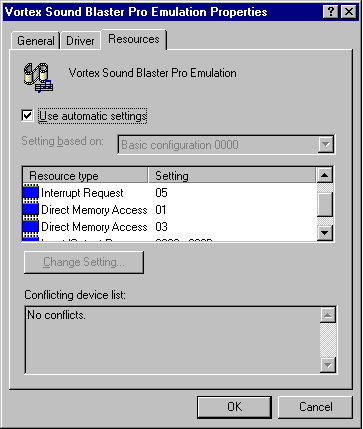
SBFMDMA=0x3

SBFMDMA2=0x1
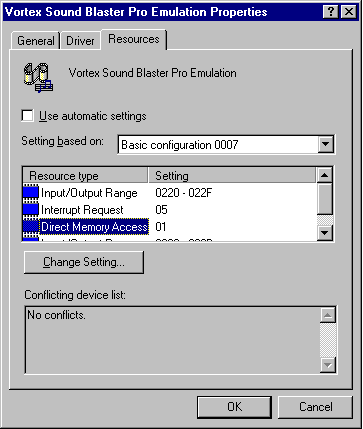
SBFMDMA=0x1

SBFMDMA2=0xFF
The PCI IRQ and CPU frequency in MHz are additionally encoded in VORTEX.INI, so
blindly copying the config file from one PC to a different is more likely to break
one thing. (CPU velocity? Seriously, you want that?)
PCIIRQ=0x9
CPUSpeed=0x1C0
DOS
Tested with FreeDOS. The Aureal driver for DOS may be mentioned to "work"
in actual mode in addition to in digital 8086 mode; nonetheless, both means it precipitated
corruption and crashes, and both means you might be caught utilizing the unimpressive
emulated OPL3 with no wavetable MIDI.
It suffices to repeat the information ASP4DOS.COM and VORTEX.INI from a W98SE
set up and do the next in AUTOEXEC.BAT:
SET WINBOOTDIR=C:LOCALSNDCARDSAU8820
LH C:LOCALSNDCARDSAU8820ASP4DOS.COM
REM This should match the configuration in VORTEX.INI.
SET BLASTER=A220 I5 D1 T4
The TSR is 38973 B and occupies 23392 B after loading. It
refused to load excessive.

There isn’t any mixer. The third-party device VORTMIX did not
work. I used to be caught with default volumes.
MPXPLAY performs music in SBPro mode for at most a minute earlier than
crashing. DN3D prints rubbish on the beginning and exit screens however is
playable. DOOM sound results are much less glitchy than they had been in W98SE,
however they nonetheless reduce off like just one can play at a time.
In abstract, although DOOM and DN3D are playable, the poor-quality MIDI,
glitched sound results, lack of a working mixer, and proof of corruption
make this card a poor alternative for plain DOS.
Montego II A3D (Vortex 2, AU8830)
The Montego II is an Aureal Vortex 2 kind sound card. The Montego II
A3D apparently is a Dell OEM variant.
The massive deal justifying an improve from Vortex 1 was
A3D 2.0. FWIW, it additionally provides a 10-band equalizer and extra decisions for
refrain/reverb results. Apart from that, although, the performance and
quirks wind up being very related.
Linux
The related module is snd_au8830. There isn’t any
synth, however there’s a profusion of subdevices for {hardware} mixing.
Card 0, ID `au8830', title `Aureal Vortex au8830'
  Device 0, ID `Aureal Vortex 2 ADB', title `au8830 adb', 16 subdevices (16 obtainable)
    1..2 channels, sampling price 5000..48000 Hz
    Sample codecs: U8, S16_LE, MU_LAW, A_LAW
  Device 1, ID `Aureal Vortex 2 SPDIF', title `au8830 spdif', 1 subdevices (1 obtainable)
    1..2 channels, sampling price 32000..48000 Hz
    Sample codecs: U8, S16_LE, IEC958_SUBFRAME_LE, MU_LAW, A_LAW
      Subdevice 0, title `subdevice #0'
  Device 2, ID `Aureal Vortex 2 A3D', title `au8830 a3d', 16 subdevices (16 obtainable)
    1 channel, sampling price 5000..48000 Hz
    Sample codecs: U8, S16_LE, MU_LAW, A_LAW
  Device 3, ID `Aureal Vortex 2 WT', title `au8830 wt', 64 subdevices (64 obtainable)
    1..2 channels, sampling price 8000..48000 Hz
    Sample codecs: S16_LE
AlsaMixer gives controls for the 10-band equalizer.
W98SE
2013-01, 865PE: The beneficial drivers from Dell fail to put in
legacy audio. This error has a workaround, however the workaround requires
a more recent model of the drivers than Dell makes use of. Moving the cardboard to a
completely different PCI slot because the error message suggests would not really assist.
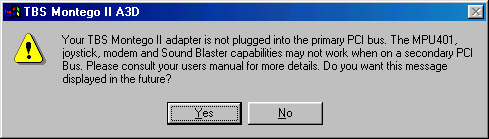

The retail Montego II drivers ("WARNING: Not for Dell Montego")
really labored, however they blue screened after the Sound Blaster Pro emulation
was put in and thus by no means put in the apps.
I obtained the very best outcomes with Aureal’s generic AU8830 drivers (model
4.06.2048) which can be found
from VOGONS.
If run with out patching, they replicate the PCI bus error proven above, however
the issue is averted by uncommenting the road
HKR,Config,DisableBusDetection,1,1 in AU30MMED.INF earlier than
putting in the drivers. There isn’t any installer executable—they’re put in
by way of the "Browse" methodology when Windows searches for drivers.

The drivers wouldn’t tolerate a second audio system or recreation port—the
motherboard’s built-in gadgets needed to be disabled in BIOS setup.
2014-07: Success was not reproducible on the PT880 Ultra
chipset. The sound drivers corrupted the system someway. Firstly,
they broke "Primary IDE controller," disabling the CD-ROM and inflicting Windows
to immediate "To end establishing your new {hardware}, you will need to restart your
laptop. Do you wish to restart your laptop now?" on each single
boot with out finish. Secondly, DOOM would crash or hold. The
solely configuration that did not crash fairly quick was operating in a DOS field
utilizing the OPL3 emulation for music. I could not take a look at DN3D a lot and not using a
working CD-ROM, however all of the sound exams had been OK in setup till Windows
crashed. Going again and attempting the retail drivers, they didn’t blue
display however neither did they resolve the issue.
2015-09, 440BX (Dell R450): Now evaluating the 4.06.2048 drivers to
latest expertise with the Vortex 1. The
put in sound font AU30GM.ARL is equivalent to the AUREALGM file that was
seen earlier. The sound font Download button now accepts SF2 information, however
they nonetheless do not work proper—the drums looped on each Scc1t2.sf2 and
Unison.sf2.
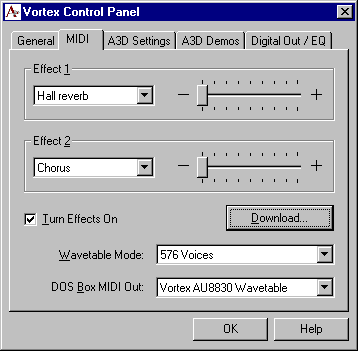
In the mixer, the "Advanced Controls for Volume Control" aren’t there
anymore, however the relative quantity of Wavetable and Wave Out is simply as
unbalanced.
Sound results are nonetheless glitchy in DOOM and the synth nonetheless will get itself
hosed. Enabling refrain and reverb precipitated the drums to cease working in
DN3D they usually did not come again after disabling results and doing a chilly
reboot. They ultimately got here again after some random flailing with
music settings and checking issues out in a DOS field.
Changing DMAs is similar as with the Vortex 1. The config file is
now known as AU30DOS.INI, however the one distinction in content material is that
[ASP4DOS.COM] adjustments to [AU30DOS.COM].
DOS
2014-07, PT880 Ultra: Everything crashed.
2015-09, 440BX (Dell R450): Similar to Vortex 1. The sound
results glitching wasn’t as unhealthy and the OPL3 emulation appeared higher as
properly. The unhealthy information is the crashing and corruption points had been precisely
the identical and VORTMIX nonetheless did not work.
Apart from renamings, configuration is similar as for Vortex 1.
SET WINBOOTDIR=C:LOCALSNDCARDSAU8830
LH C:LOCALSNDCARDSAU8830AU30DOS.COM
REM This should match the configuration in AU30DOS.INI.
SET BLASTER=A220 I5 D1 T4
CT4830 Sound Blaster Live! Value OEM (EMU10K1-SEF)

Linux
The module is snd_emu10k1. See right here about getting the synth to work.
DOS
As initially examined:
| Card | CT4830 Sound Blaster Live! Value (OEM) |
| Card kind | EMU10K1-SEF, 48 okayHz |
| Tested on | 440BX, Pentium II |
| Drivers | Creative SB16 Emulation Driver, Version 5.00 |
| Drivers want | DOS + EMM386 with VCPI enabled (I used JemmEx NOEMS) |
| Experience |
• Like Live! 5.1, solely worse • Defaults to digital output solely • Emulates Sound Blaster 16 • OPL3 emulation causes DOOM to stutter and decelerate (no such downside with General MIDI) • DUKE3D couldn’t initialize sound results* • Did not attempt Windows 98 drivers CD |
* Live! playing cards versus Duke Nukem 3D: testing sound results in setup
failed with "Playback failed, presumably as a consequence of an invalid or conflicting DMA
channel. Make positive the 16-bit DMA channel is right." The DMA
channel was right. Things that did not assist: V4.00 drivers;
reserving IRQ and DMAs in BIOS; utilizing Microsoft HIMEM and EMM386; enabling
EMS; utilizing essentially the most primary Sound Blaster possibility in DUKE3D setup (which ought to
not have required a excessive DMA in any respect).
2015-04: Reproducing success with this quite common card was
extremely tough. The failures had been multi-layered:
- On most motherboards, both the TSR SBEINIT.COM refuses to load or
trying to initialize sound in a recreation ends in a crash, lockup, or
spontaneous reboot, no matter configuration. - If UIDE is loaded, the TSR all the time fails to load with "Could not allocate
code/patch RAM beneath 4 Mbyte boundary" no matter configuration. - If the earlier two pitfalls are averted, operating DOOM or DN3D utilizing the
DOS/32A extender as an alternative of DOS/4GW ends in display corruption and a crash
shortly after the sport launches.
Here is the working configuration, in painstaking element:
- ASRock 865PE motherboard, 3.2 GHz P4
- FreeDOS kernel 2041
- JemmEx v5.78 reminiscence supervisor with NOEMS swap
- UDVD2 2014-10-19 + SHSUCDX 3.05 DVD-ROM drivers
- DOSLFNMS 0.41c lengthy filename driver
- CuteMouse v2.1 beta4 mouse driver
- Creative SB16 Emulation Driver, Version 5.00
- DOS/4GW extender for DOOM and DN3D (both authentic or upgraded)
The driver gives each OPL3 emulation and General MIDI, however the OPL3
emulation is fatally flawed. It has glorious timbre, however the velocity at
which music performs is each too gradual and inconsistent. Since this
occurred basically the identical means with a P4 as with a Pentium II, gradual CPU is
not the issue; the emulation is simply laggy.
General MIDI with an ECW soundfont works easily in each DOOM and
DN3D. The DN3D initialization downside that occurred within the authentic
take a look at with the Pentium II didn’t reproduce.
The decisions of ECW soundfont, IRQ, DMAs, and ports are coded within the config
file CTSYN.INI. SBEINIT.COM modifies the BLASTER variable accordingly,
but it surely needs to be set first anyway or it’s going to stay unset.
SET PATH=%PATH%;C:LOCALARCSNDCARDSSBLIVE
SET CTSYN=C:LOCALARCSNDCARDSSBLIVE
SET BLASTER=A220 I5 D1 H5 P330 T6
SBEINIT.COM
Note that the emulation kind is T6 (Sound Blaster 16) as an alternative of the extra
frequent T4 (Sound Blaster Pro 2.0).
W98SE
2015-04, 865PE: Version 4.12.01.0906 of the VxD drivers put in
and labored with no drama aside from the necessity to deselect "Digital Output
Only" within the superior mixer settings. The sound font utilized by Windows
Media Player and Creative’s personal .mid participant may be modified utilizing Creative’s
AudioHQ app, however DOOM and DN3D operating in DOS containers are oblivious to this and
all the time use the DEFAULT.ECW soundfont. Similarly, altering the MIDI
output system to Creative S/W Synth impacts Windows apps however not the
video games. Thus, until a third-party softsynth may be made to work, the
internet performance for video games isn’t any higher than what was doable beneath plain
DOS. (The AWE64 was capable of
change sound fonts for DOS video games inside W98SE, as was the Sound Blaster Live! 5.1 utilizing WDM drivers.)
The battle with DOS/32A didn’t reproduce in DOS containers.
I examined many various WDM drivers, however none of them labored with the
865PE motherboard. Some would set up however produce solely noise; others would
not even set up. Notes point out that some WDM drivers labored on the PT880
Ultra motherboard so far as common Windows sounds and Windows Media Player
had been involved, however video games all the time locked up at launch.
SB0100 Sound Blaster Live! 5.1 (EMU10K1-NGF)

2015-10, 440BX: After reaching success with the CT4830 I simply wished to see if the 5.1 would work
equally.
Linux
snd_emu10k1 once more.
Port    Client title                      Port title
16:0    SB Live! 5.1                     EMU10K1 MPU-401 (UART)
17:0    Emu10k1 WaveDesk                Emu10k1 Port 0
17:1    Emu10k1 WaveDesk                Emu10k1 Port 1
17:2    Emu10k1 WaveDesk                Emu10k1 Port 2
17:3    Emu10k1 WaveDesk                Emu10k1 Port 3
DOS
The drivers and configuration that labored for the CT4830 on an 865PE
motherboard additionally labored for the SB0100 on a 440BX motherboard. The
one notable distinction is that OPL3 emulation is not laggy with
the SB0100. It nonetheless causes horrible glitching of sound results,
nonetheless. DOOM’s stereo OPL3 swap would not work.

Sound obtained hosed at one level however got here again after a reboot.
MPXPLAY defaults to SB16 but in addition works with -scs SBA.

W98SE
Very few of the numerous SB Live! driver units which are on the market accurately
assist this card; those presently obtainable from Creative’s personal site
don’t. The set known as CT4780.ZIP on
Vogons accommodates WDM drivers model 5.12.01.3511 that work if put in by the
browse methodology, however no apps are included and the joystick set up is
borked. A completely useful set up of drivers and Creative apps is
doable with the June 2001 Sound
Blaster Live! 5.1 Install CD, which accommodates WDM drivers model
5.12.01.3227.
BLASTER is A220 I5 D1 T4 P330. There isn’t any OPL3 emulation, however DOOM
and DN3D each run fairly properly in DOS containers with music despatched to General
MIDI. Music slows down and sound results break up when the CPU is
overloaded, and there may be some glitching of sound results in DOOM as there
all the time is with WDM drivers.
The drivers present "A" and "B" variations of the MIDI synth, reportedly to
get round
a 16-channel
MIDI limitation. The CT4780.ZIP drivers moreover add a Creative
softsynth.
Install CD
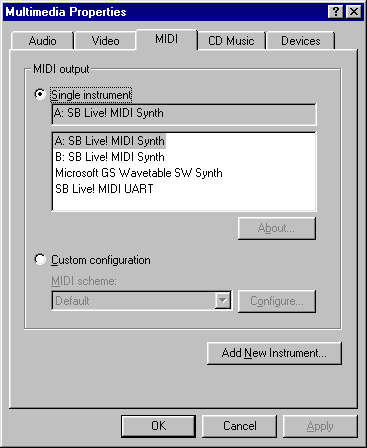
CT4780.ZIP
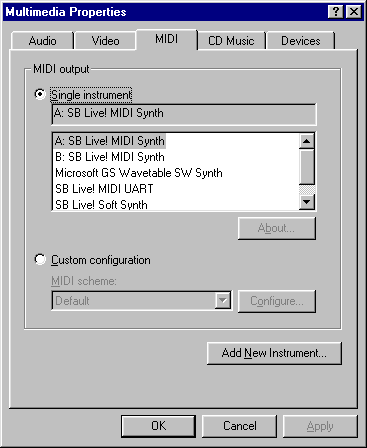
Amazingly, when the sound font is modified in AudioHQ, it really works
for General MIDI output from DOOM and DN3D!
Magitronic DCS S727-SB (ES1370 AudioPCI)

A PCI card with a single {hardware} clock that operates at 44.1 okayHz
as an alternative of 48 okayHz. The codec is an Asahi Kasei AK4531, which I
assume has an 18-bit DAC. Only a speaker out jack, however the output is of
good high quality.
DOS
2014-02, MVP3: I’ve been unable to find DOS drivers that work
with this mobo. The Creative drivers being distributed from MAME as
SBPCI64.zip get by way of initialization with out failing and the mixer appears to
function, however APTEST all the time offers "DMA take a look at failed" and no purposes are
capable of produce sound.
2015-05, 440BX (Dell R450): OK, with the identical drivers I obtained sound,
however there are nonetheless issues.
SET BLASTER=A220 I5 D1 T2
SET SNDSCAPE=C:LOCALSNDCARDSES1370
SET PATH=%PATH%;C:LOCALSNDCARDSES1370
APINIT
APLOAD

The decisions of ECW soundfont, IRQs, DMA, and ports are coded within the config
file SNDSCAPE.INI. APINIT is not going to run until BLASTER is ready. It
additionally fails if the outdated model of DOS4GW that’s bundled is upgraded.
As with all playing cards on this collection, an EMM is required for the legacy audio,
and General MIDI works with any of the three ECW soundfonts.
- The OPL2 emulation is principally the worst ever.
- The channels are reversed for PCM (Wave) output.
- PCM is way louder than synth.
- Volume settings made utilizing APMIXER do not stick when DOOM is run.
- MPXPLAY -sct detects WSS after which locks up.
- MPXPLAY with no choices makes use of SB Pro mode and works high quality.
- MPXPLAY -scs WSS works for a minute or two after which locks up.
- DOOM runs with channel-flipped sound results for a minute or two after which locks up.
- DN3D sound exams are high quality aside from the reversed channels however the recreation locks up.
- MegaMID performs MIDI with out locking up.
After testing initially with FreeDOS and JemmEx, I reproduced the DOOM
failure utilizing the W98SE kernel each with JemmEx and with HIMEM+EMM386, and
with out DOSLFNMS or CPU idle.
The PCI128 drivers that labored higher for the ES1373
card didn’t detect this one.
W98SE
2014-06, PT880 Ultra: I examined three variations of Creative’s AudioPCI /
Sound Blaster PCI 64 drivers however none of them labored within the slightest.
Through this
thread I situated a pre-acquisition Ensoniq driver distro:
Archive:  audiopci.zip
  Length      Date    Time    Name
---------  ---------- -----   ----
   248832  06-30-1997 15:13   Wizard.exe
     8192  06-30-1997 15:30   _ISDEL.EXE
     6128  06-30-1997 15:30   _SETUP.DLL
    21703  06-30-1997 15:30   _SETUP.LIB
     8256  04-02-1997 16:18   CLNUTIL.DLL
     1280  03-12-1997 08:50   CLNUTL16.DLL
    18432  03-12-1997 13:59   clnutl32.dll
    68829  06-30-1997 09:47   eapci.vx_
   327364  06-30-1997 14:27   EAPCI.Z
      184  11-12-1996 19:16   eapci_ss.in_
  2257237  01-28-1997 18:19   eapci2m.ecw
  4995408  01-28-1997 17:06   eapci4m.ecw
    45113  06-30-1997 09:49   eapci95.dr_
     5389  05-22-1997 09:52   eapci95.hl_
     4553  06-27-1997 14:44   eapci95.inf
   140934  05-27-1997 14:45   ensmix32.ex_
    22528  02-20-1997 14:59   IWLang.dll
    10175  05-27-1997 14:49   mixres32.dl_
    45312  06-30-1997 15:30   SETUP.EXE
     6455  06-30-1997 15:30   SETUP.INS
      189  06-30-1997 14:27   SETUP.PKG
    10574  05-27-1997 11:43   starter.ex_
   282766  06-30-1997 15:30   _INST16.EX_
---------                     -------
  8535833                     23 information
The set up course of stopped with "The ENSONIQ AudioPCI {hardware} has not been detected in your system:"
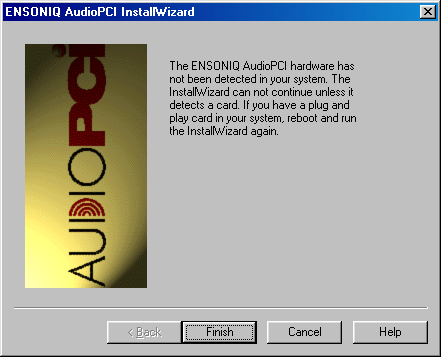
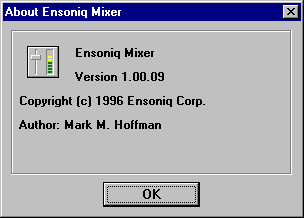
But after a reboot it was there and dealing with no apparent issues. It
even supplied a separate mixer with controls for Spatial, Reverb, and
Chorus.
- In a DOS field, BLASTER is ready to A220 I5 D1 T2 (Sound Blaster Pro,
outdated/authentic model). There is nothing in real-mode DOS, no BLASTER
and no sound. - FM synth emulation is current however is horrible. General MIDI
works. - The 2 and 4 MB ECW information are put in in C:WINDOWSSYSTEM and
DEFAULT.ECW is a duplicate of EAPCI2M.ECW. Though there is no such thing as a menu possibility
for it, any of the three ECW soundfonts may be put in by
copying them onto DEFAULT.ECW. - DOOM and DN3D each run, however the channels are backwards for sound
results (typical SBPro clone). - The Spatial, Reverb, and Chorus results supplied by the mixer have an effect on the
sound in Media Player however not in DOOM. - In Control Panel → Multimedia → Audio → Advanced
Properties one can configure speaker setup and resampling high quality. - The gameport works.
In abstract, you get Ensoniq General MIDI and a 44.1 okayHz pattern price,
however not with out the SBPro channel-swapping downside.
Wait, we missed one thing necessary right here: OMG! Ensoniq’s legacy audio drivers labored on a PT880 Ultra chipset!
Linux
Module snd_ens1370 detects and operates the cardboard. Two
gadgets are reported with completely different sampling price ranges as if there have been a
48 okayHz clock current:
*** Scanning for playback gadgets ***
Card 0, ID `AudioPCI', title `Ensoniq AudioPCI'
  Device 0, ID `ES1370/1', title `ES1370 DAC2/ADC', 1 subdevices (1 obtainable)
    1..2 channels, sampling price 4000..48000 Hz
    Sample codecs: U8, S16_LE
      Subdevice 0, title `subdevice #0'
  Device 1, ID `ES1370/2', title `ES1370 DAC1', 1 subdevices (1 obtainable)
    1..2 channels, sampling price 5512..44100 Hz
    Sample codecs: U8, S16_LE
      Subdevice 0, title `subdevice #0'
ALSA’s default configuration is problematic. It desires to upsample
every part to 48 okayHz. Using the {hardware} gadgets immediately avoids
that, however the ramifications of the completely different pattern price ranges for the 2
gadgets stay murky.
bash-4.2$ aplay --disable-resample track03.LaundryService.wav
Playing WAVE 'track03.LaundryService.wav' : Signed 16 bit Little Endian, Rate 44100 Hz, Stereo
Warning: price just isn't correct (requested = 44100Hz, obtained = 48000Hz)
         please, attempt the plug plugin (-Dplug:default)

bash-4.2$ aplay -Dhw:0,0 --disable-resample track03.LaundryService.wav
Playing WAVE 'track03.LaundryService.wav' : Signed 16 bit Little Endian, Rate 44100 Hz, Stereo

bash-4.2$ aplay -Dhw:0,1 --disable-resample track03.LaundryService.wav
Playing WAVE 'track03.LaundryService.wav' : Signed 16 bit Little Endian, Rate 44100 Hz, Stereo
2014-06: OK, so it seems that the cardboard will really settle for enter at
48 okayHz, but it surely does one thing bizarre and performs it off-pitch. This no less than
explains why ALSA believes 48 okayHz to be a sound alternative, however consequently the
48 okayHz price needs to be rigorously averted. The two separate stereo DACs should
relate to the cardboard’s implementation of 4-channel sound.
CT5803 Sound Blaster AudioPCI 64 Dell/Gateway (ES1373)

Enhanced element of Creative-branded ES1373 chip. Only faint lettering was
left after I eliminated a spherical sticker.
The single output jack claims to be line stage however is loads loud and
noisy. At excessive quantity the upper frequencies get crowded out
someway.
Linux
The module snd_ens1371 is used for ES1373 too.
aplaymidi -l reveals solely a single port, which I assume is the MPU-401 not
the synth. Wav output is regular. The card’s inside resampling
from 44.1 okayHz is middle-of-the-road.
DOS
2015-10: Testing on PT880 Ultra produced the acquainted crashing,
lockups, and spontaneous reboots in DOOM and DN3D, so I’ve gone again
to 440BX to get the baseline.
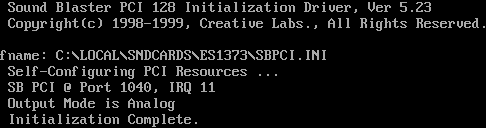
With FreeDOS, JEMMEX NOEMS, and no UIDE, the PCI128 drivers proven beneath
labored aside from printing the flawed product title.
SET PATH=%PATH%;C:LOCALSNDCARDSES1373
SET SBPCI=C:LOCALSNDCARDSES1373
SET BLASTER=A220 I5 D1 H5 P330 T6
SBLOAD
SBINIT
- The OPL3 emulation is unhealthy and utilizing it causes sound results in DOOM
to be glitchy. - DOOM and DN3D each run high quality with music despatched to General MIDI.
- MPXPLAY defaults to SB16 but in addition works with -scs ENS.

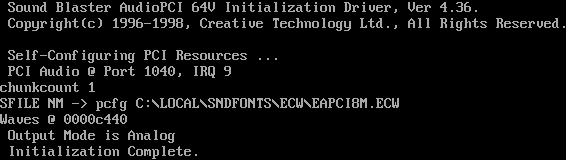
I additionally examined the AudioPCI 64V drivers proven beneath. They initialized
OK and labored for MPXPLAY and MegaMID, however DOOM and DN3D each crashed in a
matter of seconds, and the voice channels had been reversed.
SET PATH=%PATH%;C:LOCALSNDCARDSDELME
SET SNDSCAPE=C:LOCALSNDCARDSDELME
SET BLASTER=A220 I5 D1 T2
APINIT
APLOAD
W98SE
2023-06-10: Remnants of the obtain web page proven beneath can nonetheless be
discovered at
https://assist.artistic.com/….
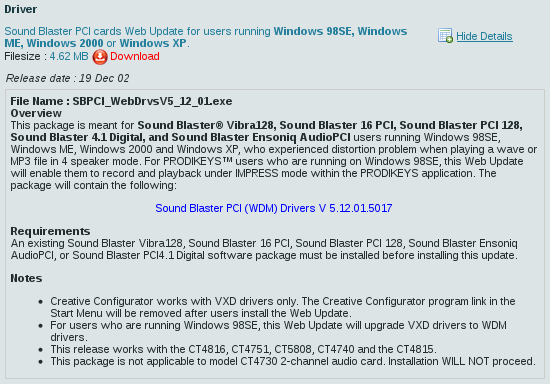
"An current Sound Blaster Vibra128, Sound Blaster 16 PCI,
Sound Blaster PCI 128, Sound Blaster Ensoniq AudioPCI, or Sound Blaster
PCI4.1 Digital software program bundle should be put in earlier than putting in this
replace." Not!
2014-07, PT880 Ultra:
Although Creative’s
product checklist clearly identifies CT5803 as an AudioPCI 64 OEM model,
not one of the driver units for Sound Blaster AudioPCI 64V that I examined had been
acknowledged by Windows as being relevant to the put in card. OTOH, the
Sound Blaster PCI128 Driver Pack and/or "Web Update"
SBPCI_WebDrvsV5_12_01.exe from Creative’s site put in easily with no
error messages and made Windows unbootable (yay). It locked up on the splash
display each time.
This time I might not surrender simply. Examination of the
non-bootable partition revealed that Creative’s installer had modified
CONFIG.SYS to load each HIMEM and EMM386, which beneath W98SE is barely going to
trigger issues:
DEVICE=C:WINDOWSHIMEM.SYS
DEVICE=C:WINDOWSEMM386.EXE
DEVICE=C:WINDOWSsetver.exe
Removing these two traces, Windows booted and the sound was
working!
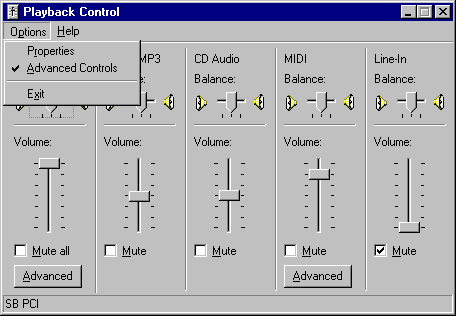
The sound initially appeared tousled, but it surely was solely as a result of spatial and
reverb results had been enabled by default. They may be disabled utilizing
the Advanced Controls within the mixer, which is accessed by double-clicking on
the quantity widget.
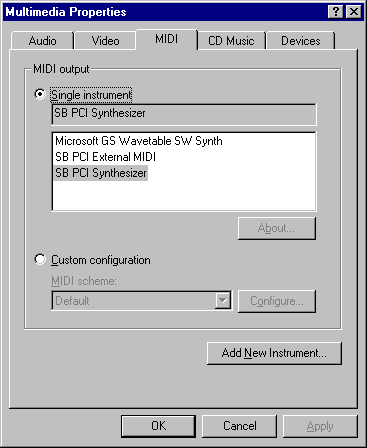
In a DOS field, BLASTER=A220 I5 D1 T4 P330. There isn’t any OPL3
emulation, however DOOM and DN3D each run properly with music despatched to General
MIDI. The channels are usually not reversed. Windows crashes or locks up
each time that DOOM exits, however at this level I can dwell with
that.
Sound results in DOOM are a little bit bit glitchy. Under Control Panel
→ Multimedia → Audio tab → Playback, Advanced Properties
→ Performance tab there’s a slider to regulate the pattern price conversion
high quality; altering this from finest/slowest to good/quickest appears to cut back the
downside however not eradicate it. (Apparently, every part will get resampled to
48 okayHz in software program earlier than it even will get to the sound card.)
There’s no menu possibility that I can discover to change from the put in
EAPCI2M.ECW soundfont to one thing else, however copying EAPCI8M.ECW onto
EAPCI2M.ECW does it. Alternately, you’ll be able to skip the Ensoniq synth
totally and route MIDI to the Microsoft GS softsynth to get the Roland
soundfont. I dislike what EAPCI8M does to DOOM’s E1M1 music (these
fading guitars), however for "Sign of Evil" (E1M8, E3M4, and E4M1) it is fairly good. (That was with
reverb on, refrain off.)
As with the SB Live!, there are billions of various driver distributions
that may apply to this card. Some of them may work higher, embody
helpful apps, desist from sabotaging CONFIG.SYS, or keep away from the crash when DOOM
exits. But after that litany of failures, now that one thing is sort of
engaged on the PT880 Ultra motherboard, I’m in no hurry to mess with it.
ASRock 4CoreDual-SATA2 R2.0 on-board audio
With no assist for DOS or W98SE in any respect, the built-in sound on this
motherboard would not be value mentioning besides that it was ridiculously exhausting
to determine how one can get it working in Linux and I wished to doc the
profitable workaround.
This VIA PT880 Ultra chipset board comes with an ALC662 rev. 1 5.1 channel
codec and a sticker masking up the "7.1 CH HD" textual content printed on the
board.
2014-04, Linux kernel 3.14: I believe there have been two separate however
interacting issues. The first downside is that the VIA HD Audio module
may be loaded by mistake and trigger conflicts. Disable that and allow
solely the Realtek HD Audio module:
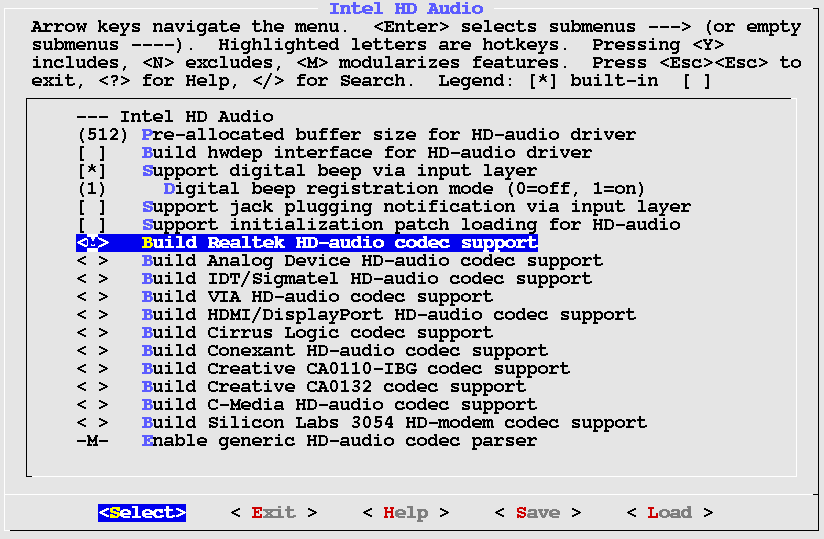
The second and worse downside is that the HD Audio module fails with
completely different, random, severe errors nearly each time, typically crashing the
kernel throughout boot, until the debugging possibility single_cmd is
turned on. To do that on Slackware 14.1, create a file
/lib/modprobe.d/alsa.conf containing choices snd-hda-intel. The kernel Documentation file ALSA-Configuration.txt
single_cmd=1
states, "Remember this can be a final resort, and must be averted as a lot as
doable…" however I’m not conscious of a greater workaround.
And then there’s the IRQ timing workaround, "Suggest an even bigger bdl_pos_adj"
error that occurs lots with HD Audio. I removed it on this case by
revising alsa.conf to choices snd-hda-intel single_cmd=1. The default worth for non-Intel implementations
bdl_pos_adj=48
is 32.
In its favor, the ALC662 does have a 44.1 okayHz mode that’s accessible
by utilizing system hw:0,0 immediately as an alternative of ALSA’s default. I’m a little bit
imprecise on how this will presumably keep away from resampling when there is no matching
clock supply that I can discover, but it surely sounds adequate to be
believable.
One lingering difficulty is that there is no such thing as a signal of the analog CD audio enter
in ALSA although the header exists on the motherboard.
HI-FI News
by way of Two Stop Bits https://ift.tt/K9HADuI
September 18, 2024 at 09:38PM
-
Product on sale
 Audiophile Vinyl Records Cleaning BundleOriginal price was: €83.88.€73.88Current price is: €73.88. incl. VAT
-
Product on saleEasy Start Vinyl Records Cleaning KitOriginal price was: €83.88.€73.88Current price is: €73.88. incl. VAT
-
Vinyl Records Cleaner Easy Groove Concentrate€41.94 incl. VAT
-
Easy Groove Super Set€238.80 incl. VAT
-
Easy Groove Enzycaster – vinyl records prewash cleaner€41.94 incl. VAT
-
Easy Groove Extreme MK. II- vinyl records prewash cleaner€54.00 incl. VAT
-
Vinyl Records Cleaner – Easy Groove Virgin Concentrate€42.00 incl. VAT
-
Easy Groove Spray&Wipe vinyl records cleaner€41.94 incl. VAT








