
Uncategorized
Formovie Theater UST 4K Projector Review
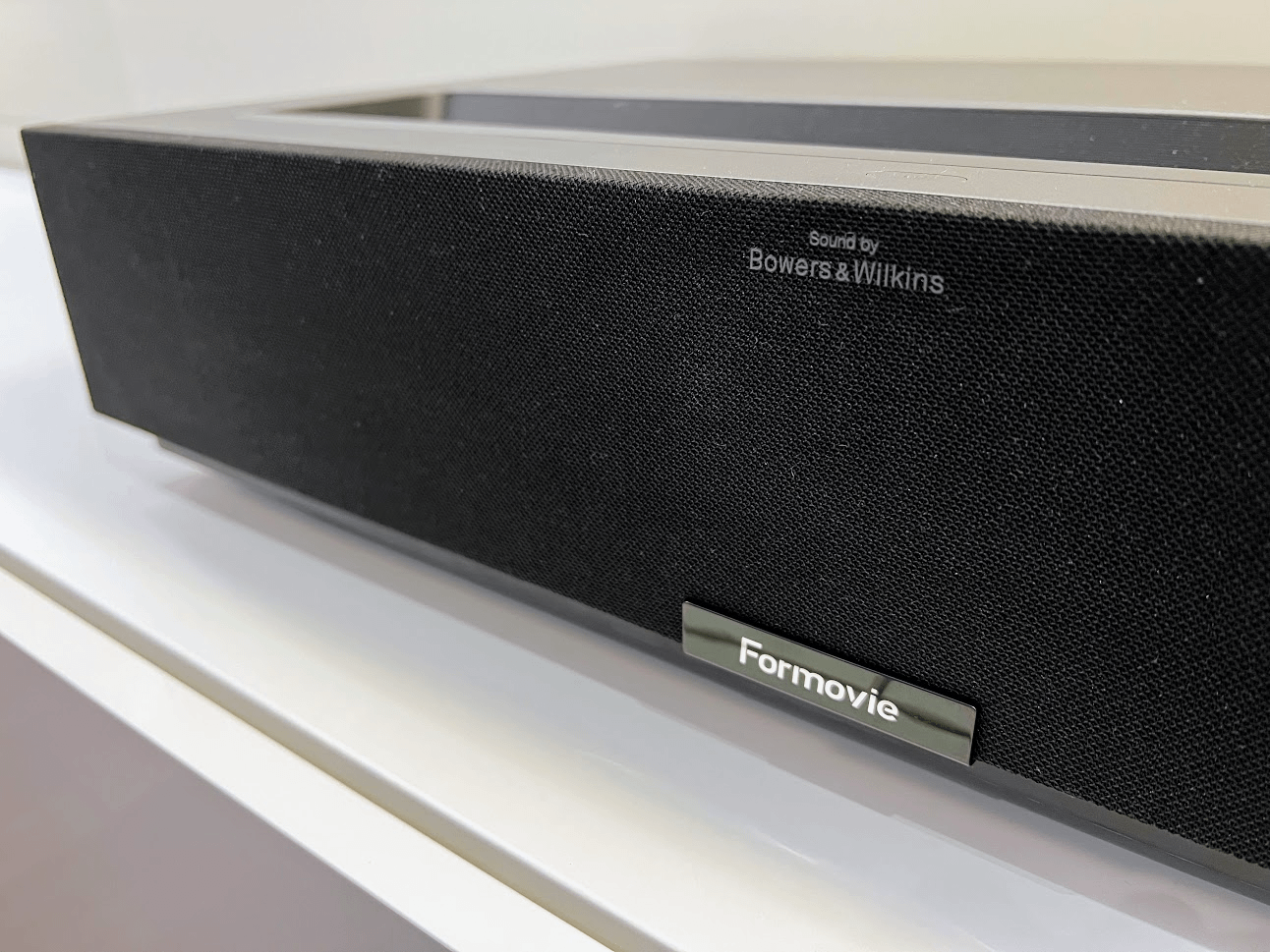
In the past year I have seen some of the hottest projectors from the biggest names including Sony, JVC, and Epson. I even had the privilege of experiencing the Christie Eclipse in a private home theater – an extremely high end projector that can actually project black. But there’s one more I had yet to experience near the top of the list: The Formovie Theater Ultra Short Throw (UST) 4K projector. This award winning projector has had my interest since it was initially released as the Fengmi T1 for the Asian market. Offering triple laser, Dolby Vision, 2,800 rated lumens, Bowers & Wilkins speakers, and way higher than average DLP contrast, and how could I not be interested? I finally got one to play with so let’s jump in.
Features
The Theater has a bit of an odd name. For the majority of this review we’ll refer to it as the Theater, as there are several other Theater projector models. Just look out for the capital “T” to minimize confusion.
The projector is a single chip Digital Light Processing (DLP) projector powered by an ALPD 4.0 based triple laser+phosphor light system, ALDP is a laser display technology designed by the Chinese brand Appotronics. The company has been a huge contributor to the blisteringly fast innovation in the UST (Ultra Short Throw) projector market.
One of the best parts about the ALPD system is that Appotronics has managed to deliver a rated 3000:1 native contrast ratio from the 0.47” DMD DLP chipset, which is much higher than other manufacturers. The RGB+ laser setup is claimed to deliver 107% of the Rec 2020 Ultra HD color spectrum, as well.
The Theater’s laser and optical system is what really got me excited, but it isn’t the only thing that makes it special. The Fengmi T1, and by extension the Theater, was the first projector to incorporate Dolby Vision dynamic metadata that TV owners have been enjoying for years. On top of that, Theater partnered with Bowers & Wilkins to incorporate a surprisingly good speaker system.
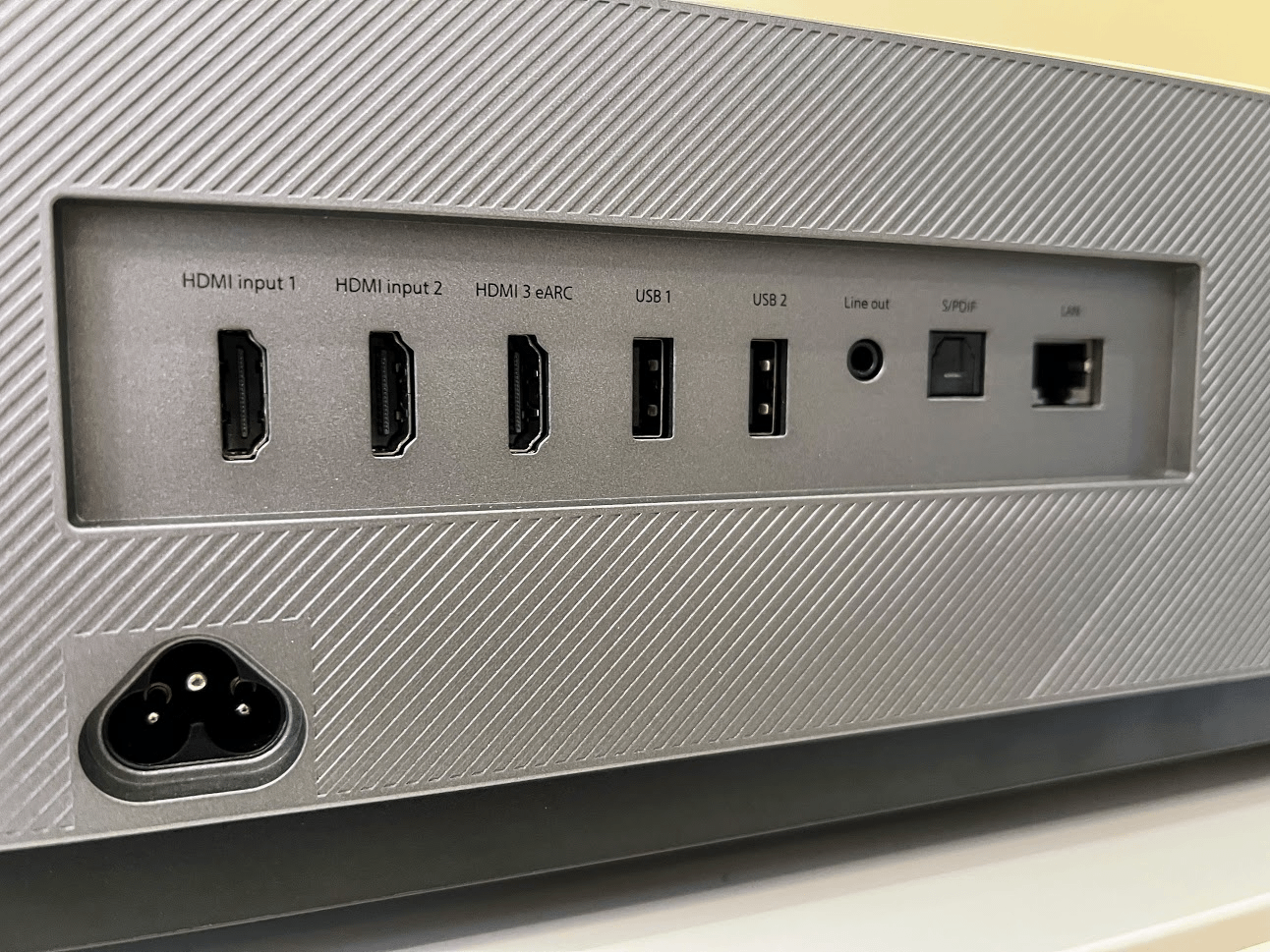
Connections include three HDMI 2.1 VRR-capable inputs with HDMI 3 supporting eARC. Two USB 3.0 ports for media playback, one S/PDIF optical out, an ethernet port, and a 3.5mm audio out.
The Build
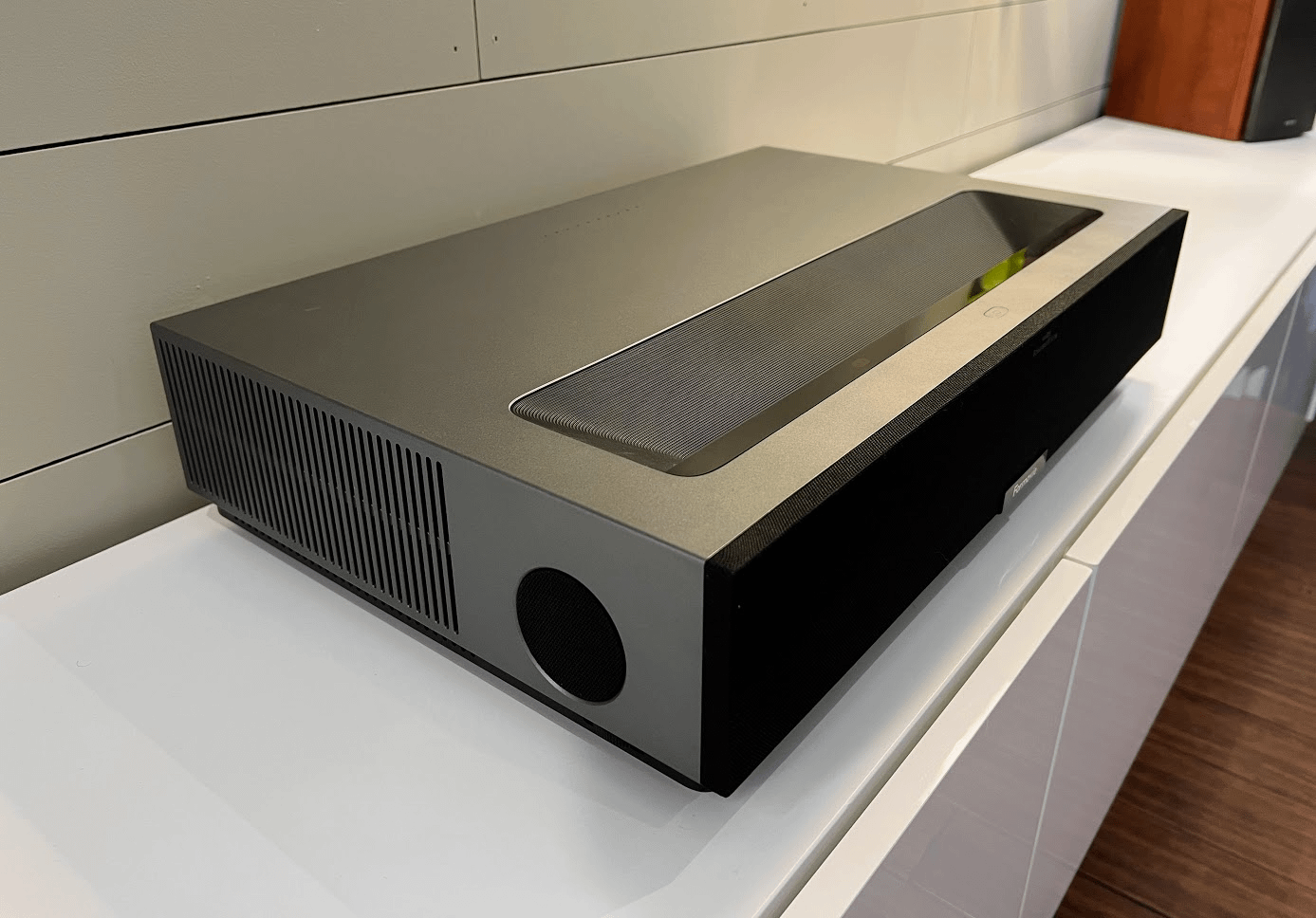
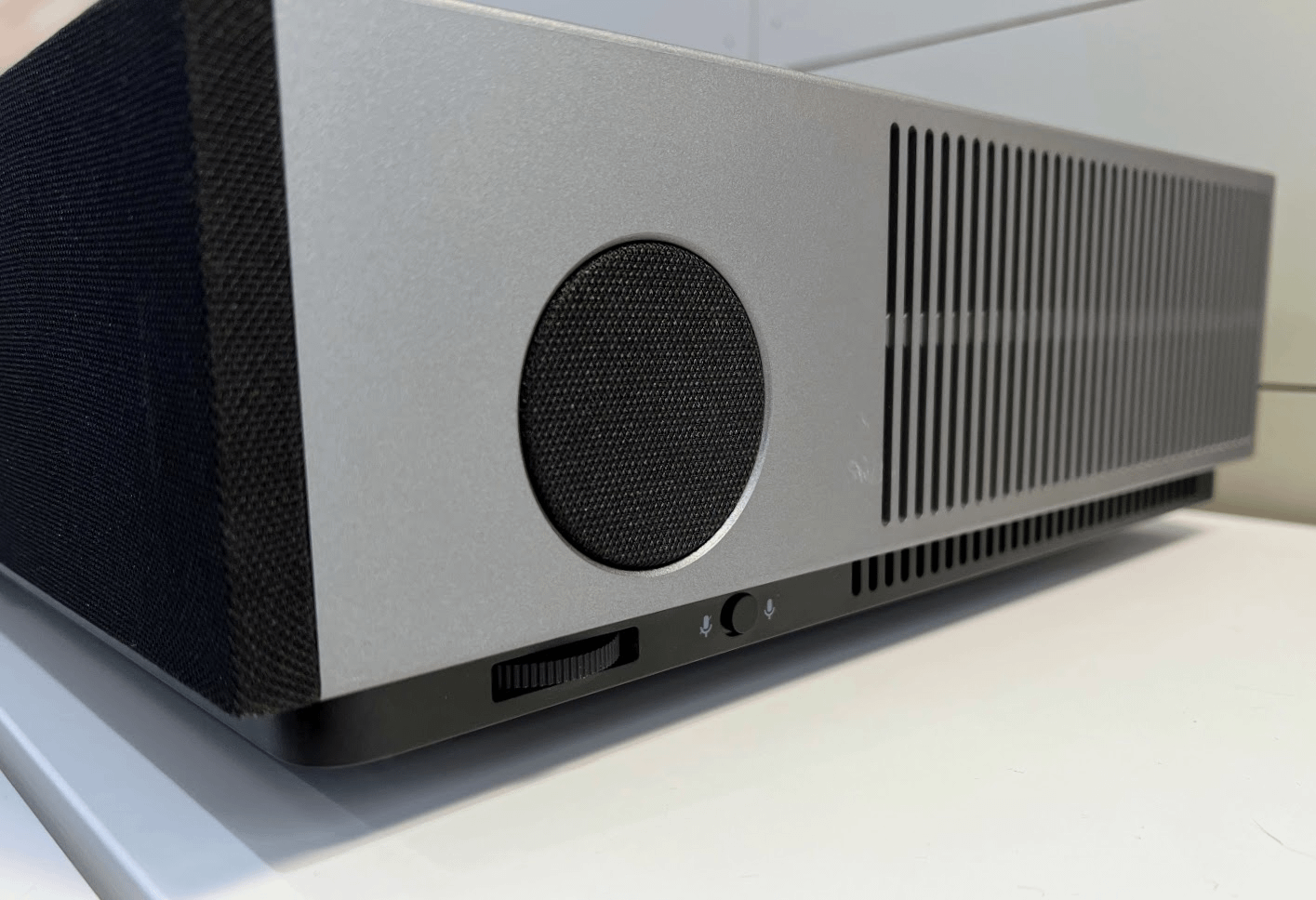
As soon as I took the Theater out of its packaging I appreciated the minimalist style and feel of its simple box with clean lines. I appreciate when a product sitting in front of my screen doesn’t try to compete with the stars it’s projecting. At 4.23” tall, 21.65” wide, and 13.74” deep it is a fairly compact UST projector, especially when compared to the Epson LS800.
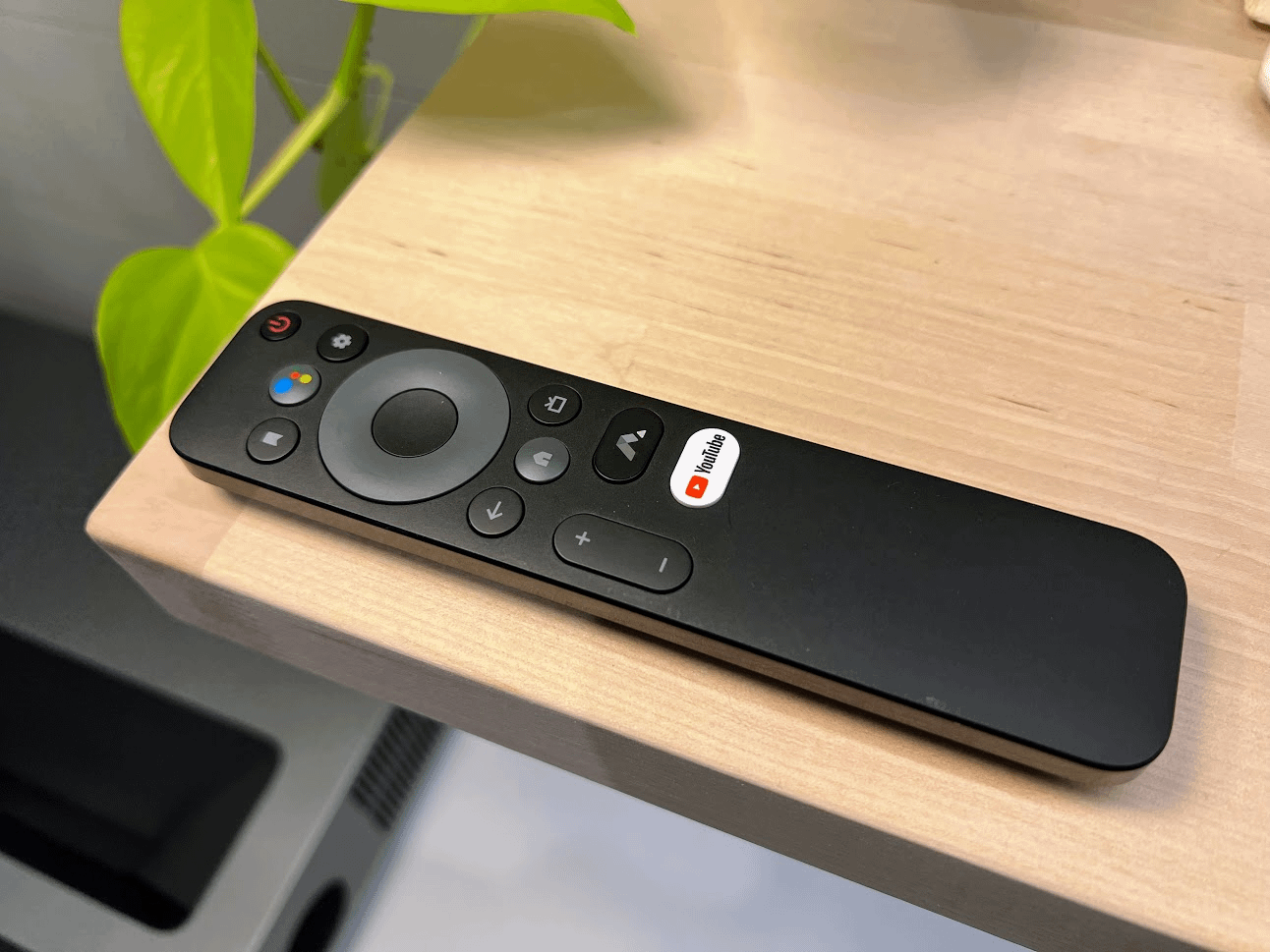
The remote is also svelte and well-balanced, with a good button layout. I do wish there were a few more app shortcuts to easily launch services on the built in Android TV 11 OS. A dedicated input button would also be nice, especially since the settings button acts a bit differently based on input. More on this later.
The Theater sits on three feet, but only two of them are adjustable. This unfortunately made aligning the image on screen harder than it needed to be.
Setup
The lack of adjustability on the projector’s rear foot made setup a bit more challenging but not impossible. Focus controls are done electronically with the remote, though you are forced to use Formovie’s focus pattern. This is a bit of a nitpick but using some other patterns can make it easier to gauge focus uniformity over the whole image.
As with most quality UST projectors, the Formoive Theater includes multiple options to keystone and distort the image to fit onto the screen. I always recommend avoiding these and instead taking the time to properly align the projector to the screen. Using keystone controls reduces effective brightness and resolution, while also casting unwanted light onto the surrounding area.
The throw distance of the Theater is pretty good but not great for an Ultra Short Throw at this price. For a 100” screen, you’ll need 21.4” from the front of the projector to the screen. This is still in the awkward region since most media consoles are under 20” deep.
Smart OS and Settings
Following many USTs before it, the Theater runs Android OS. It’s generally solid and covers most streaming services, albeit Netflix is missing. The issue I have with Android TV is that manufacturers can tailor it a bit too much and this can lead to some clunky or unexpected behaviors. This is what happened here with the Theater.
Overall, the amount of options that are included here are great, including a full Color Management System (CMS), 11-point grayscale controls, color temperature controls, blue light adjustments, frame interpolation, and more. But there are some quirks. The brightness settings aren’t within the picture controls, for instance, and pressing the settings button on the remote brings up a different menu when using a streaming app, versus HDMI.. Overall, the Android TV OS works really well and the interface is quite snappy.
Audio
I never expect much from a display’s speakers, but in this case the speakers area actually quite good. Now, don’t get me wrong, they won’t replace a good dedicated system or even a quality soundbar, but for a speaker setup built into a projector, I was impressed. The dialogue was clear and in my dedicated theater the surround effects tricked me into thinking the speakers were much further apart than they were. The 15W speakers can’t deliver the bass needed for a real home theater experience but they are really clear and loud.
Performance
As with every projector I review, I like to go through some eye candy videos on YouTube to get a lay of the land so to speak. I had just gotten done reviewing the Epson LS800 so I pulled up some of the same clips I used on that one. I was immediately impressed by the color, clarity, and contrast of the Theater Theater. My excitement in seeing this projector first hand was starting to feel well placed.
SDR Calibration
For SDR Calibration, I selected the User picture mode and used my X-Rite i1Display Pro colorimeter and i1 Pro 2 spectrophotometer and Calman Calibration Software by Portrait Displays.
The Theater’s full suite of calibration controls makes achieving a very balanced image quite easy, with a few caveats that we’ll get to later. I found that the Theater’s Warm color temperature preset is decently well balanced out of the box, measuring at 6300K, a bit warmer than the target of 6500K. A few tweaks to the Color Temperature gains and I achieved the target without much effort.
Calibrating the Theater’s gamma controls caused me some issue, one of the caveats I mentioned earlier. The Middle gamma option was the closest to the optimal 2.2 so I selected that and then used the 11-point grayscale to fine tune things. The greyscale steps were very precise and responded fairly predictably. I was able to achieve a very flat and accurate 2.2 gamma So what’s the problem? The 11-point grayscale controls are universal to all picture modes, including the HDR modes, which meant I had to optimize the grayscale settings for SDR and use some other settings to get good HDR results.
Another little quirk is that the Theater doesn’t correctly match its internal color space to the input. Essentially,the Color Space setting will need to be set to On for SDR to adjust to Rec 709, and Auto for the HDR color space. This really isn’t a big deal, though, because the Color Space setting is saved per picture mode.
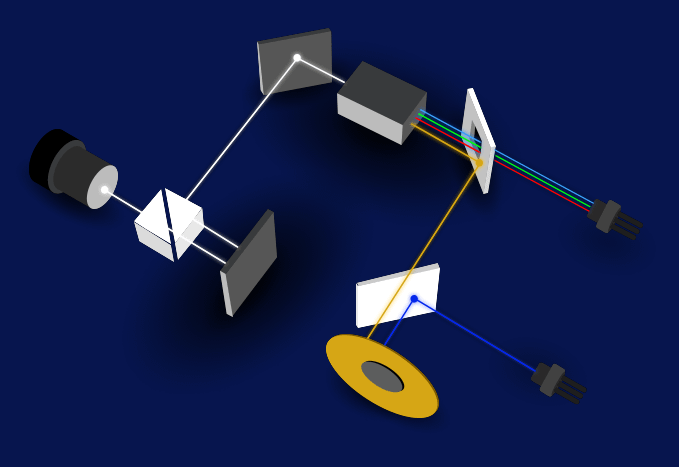
After looking into the Color Management System (CMS), I found the projector was only able to achieve 75% of the Rec 709 color spectrum for SDR content, which was surprising given its 107% Rec 2020 specification. This is likely due to the way the ALPD system increases the extra laser+phosphor brightness to achieve an overall higher luminance, as depicted below. As luminance increases, color saturation coming from the other laser diodes decreases. In the end, I had to optimize color calibration for lower luminance values for all color calibrations, SDR and HDR.”
One thing to note about the Theater’s picture modes is that they are input dependent. If you customize the User picture mode for Input 1 and want to use it for a streaming service, you can’t do that. You have to manually copy over all of the settings. This isn’t an issue for those that use a receiver or processor to handle all of the input switching but for someone that uses all three HDMI inputs plus the built in apps, this could be quite tedious.
SDR Viewing
While calibrating for SDR was a challenge, viewing was quite enjoyable. I flipped on one of my go-to movies for testing contrast and black levels, Gravity. The whole movie is mixed with bright objects against dark backgrounds, especially the early scene in which the astronauts are bombarded by debris. There is fast movement, bright surfaces from the space ship, and the deep dark depth of space as a backdrop, and the Formovie Theater handled it all very well.
I had turned frame interpolation to Low and really enjoyed the smooth movement during these scenes, with little to no noticeable artifacts. The depth displayed reminded me of my Epson 5050, something I haven’t seen a single chip DLP match in my room before. Later in the scene, astronaut Stone is flung into space where her bright white space suit is cast in front of blackness and stars, which can be very captivating. Here is where the Theater’s lack of dynamic contrast is apparent, the blacks of space were a bit too gray to pull it off successfully.
Switching to The Dark Knight on HD BluRay, the Theater handled the engaging opening scene quite well. Contrast was really good, skin tones of the bank employees were accurate, and the Theater did a really good job upscaling the resolution to 4K. I will more than likely repeat this again but I really do enjoy the fluidity and precision that DLP brings to the table. No matter what I threw at the Theater for SDR from my catalog I was impressed. The issues with color luminance during calibration didn’t really come through in watching.
Switching to Amazon Prime’s Thursday Night Football, the Theater did a really good job with depth, as expected. DLP has long excelled at motion due to their ultra fast ability to switch mirror (pixel) states which gives more detail with fast moving content. Even the bright colors looked good here, regardless of the calibration report. My only complaint for sports is that the Theater isn’t quite as bright as I would have liked and there isn’t a really bright picture mode like you’ll find on the LS800. Sometimes you just want a bright image to blast through ambient light during the day.
HDR Calibration
Calibrating for HDR wasn’t really any easier than SDR. Due to the 11-point grayscale settings applying to every picture mode, I was forced to use my SDR grayscale as a baseline. I decided to use the Bright gamma setting to brighten the image a bit and since it appears that the Theater uses some form of dynamic tone mapping, this worked fairly well and didn’t lead to much highlight clipping. I tested a bit of content and things looked good when playing with the Adaptive Luma Control and Local Contrast Control, so I moved onto color calibration.
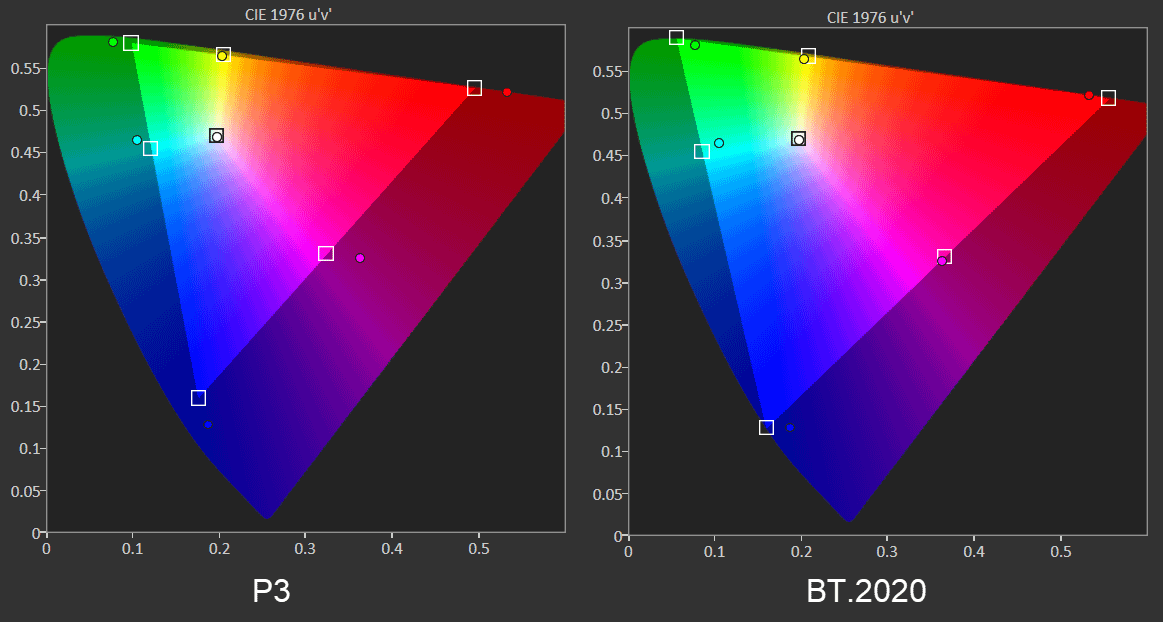
As we saw with calibrating for SDR, the Formovie Theater is limited on color luminance. Looking at your typical CIE diagram for gamut coverage this isn’t apparent. In fact, the gamut coverage in this view looks fantastic with over 99% of P3 coverage and 87% of Rec 2020. This falls short of the specifications but it is still impressive.
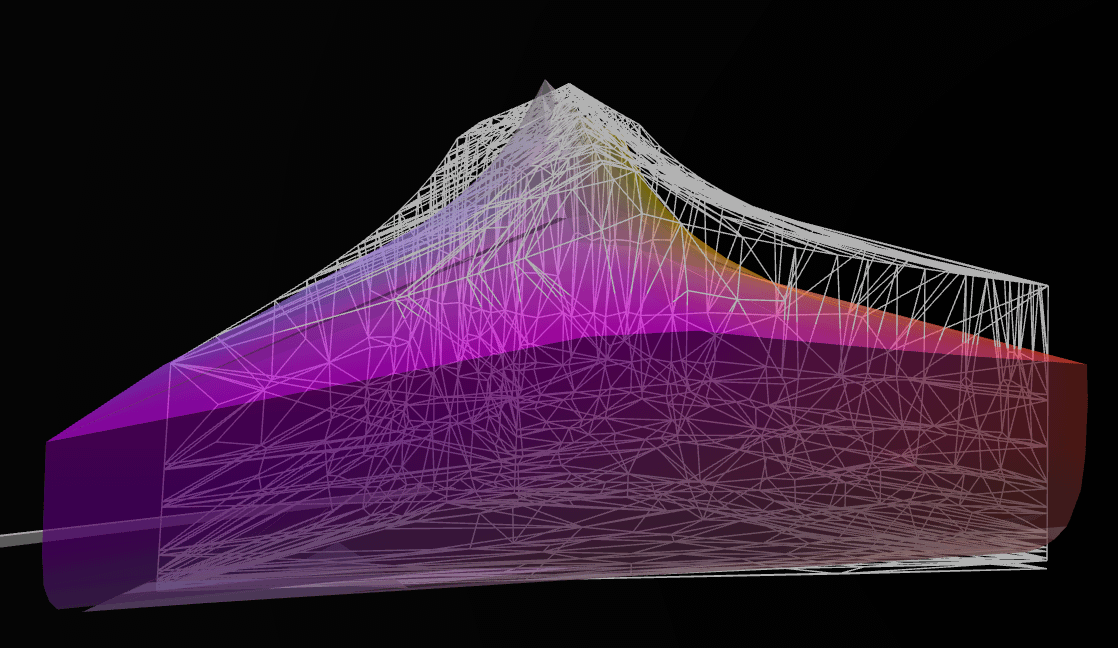
What this diagram doesn’t show is luminance, the important third dimension. Using DisplayCal we can actually get a 3-Dimensional rendering of the Theater’s native color space. In this view you can see where we’re lacking in luminance for P3. The colored area is where the Theater measures and the grey lines are the targets. You can see that the Theater is lacking in luminance throughout magenta, red, yellow, and on the opposite side of the pyramid, green. When factoring all this in, the projector really only covers about 69% of P3 (DisplayCal doesn’t report Rec 2020 coverage).
The Theater’s color tracking out of the box for HDR color is in dire need of some help. Digging into the Color Management System for calibration is a must in my opinion.
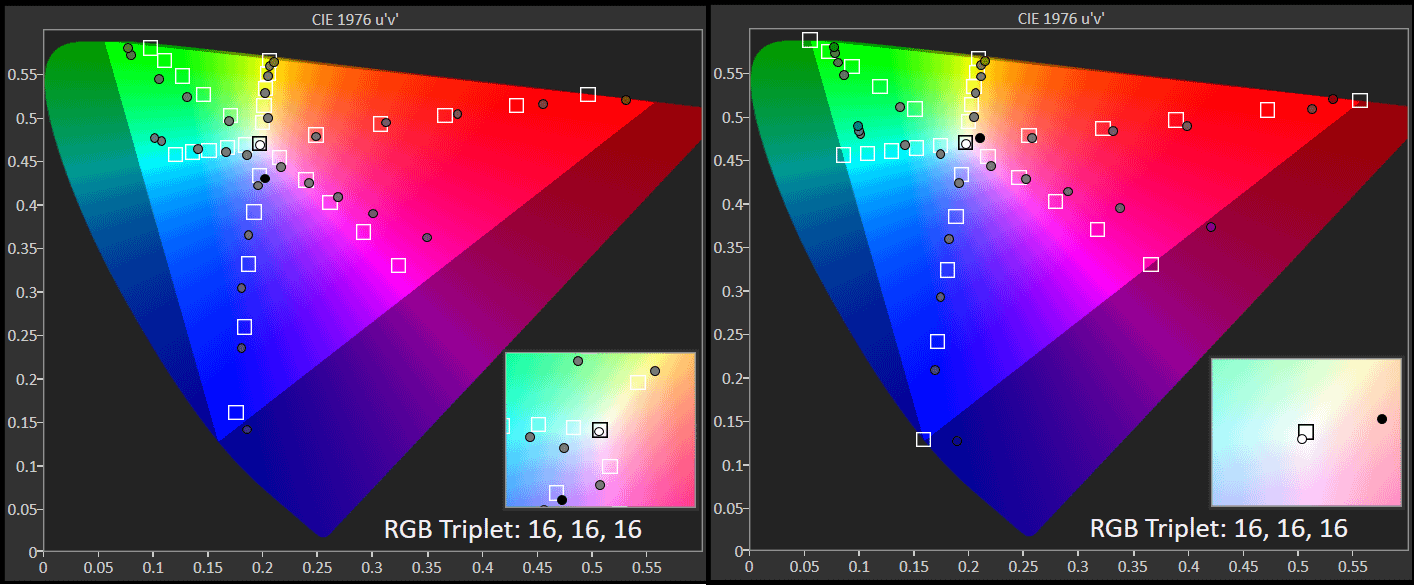
(Pre-calibration: P3 inside Rec 2020 on the left. Rec 2020 on the right)
After giving the CMS a good workout I was able to get things to be pretty linear. Delta E, or the measured difference between the display color and input color, was well into the double digits for higher luminance levels due to the technical aforementioned limitations. That said, real content looked good enough so I moved on to viewing.
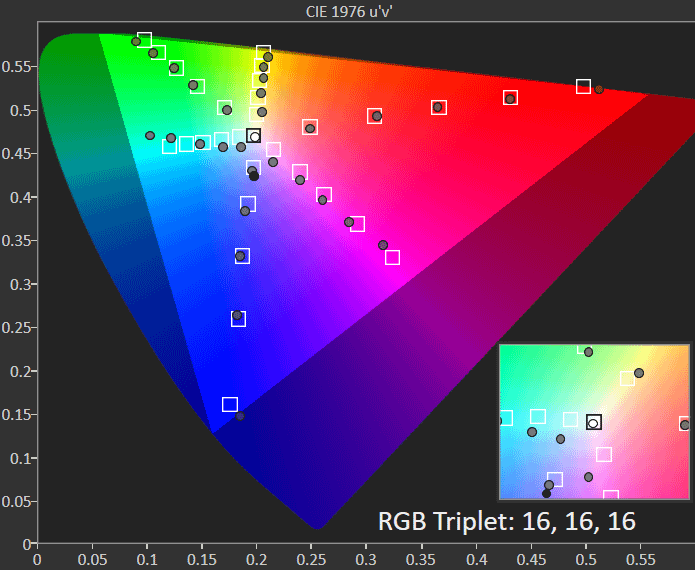
(Post-calibration: P3 inside Rec 2020)
HDR Viewing
To kick off my HDR viewing I went for a movie I have long used to test good P3 color, The Angry Birds. I was really interested to see how this projector handled the bright vibrant colors of this movie due to the issues I saw during calibration. The movie starts with Red attempting to deliver a cake for a hatchday party. Red was very red. The colors of this movie really did pop right from the get go. Red’s clown costume looked fantastic and the contrast between his bushy black eyebrows and red feathers looked great. It’s a fun movie and with colors like this I spent a little longer watching than I intended.
Moving over to some more challenging content I flipped on my favorite movie for testing dark scene contrast and tone mapping, 1917 by Sam Mendes. This time I didn’t jump straight to the dark stairwell scene but instead watched a bit as Lance Corporal Blake and Schofield started off on their journey to deliver their warning message.
Here I noticed the picture was lacking a bit in brightness compared to what I’m used to. I grabbed the remote and experimented with the Adaptive Luma and Local Contrast Controls. I found turning up Local Contrast Control gave a bit of a boost to the highlights and overall brightness that I was wanting when calibrating for HDR. I liked Adaptive Luma Control on some scenes but on others I found it flattened the image a bit. I decided to leave it off or set it to Low most of the time. Tweaking these settings allowed the Theater to deliver on expectations here, giving a nice bright and detailed image.
The stairwell scene when Schofield wakes up at night was a bit of a mixed bag. When sending the projector the HDR10 version, the built in tone mapping does a really good job showing shadow detail. This again was an area that dynamic contrast can really help with and since the Theater is missing this feature, it lacked a bit of depth due to the gray-like blacks.
I then threw in The Revenant. A well shot movie with crisp detail and good depth. The opening ambush scene is gritty with lots pannings shots over a pine forest. The Theater does a good job with showing the fine detail during these pans. Contrast is good and the visceral impact of the scene comes through clearly without artifacts. I had a hard time finding fault with the Theater on this movie.

Dolby Vision on the Theater did not live up to my expectations. The aforementioned stairwell scene from 1917 in Dolby Vision was rendered without shadow detail, smooshing everything into black. In Aquaman, highlight detail was routinely clipped and the overall presentation was flat, lacking in dynamic range. I routinely found myself preferring the built in tone mapping of the Formovie Theater over Dolby Vision.
Overall, the Formovie Theater did well with HDR content. It is sharp, clear, and packs really good contrast for a DLP projector. The colors on the majority of content appeared accurate, even though the calibration report isn’t stellar. Dolby Vision was a bit of a disappointment but it also isn’t really needed on this projector.
Epson 5050UB Comparison
I own the Epson 5050 and I know a lot of people have asked how these two compare.
In terms of contrast, the 5050 still won mainly due to its dynamic iris. As tested, the Epson’s native contrast is around 4500:1 and I measured the Formovie Theater at a bit over 3000:1. When I turned off the dynamic iris on the 5050, the two images were quite comparable. This is really impressive for a single chip DLP projector.
For color, the majority of the time the Theater was a step or two above the 5050. The deep colors of the theater are really captivating and managed to make the Epson just look straight wrong some of the time. Strawberries looked orange on the 5050 in comparison. The 5050 actually measures higher for coverage of P3 than the Theater when factoring in luminance, but measurements aren’t everything. There were times where the 5050’s better color brightness was visible, such as the fire roaring during the night scene of 1917 and the sky in The Angry Birds. If it weren’t for a comparison it may not be noticeable to some people. I’d easily give the nod to the Theater here. The deep color saturations are alluring and have changed how I view my Epson.
HDR handling, sharpness, and motion both with and without frame interpolation are better on the Formovie Theater. It is also a bit brighter. I personally still like the 5050 more due to its contrast advantage in my fully blacked out theater. But if your room is lighter in color, the contrast advantage may not be as noticeable and the other benefits of the Theater may catch your eye.
Conclusion
My time spent with the Formovie Theater was a bit up and down. Calibration was a bit of a battle, but viewing was a joy. I really enjoyed the expanded color compared to most projectors on the market, even though it was lacking in color brightness. I love the fluidity, motion, and sharpness that DLP brings to the table. Add to that the contrast this ALPD 4.0 equipped projector delivers and we’re left with a very high performing projector for the price.
This projector isn’t the brightest UST on the market making it harder to use as your main display during the day, but at night in a living or multimedia room it will be one of the best in its price range. It is missing dynamic contrast which could make it a true dedicated home theater projector in a dark room with dark decor. Dolby Vision was a bit of a let down and customized Android TV menus could use some work. Overall, the Formovie Theater is a solid projector worthy of its praise.
Pros
- Very good contrast for DLP
- Great HDR10 handling
- Excellent color saturation
- Impressive B&W sound system
- Motion detail was excellent
- Full suite of calibration controls
Cons
- Dolby Vision content lacked highlight and lowlight detail
- Fixed rear foot makes adjustment tough
- Android TV needs work
- No dynamic contrast
- Color brightness lags behind competition
- Inaccurate default picture modes
Measurements
Contrast
Fan Noise
These measurements are taken in my theater where the noise floor is 32dB.
Gamut Coverage
These measurements don’t include luminance.
P3 Gamut
Rec 2020 Gamut
The post Formovie Theater UST 4K Projector Review first appeared on HomeTheaterReview and is written by Andy Grimm



 My first experience with the Fluance brand was some years ago when I reviewed their then-top-of-the-line

