The video clip this article is about is a free HDR10+ system test from FF Pictures for you to check the functionality of HDR10+ dynamic metadata with your display. If you ever wondered if your HDR10+ devices work correctly, just download the MP4-File and play it with your system.
HDR10+: Does it work?
Surprisingly, we receive this question quite often, even for feature films where we’ve color-graded an HDR10-version and added HDR10+ dynamic metadata. The beauty of dynamic metadata is that a proper implementation acts in the background, and you overlook its work while viewing a movie. Also, if you have a TV with dynamic range capabilities close to what the mastering display could do, the effect might be relatively minor. That’s simply because aggressive tone mapping is not needed to keep image information.
That said, the image quality benefits of using entry-level HDR-TVs can be quite extraordinary. This potential quality benefit is why several manufacturers took the effort of standardizing dynamic metadata in SMPTE ST 2094.
We wanted to provide an easy method of testing the functionality of HDR10+ (ST 2094-40) for everyone by creating some extreme sets of metadata applied to the same looped video scene. The diagram below describes the production workflow and usage of the sequence.
Production workflow and description of the HDR10+ one minute quick system test.
Free MP4-file download
In order to download the HDR 10+ quick system test, simply click on the link below.
by Florian Friedrich, last updated: November 15th, 2019
TV-Makers and camera manufacturers make us believe 8K is the next big thing. While more and more devices are launching, controversial discussions about the visibility of the resolution are going hand in hand with discussions about what is real 8K. This article covers the most important aspects of 8K as well as delivering some insights about 8K metrics, 8K productions and what the human eye can see. I’ve also put together also a separate article withfrequently asked questions about 8Kbased on questions I received from attendees after my presentations. If you’re interested in getting some 8K materials for free download, please see my post about NASA 8K footage and sign up to myfree 8K newsletter, which will also provide you free access to downloading more 8K clips such as a nice Dinner Clip (see Youtube-preview) making a good example for how smooth and clean 8K can look as well as some Alexa 65 footage (6.5K, upscaled to 8K) with an 8K-Test Pattern at the end of the clip (see Youtube-preview). And if you’re doing HDR and/or 8K post-production or quality analysis, please take a look at ourHDRmaster 8Ksoftware orHDRmaster Toolset.
4K vs. 8K side-by-side comparisons during demos in 2019.
8K in the living room
Soon after home theater enthusiasts got used to bigger screen diagonals of UHD-TVs, we’re now quadrupling the resolution again with 8K. Does it mean we need even bigger TVs? And are our human eyes even capable of seeing the resolution differences?
Okay, slowly. First of all, say goodbye to the prejudice you need to sit closer to the screen or you need some kind of extraordinary eye-vision in order to see the benefits of 8K. I’m explaining the technical reasons later in this article. In my presentations this year, I have shown various content demos where people could see the differences between 4K and 8K from much further away than normal viewing distance. Many journalists and technology reviewers have noticed similar things in their articles about 8K TVs – 8K is all about smooth and silent images and losing the pixelated look. We’re now used to smartphones with “Retina” resolution for quite a while and there’s no reason why we should not enjoy the same kind of picture quality using our TVs.
33 Megapixels of 8K versus 8 Megapixels of 4K: a significant difference in pixel count.
Viewing distance and human visual acuity
One of the
most obvious questions connected to 8K resolution on a TV is:
How far away should I sit from the TV?
When the question is about a good movie experience, it can be answered quite quickly: Your TV should occupy the same field of view (FOV) that is occupied by a cinema screen in the center of the theater. According to theater standards such as SMPTE EG-18-1994 and THX, this means approximately 45 degrees of FOV. A FOV of about 60 degrees is considered the closest distance for a good experience. Translating that into a home environment with a 16:9 TV, it means the sweet-spot is in between 2x to 3x the picture height of your TV. So, you may roughly sit 2-3 meters (or 6.5 to 10 ft) away from a 75” TV.
The farthest distance to the screen should result in a FOV of no lesser than 30 degrees. You may use our online calculator for viewing distance and Field Of Viewto find your best seating position at home or for picking the best screen size.
The next
question is essential:
How much resolution can the human eye resolve?
Scientists and eye-doctors are pretty much on the same page regarding this question: A healthy human eye can resolve one arc minute. This means that we’re able to see two objects separated from each other when their distance is only 3 millimeters and we’re 10 meters away. One arc minute equals 1/60 degree. This, by the way, does not mean we can’t see smaller objects such as stars. And some people can see better and differentiate objects as close as half a minute of arc.
Unfortunately, using this value of one arc minute,
many people came to incorrect conclusions. They said that any pixel grid does
not need to be finer than one arc minute, which would lead us to 2.6K if we
look at the TV from 2.5 times the picture height away.
1 Arc minute is 1/60 of a degree.
It’s a common miscalculation to expect one pixel per arc minute, but it does not make it right, and I have multiple examples for you.
Example 1 of why 1 pixel per Arc Minute is not enough: The moon
If we want to find out how many pixels we need in order to recreate a realistic image without any pixelation effect, we need to define an object that all of us can see at the same size. An ideal example of such an object is the moon. The average size of the moon in our FOV is about half a degree or a little more than 30 Arc Minutes. Even a Supermoon is only 14% bigger, so its really a good example. Spending one pixel per arc minute for reproducing the moon, in this case, would mean we’d only have 30×30 pixels for reproducing this well-known object. In my examples, I’m adding a few more pixels and make it 32×32 pixels (just to avoid some unnecessary discussions about the size). And surely to anyone who is taking the time to think about this, it becomes obvious that this kind of pixel resolution is not enough. The lack of detail and the amount of jagged edges in the 32×32 pixel image of the moon is simply not acceptable.
So how many Pixels per Arc Minute do we need?
My answer
is: At least 4 pixels per Arc Minute are needed on a display to avoid any
pixelated effect.
Looking at the moon at 4 pixels per Arc Minute or 256×256 pixels, this claim made sense to (almost) all the people attending my presentations and demonstrations in 2019. That being said, this example is just another confirmation for my “4 Pixels per Arc Minute!” claim I constructed after doing some calculations. More of that will follow later after diving into quantization.
Example 2 of why 1 pixel per Arc Minute is not enough: Landolt-C
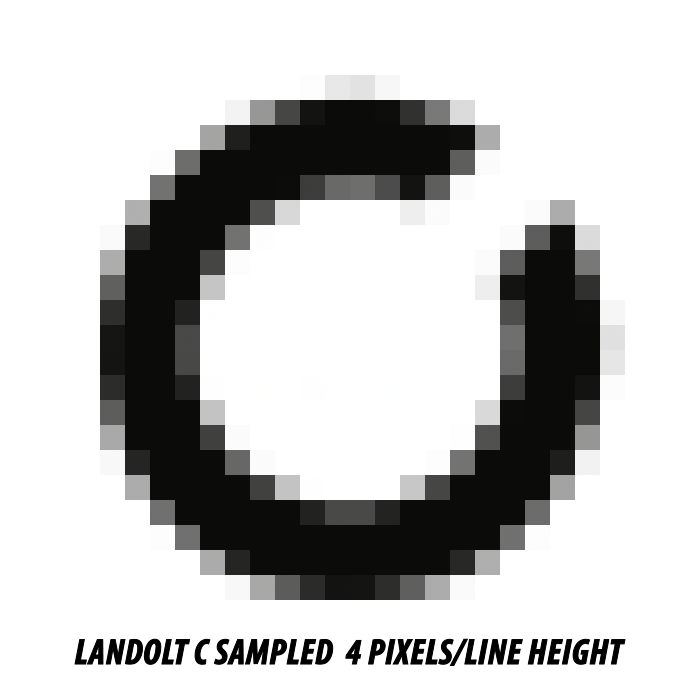
My next example is something eye-doctors and many who sat in eye-vision tests will appreciate: The Landolt-C. This symbol is a standard symbol for performing eye-vision-tests. Unlike the Snellen E, this symbol opens its gap not only horizontally and vertically, but also diagonally. It’s well defined so that we know the gap of the symbol at normal human visual acuity (visus 1.0 or 20/20 vision) equals one Arc Minute. Now, if it’s not already obvious to you that 1px per Arc Minute is not enough for what you can see, let’s look at this symbol and adjust the pixel resolution.
If we have only one pixel per arc minute, how does this symbol look like?
The answer is: Distorted, very distorted. When you have square pixels and try to show a diagonal structure of the same size as the pixels, it simply does not work. Any eye-vision test with this kind of pixelation would not work, it could not be accepted and we should not accept the display resolution of one pixel per Arc Minute when it comes to smooth images without pixel artifacts.
With 4 pixels per Arc Minute or 8K resolution, the result looks much better and can be suitable for eye-vision tests:
Sampling and quantization
The main reasons why viewers may see pixelated images together with jagged edges and flickering details can be explained easily by looking at mathematic and technical basics. Spatial artifacts are caused by the rectangular and evenly distributed structure of the pixels as well as the sampling (spatial quantization). You don’t need to have an engineer’s degree in electronics to know the underlying problem; all of us know the importance of proper signal sampling from digital audio. The sampling frequencies for digital audio are at least twice as high as our hearing ability (healthy ears can hear about 20Hz to 20kHz). No one today would accept 20kHz sampling frequency anymore, just because we’re not capable of hearing higher frequencies. Audio CD is sampled at 44.1 kHz, soundtracks of movies are usually 48 or even 96 kHz. Highend-Audio is often sampled at 192 kHz.
Transforming these numbers to video, we’d look at 4K to 16K resolution. What’s not expected in that equation yet is the geometric aspect of the rectangular pixels where diagonal structures or curved edges can leave huge gaps in between the pixels.
As a side note, projectors have some advantages in this aspect, because the rectangular Pixels are getting blurred and such gaps are closing much better than with a TV or Monitor where the red, green and blue subpixels sum up to a square picture element. As much as there is some side effect for the finest details, this results in smoother images with less visible artifacts from pixelation. As soon as an edge is in some movement (especially slight movements close to the horizontal or vertical axis), and without proper sampling, the resulting jaggies and flickering details are highly visible even from much larger distances than the normal viewing distance. I can spot this issue quite often in rolling text or advertisements during sports events. But even for movies on UHD Blu-ray, I have seen various examples.
The problem is technically well known and easy to avoid: According to Shannon-Nyquist, the sampling frequency for a signal should be at least twice as high as the highest frequency you want to cover. If you don’t sample properly, even slight phase changes (or position changes of objects in this case) will lead to massive aliasing effects. In addition to respecting Shannon-Nyquist, we also need to respect the image is two dimensional and we have this diagonal factor on top of it. I wanted to bring all factors together in one formula which I call FGRD, an acronym for Florian’s Geeky Resolution Demand. It may include better human visual acuity as well as higher Nyquist factors. But even moderately calculated, I’m coming to the conclusion of at least 7512 pixels are needed in the horizontal direction in order to make pixel structures disappear. Chroma subsampling is not even respected in this formula, so I think it’s fine to say we need at least 4 Pixels per Arc Minute or 8K in order to get rid of the visible pixel structures.
8K in Motion Pictures
Having worked with 4K+ and 8K contents since 2015, I’m a big fan of acquiring and processing digital 8K motion pictures. Of course, you have to live with the downside of much bigger demands in terms of memory and computational power, but the quality nerd in me is stronger for appreciating the visual benefits. Those benefits are similar to what 8K achieves on the display side: Significantly reduced spatial artifacts, leading to smoother images and significantly less flickering details or jagged edges. Most new motion picture cameras provide higher than 4K resolution and we can say for sure that many movies have been shot in 8K resolution now. While RED leads the way in 8K cameras currently, Sony has various cameras like theSony Venice with more than 4K resolution and even the resolution-conservative motion picture giant ARRI has theALEXA 65 with 6.5K resolution, suitable for 8K productions. In addition to that, we’re currently seeing a rapid increase of new, cheaper cameras that are also capable of capturing with more than 4K resolution. Good examples are the Blackmagic Pocket Cinema Camera 6Kand thePanasonic S1H. Of course, those cameras can’t be considered 8K cameras but with proper scaling, they can show clear advantages over 4K cameras to a point where a similar benefit can be achieved: the pixel structures disappear and some finer details become visible.
Current Post-Production and delivery are mostly restricted to 4K, but it’s only a question of time to see more and more 8K productions. Among the many benefits 8K can provide, you’ll see some freedom in digitally stabilizing or zooming into pictures without running into spatial artifacts. You’ll find a lot of additional details and thoughts in ourLP/mm vs. Camera Sensor pixels calculator. This calculator will also tell you how much resolution there was in the analog film compared to digital sensors.
If you’re a filmmaker and can’t record in 8K resolution but want to reduce Aliasing effects, Jagged edges or flickering details, you might want to use our FF Pictures Anti-Aliasing Plugin for Resolve, Premiere and After Effects. It’s the best Anti-Aliasing solution I’m aware of and our customers are very happy with it, having used it in several feature films already.
8K: The bottom line
The benefits of 8K can be very visible. In an ideal world, we’d see 8K contents delivered in 8K to an 8K TV. But the funny part is that even if you have only an 8K TV and deliver lower resolution content to it, you’ll see benefits at normal viewing distances. 8K is visible!
After my presentations about 8K in 2019 at various trade shows and events, I received questions from attendees. I’m sharing the most popular questions and answers about 8K here and might update this post from time to time.
Presentations about 8K, human visual acuity, and production aspects during various events in 2019.
What is your personal opinion regarding the 8K resolution of 7.680 x 4320 pixels (33 MP) compared to the 4K resolution of 3860×2160 pixels (8 MP)?
When it comes to comparing 4K against 8K, the biggest benefit I see is the disappearance of any kind of pixel structure. 33 Megapixels at normal viewing distances finally seem to be enough to avoid flickering details and jagged edges without compromising visible resolution. This matters for cameras and displays in the same way.
What do you think about people who claim that there’s no benefit in 8K if you don’t sit extremely close (like less than one picture height away) or if you don’t have sources with at least 8K resolution?
I actually understand where these prejudices come from, but they are not correct. I’m explaining these things in detail in my article 8K resolution: hype or benefit? You don’t need to have an engineers degree in electronics in order to understand that human visual acuity and signal sampling are two different things. We all know that from audio: In order to cover the audible spectrum from 20Hz to 20kHz, we’re using sampling frequencies that are at least twice as high as the highest frequency signal we want to cover. Audio-CD is sampled at 44.1 kHz, audio tracks in movies at least at 48 kHz and Highend-Audio uses up to 192 kHz in order to get rid of aliasing effects. No one would dare to say it’s enough to have 20kHz sampling frequency in audio. This is basic electrical communications engineering, where you can’t ignore the sampling theory. In addition to that, we’re talking about square-shaped pixel structures where geometrical aspects are adding to the challenges. So, we really need proper signal sampling and then it’s easy to see the benefits of 8K even at normal viewing distances. It’s a big benefit to see aliasing artifacts disappear. The resulting pictures are smoother and “more silent” as I like to call it.
At which screen diagonal do you think it makes sense to pick an 8K TV and why?
It always depends on the distance to the TV. But as a rule of thumb: If you’re sitting in up to 4 times distance relative to picture height, and if you have healthy eyes, you may clearly see the benefit of 8K.
Which screen diagonal would you consider ideal for a home theater in 8K and how important is upscaling?
The ideal screen diagonal for immersive home theater should be delivering a similar experience as a center seat in the cinema. Looking at the relevant standards such as SMPTE EG-18-1994 and THX, the cinema screen is covering about 45 degrees of our field of view (FOV), when we sit in the center of the theater. If you translate that to a 16:9 TV at home, you’ll find that 2.5 times the picture height is an ideal viewing distance. So if you sit about 2.33 to 3 meters (~7.5-10ft ) away from your TV, the ideal pick is a 75-85 inch TV.
Even if you don’t look at 8K contents, good upscaling can make the pixels of lower resolution content disappear and your 8K screen will deliver a smooth experience with less digital artifacts than you might be used to see.
When we had CRT-TVs, TV viewers used a distance of up to about 5 times the picture height, why is that not valid anymore?
Well, CRT-TVs could not be built as big as Flat-TVs because that would have been too heavy and costly and also they had a low resolution. That along with some flickering issues led to recommendations of sitting much further away. It has nothing to do with the limitations of perceived resolution. In fact, you needed a higher distance in order to avoid seeing the shadow mask.
Most TV-Programs are SD or HD, so how many pixels does the TV-viewer really need?
I understand that many people don’t see why they should get an 8K TV when we won’t see a lot of TV-programs in 8K really soon. In fact, we can be happy if linear TV over cable, terrestrial or satellite develops more and more towards Full HD and UHD / 4K. TV production has to happen fast and has to be compatible with existing devices as much as possible. But here is the point: If the TV-viewer at home has a premium display with 8K resolution and proper upscaling, it’s really beneficial for the viewing experience.
So if someone says there’s no reason for an 8K TV just because there’s not enough content, I really can’t follow this argumentation.
Which types of 8K content are most fascinating for you at this time?
I’m producing close-to-8K resolution since 2015 when I started to work with the Sony F65 camera and I was part of several newer 8K projects in postproduction. This is why I love this kind of high-quality 8K motion picture. Most of it plays directly from a USB-Stick on the TV (MP4-Format, HEVC). In addition to that, I’m a passionate photographer and even walk the extra mile to convert some of my RAW-pictures into 8K HDR slideshows. This results in a picture quality that blows away even very experienced picture quality enthusiasts and top-notch photographers. But you don’t need to put that much effort into it in order to see the benefits. For example: If you use your 10 Megapixel smartphone-camera and take a portrait-picture to play it with your 4K-TV, only less than 3 Megapixels remain (because of the black bars and 8MP resolution). On the 8K-TV you, in contrast, you’ll see the full resolution of the image.
There’s a discussion about “Real 8K”, so how important are individual picture quality factors such as Peak Luminance, Contrast, Gamut or Contrast Modulation?
Any display higher display resolution is not relevant if some of the main aspects of display quality are compromised. High Contrast, Wide Color Gamut and a Peak Luminance suitable for good HDR are essential elements for a good and modern display. Compromising these factors means that advantages in resolution become less relevant. On the other hand, the value for contrast modulation (CM) is not as important as many people might think. 8K is more about getting rid of jagged lines, flickering details and a lot of other artifacts than showing more and more detail. Of course, good 8K sources will show visible improvements on the detail side as well, but what I really appreciate is the smoothness and realistic look of the image. In order to achieve a realistic look, a wide color gamut combined with a good contrast ratio and the ability to reproduce fine details is necessary.
If someone makes you think the contrast in a 1-pixel-grille is what defines resolution, you should not believe it. I’m personally a member of the ICDM spatial subcommittee and as much as we can’t talk in detail about the upcoming next version of the standard, I can tell you there’s a difference between what such measurement tells you and what you can see with your eye. I’d like to state it like that: If you measure CM, you have to look at 2,3,4-pixel-grilles as well. In fact, a high-resolution display that has great values for 2 or 4-pixel grilles might look more pleasing to you while not losing relevant image information in almost all cases of up to 8K content. The key here is the addressability of the pixels and delivering good contrast at relevant spatial resolutions in all directions, including diagonal lines and curves.
When do you expect real 8K contents and do you believe in any UHD Blu-ray Format with 8K resolution?
I hope very fast. Of course, because my company FF Pictures is an experienced service provider when it comes to 8K and we’re always searching for new innovative projects. What I can see is that there is a demand in special areas like digital signage and infotainment. It’s incredible how much detail 8K can bring to the canvas. It seems very likely that 8K will find its way mainly using streaming and satellite rather than physical media. I currently don’t see any indications for an upcoming 8K UHD Blu-ray. What I hope to see is 8K content to be temporarily and securely downloaded, so we can overcome bandwidth limitations.
What kind of TV are you using in your private living room?
You may guess it… I’m currently using a 75” 8K-TV of the 2019 generation of Samsung. Of course, this has to do with the fact that I enjoy checking any 8K contents we created in a living room environment. During the last year, I used linear TV lesser and lesser. My kids are so-called “digital natives”, they have a hard time understanding linear TV or why you can’t touch any screen. It does not seem modern to plan your day around the TV schedule just to see something. I still like some aspects of the linear television concept like seeing old classic movies and documentaries you won’t find on Amazon, Netflix, Apple TV & Co. That’s why I hope more and more TV stations will find their way into streaming the valued content they have.
Die HDR warm-up Videos sind für folgende Aufgaben geeignet:
Einspielen des HDR-Fernehers oder HDR Projektors
Erkennen von Pixeldefekten
Erkennen von Einbrenneffekten
Erkennen von Ungleichmäßigkeiten der Helligkeit oder Farbe im gesamten Bildbereich (beispielsweise Clouding oder Mura Effekt)
Erkennen von Übertragungsfehlern (bei Kabeln, Repeatern, AV-Receivern und mehr)
Durchführung langfristiger Belastungstests
Folgende Testsequenzen sindim Download enthalten:
Sequenzen mit vollflächigem Rot, Grün, Blau, Schwarz, Grau und Weiß (DCI-P3 Farben)
Sequenzen mit vollflächigem Rot, Grün, Blau, Schwarz, Grau und Weiß (BT.2020 Farben)
Bewegtes Zonenplattentestbild (variable Phase)
Pixelrauschen (in verschiedene Richtungen bewegtes Bild mit zusälligem Rauschmuster und idealer Verteilung über den HDR-Helligkeitsbereich)
Technische Details:
Die Videos sind im HEVC-Format (H.265) mit 10Bit im BT.2020 Farbraum codiert, weisen die für HDR 10 erforderlichen Metadaten auf und werden nach dem Kauf im MP4-Format zum Download zur Verfügung gestellt. Die MP4-Dateien eignen sich je nach Kompatibilität zur Wiedergabe mit modernen HDR-Fernsehern oder mit Ultra-HD Blu-ray Playern.
Die Gesamtspielzeit der Videos beträgt 40 Minuten (10 Minuten pro Video). Wir empfehlen eine automatische Wiederholung der Videos per “Repeat”-Funktion des entsprechenden Mediaplayers im Fernseher oder Ultra-HD Blu-ray Player.
The Alpa Platon project is dedicated to adding everything a filmmaker can dream of to a Hasselblad H6D-100c camera. But let’s start from the beginning… Have you heard about large sensor digital filmmaking yet? The usual sensor size in digital filmmaking is Super 35 (S35 ~25mmx13mm, depending on the camera and aspect ratio) and some cameras like Sony Venice (36mm x 24mm) started to use full frame or bigger sensors recently. A larger sensor in general means that you can capture more pixels of the same size or increase the size of pixels on the sensor. While both approaches have their specific advantages (resolution or noise level), the downside is that you need bigger lenses to fulfill the needs of a larger sensor. So, of course, the cost for appropriate lenses considering all the high-quality glass and optics can be tremendous and must be well considered.
This is what a rigged ALPA Platon system may look like. As with all professional camera systems for motion picture, there are a lot of options on how to attach additional elements such as preview monitors, focus gear, alternate power sources and more.
Where I come from
My special field is picture quality, where I’m always most concerned about dynamic range, color management and resolution. The camera of my choice which I’m using personally for some years now is the unparalleled Sony F65. Technically, this camera has everything I always wanted: massive resolution (8K x 2K), huge dynamic range, ideal color management (it’s THE ACES camera), 16Bit RAW recording, perfect reliability and great lenses available (PL-Mount). All that being said, the camera has one major disadvantage: It’s heavy and bulky like no one’s business. Also, the memory cards are hugely expensive (a 512GB SRmemory card can easily cost a couple of thousand Euros). So, having such a bulky camera, I face situations where I can not carry it with me. You can’t pack a F65 and make sure you have everything when you need to leave in 5 minutes. You can’t carry it long ways when you want to do a mountain hike or a bike tour. I played with a lot of alternatives that I owned already: A Sony FS7, a Panasonic GH5 with external recording on the Atomos Shogun Inferno, Sony Still Cameras like the Alpha 7R III and so on. But quite honestly, nothing gave me the combination of quality, flexibility and creativity I wanted to have as an alternative to the F65. A camera system that can’t do extraordinary HDR or has a lack of resolution or where I have to deal with compression artifacts is something I need to avoid. My company can’t be developing high quality post-production tools for HDR and then compromise image acquisition when it comes to producing test- and demo materials. Hearing about the Platon project, I got fascinated. VERY fascinated.
Some HDR-graded footage from the Alpa Platon / Hasselblad H6D 100c system running on a Consumer HDR-TV.
The large format WOW-factor
Those of you who are real fans of high-quality photography should be very familiar with the benefits of the large format sensors (considering large format starts above 35mm). Some of the most pristine and exquisite digital cameras ever came from Leica, Phase One, Pentax, Mamiya Leaf and – of course – Hasselblad. I’m personally a fan of Hasselblad since the late 90s when I got a Hasselblad 501cm to play with. Even digitizing the old analog exposures a couple of years ago resulted in some stunning memories with a creative quality I still appreciate compared to most of the cameras I used to work with. And I will say that I got a lot of cameras to play with in my two years of being editor-in-chief for a German photography magazine “Foto Digital” before it was sold to another publisher. One of the latest cameras Hasselblad has to offer is the H6D-100c with a sensor size of 53.4 mm x 40mm where the width is very similar to the Alexa 65, a digital motion picture camera from ARRI that has recently made some noise for the fact it offers the long desired large format in a digital age. The large format offers numerous unparalleled benefits like a bokeh to melt away, less distorted wide-angle shots, a more analog feeling when looking at the imagery (closer to the perception of the human eye) and a completely different choice of high-end lenses. My main point of why I love good large format photos or motion pictures (like some IMAX productions) is that I look at the imagery and don’t know why it is so much more captive then most of the images I usually see. This benefit becomes more and more obvious as the size of the picture increases. It’s a clear advantage in the Cinema, but considering that large format TVs like 75 inch LCDs are available for relatively low prices compared to a couple of years ago, we can bet it attracts viewers at home as well.
Scenic images like this one here from a ferris wheel in the municholympic parc work very well on large format.
Hasselblad’s unexpected move
Whatever triggered Hasselblad to implement some motion picture RAW-recording – I’m really happy they did it since it is a wonderful idea! Never before I have seen such a compact powerhouse of image quality! I mean come on, 100 Megapixels, large format, RAW photos and RAW videos in the palm of your hand – it still completely blows me away! Sure, it at least sets you back at least 40.000 bucks which are a serious investment even in the motion picture business. And yes, the RAW video seems to use pixel skipping (not full sensor readout plus scaling) and it is restricted to 4K with 24 or 25 frames per second. But given the fact that the results are on a different level of creativity, many productions can benefit from it.
Isn’t it fantastic? A camera like the Alpa Platon is compact enough to carry around everywhere and take pictures of playing kids for example.
Alpa Platon Camera System
Only combined together with the Alpa Platon accessories and solutions, this camera becomes useable for the professional motion picture productions. It’s not only the PL mount that makes it a motion picture camera… To me, the stable, flexible and easy to use housing together with the stabilized power supply and active cooling are the core elements of the Platon system. I’m not sure if there’d even be some recognition of the Hasselblad camera’s motion picture abilities without ALPA making it usable for professionals. Trying the standard battery and no cooling system led to dropouts and short recording times for me. In the Platon world in contrast, everything worked like a charm.
Here you can see the cooling system of the ALPA Platon – a relatively big fan, moving slowly for low acoustic noise while improving reliability and internal signal noise (affecting image quality).The camera system around the Hasselblad body is built for a maximum of usability and protects the otherwise sensible connection sockets.
Some quality analysis
In order to see what the camera system is capable of doing, I used some of the RAW footage I shot for that purpose and started HDR colorgrading as well as image analysis utilizing the tools in our HDRmaster Toolset. HDRmaster 8K is capable of opening the DNG sequences directly.
Resolution Test Chart (filmed in video and exported as a still frame) . Click to enlarge.Even the finest details in the resolution test chart are represented very well due to the capabilities of the lens and camera.
In general, I found that there are situations where the dynamic range results to be more compromised than I expected and where there was more noise in the dark areas than I expected. The footage appeared to be very useful for HDR, without any tendencies to introduce cause banding or deficits in resolution. In fact, the camera recorded the highest possible frequencies up to Nyquist of 4K or single pixel transitions with full contrast if you want to put it that way. In general I would say once you know what the camera can do in terms of dynamic range, color and resolution, a very attractive creative process can start. At this point I would not say the camera is perfectly suited for reproducing all levels of light or resolution without side effects, but I still really liked the results. It’s a camera with character!
Even better in future
We could keep our faces to the sun and ignore some shadows but I don’t want to leave unmentioned that I have discovered some aspects of the system where I hope they’ll get better over time. So first of all, the RAW format requires Hasselblads “Phocus” software to convert the video files recorded on the CFAST cards into something you can actually use in post-production and editing. Actually, I don’t get why Hasselblad did not share some SDK or detailed specs for the RAW format since it has the potential to not only increase speed significantly but also it might increase quality (referring to color management and dynamic range). Among the options the Phocus software has to offer for converting the video files into something you can actually use is different flavors of ProRes and DNG. My short advice here: The ProRes implementation might sound good in theory, but it is wasting a lot of image quality – at least with the current implementation the software is using. The only way to go for now as of Phocus 3.4.1 in early 2019 is to render Cinema DNG file sequences. The conversion process in the phocus software does not utilize the potential of GPU optimization, so it is too slow on powerful machines. I’m optimistic Hasselblad is able to further improve the workflow and resulting image quality as some improvements seem to be software related only. I hope the developers are listening to comments like mine here to make a great camera even greater.
by Florian Friedrich, last update: April 29th, 2019
8K-playback of the color graded HDR video on the Samsung Q900 (75 inch model). The bias light behind the TV is a Medialight 6500K (D65 neutral white) – a bias light I highly recommend!
When I saw that NASA shared some 8K footage ready to download on its website, I immediately thought I want to see this on a 8K TV! Seeing the ISS and earth in that kind of resolution seemed fascinating to me.
Mission1: Download the file from NASA
I do have access to a 75″ Q900 TV from Samsung which has the desired 8K resolution, so I downloaded the MP4-Video which was encoded to 709 SDR, MPEG level MAIN 6.2 with about 140 MBit/s. So there’s no HDR or Wide Color Gamut for 8K space material, really? I had put the file onto a USB Stick and plugged it into the TV which rejected to play it.
Oh wow, the first 8K Video from NASA and the first 8K TV on the market don’t know each other? I immediately wanted to act as a dating agency here, the content and the TV should be a match
Mission 2: Dress it up for the date
Re-encoding it for being playable with the TV would have been one option, but I thought when I have to do that anyway, why not take it to the next level? My company FF Pictures does software products for HDR mastering which includes standalone software and plug-ins for popular color grading software. Being able to produce HDR videos for consumer TVs, I decided to not only do the compatible encode but also give it the enhancement I’d like to see. The result of using a compressed MP4-file in SDR is obviously not the same as working with the original RAW footage and making proper HDR out of it, but at least the footage was “flat” enough so that areas of high brightness and dark shadows were not clipped. What I saw made me sure I could give it the kind of contrast, color, and perceived resolution I expected to see. I do have to say the result is not without blemish because I had restricted the amount of time I spent with the enhancement. So for example, there are dead pixels in the material. I think it has to do with either the radiation or pressure changes that were harming the camera sensor of the RED Helium 8K. The dead pixels could be cleaned up in post-production and of course, the enhanced dynamic range is making these pixels more visible. Then there are some frames with color flaws from the original mp4 which enhanced in the HDR version and I did not fix, but nevertheless, Update: I fixed the dead pixels, see Mission 3. I really enjoy the end result: Seeing the 8K footage playing on the Samsung 75″ Q900.
Some scenes like this one combine impressive dynamic range and details.In this close-up, you can see that there’s plenty of details while diagonal lines of the 8K version are perfectly smooth – without any jagged edges or flickering in movements. You may also notice the dead pixels (white dots).
Mission 3: Reincarnation of the dead pixels
After receiving a lot of questions about defective pixels from people who downloaded the clips, I took the time to reincarnate the dead pixels in the footage. I think I caught more than 99% of them (hundreds!) and fixed them by interpolating their value from surrounding pixels.
Amount of dead pixels to be fixed in the color grading process.Animated comparison: Before and after fixing the dead pixels. Look at the bright little spots in her hair.
Mission 4: Make it available
Being aware of 8K TVs are not widely in use yet, I made multiple versions of the material. One -the master- is produced in the original 8K resolution and one is downscaled to 4K HDR. For both resolution alternatives, and in order to avoid further scaling by the TV, I decided to crop out the 16:9 portion of it and make the video fill the screen. So no matter if you own the Samsung Q900 8K TV or if you want to see a 4K HDR version of it, I do have a file for you.
4K with HDR10 plus dynamic meta data, mapped to 600nits
4K with P3 SDR (in the BT.2020 container)
4K with HLG
The download of the HDR-enhanced video comes in 5 different versions, allowing direct playback on 4K and 8K televisions.
These additional versions should allow some tests and comparisons for how well a specific type of signal is displayed by your TV. Most likely you will see differences in between the HLG and PQ versions (mainly because of how each signal is handled by the display) and of course SDR will look less bright, less rich of contrasts, less detailed in shadows and highlights. If your TV only has a restricted light output capability but supports HDR10+, then this version with dynamic metadata should look better than the one without.
In order to download the files for free, I only ask you to sign up to my newsletter. I will use this newsletter only for notifying you about updates for the contents and more test and demo materials or software from FF Pictures. If enough people are interested, I also intend to do a version with the dead pixels fixed. Also, if I can get ahold of the original RAW files and if there’s enough interest, I intend to do a “native” HDR version, not derived from the SDR download I used for color grading.