Tag Archives: Projector Reviews

Optoma UHD35STx Short Throw Projector Review – 4K at a Cost


The Optoma UHD35stx 4K projector is shown from the right on a table.

The Optoma UHD35STx involves us filling a singular area of interest within the projector market. With a throw ratio of 0.5:1, this projector can throw a 100-inch picture from solely 44-inches away. This makes it the shortest-throwing 4K projector available on the market with a conventional projector design. Ultra Short Throw (UST) projectors could be positioned nearer, however these are very completely different projector designs with top-firing lens programs that usually include increased worth tags to match.

With a rated 3600 lumens and low enter lag, the Optoma UHD25STx has some nice options, however its comparatively poor shade and tough HDR efficiency could not make it your best option in your cash. Let’s dive in to get the total image.

High Points

  • Good distinction for the value vary
  • Low enter lag
  • Big display screen from shut up

Low Points

  • Very poor shade efficiency 
  • HDR dealing with is tough
  • Usable modes are a lot dimmer than specs
  • Dynamic distinction creates artifacts

Design and options

The UHD35STx is obtainable with a single white shade choice in a reasonably compact case. It’s nothing particular to have a look at but in addition isn’t offensive in any manner. The lens in entrance resembles a big fisheye and offers the design some distinction. 

There’s a single focus dial on prime–no zoom or lens shift right here–and some inputs on the again. On the entrance left of the unit is an exhaust vent for the followers. This opening could possibly be higher designed as there may be lots of gentle that makes it by to your room. It’s not one thing you’ll be able to simply block both because you want enough area for airflow. 

Spec-wise this Optoma contains a rated 3600 lumens and rec709 shade gamut. It contains a 4-way pixel shifting 0.47-inch DLP DMD (Digital Mirror Device) with XPR (Xpanded Pixel Resolution) from Texas Instruments for 4K decision, alongside low enter lag, and 1080p help at 240Hz. There are two HDMI 2.0 ports on the again, a USB port to energy a streaming stick, RS-232 for gadget management, 3.5mm and S/PDIF for audio out, and a 12v output. There’s additionally an included speaker that I’d contemplate extra of an emergency speaker than one thing to be commonly used for leisure. 

Setup and connection 
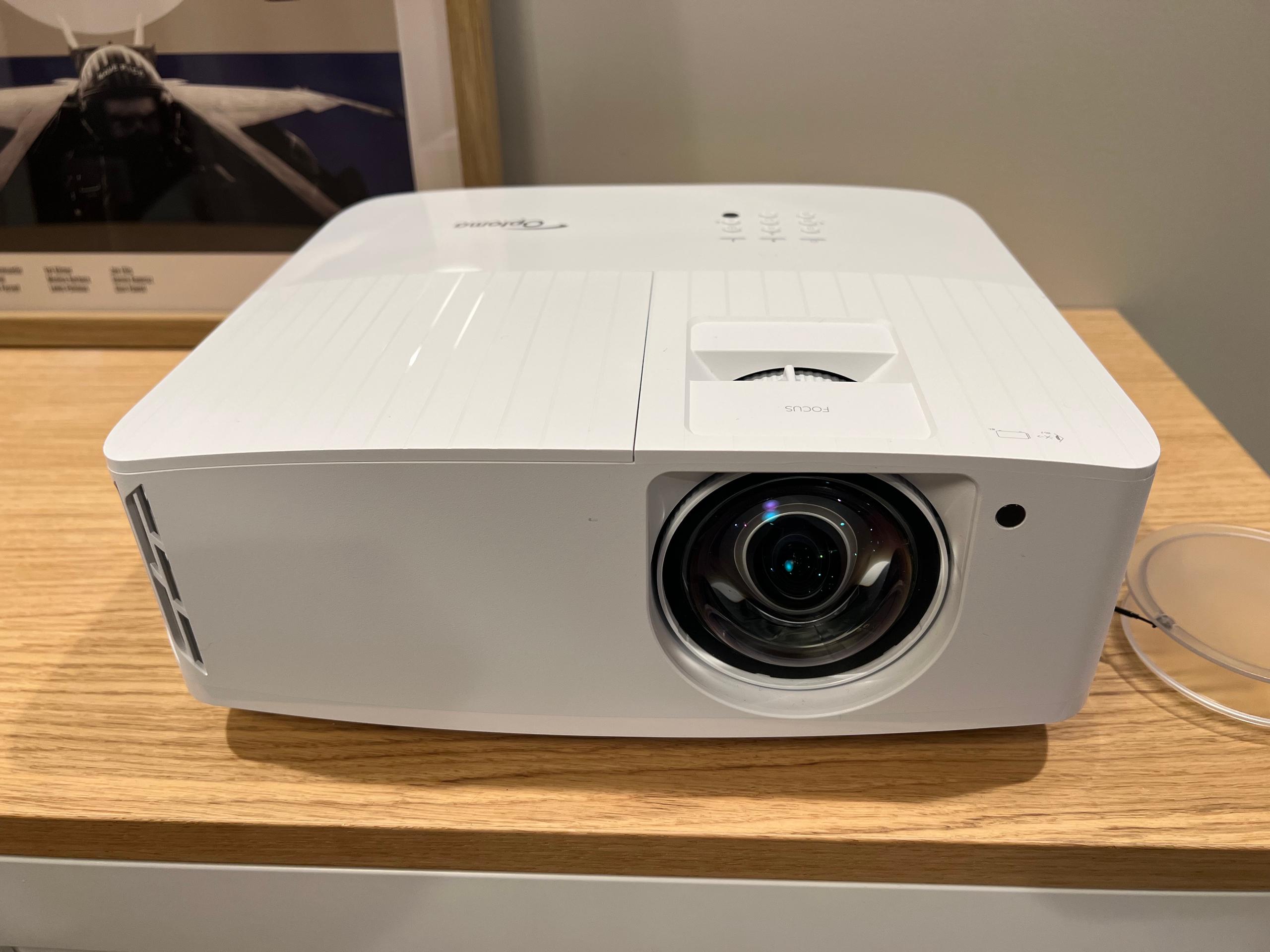
Optoma's UHD35STx short-throw 4K projector is affordable, but performance is lacking. 4aab153b optoma uhd35stx front center

Setting up the UHD35STx was very like establishing an Ultra Short Throw projector. I positioned it on a makeshift desk and used the helpful built-in check patterns to align and focus the picture on my 123-inch display screen. 

There are three adjustable toes on the projector, one in entrance and two in again. Since there’s no zoom or lens shift it’s a must to bodily place the projector good on every axis to get a uniform picture. Optoma features a suite of Geometric Correction options to assist digitally align the picture to the display screen if you happen to can’t get it good with placement. It is greatest to keep away from these options if you happen to can as they scale back decision, can create artifacts, and waste brightness. They are additionally disabled when enabling the Enhanced Gaming mode which provides you the perfect enter lag efficiency for gaming.  

Smart OS and Settings

Optoma's UHD35STx short-throw 4K projector is affordable, but performance is lacking. e7c25b24 optoma uhd35stx left vent and remote

Numerous projectors embrace their very own sensible OS or dongle with a sensible OS today, however Optoma bucks that development by conserving it old fashioned which I recognize. I’d slightly have the fee go towards the projector and never towards a streaming setup that hardly ever competes with devoted gadgets from Roku, Google, Amazon, or Apple. 

The Optoma UHD35STx’s OS is much like lots of different projectors however I had some points with operation. Adjusting the settings makes the entire display screen freeze–press and maintain a button to extend a setting and nothing will change till you launch it, making it tougher to slim in on the optimum place. I additionally assume sure settings, just like the HDR Strength slider, are buried too many ranges deep. 

Optoma features a slightly fundamental light-weight distant with mushy, backlit buttons that’s clearly used with different projectors from the model. There are buttons for inputs that this projector doesn’t characteristic and you’ll really feel open areas beneath the silver sticker for extra buttons the place there presently aren’t any. I did just like the three user-assignable buttons which got here in helpful throughout calibration. 

Calibration

(Note: For those that aren’t into the nuts and bolts of calibration, be at liberty to skip forward to the Performance part.) 

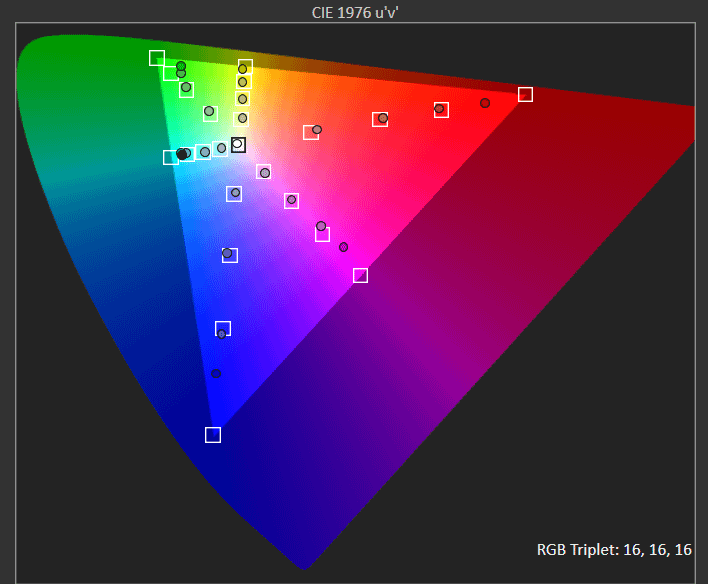
Calibrating the UHD35STx wasn’t a troublesome endeavor however it was irritating. Using my Calibrate ColorChecker Pro, X-Rite i1Pro 2, and Calman Ultimate by Portrait Displays I put the Optoma by a battery of assessments. Color efficiency was so poor that it made me marvel if one thing was defective–it wasn’t, we even checked with Optoma. For SDR, the Rec.709 shade gamut isn’t absolutely lined in any image mode. I calculated solely 82% protection of Rec.709. I wasn’t anticipating a lot for a bulb-based single-chip DLP projector, however not coming near overlaying Rec.709 is shocking. Compare this to the BenQ TK700STi, which can be a short-throw gaming-focused projector, that is available in round 96% of Rec.709. 

SDR calibration was fairly simple. The included image modes are tailor-made for a lot of use instances, all of which want some tuning to be correct. The Reference mode can be the perfect for important viewing however its default corrections have been extra extreme than wanted and it sacrificed brightness. There’s a Bright mode which is the place this projector’s lumen score comes from however it’s something however usable–it’s received a inexperienced shade shift and appears very undersaturated. 
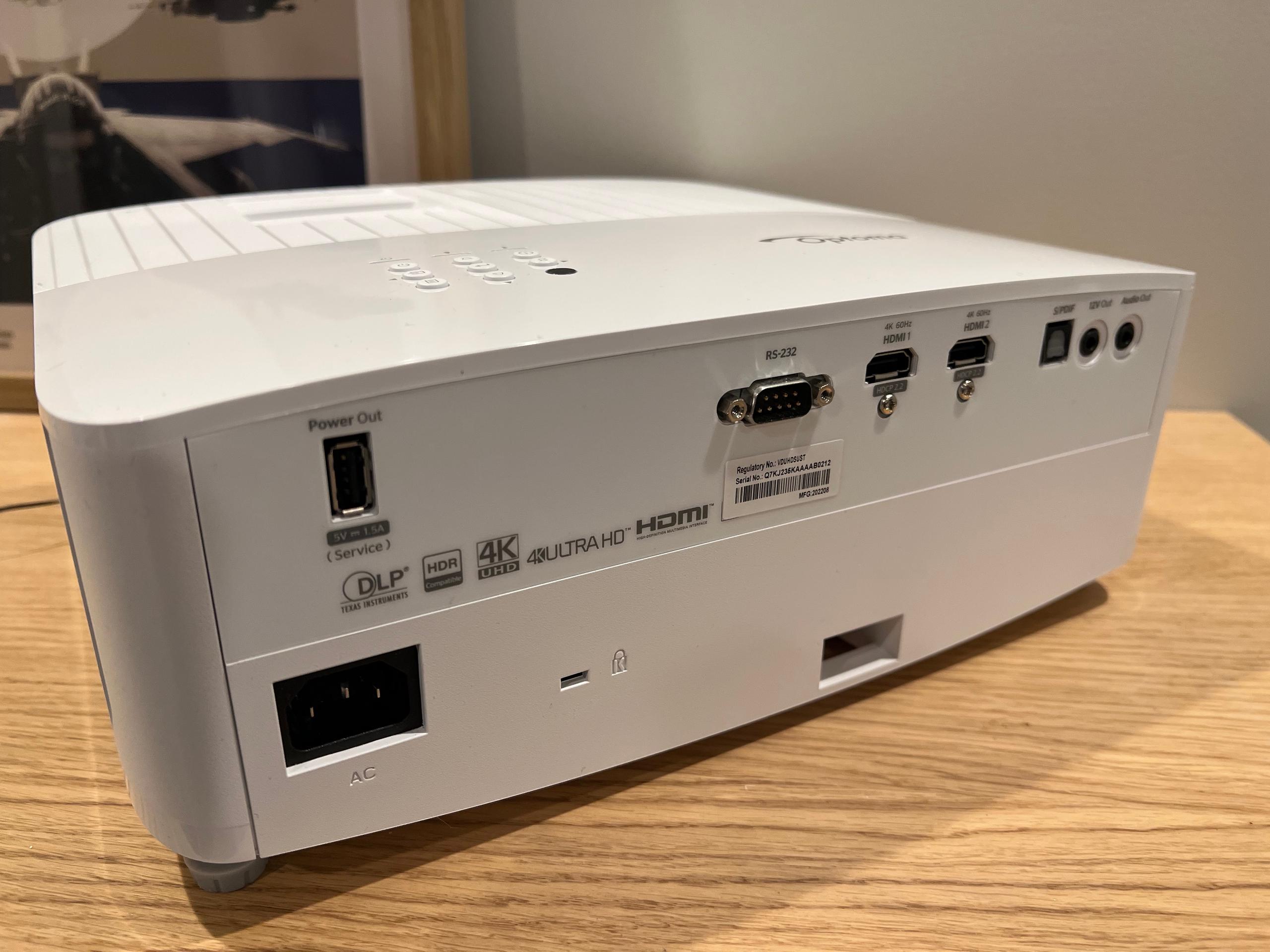
The Optoma UHD35stx 4K projector is shown from the backside with inputs on a table.

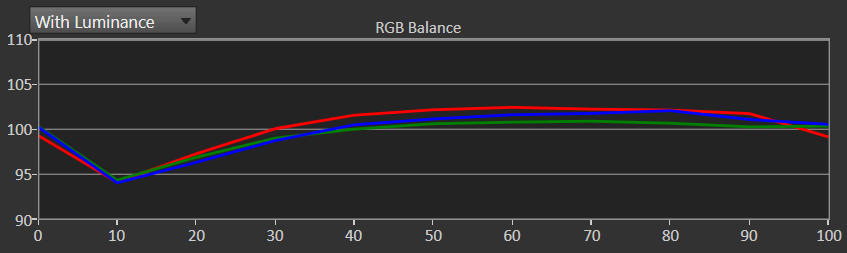
For all of my calibrations, I used the Bright lamp brightness mode. I chosen Reference as my image mode to calibrate. This mode began off with a distinction ratio of ~650:1, a blueish 7400 shade temp and a mean gamma near 2.2. The White setting within the CMS had been overcorrected so I set that to all zeros and used the 2-point grayscale management to hone the RGB steadiness. 

Combining this with a barely boosted Brilliant Color setting of three, I used to be capable of obtain a local distinction ratio of 850:1–not unhealthy in any respect for this 0.47-inch DMD. Nailing gamma was a problem although. Setting the gamma management to 2.4 gave me the perfect total monitoring for my 2.2 goal however there was a notch between 10-30% white that I couldn’t repair. This is concerning the worst place to have a notch because it hurts shadow element, a problem I noticed whereas watching content material. I attempted to spice up brightness however it decreased distinction and flattened the picture.
Optoma's UHD35STx short-throw 4K projector is affordable, but performance is lacking. 3729bcd8 image 1

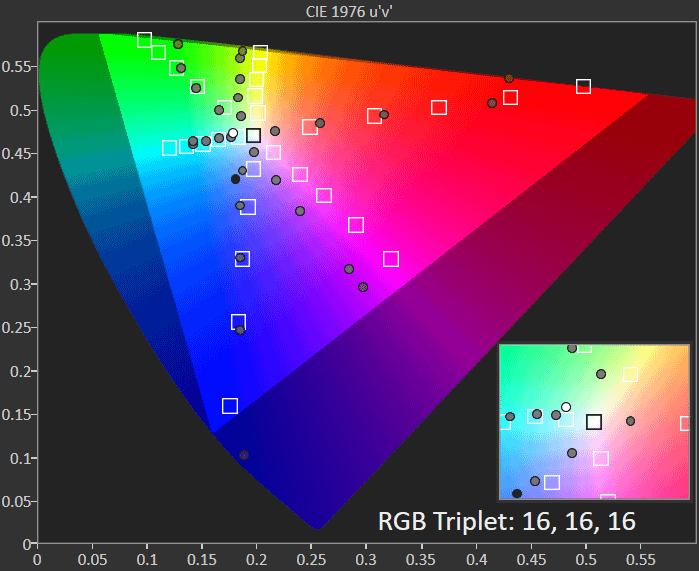
Adjusting the CMS was once more simple and controls responded as I anticipated. Below you’ll be able to see what the Rec.709 post-calibration appeared like. Everything is linear however we’re fairly in need of full Rec.709 protection. What you’ll be able to’t see are luminance targets, that are pretty off even with Brilliant Color at 3. Turning it all the way down to 1 doesn’t assist a lot however turning it up hurts rather a lot. There was no actual option to repair the luminance points which resulted in ITP dE errors of over 30 and a mean of seven (a measurement of how near reference a shade is, underneath 3dE is the goal whereas over 5dE is taken into account poor). 
Optoma's UHD35STx short-throw 4K projector is affordable, but performance is lacking. 27a2a9cf image

I additionally calibrated the User image mode whereas specializing in brightness and distinction on the expense of shade. I achieved a distinction ratio of 1250:1 and elevated brightness by 50%. This mode had very giant shade errors as a result of an absence of shade luminance and in addition had the identical shadow element challenge. I used to be capable of obtain 2000 lumens with Brilliant Color at 10 so this is able to be a very good mode to make use of to fight ambient gentle the place shade accuracy isn’t wanted.

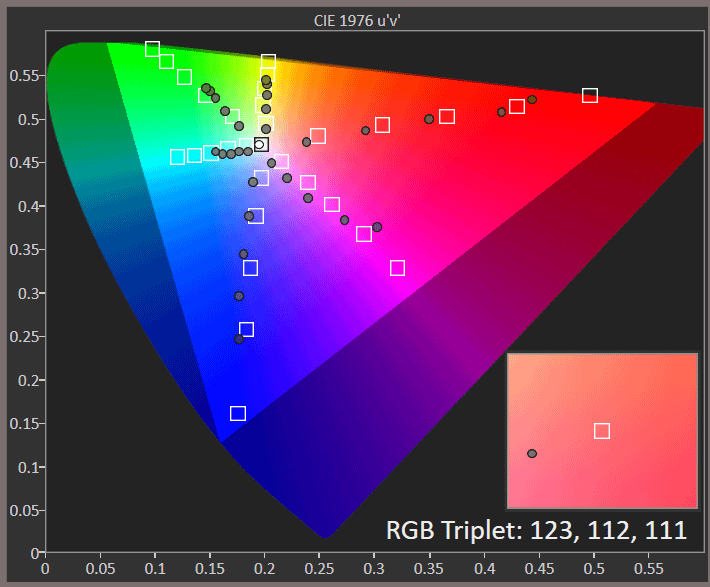
Calibrating for HDR was once more simple albeit disappointing. There are solely two image modes to choose from for HDR or User. I selected HDR for my calibration. P3 shade gamut protection was expectedly very low at 60%. There was no use in making an attempt to hit all the colour targets so as a substitute I optimized for hue and linearity. Like the User image mode for SDR, I used a Brilliant Color setting of 10 to optimize for brightness and distinction for HDR. This didn’t assist shade however gave some wanted punch to the picture.
Optoma's UHD35STx short-throw 4K projector is affordable, but performance is lacking. d2a2a062 image

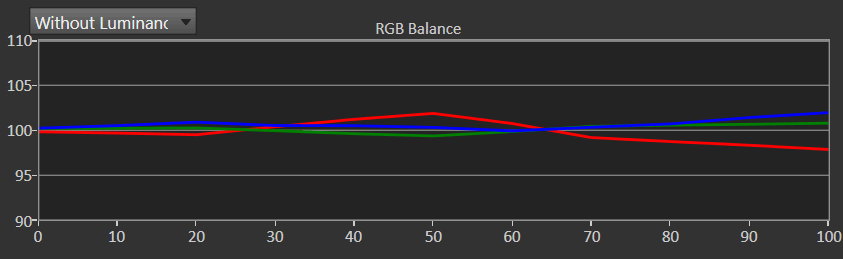
Due to Optoma utilizing static tone mapping I didn’t spend an excessive amount of time calibrating its EOTF (the HDR model of gamma) since I knew it must be adjusted per film to attain the perfect picture. This can be accomplished with the HDR Strength slider and distinction settings. Instead, I targeted on getting a very good RGB steadiness which once more was achievable identical to with SDR. Interestingly, I seen adjusting the HDR Strength slider to a decrease quantity elevated brightness at 100% white. This wasn’t precisely a very good factor because it received there by rising blue and inexperienced and wrecking my RGB shade steadiness. Increasing the distinction slider did the identical. These settings should be adjusted primarily based on the content material you’re watching so this sadly isn’t avoidable. 
Optoma's UHD35STx short-throw 4K projector is affordable, but performance is lacking. 3729bcd8 image

SDR Performance

I began my viewing by placing on the Spears & Munsil UHD HDR Benchmark

disc to confirm my calibration settings and into some acquainted content material. Sharpness appeared good because it often does with these pixel-shifted DLPs. There is a little bit of pink fringing round objects brought on by chromatic aberration–a shade distortion across the edges of objects brought on by uneven gentle refraction by the lens–however it is not noticeable from common seating distances. Motion assessments appeared good with 24Hz content material if you happen to’re comfortable with the everyday judder with this body fee. Know that there’s no body interpolation if you happen to’re not. 

My solely actual grievance with the SDR demo content material in my Reference calibration was the shortage of depth because of the decrease distinction ratio. I made a decision to attempt my User mode calibration for added brightness and distinction and I instantly seen a problem with shiny colours. Having the Brilliant Color set to 10 induced very noticeable posterization, primarily with reds, oranges, and yellows. I believed turning it down a bit would repair it however it solely goes away if you flip it to three or decrease–this cuts a 3rd of the brightness! I attempted fixing it with the CMS as nicely however lowering saturation or the achieve harm shade in different ways in which weren’t acceptable.

I proceeded to throw a wide range of SDR motion pictures on the Optoma to see the way it festivals in that Reference mode. I used a few of my favorites for testing, together with Sing, Avatar, Gravity and Edge of Tomorrow. Starting with Sing, I seen there simply wasn’t the depth and richness I’m used to on this film. The shiny colours, just like the squids in Buster Moon’s short-lived aquarium, have been additionally missing in saturation. This is particularly true if you happen to attempt to push Brilliant Color increased for the added brightness. 
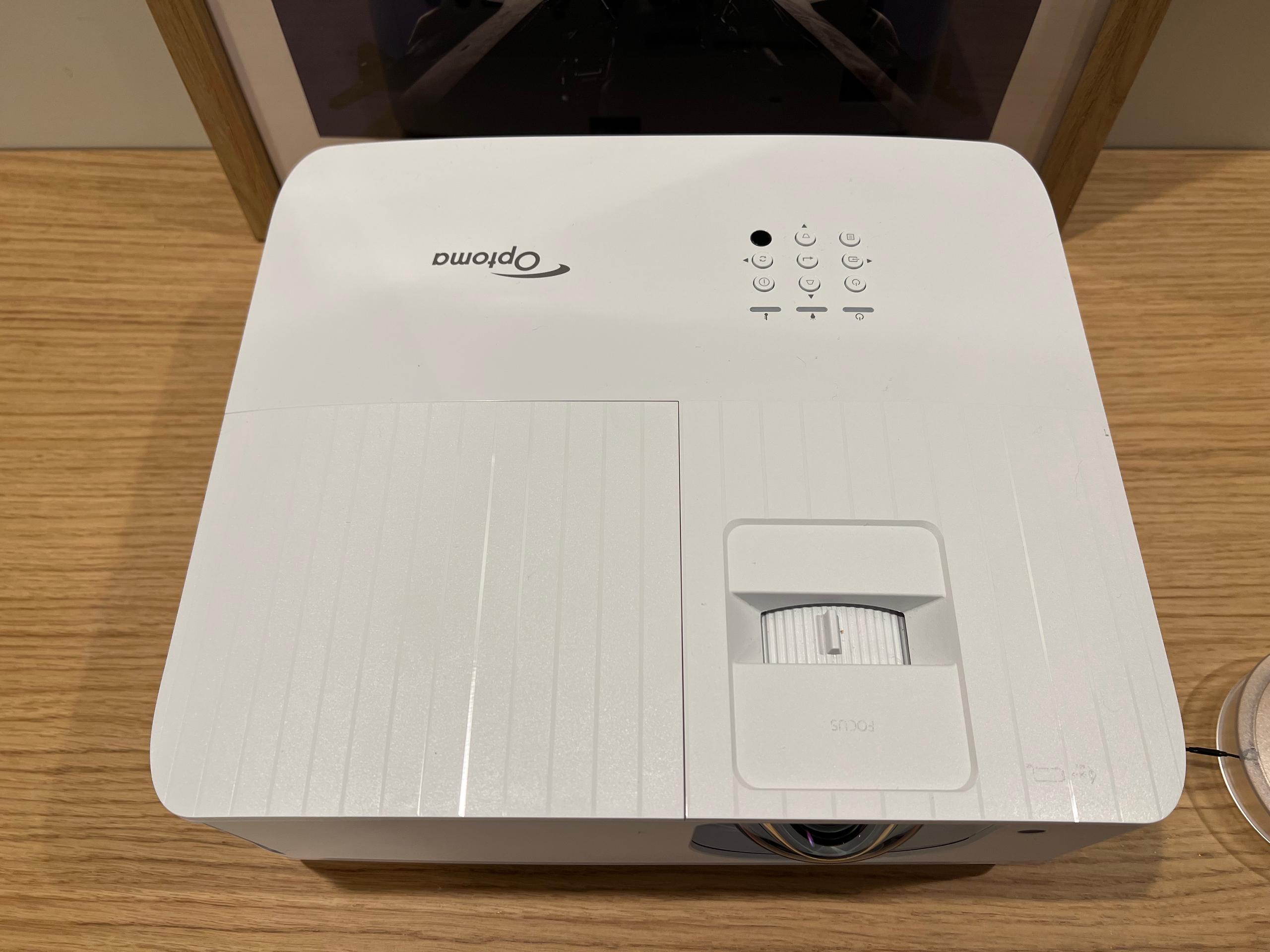
The Optoma UHD35stx 4K projector is shown from the top on a table.

I knew this projector supplied some dynamic distinction functionality by dimming the bulb for darkish scenes to extend perceived distinction. This could be activated by utilizing the Dynamic or Eco+ brightness modes. I made a decision to provide the Dynamic mode a attempt to see if it may assist add a few of that depth I felt was lacking. It did! Sing appeared higher and when flipping over to Gravity and Edge of Tomorrow I felt issues appeared actually fairly good. The Dynamic brightness mode not solely dims the picture for darker content material however it additionally manipulates the gamma, boosting the brightness of darker scenes and giving the look of a better distinction projector. So far I used to be having fun with the impact though I knew it was altering the precise content material a bit from the director’s intent. 

In Gravity, this mode is nearly important. When Astronaut Stone flies off into area, a go-to check scene for black ranges, this mode boosts the brightness of the celebs whereas dimming the general brightness giving the scene a a lot better look than the usual Bright mode. It isn’t all gravy although. Modulating a bulb isn’t very quick and the speed of change is noticeable at instances. Thus far I used to be alright with the compromises. This mode additionally fastened the shadow element points I famous throughout calibration. 

To full my SDR viewing I watched some NBA basketball. The Lakers have been taking up the Phoenix Suns which made for an awesome check topic for shiny colours. The UHD35STx dealt with the fast-paced movement very nicely however these shiny colours once more have been simply missing. 

The Lakers’ jerseys have been noticeably undersaturated and there simply wasn’t a option to make them pop. Using a decrease Brilliant Color setting helped some however then I misplaced brightness once more. Overall, sports activities are acceptable on this projector. The movement decision from DLP and good intra-scene distinction make for a stable expertise. Just know that the brighter colours will likely be lower than desired and will result in some posterization.

HDR Performance

For HDR viewing I began with the opening ambush scene from The Revenant, which provides a number of panning scenes that assessments a projector’s capacity to deal with 24Hz nicely, in addition to a very good quantity of element.

Setting the UHD35STx’s brightness mode to Dynamic I used to be pleasantly stunned with the way it dealt with this scene. Contrast was fairly good for a extra budget-minded 4K projector. I discovered that the default brightness setting was crushing darkish element so I raised that from -15 to -10 and that fastened the difficulty with out elevating black. Motion dealing with on this scene was good however I do want there was body interpolation as I’m not an enormous fan of 24Hz judder. DLP’s nice movement decision efficiency results in much less blurring however it might probably make the judder extra noticeable.

I subsequent flipped over to the visible and audio masterpiece that’s Top Gun: Maverick. Unfortunately, right here my nice shock didn’t carry over. I actually struggled to search out the appropriate mixture of settings. Scenes lacked depth and shadow element was barely there. 

Dynamic brightness mode was actually wanted to provide the pop that this film provides however it didn’t assist all scenes. I reached for the distant a number of instances to spice up distinction or lower HDR Strength (which makes the picture brighter). This would assist quickly however not for each scene. I discovered that leaving the HDR Strength setting at 6 and distinction at 15-20 was about the perfect I may do, however it nonetheless resulted in spotlight clipping.

I then flipped to Aquaman and this once more was a shock–a very good one! The settings from Top Gun: Maverick carried over nicely. There was really much less spotlight element clipping right here, I used to be even capable of enhance distinction extra to get extra brightness. I ended up modifying the distinction greater than the HDR Strength setting as a result of it was a button away on the distant and had the same impact, however with finer changes. The HDR Strength setting is a number of menus deep, making it troublesome to regulate mid-movie. 

Next up was Blade Runner 2049. At first I believed the settings carried over once more and that I’ll have discovered the appropriate combo. Then…chaos struck. Midway by the film, Lt. Joshi is speaking with Officer Ok in his house. There is a reasonably good HDR impact right here with some wall lights shining very brightly. For some motive, the Dynamic brightness mode’s algorithm was tripped up right here and it induced some very unhealthy brightness pumping and even flashing. It was so unhealthy on this film I needed to flip it off. This was very unlucky as a result of it was what fastened the crushed shadow element challenge. Turning it off and resorting to Bright made this film manner much less, nicely…dynamic. 
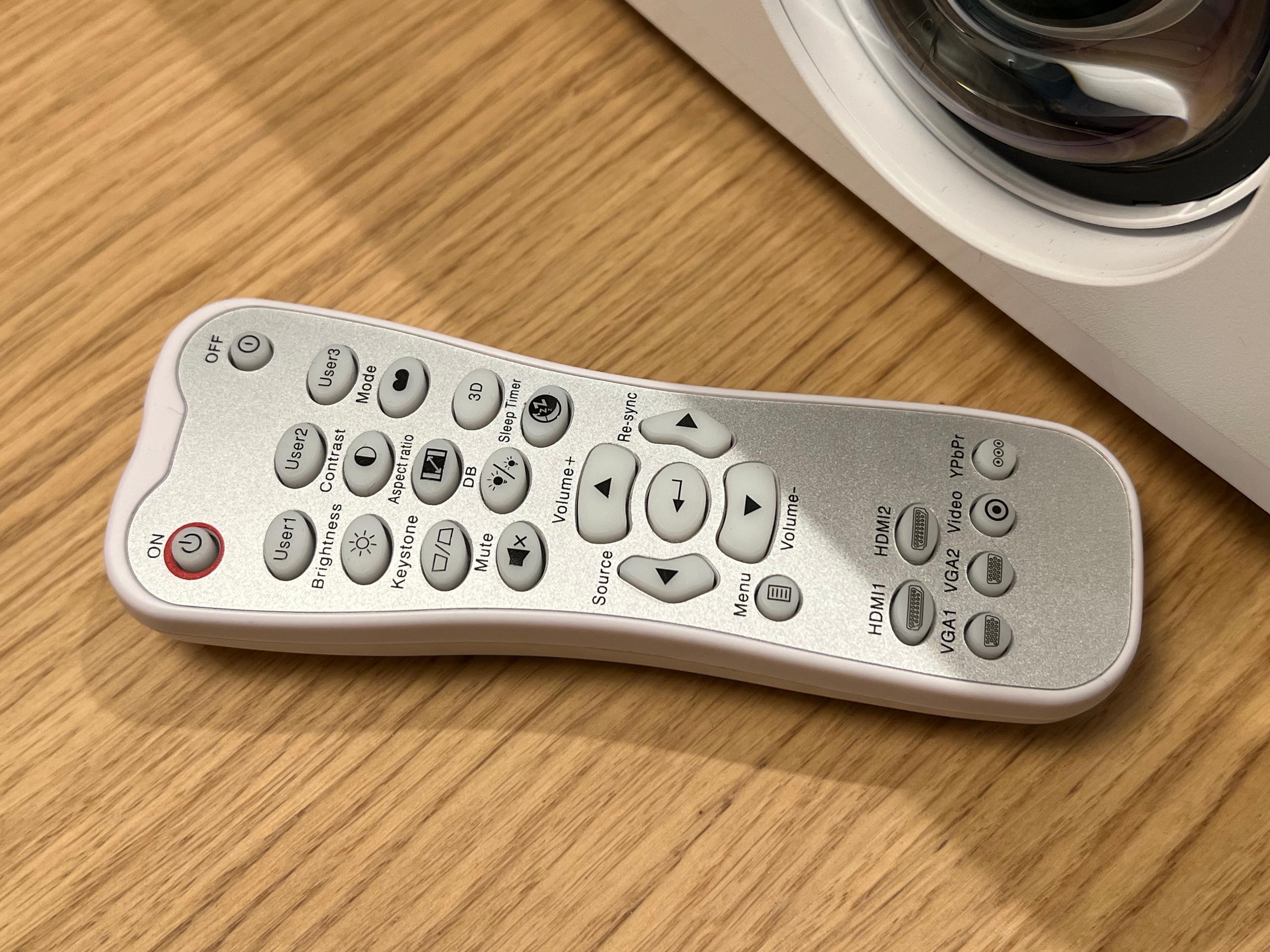
The Optoma UHD35stx 4K projector is shown with the remote on a table.

I flipped over to The Meg for my final HDR film and I rapidly realized this one was simply an excessive amount of for the Optoma’s HDR tone mapping. It’s a troublesome film to breed as a result of the truth that it was mastered at 10,000 nits. It was an actual problem to get the brilliant day scenes on the ocean to look good. I used to be both capable of get the clouds to render with element, or the individuals and boat to have good distinction and depth, however not each. 

This projector’s HDR rendering points aren’t unusual amongst related projectors however it’s atypical to have to regulate so many settings to get it to look good. Sometimes it was the Contrast setting, different instances Brightness or HDR power. I all the time wish to give the Dynamic brightness mode a attempt however the pumping artifacts I noticed in Blade Runner 2049 made it really feel like taking part in with fireplace. 

I completed my viewing expertise with some gaming and golf simulator play-throughs on YouTube. This is the place I noticed probably the most minimal downsides and I even had fairly a little bit of enjoyable! I gave Halo Infinite a dust-off and I ended up spending extra time than I meant taking part in into the evening. I gave the Dynamic mode one other attempt right here and by no means as soon as did I see it get tripped up. It actually helped make this sport pop in HDR. Colors have been acceptable and never distracting and the 4K DLP picture was impressively sharp. Input lag was perceptively very small and didn’t impede in my capacity to get some headshots.

While watching the simulator play-throughs, it was simple to see that the brilliant greens right here have been a bit missing however total the picture was fulfilling with good definition and distinction. There’s not a lot right here to journey up the processing so utilizing the Dynamic mode received the inexperienced gentle and it appeared good. 

Competition and Comparison

The marketplace for this projector is exclusive. If you actually need a 0.5:1 throw 4K projector then that is it–there isn’t one other one, not even shut. The upcoming ViewSonic X2 4K would be the solely brief throw 4K projector that can come near it and it’s at a minimal a 0.69:1 throw. I’d look out for that one if it suits your setup. It may also characteristic a 4LED solid-state gentle system that means no bulb modifications.

If you’ll be able to stretch your setup distance additional, the BenQ TK700STi can be a greater all-around performer with a throw of 0.9:1. Another choice from BenQ is the TH690ST. This brief throw projector (0.69:1-0.83:1) isn’t as shiny because the UHD35STx and is barely 1080p, however it comes nicely calibrated out of the field, has a lot wider shade gamut protection, and may have better-calibrated distinction too.

Then there may be the flourishing Ultra Short Throw class. Numerous these projectors characteristic a laser or triple laser gentle system. One to have a look at can be the AWOL LTV-2500 which options an RGB triple laser system for enhanced shade, a built-in sensible OS, and higher distinction. That stated, most have increased enter lag which might have an effect on gaming purposes, they usually’re additionally usually dearer.

Conclusion

My time with the Optoma UHD35STx was usually underwhelming. Movie watching was a really combined bag, even inside the identical movie. The inconsistent presentation made it irritating as you by no means knew what you’ll get or if you’ll want to succeed in for the distant to tweak a setting.  I might solely suggest this projector for particular use instances the place a brief throw and 4K decision are wanted. It would do nicely as a golf sim and/or gaming projector the place precise shade efficiency is not demanded. Otherwise, you will most likely wish to have a look at one of many choices famous above.

SDR and HDR Calibration Extras

Measurements and lumens

Here I measured every mode because it comes out of the field. Calibrated in Reference shade mode got here to ~1100 lumens. 

Noise

Noise flooring in my room is 31.5dB. Dynamic and Eco+ each fluctuate the brightness and fan speeds. Bright and Eco exhibited the loudest and quietest the fan will attain.

Contrast 

Below are ADL distinction measurements for each Reference and User image modes. Brilliant Color was set to three for Reference and 10 for User, each are D65 calibrated. Cinema is uncalibrated with the D65 shade temp chosen and features set to 0. 

Dynamic distinction with the Brightness Mode set to Dynamic within the Reference mode was 3200:1

Color Gamut

For the measurements beneath I put the projector in its greatest shade mode, Reference with Brilliant Color at 1. 

The put up Optoma UHD35STx Short Throw Projector Review – 4K at a Cost first appeared on ResidenceTheaterReview and is written by Andy Grimm

Epson EpiqVision Ultra LS800 Review


Epson redefines the 'Ultra' in 'Ultra Short Throw' projectors... f69e263a epiqvision ls800 fg tile 1

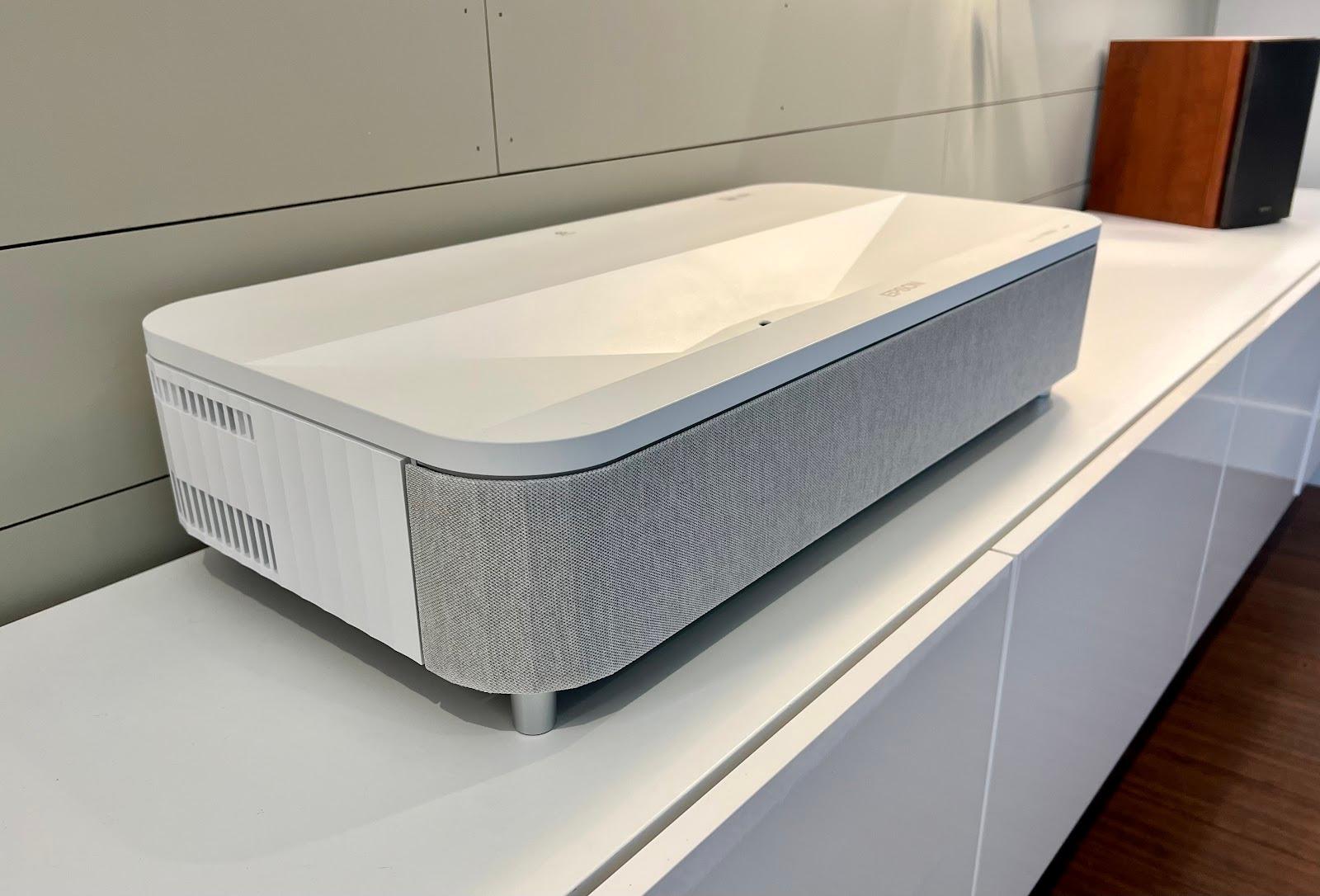
Here we are in late 2022 and the Ultra Short Throw (UST) projector market is still delivering us new and exciting products. Unlike the standard throw projector market, USTs are evolving at a breakneck pace. Epson is throwing its hat into the ring to continue that evolutionary pace with the EpiqVision Ultra LS800 priced at a relatively reasonable $3,499. Epson is promising big things from this projector, pun intended.

Epson LS800 Review

Summary

Epson has done a few special things with the EpiqVision Ultra LS800. This projector delivers among one of, if not the shortest throw ratios available, a very bright and usable picture mode in Dynamic, an accurate out-of-the-box Cinema mode, and no rainbow effect. The projector offers built-in Android TV, great dynamic contrast, a good speaker system designed by Yamaha, and a gaming input for ultra-low input lag.

For these reasons we decided to give it an Editor’s Choice award for those looking for a big bright image in their living room that will handle almost anything you throw at it. The Epson LS800 is the complete package for living room viewing – pair it with a good lenticular ALR screen and it is sure to impress. HDR handling could be a bit better, it’s not the sharpest UST out there, and we’d look elsewhere for a dedicated theater space with light control due to its average native contrast, but it sure is fun to get an image this bright and usable with all the lights on at any time of day.

Epson redefines the 'Ultra' in 'Ultra Short Throw' projectors... 0f9c2234 image

Features

The LS800 picks up where the LS500 left off with a rated 4000 lumens coming from a 20,000 hour rated blue laser+phosphor pushed through Epson’s proprietary 4K PRO-UHD 3LCD pixel shifting system to bring near 4K resolution onto screen. Even though they share the same branding, this system is unlike the new quad-pixel shifting in Epson’s standard throw LS11000 and LS12000 projectors. This is a dual shifting mechanism just like the previous Epson 5050UB, a very well liked projector. 
The 3-chip LCD design from Epson delivers a lot of usable brightness, more than you typically get in a single-chip DLP projector. Epson really takes advantage of these lumens in the LS800 by enabling screens up to 150” from very short throw distances, even for an ultra short throw  projector. Measuring from screen to the front of the projector you can have a 100” screen at 17.3”, a 120” screen at 20.2” and a whopping 150” screen from 24.2”. A lot of USTs need 25” just to throw a 100” image. This truly is an ultra short throw projector and for 120” screens it can fit on a lot of media consoles. Well done, Epson.

Assembly and Design

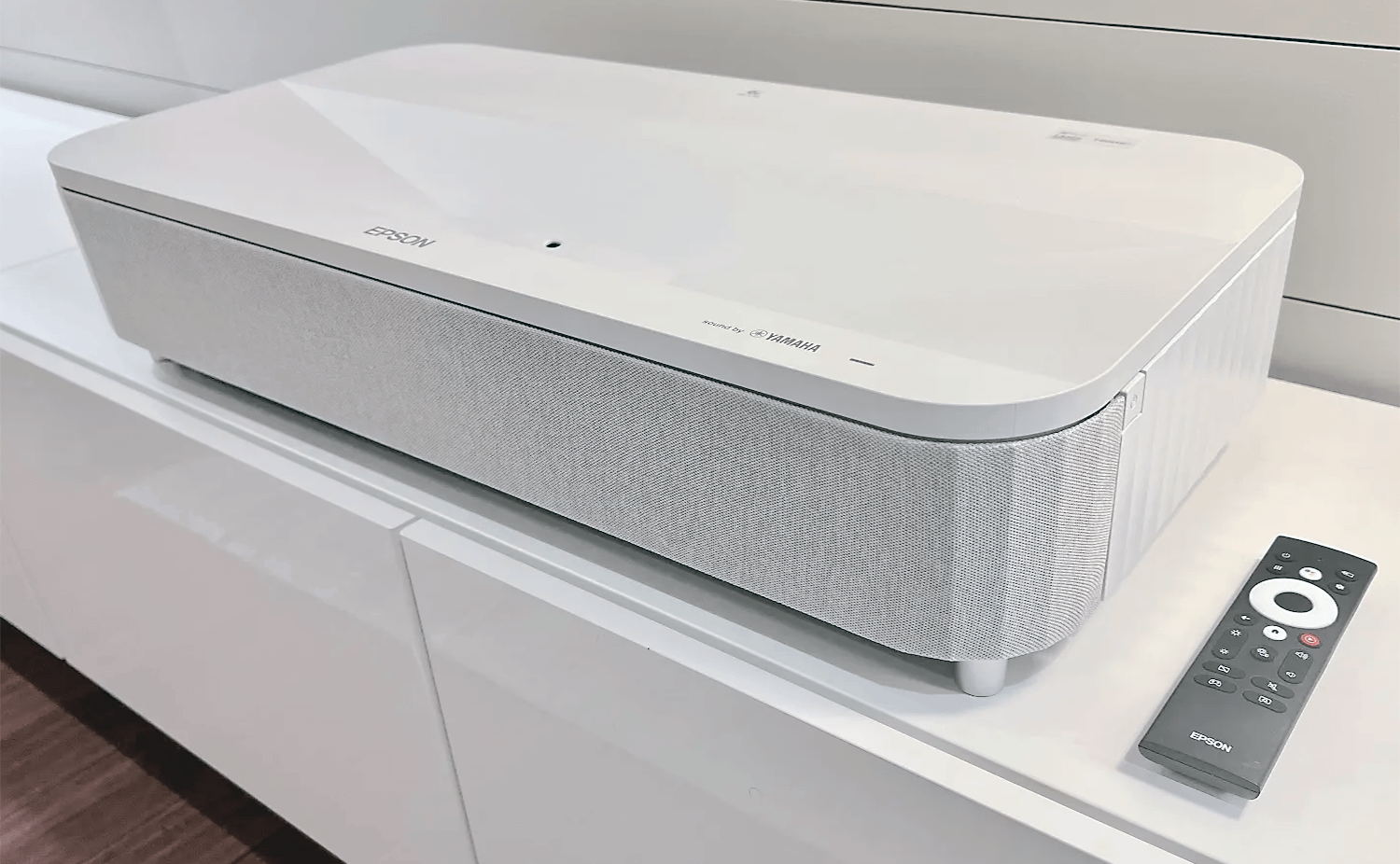
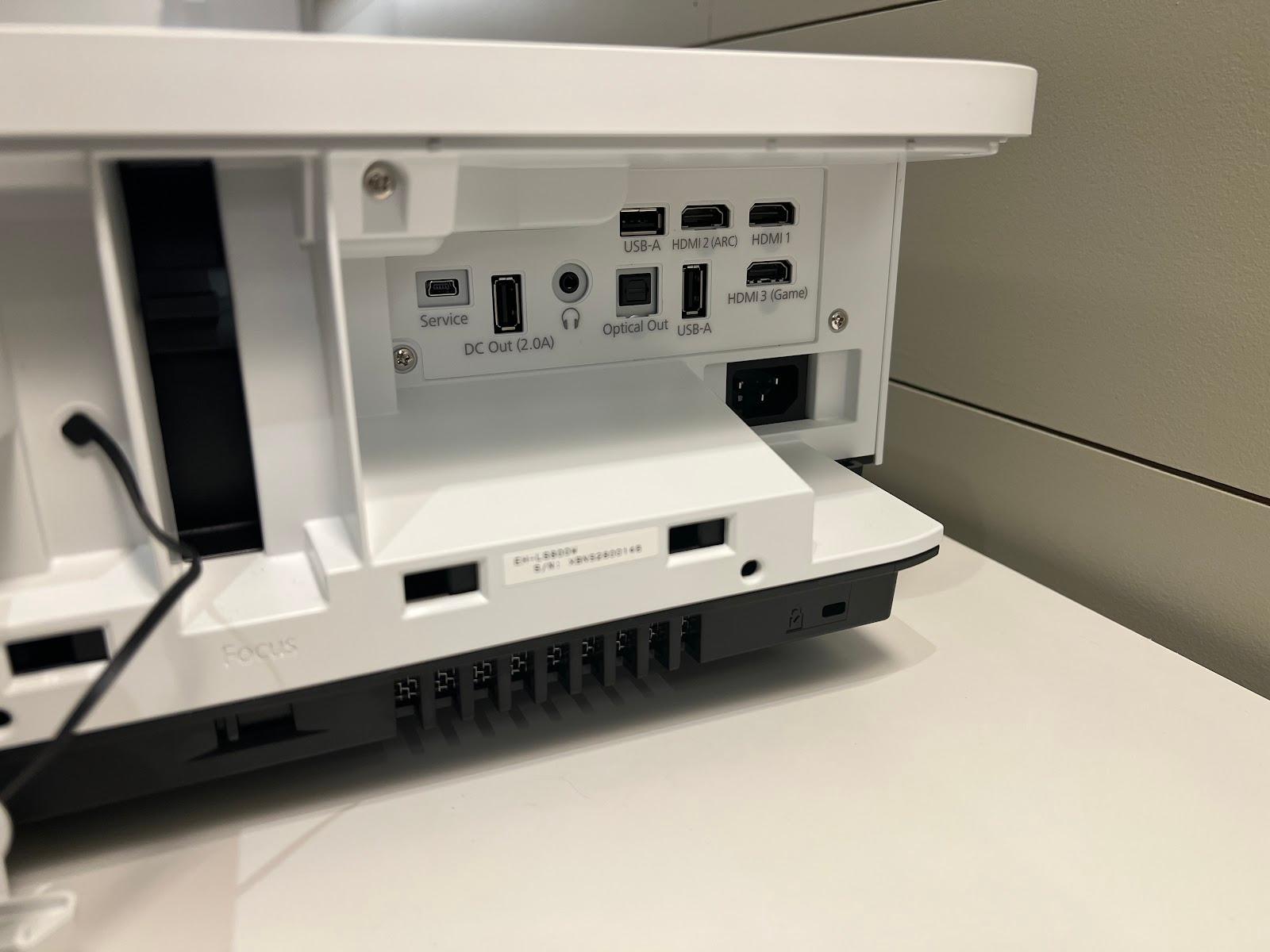
I was pleased to see that Epson offers this projector in both black and white casings to match room aesthetics. Overall, it’s an attractive design and much cleaner and an improvement from the LS500. It’s a large projector weighing in at 27.6 lbs and stretching 27.4″ wide, 13.4″ deep and 6.2”. The front of the projector is dominated by a large removable cloth cover hiding the surprisingly decent Yamaha custom designed 2.1 AudioEngine speaker system. On the right side you’ll find a removable cover that hides the LS800’s array of ports and its manual focus slider. The cavity behind the cover is quite large and allows ample room for hiding your cabling or even a streaming stick if you don’t care to use the built in Android TV OS.

Epson redefines the 'Ultra' in 'Ultra Short Throw' projectors... 71a71dbf untitled

The LS800 sits on three feet, two in front and one in the rear. The front right and rear feet are manually adjustable to assist with aligning the projector.

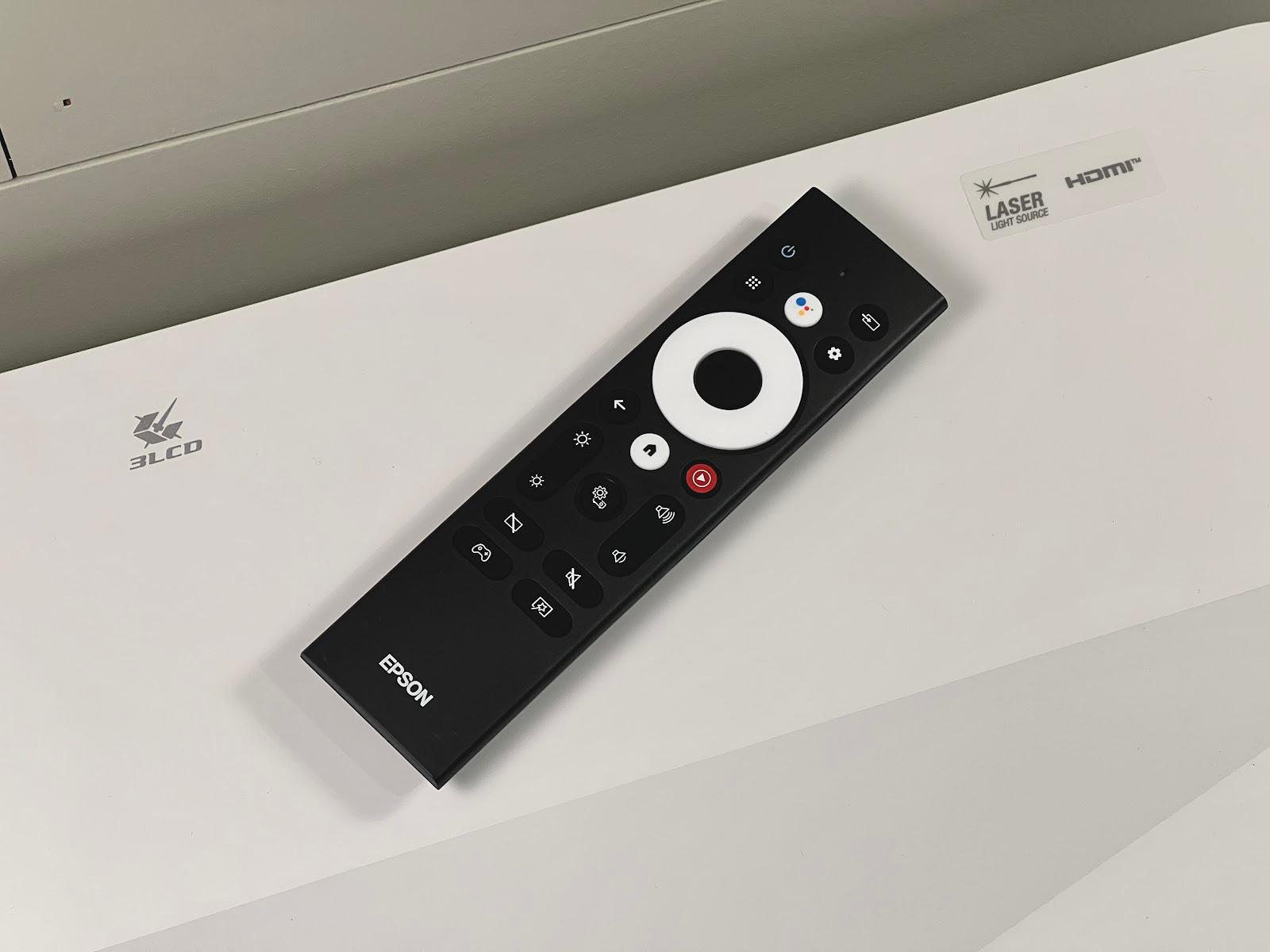
The included remote is well laid out with buttons logically placed. I was quickly able to learn the layout for my most used buttons and didn’t need to look down to use it. My only complaints are it feels a bit basic and I’d like a more premium feel for something that accompanies a $3500 display.

Setup and Screen

Epson had also sent me the 120” version of their SilverFlex lenticular ALR screen. It is claimed to be able to reject up to 90% of ambient light and offer viewing angles all the way to 180 degrees. In a little under two hours I had the screen assembled, the LS800 unboxed and splashing its 4000 lumens on screen. All three feet are adjustable which makes alignment as easy as it gets for and UST projector – a little tedious, but not too bad with a bit of patience.

Epson does include many options to digitally alter the image to fit your screen if you can’t get perfect alignment. These features are best to go unused if possible. As with any projector the use of keystone or digital zoom will result in wasted light output and reduced resolution. That being said, the options are nice to have if you just can’t get the projector aligned perfectly. I do wish that Epson had included some amount of digital masking for the bit of slightly visible overfill I had on the satin border of the SilverFlex screen.

Epson redefines the 'Ultra' in 'Ultra Short Throw' projectors... 3cdb131a untitled

Android TV and Settings

Along with many ultra short throw projectors being made today, this Epson comes with Android TV built in, no dongle required. Just like a lot of other Android TV-based UST competitors this projector lacks Netflix but does have just about any other app you could wish for. 

While having Android TV be the base operating system makes ease of use, well…easy, it has come with some drawbacks. Epson has long had projectors featuring lots of tunability and customization with full CMS controls, multi-point grayscale settings, custom gamma options and much more. Most of that is gone on this Epson LS800 and instead they provide the user with only a color temperature and saturation slider. Unfortunately, these limited controls made getting a fully calibrated image near impossible.

Audio

As someone that has a dedicated audio system hooked up to every TV in my house I clearly don’t expect much out of a display’s speakers. Well, I turned on this LS800 and was immediately impressed with the kind of audio it put out. It’s not going to replace a dedicated surround system but some may find the Yamaha designed 2.1 speaker system adequate enough to not go hunting for a soundbar to fit between their new UST and projector screen.

Epson redefines the 'Ultra' in 'Ultra Short Throw' projectors... 41b2563b untitled edited

The LS800 was able to fill the couple rooms I tested in with easy to hear dialogue and an almost convincing surround sound effect. The soundstage easily felt larger than the width of the projector. I found that the only time the audio performance felt lackluster was with some intense moments in movies with loud effects or a lot of bass. In these situations it sounded like the little speakers were being overwhelmed and any dialogue got a little lost. Overall, I was impressed by the audio performance but a 100” or larger screen is really asking for a full surround sound system.

Performance

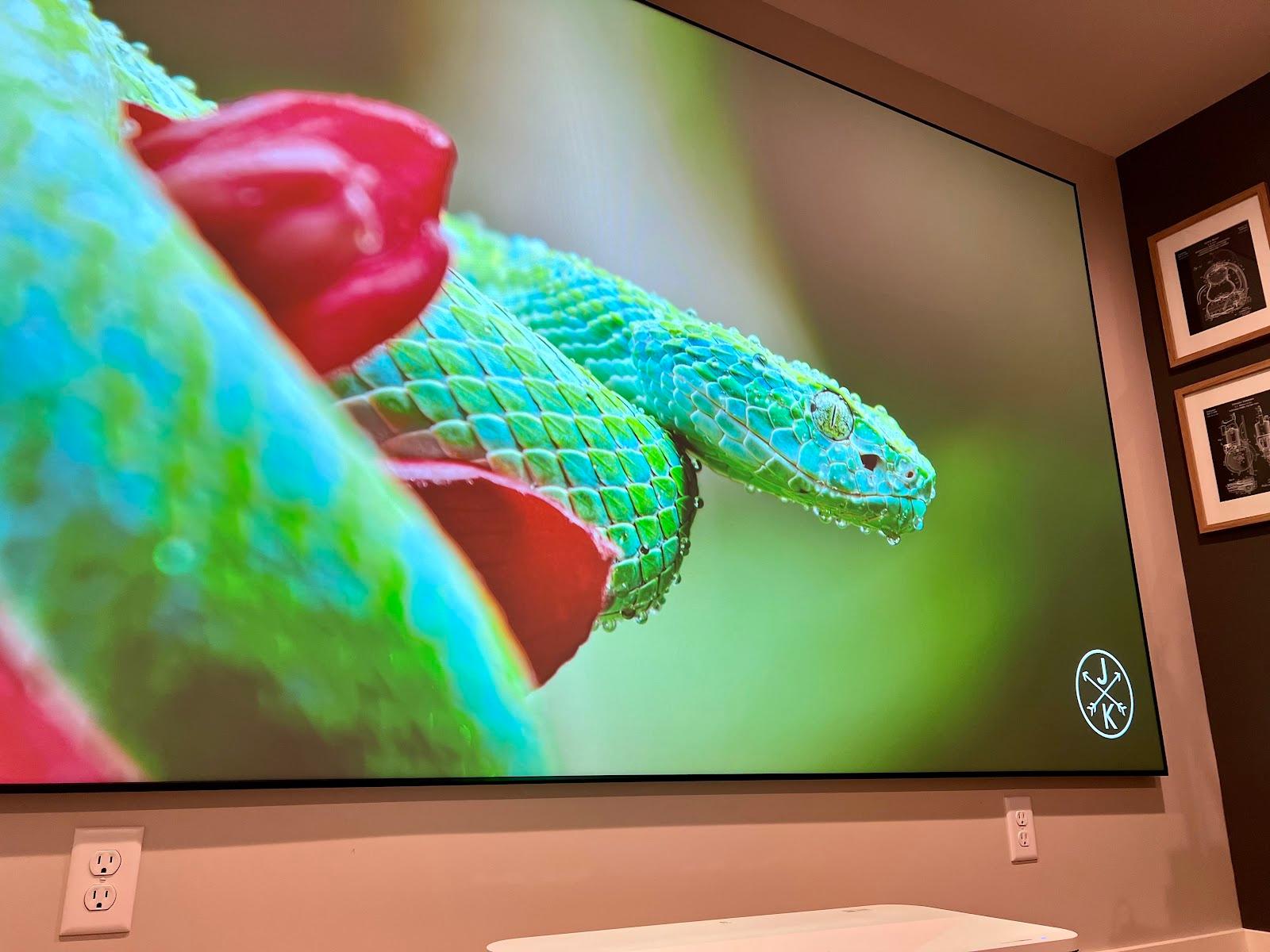
Whenever I get to a new projector to play with I like to pull up some YouTube 4K demo videos just to get a feel for the basics of the projector. This gives me a chance to play with the menus and usually see some nice eye candy as an initial impression. Wow! This thing is bright. I had the projector set to Dynamic Color mode which delivers the most light output and I kept finding myself in awe as the LS800 lit up the 120” SilverFlex screen in my bright office. The picture was clearly a bit oversaturated and a cooler temperature than desired but I was impressed nonetheless. Off to figure out what else this lil’ guy can do.

Epson redefines the 'Ultra' in 'Ultra Short Throw' projectors... 2ac0dda5 untitled

SDR Calibration

Having used multiple Epson’s in the past I went right for the LS800’s Natural color mode for what I thought would be more accurate viewing. At first, this appeared to be the right choice after breaking out my X-rite i1 Display Pro colorimeter and Portrait Displays’ Calman calibration software and measuring its color temperature at 6600K and color gamut that appeared designed for Rec709. The problem I had with Natural was greyscale balance wasn’t nearly as good as I hoped with there being a blue shift and errors averaging around 4-5 DeltaE. Using the Color Temperature slider to try to fix the errors resulted in too big of swings resulting in the default setting being the best. 

Flipping over to Cinema and the greyscale balance was much better. Greyscale errors were actually spectacular for out of the box performance, an average DeltaE of 1.6 and a max of only 2.4. Color temperature came in at 6600K as well, just like Natural. A quick color gamut sweep showed the primaries measuring outside Rec 709 making it apparent that Epson optimized this mode a bit for HDR. I deduced to proceed with this being my SDR picture mode nonetheless due to the greyscale performance. After reducing saturation to 45 Calman’s SDR ColorChecker measured an average DeltaE of only 2.9 and a max of 9.8 with really only the 100% primaries and secondaries being of concern. Gamma without Dynamic Contrast set to high is linear but quite low at an average of 2.1. At first I was quite concerned by this but found that setting Dynamic Contrast to High Speed gave a gamma that tracked fairly linearly to 2.2 using a 10% window. Setting brightness and contrast was a non-issue as they both appeared well set from the factory. Native contrast was measured at 1100:1. Overall, I was pleased with the results given the incredibly limited controls. 

Epson redefines the 'Ultra' in 'Ultra Short Throw' projectors... dd3c12cb untitled

Given my initial positive reaction to Dynamic Color mode out of the box I decided to see how this mode measured and tried to optimize it the best I could. I knew it wouldn’t be perfect just as every bright picture mode on any other projector. To my un-surprise, Dynamic was quite short on red and high on blue/green measuring at an average of 7500K. Again I tried to use the White Balance slider to warm things up a bit but I found I lost quite a bit of light and things didn’t perceptively get better to me. I quickly realized that I’d instead just use what this mode had to offer and that was a cool yet very bright picture. Gamut tracking is a bit of a mess here and things are anything but linear. I later decided to use this mode for HDR as well so I balanced the one gamut controI had the best I could and set Saturation to 45. Gamma without Dynamic Contrast measured incredibly low at 1.9. But, with Dynamic Contrast set to High Speed and on a 10% window I got an average of 2.3. DeltaE errors in the ColorChecker averaged at 8.8 with a max of 17…yeah, not the best. On the positive side I measured native contrast at almost double Cinema and Natural at 1900:1. With Dynamic Contrast set to High Speed you get a more aggressive laser dimming algorithm that includes a full fade to black. Dynamic Contrast is pretty much required in any picture mode on this projector.

SDR Viewing

I have two rooms that I am able to test projectors in. One is my dedicated theater that is fully treated with black flock, dark furnishings and a white screen. It is a room that can eek out every last drop of performance from a projector. The other room is my office with light colored walls, a couple of south facing windows, overhead lighting and multiple desk lamps. This room has the Epson SilverFlex lenticular screen and it needs it. 

Most of my SDR viewing consisted of sports and streaming TV, or if you’re old school, cable TV. With this content and the environment I and others would most likely view it, Dynamic Color Mode did a fantastic job. On the SilverFlex screen from Epson I was able to watch pretty much any TV program with the lights on and during the day. Watching football during the day in this setup really did feel like I was watching a giant flat panel. With over 250 nits on the 120” screen it really isn’t a surprise. The cooler white that a 7500K picture mode gives you really does look good with sports. Jerseys pop, helmets shine and on-screen graphics are bright and clear. I expected to see something offensive in this mode. Colors to look off, highlights to be clipped or something like that. But, Epson did a good job with this mode. Colors were a tad flat but the brightness made up for it. 

I did spend a decent amount of time watching the same casual content with Cinema mode and while I found it to be more accurate and colors to have more depth, it just wasn’t as appreciated as the brightness Dynamic offered for daytime viewing. If you’re going to be watching a game at night with the lights off then this mode works really well to add a richness to the picture at the expense of some light.

YouTube Video

Switching over to some movie content I immediately went for the balanced Cinema mode to watch. I also started this content in my dedicated theater where I wouldn’t need the shear brightness Dynamic offers. I went right for the movie Gravity, one of my favorites, to not just test black levels but also how well a projector can balance those blacks next to bright objects. The beginning scene is great for this. As astronauts Stone and Kowalksi are working on the satellite in their bright space suits, the sunlit satellite and big blue ball known as Earth light up the screen while deep black space fills everything in-between. The LS800 did a great job of showing everything bright but missed some of the depth that this scene can offer. Shadows of their suits felt a bit washed out and deep black space felt a tad more like a deep-ish gray. I experimented with turning the laser brightness down using the convenient buttons on the remote but then I lost the brightness of the scene that I liked and the bit of flatness stuck around. This scene is just too bright for dynamic contrast to kick in to darken the blacks. Toward the end of the beginning scene, Stone is flung off into space and there’s just her floating with only the black of space around her. A great scene to test black levels. Here the Epson saw that Stone was bright white and wouldn’t let the laser dim, unfortunately, this left deep space to be again a bit too gray. This was a running theme with a lot of content I tested in my theater. The native contrast was just too low to shine in this environment. 

I decided to move the projector back to the office as I felt this was the best place to view it…and I was right. Now that my eyes weren’t anchored to dark walls and instead to the lighter decor, the blacks of space and shadows became more realistic. Now I started to have some fun. I flipped back to Gravity and those same scenes felt much more realistic. I wasn’t bothered by the black levels any longer because I had a bright giant screen in my office with a very balanced image in Cinema. 
Once again I gave Dynamic a try and found it to be better than expected with movie content. The built in gamma in this mode seems to bring a bit more out in shadows than the other modes. In The Dark Knight I was able to see more shadow detail in this very well done dramatically shot Batman film. I’m starting to get a sense of what this projector is really designed for.

HDR Calibration

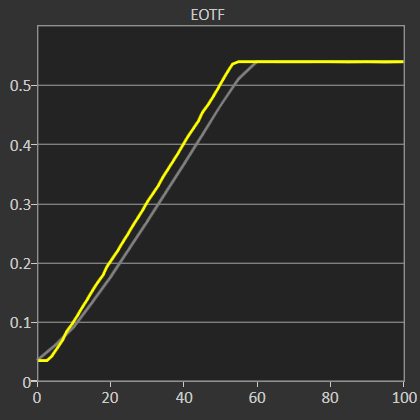
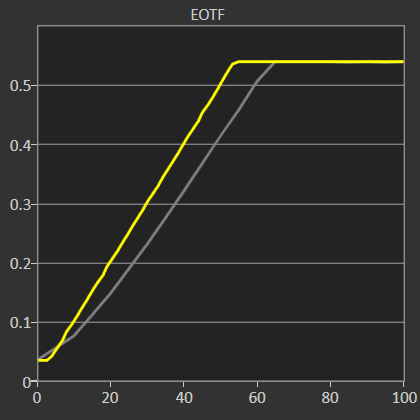
After spending a decent amount of time with the projector I knew that HDR calibration would be pretty basic as there aren’t many controls to manipulate. I started off by seeing how Epson decided to approach tone mapping on this LS800. Given that there’s no dynamic tone mapping here I set the HDR slider to 1 and tested how it tracked the PQ EOTF. At this setting and in pretty much every color mode it tracks right along PQ until it hits the peak white level and then hard clips everything above circa 65%. I was hoping for a bit of a roll off to preserve highlight detail. Let’s see what a setting of 4 does…not what I had hoped. Every notch higher on the slider and the LS800 reduces brightness throughout the image, tracking below PQ and clipping less highlight detail. You can have less clipping and a dimmer image, or clipping and a brighter image. And, without the custom gamma or grayscale options seen on other Epson’s it is not possible to add in that softer roll off either. I’m a bit bummed by Epson’s tone mapping here since it will undoubtedly result in a dimmer image than needed as I attempt to preserve some highlight detail. Adjusting the targets in Calman I found that a slider level of 8 would allow for essentially no clipping on HDR content mastered at 1000 nits but, PQ tracking was so far off lower at lower stimulus levels that it would clearly be too dark to be enjoyable. Subjectively it appears that a setting of 2-4 would be the best balance of clipping and brightness for 1000 nit content. This type of content is the most common so many users will find this to be a good place to start.

Epson redefines the 'Ultra' in 'Ultra Short Throw' projectors... 5898f156 untitled
Cinema – Dynamic Contrast set to High Speed – HDR Slider set to 1
Epson redefines the 'Ultra' in 'Ultra Short Throw' projectors... 512bafbe untitled
Cinema – Dynamic Contrast set to High Speed – HDR Slider set to 4

Picking the right color mode to use for HDR became a similar story to SDR. A more balanced image with Cinema or to go for the brightness that HDR desires and choose Dynamic. In the end, I used both and was able to utilize the same picture settings as SDR. A large part of that is because I had to, Epson doesn’t give SDR or HDR specific color modes.

Epson redefines the 'Ultra' in 'Ultra Short Throw' projectors... ebfdbe64 untitled
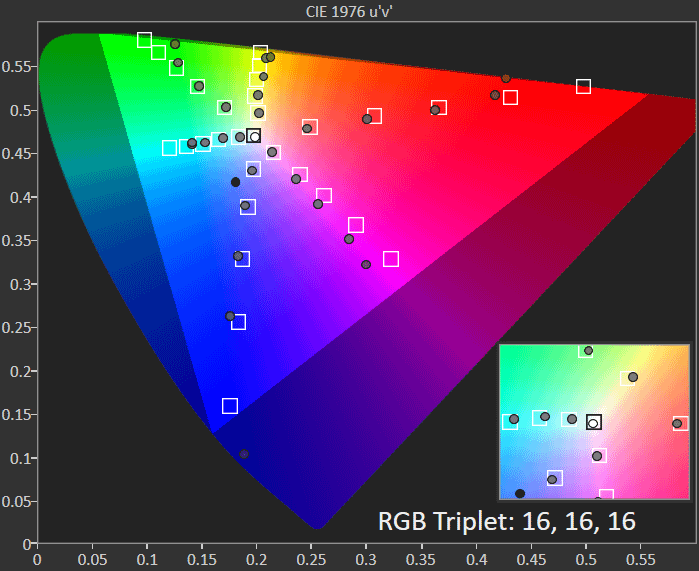
Cinema Color Mode – P3 inside BT.2020
Epson redefines the 'Ultra' in 'Ultra Short Throw' projectors... 6c780aab untitled
Dynamic Color Mode – P3 inside BT.2020

HDR Viewing

I started off my 4K HDR viewing with the fantastic 1917 directed by Sam Mendes. This movie has a steller scene for testing black levels, intra-scene contrast, tone mapping, dynamic range, and even color. Halfway through the movie Lance Corporal Schofield gets knocked out and there’s a decently long fade to black with him waking in the dark of night. He then crawls up a stairwell to look out the window and sees bright flares bursting in the air against the night sky. The cinematography is just fantastic. The LS800 handles this scene just OK in Cinema mode. The fade to black is somewhat convincing but shadow detail as Schofield wakes up and climbs the stairs are lost.

YouTube Video

Black levels also appear more of a gray, even with Dynamic Contrast set to High Speed. Adjusting the HDR slider lower helped some but in brighter scenes there was just way too much clipping. In Cinema, I found a level of 2 or 3 to be the best balance. Once again I tried out Dynamic Color Mode to see how it faired in this scene. Wow, what a difference! Dynamic Contrast had a much larger impact with fade to black actually going completely black. When Schofield wakes up and there’s subtle highlights on screen the black levels stay much deeper and shadow details are intact. I can tell that the Epson is using some heavier gamma manipulation in this mode which really helps with scenes like this. Dynamic did a great job of tricking me into believing I was watching a much higher contrast projector. 

When well done, this scene always pulls me in. I usually forget that I’m analyzing a projector and just enjoy the show. The LS800 was no different here. Yeah, contrast could have been better at times but it was impressively bright again and the dynamic contrast worked effectively enough to trick me into enjoying one of my favorite movies again. At one point I was actually writing this review and had it going in the background. Schofield came to the point with the church roaring in flames and I couldn’t help but to look up and be wowed at the 250 nits this Epson was putting out into my dedicated theater. 

I then switched over to Aquaman to test how well it handles wider color gamut and bright highlights. For this movie I had to bump up the HDR slider to not overly clip these highlights. I found that between 7 or 9 worked best to balance brightness with a bit of clipping. This was exactly what I was afraid of during my calibration. The picture got dimmer than it really needed to if Epson had designed its tone mapping to roll off a bit before clipping. This movie is fairly bright though, so the picture was still pleasing and I enjoyed the presentation. Being that the LS800 is only rated for Rec 709 gamut coverage, the colors in Aquaman didn’t have quite the depth and richness as some competing USTs on the market with triple lasers. If you haven’t seen a wide gamut producing display then it would be easy to be satisfied with Epson’s color reproduction here.

Sharpness

This is an area that I wish the LS800 would have done a bit better. My unit had some focusing issues where I wasn’t able to achieve uniform pixel focus across the image. I had to balance a few sections of the screen which resulted in a bit of a soft appearance. Considering that this is just a dual-shifting 1080p based projector, I was yearning for some more detail with high quality content. Don’t get me wrong, the LS800 did deliver better than 1080p detail, but as we go into 2023 I did expect a little better.

Gaming

The LS800 is a bit odd in that it has a dedicated game HDMI input that disables any UI overlay to optimize solely for reduced input lag. This worked quite well as I wasn’t able to detect a lag in my reaction times while playing. This came with compromises though. The gaming input uses the picture mode and settings that are set on the Android TV OS home screen and apps. Meaning you can’t change picture settings in the middle of gaming or while using that input. If you are using a console to game and watch movies but want to use different picture modes for each content type you’ll need to go back to the home screen, change the picture mode, and then back to the gaming input. One of the biggest downsides to this is the inability to quickly adjust the HDR slider, or even see how it is impacting the image. This design works to reduce input lag, but it is a bit clunky for usability. 

I’m not the biggest gamer but the games I do play require twitchy reactions. Halo and Rocket League are my favorites and I’ve gotten decent at them over the years. For this test I decided to get my car soccer on. I haven’t had a projector in my room that could play at 120hz so I was excited to test this mode on the LS800. I set my PC to 1080p at 120hz and booted up the game. In this setting, I detected no input lag and the only reason I lost was because my team didn’t rotate on defense. (Rocket League players will understand.)

I tried one of the other HDMI inputs to see how the input lag felt with the full processing of the projector enabled. As I suspected the lag was too high for any sort of game that requires fast reaction times but it could be passable for some more casual games.

Conclusion

Overall, I enjoyed my time with the LS800 even if it didn’t match what I typically look for in a great dedicated theater room projector. This Epson delivers great brightness in its Dynamic color mode and is what I believe is its best feature. For a dedicated theater room I would look elsewhere but I can easily recommend this projector for anyone looking for a big bright image in their living room. The very short throw allows it to reach sizes other projectors can’t and the light output will actually fill those screens.

Pros

  • Brightness
  • Out of the box calibration in Cinema
  • Very short throw
  • No rainbow effect
  • Dynamic contrast
  • Speakers

Cons

  • Low native contrast
  • Only Rec 709 gamut coverage
  • Soft image
  • Lack of calibration controls
  • No dynamic tone mapping or Dolby Vision support

Measurements

Lumens

At just over 70% on the laser brightness slider, estimated since there are no numbers, the fan noise gets measurably louder. I decided to measure lumens just below this audible increase and also with the slider at its lowest level.

Noise

These measurements are taken in my theater where the noise floor is 32dB. The LS800 has three fan levels which by my estimation fall at 0-30%, 31-70% and 71-100%. At full tilt the fan noise is a bit louder than I’d personally like but I still found it acceptable.

Contrast

Native Contrast

Dynamic Contrast

Dynamic contrast was a bit tricky to measure because of how the laser modulates over time. In Normal and in High Speed on color modes other than Dynamic the laser dims quickly to a point and then gradually keeps fading. I tried my best to time my reading to that first dim level since this is the darkest it would probably get during real usage.

Gamut Coverage

P3 Coverage

BT.2020 Coverage

The post Epson EpiqVision Ultra LS800 Review first appeared on HomeTheaterReview and is written by Andy Grimm