
World News
Troubleshooting Android Audio Jack Issues
Troubleshooting Android Audio Jack Issues
The Android audio jack is the principle a part of your cellphone. It is used to attach headphones that are used to take heed to any audio messages, songs, and audio of video. It turns into irritating if it isn’t working correctly.
Troubleshooting Android Audio Jack Issues
The bother with the Android jack in your cell will not be as uncommon as it’s possible you’ll anticipate. It happens to a lot of customers and will be very annoying, particularly for many who often take heed to music. To clear up the audio jack subject the methods are:
- Inspect your Headphone
- Cleaning the audio jack
- Check the audio settings
- Disconnect secondary connections
- Restart your machine
Fix 1: Inspect your Headphone
When the jack of the Android will not be working correctly, at the beginning, it is advisable examine whether or not your headphones are working correctly or not. Because so many individuals overlook the problem of headphones and begin fixing the audio jack. For that, plug within the headphones in some other machine and examine the amount button if there may be any on the headphones. If it’s working positive on a distinct machine, then it means that there’s a drawback together with your machine, and if not, then the problem is with the headphone
Fix 2: Cleaning the Audio Jack
If your headphones work correctly, then begin inspecting the audio jack. This is a really efficient approach to clear the audio jack, typically mud within the jack stops it from working correctly. For this, you may swiftly blow the headphone jack with compressed air to clear any particles which can be blocking the passage.
Fix 3: Check the Audio Settings
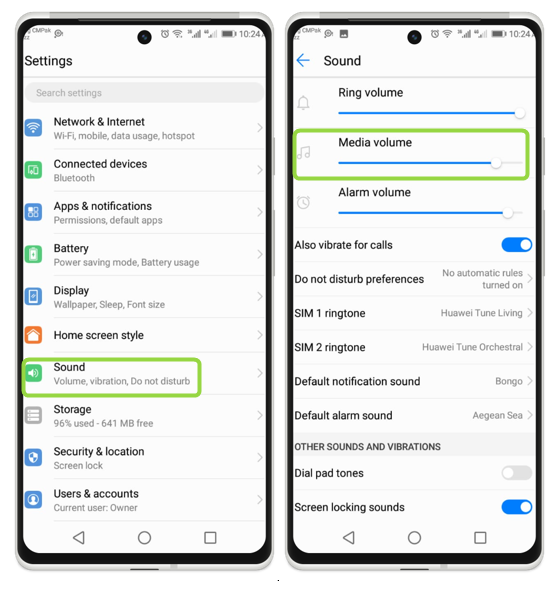
This is one other efficient approach to examine the issue of the audio jack in your Android. Some steps concerned in fixing the audio jack drawback are given as:
Open the cell settings, then faucet on the sound possibility. A brand new display screen opens, on this display screen faucet the media quantity and drag it to the appropriate facet:
Fix 4: Disconnect Secondary Connections
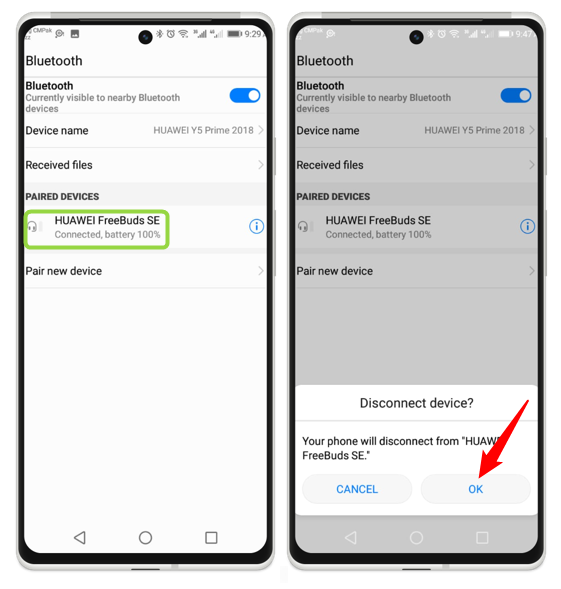
For the answer to the audio jack drawback, typically it is advisable disconnect your Android from the secondary machine linked by Bluetooth.
As proven within the determine under just one machine is linked via Bluetooth, Long press this machine possibility, then the disconnected machine possibility seems on the display screen, and faucet on the OK button:
Fix 5: Restart your Android
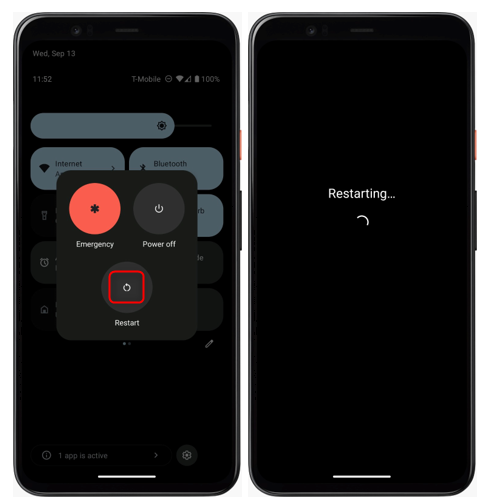
On your Android machine, a restart can typically resolve a wide range of difficulties, together with the audio jack not functioning in the issue. Restarting the system clears the cache, ends background processes, and refreshes the system.
You can restart your smartphone by lengthy urgent and holding the facility button. A brand new display screen seems, from this display screen, faucet on the Restart possibility:
Conclusion
An audio jack is used to attach the headphones to the cell machine. You can take heed to an audio tune, audio, or video by utilizing headphones. Sometimes the audio jack will not be working correctly, and it turns into irritating. There are many options to this drawback, reminiscent of inspecting your headphones, cleansing the audio jack, checking the audio settings, and restarting your machine.
HI-FI News
through https://linuxhint.com
November 15, 2023 at 04:56AM
-
Product on sale
 Audiophile Vinyl Records Cleaning BundleOriginal price was: €83.88.€73.88Current price is: €73.88. incl. VAT
-
Product on saleEasy Start Vinyl Records Cleaning KitOriginal price was: €83.88.€73.88Current price is: €73.88. incl. VAT
-
Vinyl Records Cleaner Easy Groove Concentrate€41.94 incl. VAT
-
Easy Groove Super Set€238.80 incl. VAT
-
Easy Groove Enzycaster – vinyl records prewash cleaner€41.94 incl. VAT
-
Easy Groove Extreme MK. II- vinyl records prewash cleaner€54.00 incl. VAT
-
Vinyl Records Cleaner – Easy Groove Virgin Concentrate€42.00 incl. VAT
-
Easy Groove Spray&Wipe vinyl records cleaner€41.94 incl. VAT







