
World News
Why I Built My Own Audio Player
Why I Built My Own Audio Player
In 2025, taking part in your personal music on an iPhone is surprisingly laborious, until you pay Apple or navigate a maze of limitations. So I constructed my very own participant from scratch, with full textual content search, iCloud help, and a local-first expertise. GitHub hyperlink
Why I Built My Own Audio Player
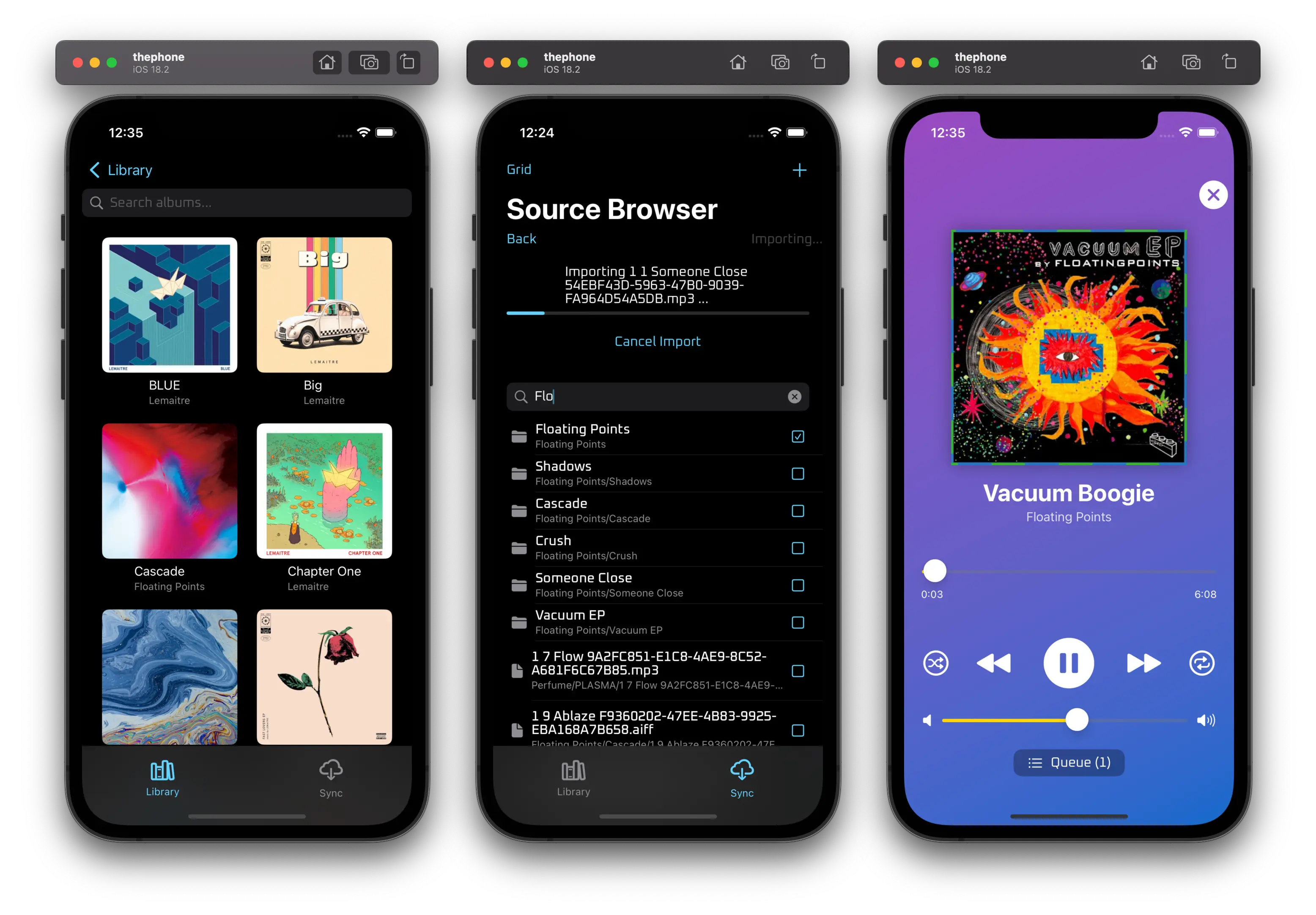
Like many individuals, I’ve picked up too many subscriptions, some by means of Apple (iCloud, Apple Music), others obtained misplaced in random platforms (like Netflix, which I forgot I used to be nonetheless paying for). I truly used Apple Music usually (and beforehand Spotify), however the streaming turned out to be extra comfort than necessity. With a curated native library, I didn’t lose a lot, simply the lock-in.
Initially I believed, I’d simply hold utilizing iCloud Music Library for cross-device music synchronization, however as soon as I cancelled the Apple Music subscription, the sync stopped working. Turns out this characteristic is behind a paywall. You can technically get it again by way of iTunes Match ($24.99/yr). Match simply shops 256-kbps AAC copies on-line; your authentic information keep put until you select to interchange them. On a contemporary Mac, you do all this within the Music app. Without both subscription, cloud sync is gone, and also you’re again to cable/Wi-Fi syncing.
Frustrated with the shortage of choices, I went the builder route. If I purchased a computing gadget (iPhone on this case), what stops me from simply constructing precisely what I would like with code to make use of it? In this text, I wish to share my full journey of frustrations in the direction of making a primary music participant performance: loading audio information, organizing and taking part in them again, however principally, I needed to remind myself, that is nonetheless a general-purpose pc, I ought to be capable to make it do what I need.
What Apple (and Others) Offer Today
Before writing my very own app, I explored the official and third-party choices for offline music playback.
Apple’s Built-in Apps
Apple technically permits you to play music straight from iCloud by way of the Files app, however its performance isn’t designed for music listening. It lacks important options akin to playlist administration, metadata sorting, or playback queues. While it helps music playback, it’s very restricted and general not a great consumer expertise.
Third-Party Apps
I went to the app retailer to search for cool apps that clear up my drawback, whereas there are numerous of them, many depend on subscription-based pricing, a questionable mannequin for an app that merely performs information customers already personal. There’s one app that I favored, Doppler. I’ve performed with it throughout a trial, however the UX is constructed round managing albums. The search wasn’t that good, and the import performance from iCloud was sluggish and laborious to make use of on a lot of nested folders. The upside was, it had a single fee pricing mannequin.
Going Builder Mode: My Technical Journey
With that stated, I made a decision to create my very own excellent music participant that solves my ache factors:
- Flexible full-text search throughout iCloud folders, so I can choose and import a folder with music or particular information shortly.
- Functionality in managing music not less than on par with the official Music App: queue, playlist administration, and sorting by albums, and so on.
- Familiar and pleasant interface.
Trying React Native First
Initially, I averted Swift due to my earlier expertise with it. Just a few years again, I favored the syntax (felt nearer to TypeScript) and appreciated the Rust-like reminiscence security, however with out native async/await at the moment, writing concurrent code in comparison with Go or JS/TS felt clunky and boilerplate-heavy. That expertise left me pissed off, so after I revisited this undertaking, I initially reached for one thing extra acquainted.
That stated, I went with React Native or Expo, hoping to reuse my internet improvement expertise and plug in a participant UI from current templates. Building the playback UI was easy; there are quite a few open-source examples and tutorial movies on constructing handsome music gamers that match my wants. I picked an current template undertaking by Gionatha Sturba, as a result of it seemed to have each characteristic I would like for my app.
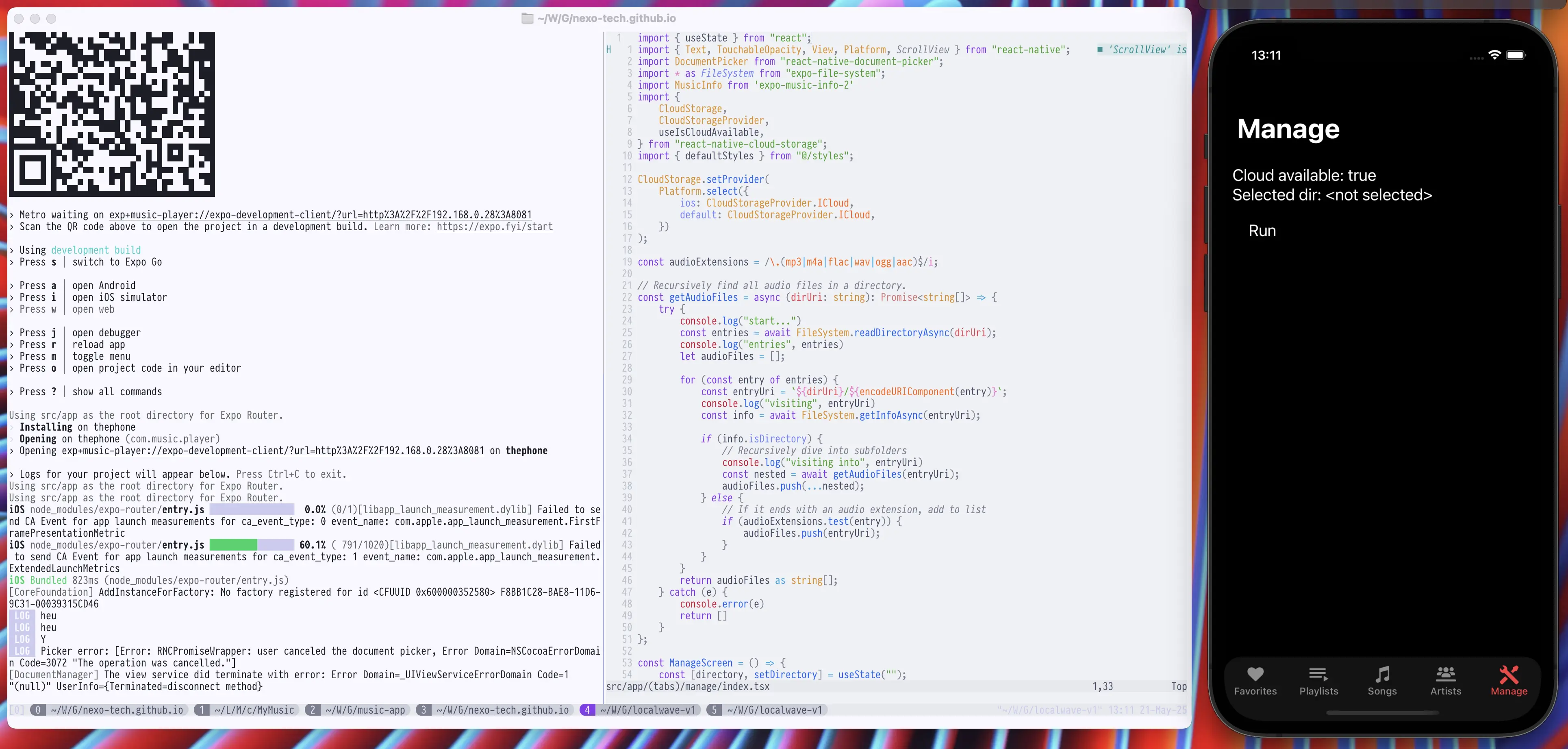
Accessing the file system and syncing cloud information hit main roadblocks: libraries like expo-filesystem supported primary file selecting, however recursive traversal over deeply nested iCloud directories typically failed and even induced app crashes. This made it clear {that a} JavaScript-based strategy launched extra complexity than simply working with Apple’s native APIs, even when it meant a steeper studying curve.
iOS sandboxing prevents apps from studying information with out express consumer permission, which meant React Native couldn’t entry exterior folders reliably. Switching to Swift gave me extra management over iCloud file entry and sandboxed permissions.
Switching to SwiftUI
I went with SwiftUI as a substitute of UIKit or storyboards as a result of I needed a clear and declarative UI layer that will keep out of the way in which whereas I centered on area logic and information synchronization. With fashionable options like async/await and integration with Swift Actors, I discovered it simpler to handle information stream and concurrency. SwiftUI additionally undoubtedly made it simpler to construction the app into remoted ViewModel parts, which in flip helped me get higher outcomes from LLMs like OpenAI o1 and DeepSeeokay. LLMs may produce pure UI code or information binding code with out introducing messy interdependencies.
App Architecture and Data Model
Let’s go over the structure of the app I’ve created: I used SQLite for persistent information storage and approached the app structure as a easy server utility. I averted CoreData as a result of I wanted tight management over schema, uncooked queries, and particularly full-text search. SQLite’s built-in FTS5 help let me add quick fuzzy search with out pulling in heavy exterior engines like google or constructing my very own indexing layer.
Three Main Screens
The app consists of three display screen/modes:
- Library import. This is the place you add your iCloud library folder. The app scans each folder for audio information and inserts each path right into a SQLite database. This method, you possibly can have full flexibility in looking out, including folders, and subfolders. Apple’s native file picker may be very clunky; you can’t choose a number of directories that you simply searched by key phrase after which additionally a bunch of information in a single go. It merely isn’t designed to try this.
- Library administration. This is the place you possibly can handle the added songs and set up playlists. For essentially the most half, I’ve mirrored the way in which Apple did that of their Music app, and it was adequate for my wants.
- Player and playback. This a part of the applying manages queue administration (repeat, shuffle), and so on., and play, cease, and subsequent track performance.
A easy consumer stream diagram is proven right here:

User stream in apply: When the app launches with an empty library, it lands on the Sync tab, displaying a giant “Add iCloud Source” button. Pick a folder there, and the Sync display screen shows a progress bar whereas it walks the tree. As quickly as indexing finishes, it switches you to the Library tab, whose first display screen lists Playlists / Artists / Albums / Songs. Dive into any listing, faucet a observe, and a Mini-Player pops up alongside the underside; faucet that mini-bar to open the full-screen Player with shuffle, repeat, queue reorder, and quantity. Swipe or faucet the shut icon, and also you’re straight again to the Library whereas playback continues. Any time you want extra music, soar again to Sync, hit the “+” within the nav bar, choose one other folder, and the import service merges new songs within the background, no restart required.
Backend-Like Logic Layer
Having an online/cloud background and shipped quite a lot of server code whereas working in startups, I went with a backend-like structure for the cellular app. The complete area/logic layer was separated from the View and View-Model layer as a result of I needed to nail the cloud syncing, metadata parsing side of the app and having clear information entry to a SQLite DB. Here’s an approximate layered structure diagram that I used right here:

How the layers speak: SQLite sits on the backside, storing uncooked track rows and FTS indexes. Then repositories wrap the database and expose async APIs. On high of these dwell my area actors, Swift actors that personal all enterprise guidelines (import, search, queue logic) so state mutations keep thread-safe. ViewModels subscribe to the actors, remodel the information into UI-ready structs, and SwiftUI views merely render no matter they get. Nothing crosses layers straight, preserving iCloud sync, playback, and UI properly decoupled.
Implementing Full Text Search with SQLite
Like I beforehand talked about, it’s lucky that you would be able to import an SQLite model with FTS capabilities: beginning round iOS 11, it’s obtainable out of the field with out further setup. This made it straightforward to combine fuzzy search into my music library with none third-party dependencies. Additionally, I used the SQLite.swift library for normal queries (which works as a form of question builder with compile-time security); nevertheless, for FTS queries, I needed to resort to common SQL statements.
SQLite’s FTS5 extension ended up being some of the priceless items of the structure. It let me question throughout file names and metadata like artist, album, and title with out further indexing infrastructure.
Setting Up the FTS Tables
| Domain | Swift actor / repo | FTS5 desk | Columns that get listed |
|---|---|---|---|
| Library songs | SQLiteSongRepository |
songs_fts |
artist, title, album, albumArtist |
| Source-browser paths | SQLiteSourcePathSearchRepository |
source_paths_fts |
fullPath, fileName |
I used two FTS5 tables: one for listed songs (artist/title/album) and one for file paths throughout folder import. Both tables dwell subsequent to the first rows in plain‐previous B-tree tables (songs, source_paths). FTS is read-only for the UI; all writes occur contained in the repositories so nothing slips by means of the cracks.
Creating the search index
SQLite’s built-in FTS5 makes fast searches straightforward. Here’s a easy desk definition I used:
|
|
I used unicode61 tokenizer to make sure that all kinds of characters are dealt with. Non-searchable keys are flagged with UNINDEXED, so that they don’t bloat the time period dictionary.
Updating information reliably
To hold issues easy and secure, I wrapped updates and inserts in transactions. This ensures the search index by no means will get out of sync, even when the app crashes or will get interrupted.
|
|
Querying with Fuzzy Search
For user-friendly search, I add wildcard help robotically. If you sort “lumine,” it searches for “lumine*” internally, giving on the spot outcomes even with partial queries.
I additionally leverage SQLite’s built-in sensible rating (bm25) to return extra related outcomes with out further complexity:
|
|
Overall, utilizing uncooked SQLite gave me the flexibleness I wanted: predictable schema, local-first entry, and highly effective full-text search, with out introducing any community dependencies or exterior companies. This strategy was excellent for an app designed to be non-public and offline-first.
Working with iOS Files and Bookmarks
On iOS, apps can retailer persistent bookmarks to file areas, however security-scoped bookmarks, which grant prolonged entry to information outdoors the app’s sandbox, are solely obtainable on macOS. iOS apps can use common bookmarks to recollect file paths and request entry once more by means of the doc picker, however that entry isn’t assured to persist silently. See Apple’s bookmark documentation.
To mitigate this, I applied a fallback mechanism that copies information into the app’s personal sandboxed container. This avoids the delicate lifecycle of security-scoped bookmarks that may silently break if iOS resets the permissions. By copying information proactively within the background, whereas the bookmark is legitimate, there’s no threat in accessing invalid audio-file references.
This strategy additionally improves indexing velocity. I can scan the folder construction as soon as (whereas entry is lively), import solely related audio information, and safely traverse deeply nested directories. But reliably taking part in again particular person audio information from exterior areas, particularly after gadget restarts, stays an unsolved drawback to me. This highlights how under-supported this use case is, even for native apps, and the way advanced it nonetheless is to deal with file entry reliably on iOS.
Building the Playback and UI
To parse metadata from audio information, I used Apple’s AVFoundation framework, particularly the AVURLAsset class, which permits inspection of media file metadata, akin to title, album artist, and so on. While metadata parsing is dealt with by the native SDK, sure fields like observe numbers you must manually search for from ID3 tags. I relied on GitHub search to seek out examples, because the official documentation lacked protection for edge instances.
Audio Playback with AVFoundation
After the library is listed, implementing an audio participant feels fairly easy: you simply need to initialize an occasion of AVAudioPlayer and let the audio play. Additionally, for quality-of-life options: taking part in music from the management middle, I needed to implement the AVAudioPlayerDelegate protocol and in addition hooked into Apple’s MPRemoteCommandCenter, which lets builders reply to system-level playback controls.
Reflections: Apple, Developer Lock-In, and the Future
Here’s what stood out throughout improvement:
The Bad
Xcode’s limitations stay irritating. Real-time SwiftUI previews are undoubtedly a step ahead, however the general improvement expertise nonetheless isn’t on par with what Flutter supplied 5 years in the past: tight VSCode integration, real-time simulator reloads, and acquainted debugging instruments.
Lack of editor flexibility. Setting up Language Server Protocol (LSP) help for Swift in Neovim or VSCode requires further tooling like xcode-build-server, and nonetheless doesn’t totally match the developer expertise of web-first ecosystems.
Some corners of Apple’s SDK nonetheless dwell in Objective-C land. Spotlight file search, for example, is simply uncovered by means of NSMetadataQuery, which makes use of Key-Value Observing (KVO) and string keys, no Swift-friendly wrapper but. Documentation is commonly sparse, which steepens the training curve.
SwiftUI’s declarative UI is nice, however debugging iCloud interactions nonetheless requires guide mocks. SwiftUI previews can’t emulate full app behaviors involving iCloud entitlements, so you must mock cloud interactions manually, a minor annoyance however notable.
The Good
Async/await. Finally, I can write I/O-bound concurrent code like an crucial one with no annoying callbacks. That’s a giant win, and I enormously respect how straightforward it’s to jot down even sync code into Actors and name it such as you do in JavaScript ecosystems.
Plethora of native libs. Yes, you’re not restricted by open supply bindings like in React Native/Flutter ecosystems. Here you’ve got rather more freedom in creating one thing “extra severe” than your organization/product web site alternative (due to poor mobile-first expertise). Many Apple’s APIs can be found with examples, which made it straightforward to get began.
SwiftUI itself. Yes, the React-style strategy to constructing UIs offers extra productiveness and house for explorations. It’s simply nice that Apple adopted it.
Summary: Building Should Be Easier
After 1.5 weeks of hacking round, I used to be in a position to get the piece of software program which precisely satisfies my wants: a native/offline music participant that may import audio information from cloud storage.
But builders shortly understand they’ll’t simply deploy apps to their very own gadgets as of late and overlook about it: apps solely run for 7 days and not using a dev certificates, and after that, you must rebuild it, until you paid $99 to Apple to enroll within the improvement program.
Even after the DMA Act within the EU, sideloading nonetheless isn’t totally open. EU customers can now set up apps from third-party marketplaces straight from a developer’s website, however provided that that developer nonetheless enrolled in Apple’s $99/yr program and agrees to Apple’s Alternative Terms. For private/hobbyist use, this nonetheless doesn’t take away the 7-day dev construct limitation.
This makes finally no sense. An revolutionary expertise firm actively places roadblocks into democratized utility improvement. Even Progressive Web Applications (PWAs) face notable limitations on iOS: even after Apple’s 16-18.x updates, iOS PWAs nonetheless run inside Safari’s sandbox. They get WebGL2 and web-push, however they don’t get Web Bluetooth/USB/NFC, Background Sync, or greater than ~50MB of assured storage. WebGL runs by means of Metal shim, so real-world frame-rates typically path native Metal apps; that is adequate for UI, however not for AAA 3D video games.
Nowadays, AI has lowered the complexity of contemporary software program improvement by permitting anybody to deal with unknown applied sciences by offering all the required data in an accessible method. You can clearly see how internet improvement obtained extra curiosity from non-technical individuals who have a option to construct their concepts with out specializing in a plethora of applied sciences. But relating to cellular apps, you simply need to play by the synthetic guidelines. Even should you constructed it your self, for your self, Apple nonetheless will get the ultimate say earlier than you possibly can run it for greater than per week. The identical firm that when empowered impartial builders now imposes tight restrictions that hinder private app improvement and distribution. AI has made it simpler than ever to construct new instruments, until you’re constructing for iOS, the place the gate continues to be locked.
HI-FI News
by way of Hacker News https://ift.tt/wv1UTMS
May 22, 2025 at 05:16PM
-
Product on sale
 Audiophile Vinyl Records Cleaning BundleOriginal price was: €69.90.€59.90Current price is: €59.90. incl. VAT
-
Product on saleEasy Start Vinyl Records Cleaning KitOriginal price was: €69.90.€59.90Current price is: €59.90. incl. VAT
-
Vinyl Records Cleaner Easy Groove Concentrate€34.95 incl. VAT
-
Easy Groove Super Set€199.00 incl. VAT
-
Easy Groove Enzycaster – vinyl records prewash cleaner€34.95 incl. VAT
-
Easy Groove Extreme MK. II- vinyl records prewash cleaner€45.00 incl. VAT
-
Vinyl Records Cleaner – Easy Groove Virgin Concentrate€35.00 incl. VAT
-
Easy Groove Spray&Wipe vinyl records cleaner€34.95 incl. VAT


