
World News
WiiM Amp streaming D/A built-in amplifier
WiiM Amp streaming D/A built-in amplifier
Life will not be for Goldilocks. "Just proper" is elusive. Every day, we face numerous conditions the place our selections are both too many to navigate or too few to seek out satisfaction. Behavioral scientists name these dissatisfying alternate options "selection overload" and "selection deprivation," respectively (footnote 1).
I feel selection overload could scare some audiophiles away from the fantastic world of streaming, the place the majority and finite scope of a bodily music-media assortment might be traded for (or augmented by) many extra listening selections. If you are prepared to discover and select, you’ll be able to hear as deep and broad as most musical rabbit holes are prone to go, after which return to your favourite songs with a few finger-pecks in your telephone.
For some individuals, all that selection is intimidating, paralyzing, overwhelming, extremely demanding. That’s no solution to get pleasure from music! I sympathize. I’m not prepared to depart bodily media behind. But I’m very completely happy within the streaming current. In reality, I urge the hesitant: Cast apart your fears and trepidations, join a free month of Qobuz, Spotify, Tidal, Apple Music, you resolvethen take it gradual. At first, keep away from lookingsimply seek for the music you need to hear. Try one thing new every day. Over time, you may regulate to the overwhelming abundance. By the tip of the month, particularly with a full-resolution service like Qobuz, Tidal, or Apple Music+HD, you might not need to give it up. The future-present beckons loudly.
Which brings me to the topic of this evaluation, the WiiM Amp (footnote 2). This is modernity: An organization (LinkPlay, which is predicated in California) put a number of thought and care into designing a neat-looking amplifier-gadget and the accompanying app, each branded WiiM, providing music followers the broad world of streaming. It can entry digital recordsdata in your NAS server and hook up with the interwebs by Wi-Fi or Ethernet cable. It was lately licensed Roon Ready. For your different sources, there are optical and HDMI-ARC digital inputs, a USB flash drive porteven an analog-in connection.
What units the WiiM Amp above most different similar-cost streaming choices is that it would not want any exterior electronics and it would not have its personal little audio system. Rather, it has an amplifier highly effective sufficient (60Wpc into 8 ohms, 120Wpc into 4 ohms) to drive all however troublesome passive loudspeaker massessimply add audio system and wires. The bundle even consists of an Alexa-based voice-activated distant management, although one of the simplest ways to run it’s from the sturdy app, accessible for Apple and Android. The app consists of many tone-shaping (DSP) choices together with graphic and parametric digital equalizers plus 23 EQ presets. You may even use the WiiM Amp as an alarm clock, waking as much as no matter music or web radio station you need. And it transmits its streams over Bluetooth and AirPlay in case you need to pay attention on wi-fi headphones or on a wi-fi sensible speaker in one other room.
It sells for $299.
How is that this attainable? It comes all the way down to intelligent design in-house, a superb manufacturing companion in China, promoting by means of Amazon, and using high-quality, commodity-priced components.
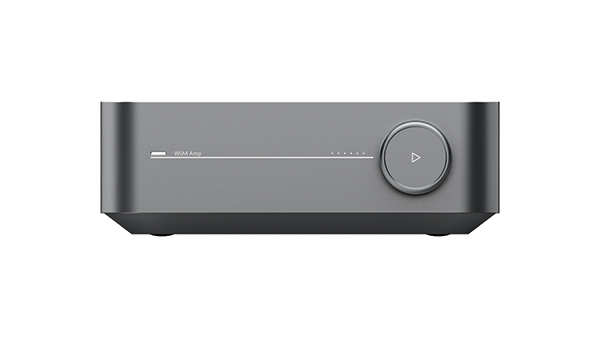
What’s it made from?
Housed in a 7.5" × 7.5" × 3" aluminum field with a plastic backside, with rounded corners and a Mac mini look, the WiiM Amp is a multi-function gadget run by an ARM Cortex-A53 quad-core pc with 512MB of DRAM and one other 512MB of flash reminiscence. That’s the brains of the operation. There is a quantity/energy/play/pause switch-knob on the entrance, plus, as talked about, a distant management, which (setting apart voice management) is helpful for turning the amount up and down, turning the unit on and off, and never a lot else.
At the amplifier’s audio-conversion core is an ESS Sabre DAC 9018 K2 "Hyperstream" chip. At the amplification core is a Texas Instruments TPA 3255 class-D amplifier. Also contained in the "shell," as WiiM calls it, are Wi-Fi and Bluetooth transceivers.
Having an actual pc implies that DSP capabilities might be modified and added, plus the firmware/OS might be up to date over the interwebs. During the time I had the WiiM Amp in my programs, there have been 4 firmware updates, the final of which finalized Roon Ready certification. That could add additional attraction for a present or aspiring multiroom Roon person wanting a second or third system for the bed room, workplace, kitchen, or den.
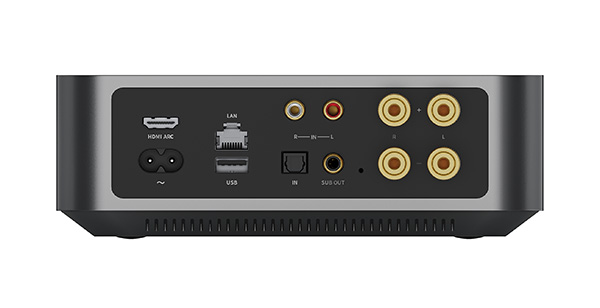
On the again, you may discover what you’d count on: binding posts that work with spades, bananas, or wire; RCA jacks for the line-level analog enter; a USB jack for including storage; and TosLink and HDMI-ARC digital inputs. There can also be an RCA output for a powered subwoofer, switchable on and off from the app. When a subwoofer is plugged in, the app permits a crossover level to be set wherever within the vary of 30200Hz.
Based on my experiences, I feel that is the WiiM’s candy spot: It’s completely matched to a system with comparatively delicate standmount audio system and a powered subwoofer. With most music, when you can match the system in order that the crossover level is on the upper finish of the vary120Hz or largeryou will not run out of amplifier energy earlier than ear-bleeding SPLs.
I might not use this amplifier with hard-to-drive audio system; that is asking an excessive amount of of it. But we’ll see what JA’s measurements present.

All the issues it does
The key to this gadget is the app, known as WiiM Home. Understand the app, and you may know what the WiiM Amp can do. It goes layers deep, with a wealth of parameters and selections, permitting full management of the listening expertise. Yes, it may set off resolution paralysis! It’s effectively thought out, although, and one needn’t soak up all its performance directly. I launched myself to the WiiM Amp by unpacking it, hooking it as much as a pair of Behringer Truth 2031P passive studio displays, pushing the management knob/change till lights began blinking, then pairing it by Bluetooth to my iPhone 15. In seconds, I used to be streaming music from Qobuz and Spotify’s native apps.
Then I downloaded the WiiM app and skim the quick-start directions. I went by means of the setup course of and paired it to my Wi-Fi community and to its distant management (which operates over Bluetooth), all utilizing the telephone. Then it slowed down throughout a firmware replace. When it restarted, it could not discover the Wi-Fi community.
When it involves balky devices, this wasn’t my first rodeo. The WiiM Amp remained paired to my telephone by way of Bluetooth. So utilizing the app, I shut it down. Outside the app, I unplugged it from the wall and let it cool its heels as I ate dinner.
I returned to it that night and plugged it in. It discovered the community and commenced speaking with my telephone over Wi-Fi. From then on, I used to be in a position to stream Qobuz by means of the WiiM app. (I needed to signal onto Qobuz from inside the app; the identical could be true of the numerous different companies accessible that stream instantly.) Like different streaming devices, the WiiM Amp makes use of Spotify Connect and Tidal Connect to entry these companies. You management the music by means of the service’s app, nevertheless it’s the WiiM pc that is interacting with the service’s servers, by way of applied sciences often known as UPnP and DLNA; the app in your pill or telephone is merely the director.
I used to be up and operating. I pushed the Browse button on the backside of the app, and all my music, streamed and native, was at my fingertips. Want to decide on a distinct enter? Scroll to the underside to pick out. At the highest of the menu you may see your own home NAS server and its music library, plus the USB drive if in case you have plugged one in.
About that USB drive: It might be formatted as VFAT, NTFS, or EXT4. The USB socket can present as much as 650mA of present, sufficient to drive any thumb drive and lots of exterior SSDs however not sufficient to energy mechanical onerous drives that lack their very own energy provide.
To discover music, choose Artists, Albums, or Songs and search on the high of the display screen. Go again to the Browse display screen and scroll all the way down to see the assorted streaming-service choices, together with the same old radio suspects: numerous BBC feeds, iHeartRadio, one thing known as Calm Radio, Napster (which I assumed was lengthy useless).
After a number of hours enjoying with the WiiM app’s capabilities, unfold over a number of days, the firmware replace that added Roon Readiness occurred. To begin utilizing Roon, you could arrange the server in your native community (if it is not arrange already), go to Settings > Audio on the Roon server, and Enable the WiiM Amp as a Device (endpoint). It had been some time since I used Roon, so I needed to register once more, on the pc and on my telephone. All that executed, I may function the WiiM Amp from Roon on the pc or by means of the Roon app.
Things went as anticipated. I believe that some potential patrons will use the WiiM app minimally, only for setup, then largely use Roon to play music. Others will benefit from the WiiM Home app’s broad and deep performance. More selections. Please stay calm.
Footnote 1: Here is one amongst many articles on trendy life and selections: tinyurl.com/mr3pry2k.
Footnote 2: See wiimhome.com/wiimamp/overview.
HI-FI News
by way of InnerFidelity https://ift.tt/D2HiUhL
June 21, 2024 at 04:39PM
-
Product on sale
 Audiophile Vinyl Records Cleaning BundleOriginal price was: €69.90.€59.90Current price is: €59.90. incl. VAT
-
Product on saleEasy Start Vinyl Records Cleaning KitOriginal price was: €69.90.€59.90Current price is: €59.90. incl. VAT
-
Vinyl Records Cleaner Easy Groove Concentrate€34.95 incl. VAT
-
Easy Groove Super Set€199.00 incl. VAT
-
Easy Groove Enzycaster – vinyl records prewash cleaner€34.95 incl. VAT
-
Easy Groove Extreme MK. II- vinyl records prewash cleaner€45.00 incl. VAT
-
Vinyl Records Cleaner – Easy Groove Virgin Concentrate€35.00 incl. VAT
-
Easy Groove Spray&Wipe vinyl records cleaner€34.95 incl. VAT


