Tag Archives: Davinci Resolve

Mix Tech Spotlight: Digital Audio Workstations 2022

New York, NY (November 30, 2022)—Every year brings with it new updates to our favorite digital audio workstations, bringing with them new features, bug fixes and more aimed at everyone from new users to veteran pros. With that in mind, here’s some of the major DAW editions we’ve seen this year.

Audacity 3.2
Audacity 3.2

Audacity 3.2

With the release of Audacity 3.2 in late September, following the company’s acquisition last year by Muse Group, the program got one of its biggest overhauls to date, with the goal of making the open-source DAW an end-to-end production tool. To that end, Audacity has added real-time effects support, non-destructive editing, VST3 support, UX and UI improvements, and online audio sharing with the newly launched audio.com, the company’s free cloud-based audio file platform. The underlying code has been completely rewritten to ensure stability and the GUI has been reworked to provide a smoother editing experience, with the audio output bar and volume slider combined. A new Audio Setup option allows for changes to input, mic and output settings.

Avid Pro Tools Intro

Avid Pro Tools Intro

With Pro Tools upgrades and feature additions coming throughout the year, along with associated partnerships and workflow enhancements, it can be a full-time job just keeping up. Big news came in early October, however, with the debut of Pro Tools Intro as a free download—the idea being to offer PT functionality to a new generation of content creators. Built on the Pro Tools code base, which ensures a smooth upgrade path, Intro includes most of the essential features, including MIDI tools and dozens of core effects and instrument plug-ins. Pro Tools Intro users become part of the Avid global community through the Avid Link app, allowing content to be shared with others; by upgrading to the AvidPlay subscription service, users could then distribute their content to the world.

Focus Features, AppleTV+ and Universal Join Mix Presents Sound for Film: Awards Season

DaVinci Resolve 18—Fairlight

Blackmagic Design DaVinci Resolve 18—Fairlight

Fairlight, a DAW that dates back to the late 1980s, gained new life when it was integrated into the Davinci Resolve engine, and with the July 2022 update to Resolve 18, it packs a host of new features, including the ability to convert fixed bus projects to FlexBus in project settings, freely order tracks and buses in the mixer via the track index, and nudge custom millisecond or sub-frame intervals in the timeline. It also features improved quality for time-stretched audio, improved Dolby Atmos immersive mixing, including binaural monitoring, and Native support for Dolby Atmos production for Linux and Apple silicon. Improved plug-in management adds replace-and-copy settings in the mixer, and there are new built-in presets for equalizers and dynamics, along with dozens of improvements and upgrades to specific features.

Soundation Beatmaker Online DAW

Soundation Beatmaker Online DAW

In early October, music software developer Soundation launched Beatmaker, an online DAW/social platform intended to help emerging musicians collaborate online by providing ready-made and royalty-free beats, drum kits and samples, and also allowing users to upload their own sounds and samples. After they’re uploaded, beats and samples can be manipulated and edited within the online sequencer and sampler for beat making—and ultimately be shared with others within Soundation’s online community of 100,000 users. Producers can immediately use the Beatmaker studio to remix beats made by MG the Future, with kits by Justin Hawkes and Bishu to follow. No sign-up is required. Each kit comes with a beat pattern, which can be built upon or completely changed by the user.

Steinberg Cubase 12
Steinberg Cubase 12

Steinberg Cubase 12

Every version of Cubase—Pro, Artist and Elements—has been updated with the introduction of Cubase 12 earlier this year. All three editions now sport enhanced controller support, allowing MIDI controllers to be integrated by automatically detecting selected controllers and providing enhanced options for mapping external devices. Also, the Chord Track now allows audio events to be dragged and dropped to provide MIDI chord progressions for audio. Additionally, the entire Cubase family gets new editing workflow improvements and near sample-accurate volume automation, which is no longer affected by the set buffer size.
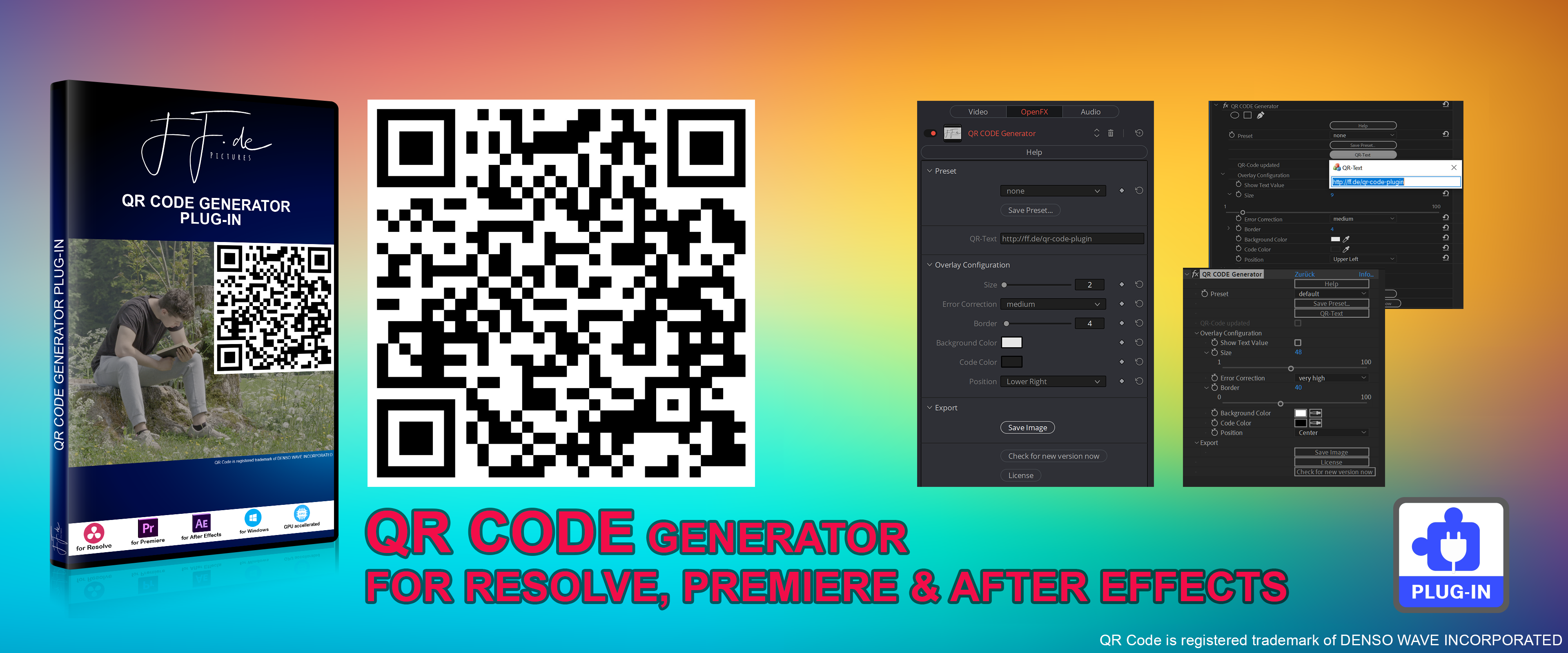
QR Code Generator Plug-in

QR Code Generator Plug-in for Davinci Resolve, Adobe Premiere and Adobe After Effects (Windows Versions).

With this plugin, you’re able able to insert QR Codes into your video production. This allows viewers to visit a specific website with more information, read an additional text, link to your social media profiles and much more –  you name it!

Buy now

QR Code Generator Plug-In in Resolve.

Controls: Preset Section

In this section, you’re able to save and open presets for this plug-in. You may store all your settings, including text color and position into one preset file. This allows you to maintain the same style across different projects.

QR-Text

Here you’re able to enter the text information of the QR Codes itself. This may be plain text or links or other functions.
Examples:

http://ff.de/qr-code-plugin  -> links to this page
mailto:[email protected] -> starts to create an email to [email protected]

of course, you can do other things as well: Send money to a PayPal or bitcoin address, trigger calender events, link to your Youtube channel, Instagram Profile or put in geolocation.

Controls: Overlay Configuration

Size: The size of the QR Code is measured in pixels per code element. So size “2” means 2×2 pixels per individual code element. Every size setting is resulting in integer sized square blocks. This is our way to make sure scaling does not affect the readability of the code. Once you pick a size that exceeds the screen dimensions or you hit a border of the video image, the size will be limited to make sure the QR Code is not cropped.

Error Correction: Your choice of error correction. Higher error correction means more space occupied by the QR Code, but it also means less risk to reading errors caused by image artifacts while reading the code.

Border: A border around the QR code helps to improve readability and also it looks nicer. The border size is measured in pixels and gets restricted if the QR Code hits the border of the video image.

Background Color: Here you can define the color of the background (usually white). As much as it makes sense to create nice colors and follow the style or cooperate identity of the video, please keep in mind that maintaining a high level of contrast means better readability of the code.

Code Color: That’s the color of choice for the individual code elements.

Position: Your choices here are “Upper Left”, “Upper Right”, “Center”, “Lower Left”, “Lower Right” and Manual. When you put it into one of the corners, please use an appropriate border so the code can’t be affected by overscan.

Export Section

Save Image: This button allows you to create an 8-Bit TIFF File of the QR Code itself. The default file name is created using the QR-Text you are using. This option might become handy when you want to use the same QR Code somewhere else. For example on a web page or printed materials like a poster, a cover or similar.

Q&A

Question: Why should I use a QR-Code in my video?

Answer: When you produce videos, you never know where they end up to be played. Sometimes your viewers are in a hurry and want to get quick access or take a quick note about what they have seen. If you offer a QR-Code inside the video, it’s easy as opening the camera app on a smartphone, pointing it to the screen and heading to the according website. Educational videos might benefit from additional information that can be kept current, review videos may carry an affiliate link, videos from influencers may point to their profile on instagram or any other sort of social media. Possibilities are endless!

Question: Why do I need a QR-Code generator as a plug-in?

Answer: Only because it is VERY convenient. We understand that there are other ways of creating QR-Codes outside your video editing or color grading application, but that means you need to save the generated image, import it and place it somewhere. At the same time you need to make sure you’re not importing an QR Code image that does not belong to the video or decrease the readability of the code by scaling it. With our QR Code Generator Plug-In, you not only achieve perfect quality, but also have the fastest solution to embedding QR-Codes in your videos.

QR Code is registered trademark of DENSO WAVE INCORPORATED

Der Beitrag QR Code Generator Plug-in erschien zuerst auf FF Pictures GmbH | Florian Friedrich.