Tag Archives: Adobe Premiere

True Crime Sound Design on ‘Anatomy of Murder’

Dayton Cole, handles all the post-production work on Anatomy of Murder using a variety of tools, including Avid Pro Tools, a Universal Audio Apollo Twin X interface, plug-ins on an adjacent screen like Waves’ WLM Loudness Meter, and a pair of Audeze LCD-2 Classic Open-Back Over-Ear Headphones.
Dayton Cole, handles all the post-production work on Anatomy of Murder using a variety of tools, including Avid Pro Tools, a Universal Audio Apollo Twin X interface, plug-ins on an adjacent screen like Waves’ WLM Loudness Meter, and a pair of Audeze LCD-2 Classic Open-Back Over-Ear Headphones. LEAF & PINE PHOTOGRAPHY | www.leafandpine.com
Anatomy of Murder executive producer Sumit David.

Indianapolis, IN (March 18, 2021)—True-crime podcasts, by the nature of the stories they tell, tend to be underlaid with tense and ominous sounds. While each episode of the Anatomy of Murder podcast, produced by Indianapolis, IN-based Audiochuck, deals with dark themes and details, there is also plenty of room for light, says executive producer Sumit David.

“If you look at the color palettes of a Star Wars movie, they always [begin] white and bright, and as the movie progresses, it gets darker,” says David. “[We were] like, ‘That’s how we should approach the sound design of this. Let’s start not so true crime. Let’s not start very heavy. Let’s ease our audience into it.’”

Dayton Cole, who handles all the post-production work on Anatomy of Murder at podcast editing service Resonate Recordings (Lousiville, KY), likens the process to building a house, with the brooding sounds serving as the basement. Once they establish that baseline, Cole attends to the “brighter, sentimental moments,” which are his favorite to highlight. “More natural sounds, strings and piano—those kind of natural elements—rather than the synthetic, electronic pulsing and droning,” he says.

Anatomy of Murder's hosts Anna-Sigga Nicolazzi, an NYC homicide prosecutor, and Scott Weinberger, an investigative journalist.
Anatomy of Murder’s hosts Anna-Sigga Nicolazzi, an NYC homicide prosecutor, and Scott Weinberger, an investigative journalist.

David’s background as an editor on reality television programs prepared him for his role on Anatomy of Murder, which is also unscripted. Hosts Anna-Sigga Nicolazzi, an NYC homicide prosecutor, and Scott Weinberger, an investigative journalist, research the cases and keep a loose set of talking points for each episode, but otherwise the interviews and case discussions are fluid. The pair record on Blue Yeti USB microphones, while guests record locally on their own computers during video conferences with the hosts.

Before the audio files make it to Cole as an OMF, an open-source format that allows him to import David’s Adobe Premiere files into Pro Tools, David edits the interviews and compiles related archival audio collected from law enforcement sources.

How ‘Real Narcos’ Makes Rough Audio Work

Missing In Alaska’s Sound Puts Listeners in the Search

“I try and make it so that the story is all laid out, that all the bites, whether they be from Scott, Anna-Sigga, from the guests, or from archival material, are all put together in one big sequence, divided up into the four acts,” says David. “From there, it’s handed off to Dayton so he can do his magic of adding the sound design, pacing [and] music.”

David provides some creative direction, but after working together on dozens of episodes of the podcast, the pair have a largely unspoken workflow. Cole approaches each episode as a listener would, forming an outsider’s perspective on the structure and recordings David sends him. “I create blank tracks—little ‘slugs’ I call them—so I can just say, ‘This is kind of the emotion I want in this section,’” says Cole.

Many of the sounds Cole weaves into the podcast’s aural environment come from sound libraries, although he often manipulates the stems through processors like iZotope Rx to meet his needs. The main concern is to keep the music from distracting listeners away from the dialogue, so it is impactful but not overpowering. On a recent episode where he didn’t have access to stem tracks, he improvised to keep the bass and kick drum from overpowering the other instruments.

“I liked what all the other elements were doing,” so “I used the Elysia Alpha Compressor to be able to help the mids come back, and then open up the sides,” he says. “And, I was able to kind of blend that underneath so it wasn’t hitting you in the face so much.”

Transparency is key at the end of the day. Cole prefers to remain in the background and work without being detected. “My job is, don’t be noticed, but be impactful,” he says. “If people are in the story and they’re digging it and they don’t notice all the sound changes, that’s when I know I’ve done my job.”

Anatomy of Murder • https://anatomyofmurder.com

Pro Audio Veteran Goes Viral (on YouTube)

As COVID-19 has brought much of the music industry to a halt, it has also unleashed a tidal wave of musical creativity onto the internet as superstars and unknowns alike have livestreamed and posted homebrew performances during quarantine. Some of the clips are cute and others are inept, but after you’ve seen a couple, very few stand out—so let me tell you a bit about one that does, not only for the performance but also the resourceful story behind it. Both amusing to watch and musically satisfying, it’s a viral video of top L.A. session musicians remotely covering the 1980s hit “Easy Lover” by Philip Bailey and Phil Collins.

First off, they nail it—and even if your ears or taste in music don’t agree, they can statistically prove it: At press time, the jubilant clip has amassed more than 145,000 views on YouTube in just two weeks, allowing the behind-the-scenes players—guitarist Jay Gore, drummer Chad Wright, keyboardist Noriko Olling and legendary bassist Leland Sklar—to step into the limelight. Fronting it all on vocals is pro audio industry veteran Gussie Miller, who takes on both Bailey and Collins’ parts with suitable aplomb.

Re-creating the vibe of “Easy Lover” in their viral video are (clockwise from top left): Gussie Miller, Leland Sklar, Gussie Miller, Noriko Olling, Chad Wright and Jay Gore.

The “Easy Lover” clip was the brainchild of longtime friends and session pros Gore (Lauryn Hill, Michael McDonald) and Wright (The Jacksons, Bruce Hornsby). Getting Olling (Chaka Khan, Pink, Teena Marie) onboard to play keyboards was easy, as she’s married to Wright. Still, they needed vocals, and Miller quickly came to mind.

While he’s a journeyman audio pro who’s worked everywhere from Sam Ash to NASA—not to mention stints with Steinberg and TC Electronic—Miller is really a singer, having toured as a background vocalist for Lavern Baker, Seal and Cher, in addition to releasing his own album, Forever Plan, a few years ago. Miller recalls, “Jay got ahold of me and said, ‘Dude, Chad and I want to redo “Easy Lover.” Are you down?’ I said sure, but who’s gonna sing the other part? ‘Sing both.’”

The need for a bassist remained, but Miller had an idea. Having befriended Sklar at a Recording Academy event, he called up the renowned bass player, who, in addition to having played on hundreds of hit records over the years, has been Collins’ go-to studio/live bassist for the last 35 years. These days, Sklar has his own group, The Immediate Family, with fellow music legends Waddy Wachtel, Russ Kunkel, Danny Kortchmar and Steve Postell, but when asked to play on the video, he was immediately in, later joking on YouTube, “Gussie recommended me because he said I have a chart to it.”

One thing Sklar didn’t have, however, was a way to record his part. Miller explained, “I called him up and Lee said, ‘Yeah, I’ll do it, but I don’t have any recording gear at home. Never had it—no interest. If you can help me through that, fine.’ I said, let me call some people.” Within minutes, Miller was on the phone with Phil Wagner, senior vice president of Solid State Logic, who recommended the company’s new SSL 2+ interface. “Lee needed an interface, so we made sure he had one in time to complete the track,” said Wagner. “We’re pleased it worked out as I’m a huge fan.” Set up with the SSL 2+ and a copy of Avid Pro Tools Free, “he cut the track and did an amazing job, because he’s Lee Sklar,” laughed Miller.

For his own contributions, Miller not only dressed the part(s) for the viral clip, recalling the sartorial finesse of Bailey and Collins in the original MTV-era “Easy Lover” video, but also got some inside vocal help from an unlikely source: longtime friend and fellow vocalist Valerie Bailey—aka Mrs. Philip Bailey—who sang on Miller’s album a few years ago. “You hear my record, anybody that’s singing above me, that’s Val,” grinned Miller.

Quickly drafting her as a coach, Miller sent Bailey sections of his vocal and got line-by-line feedback: “She was like, ‘Okay, you’re a little ahead of the beat. You gotta lay back; he’s more smooth than that,’ and she would literally talk me through it,” said Miller. “I cut his vocal with a U87, and while Phil Collins always used a Beyer M88, I own one but couldn’t find it, so I ended up cutting his part with a M69. It really made the sound because they’re radically different-sounding microphones. It helped find that urgency with the Phil Collins side.”

Once Miller filmed his cheery impersonations with an iPad (“I live in a condo, so my neighbors must hate me now from hearing the song a million times.”), he sent the footage to Olling, who used the project as an opportunity to teach herself video editing in Adobe Premiere, knocking out the edit in two days while husband Wright mixed the project in Steinberg Nuendo. Uploaded to Sklar’s YouTube account on June 30, the clip gained traction right away, to the delight of all involved.

“We’ve been overjoyed at how it’s blown up,” said Miller. “It has literally freaked me out, because I get email and cool comments, and people are following me or bought my CD. You can’t pay for this kind of advertising.” Indeed, Miller’s next album, My Name Is Gussie, will come out later this year, and he’s hoping the video’s success becomes a launch pad for the collection. For now, the thrill of seeing the clip go viral has given even its naysayers a bit of a shine for Miller: “11,000 people have ‘liked’ the video on YouTube, but 87 people just weren’t feeling it. I think that’s hilarious!”

QR Code Generator Plug-in

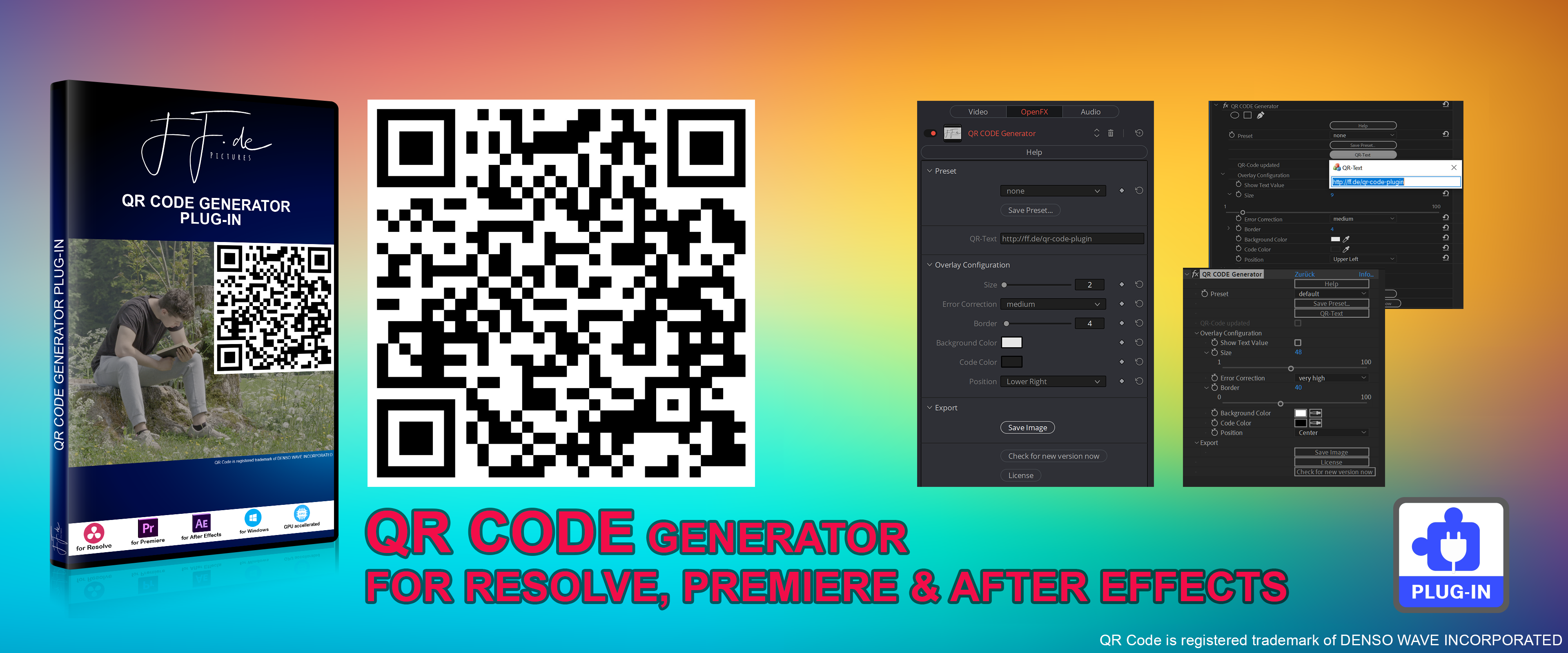
QR Code Generator Plug-in for Davinci Resolve, Adobe Premiere and Adobe After Effects (Windows Versions).

With this plugin, you’re able able to insert QR Codes into your video production. This allows viewers to visit a specific website with more information, read an additional text, link to your social media profiles and much more –  you name it!

Buy now

QR Code Generator Plug-In in Resolve.

Controls: Preset Section

In this section, you’re able to save and open presets for this plug-in. You may store all your settings, including text color and position into one preset file. This allows you to maintain the same style across different projects.

QR-Text

Here you’re able to enter the text information of the QR Codes itself. This may be plain text or links or other functions.
Examples:

http://ff.de/qr-code-plugin  -> links to this page
mailto:[email protected] -> starts to create an email to [email protected]

of course, you can do other things as well: Send money to a PayPal or bitcoin address, trigger calender events, link to your Youtube channel, Instagram Profile or put in geolocation.

Controls: Overlay Configuration

Size: The size of the QR Code is measured in pixels per code element. So size “2” means 2×2 pixels per individual code element. Every size setting is resulting in integer sized square blocks. This is our way to make sure scaling does not affect the readability of the code. Once you pick a size that exceeds the screen dimensions or you hit a border of the video image, the size will be limited to make sure the QR Code is not cropped.

Error Correction: Your choice of error correction. Higher error correction means more space occupied by the QR Code, but it also means less risk to reading errors caused by image artifacts while reading the code.

Border: A border around the QR code helps to improve readability and also it looks nicer. The border size is measured in pixels and gets restricted if the QR Code hits the border of the video image.

Background Color: Here you can define the color of the background (usually white). As much as it makes sense to create nice colors and follow the style or cooperate identity of the video, please keep in mind that maintaining a high level of contrast means better readability of the code.

Code Color: That’s the color of choice for the individual code elements.

Position: Your choices here are “Upper Left”, “Upper Right”, “Center”, “Lower Left”, “Lower Right” and Manual. When you put it into one of the corners, please use an appropriate border so the code can’t be affected by overscan.

Export Section

Save Image: This button allows you to create an 8-Bit TIFF File of the QR Code itself. The default file name is created using the QR-Text you are using. This option might become handy when you want to use the same QR Code somewhere else. For example on a web page or printed materials like a poster, a cover or similar.

Q&A

Question: Why should I use a QR-Code in my video?

Answer: When you produce videos, you never know where they end up to be played. Sometimes your viewers are in a hurry and want to get quick access or take a quick note about what they have seen. If you offer a QR-Code inside the video, it’s easy as opening the camera app on a smartphone, pointing it to the screen and heading to the according website. Educational videos might benefit from additional information that can be kept current, review videos may carry an affiliate link, videos from influencers may point to their profile on instagram or any other sort of social media. Possibilities are endless!

Question: Why do I need a QR-Code generator as a plug-in?

Answer: Only because it is VERY convenient. We understand that there are other ways of creating QR-Codes outside your video editing or color grading application, but that means you need to save the generated image, import it and place it somewhere. At the same time you need to make sure you’re not importing an QR Code image that does not belong to the video or decrease the readability of the code by scaling it. With our QR Code Generator Plug-In, you not only achieve perfect quality, but also have the fastest solution to embedding QR-Codes in your videos.

QR Code is registered trademark of DENSO WAVE INCORPORATED

Der Beitrag QR Code Generator Plug-in erschien zuerst auf FF Pictures GmbH | Florian Friedrich.