Montreal, Canada (June 11, 2021)—Digital audio service company LANDR has acquired UK software developer Synchro Arts, which produces the VocAlign and Revoice Pro plug-ins.
While best-known for its AI-based mastering software, LANDR also offers a music distribution service, a samples marketplace, a plug-in store and a marketplace for hiring producers, engineers and promoters, as well as a video chat software that streams high quality audio from the DAW. Synchro Arts’s plug-ins will be added to LANDR’s product catalog, but will remain available at typical plug-in retailers. The products will eventually be available through LANDR’s plug-ins store as well, but no specificdate is currently available.
The Synchro Arts team, based in the UK, will be integrated into the global LANDR team, but will continue to be responsible for the development and evolution of the existing product lines, which LANDR has no plans to make changes to.
Founded in 1994, Synchro Arts produces its VocAlign plug-in, used worldwide, and its Academy Award-winning Revoice Pro software can likewise be found in professional music, TV and film studios globally.
“This deal is a natural fit,” said Pascal Pilon, CEO and co-founder of LANDR. “Vocal processing is a key piece of the music creation process, and with Synchro Arts, we have added world-class technology to our platform and world-class individuals to our team.”
“To be joining forces with the talented LANDR team opens up fantastic opportunities for us,” added Jeff Bloom, CEO and founder of Synchro Arts. “We are all very excited by their vision and interest in incorporating much more of the audio processing technology we’ve been developing over 26 years into new, jointly developed applications.”
While the VocAlign and Revoice products will continue to be developed and maintained on their own, LANDR also has other plans for the underlying technology. “We’re working on something really exciting that will bring the magic of what Synchro Arts has accomplished to a whole new audience,” said Pilon.
How do you capture the essence of a legendary engineer/producer with 23 Grammys, 160 gold and platinum albums and a ‘who’s who’ resume, and put that into a piece of software? Well, that’s just what Leapwig and the iconic Al Schmitt went for with the new Al Schmitt signature plug-in. The team literally encapsulated his gear, mixes’ textures and workflow to come up with something that ambitious.
When first opening the plug-in, you select from a Source dropdown menu that offers up Vocal, Bass, Brass, Mix, Piano or Strings. These are referred to as ‘profiles’ and each of them are tuned differently with their own character and tone. Each profile also features a different ‘tuned’ amount of harmonic distortion. Within each profile, there are a number of options as well—for example, Vocal features Body Level, Air Level, Echo Level, Compression, Air Type and Echo Type.
This approach to plug-in design has led Al and the team at Leapwig to create something that operates in a unique fashion. When audio is played, rings that represent loudness are played around the relevant icon in the center in real time. If there is something like gain reduction happening, the outer rings tighten up accordingly at ½ dB per ring. For instance, if there are four rings happening, you’ve got 2 dBs of reduction. It’s something your eyes have to get used to because it’s simply a new way of operating.
Since each source features its own customized parameters to tweak, you quickly adjust to how to get around. For example, Mix features Sub Boost, Low, Mid and High Level, Low, Mid and High Comp, a compressor link and Air Boost. Bass is nothing but Compression, Body Level and Air Level, but it includes additional harmonic distortion within those parameters. Piano, which is one of my favorites, features Compression, Echo Level and A/B/C Echo Type. Note that “echo” is actually a reverb, a name that was chosen since that is what Al calls it. Aside from that, there’s In and Out Meters with up to 12 dBs of gain.
Leapwing Al Schmitt Signature Plug-In
What I like about this plug-in is that you can dial in some taste very quickly. When first listening, it helps to run through each source to understand what the parameters do. To hear the echoes clearly, I would simply put on audio with attack and stop the transport, listening to what sound is created afterwards. The others, such as Sub, Air bands and EQs are easy to hear. Compression is subtle yet clearly audible. I found it useful to also mix and match—for example, using the compression in the bass source on something like a piano. Then, if I wanted more, I put another instance after in the DAW and used the EQ in Echo in the Strings source, or the EQ and Air settings in the Mix source. Once you have a feel for it, your instinct knows where to go. I saved a number of presets for easy recall: I like Echo Type C on the Strings source, so that’s now my “RT Echo 1 Strings’ preset, and I also captured a nice Mix bus preset with Sub Boost, Air Boost a few dBs of Gain and a touch of Highs as “AS Master 1.”
Aside from being easy, this plug is fun to use. You can get to a sound with just a few quick fader slides and most importantly, it works as advertised. It’s not big, bold and aggressive, but subtle and tasty, especially in the reverb/echo fields. Most importantly, all of these sounds are clean, clear and tasty. I would also use the word “refined,” which is a testament to the team making it. Since you probably can’t get him to your session, now you can bring a little of Al Schmitt’s magic sonic touch to your own tracks.
Rich Tozzoli is an award-winning, Grammy-nominated producer, engineer and composer for programming such as FOX NFL, Pawn Stars and Oprah & Deepak Chopra. www.richtozzoli.com
Knoxville, TN (September 9, 2020)—Waves Audio has shipped its new Kaleidoscopes plug-in, which creates a selection of classic analog studio effects from over the years, such as 1960s phasing and tape flanging, 1970s stadium tremolo-guitar vibes and 1980s chorus sounds.
The plug-in sports Dual Cascade engines, allowing users to combine or “cascade” any two effects for additional textures, or run in parallel. The plug-in also features intelligent triggers that respond dynamically to performances in real time.
On each of the two engines, users choose a selection of waveshapes or any sidechain signal from a DAW session to be the modulation input. A performance can also be chosen as the input, allowing live playing to control the sound in real time and drive the pulsing of the effect.
Control options include Speed, Resonance, Width and Depth of the modulation, plus filter settings and mix knobs. There are also five different effect “characters” for different analog flavors, and users can tempo-sync the modulation effect to their DAW sessions to keep things consistent every time they re-open a song.
The plug-in also offers an added THRU mode for a stompbox-styled sound, with the dry signal on one channel and the wet signal on the other.
With the Intelligent Triggering section, users can set input-sensitive envelopes and adjust intelligent triggers, enabling the two effects to “listen” to a performance and respond dynamically
Kaleidoscopes is included in Waves’ Mercury, Pro Show and SD7 Pro Show bundles.
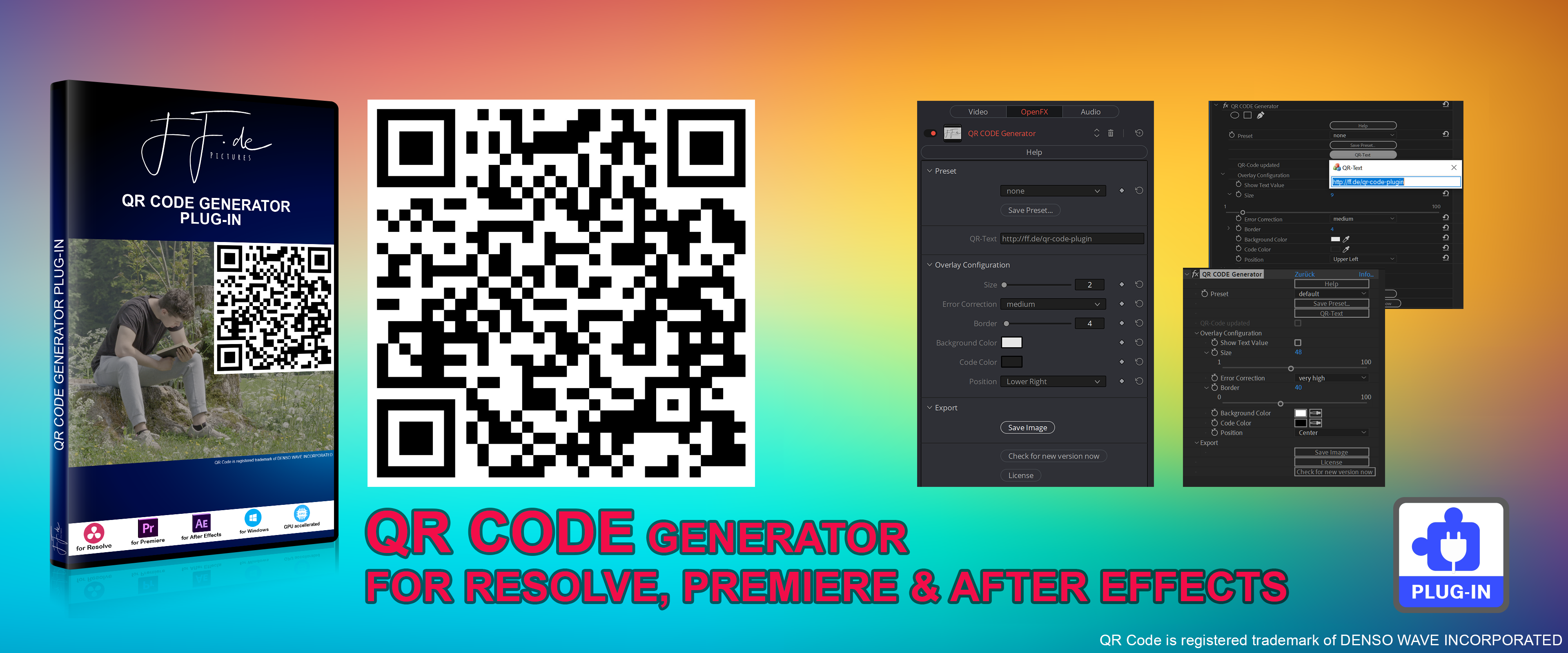
QR Code Generator Plug-in for Davinci Resolve, Adobe Premiere and Adobe After Effects (Windows Versions).
With this plugin, you’re able able to insert QR Codes into your video production. This allows viewers to visit a specific website with more information, read an additional text, link to your social media profiles and much more – you name it!
In this section, you’re able to save and open presets for this plug-in. You may store all your settings, including text color and position into one preset file. This allows you to maintain the same style across different projects.
QR-Text
Here you’re able to enter the text information of the QR Codes itself. This may be plain text or links or other functions.
Examples:
of course, you can do other things as well: Send money to a PayPal or bitcoin address, trigger calender events, link to your Youtube channel, Instagram Profile or put in geolocation.
Controls: Overlay Configuration
Size: The size of the QR Code is measured in pixels per code element. So size “2” means 2×2 pixels per individual code element. Every size setting is resulting in integer sized square blocks. This is our way to make sure scaling does not affect the readability of the code. Once you pick a size that exceeds the screen dimensions or you hit a border of the video image, the size will be limited to make sure the QR Code is not cropped.
Error Correction: Your choice of error correction. Higher error correction means more space occupied by the QR Code, but it also means less risk to reading errors caused by image artifacts while reading the code.
Border: A border around the QR code helps to improve readability and also it looks nicer. The border size is measured in pixels and gets restricted if the QR Code hits the border of the video image.
Background Color: Here you can define the color of the background (usually white). As much as it makes sense to create nice colors and follow the style or cooperate identity of the video, please keep in mind that maintaining a high level of contrast means better readability of the code.
Code Color: That’s the color of choice for the individual code elements.
Position: Your choices here are “Upper Left”, “Upper Right”, “Center”, “Lower Left”, “Lower Right” and Manual. When you put it into one of the corners, please use an appropriate border so the code can’t be affected by overscan.
Export Section
Save Image: This button allows you to create an 8-Bit TIFF File of the QR Code itself. The default file name is created using the QR-Text you are using. This option might become handy when you want to use the same QR Code somewhere else. For example on a web page or printed materials like a poster, a cover or similar.
Q&A
Question: Why should I use a QR-Code in my video?
Answer: When you produce videos, you never know where they end up to be played. Sometimes your viewers are in a hurry and want to get quick access or take a quick note about what they have seen. If you offer a QR-Code inside the video, it’s easy as opening the camera app on a smartphone, pointing it to the screen and heading to the according website. Educational videos might benefit from additional information that can be kept current, review videos may carry an affiliate link, videos from influencers may point to their profile on instagram or any other sort of social media. Possibilities are endless!
Question: Why do I need a QR-Code generator as a plug-in?
Answer: Only because it is VERY convenient. We understand that there are other ways of creating QR-Codes outside your video editing or color grading application, but that means you need to save the generated image, import it and place it somewhere. At the same time you need to make sure you’re not importing an QR Code image that does not belong to the video or decrease the readability of the code by scaling it. With our QR Code Generator Plug-In, you not only achieve perfect quality, but also have the fastest solution to embedding QR-Codes in your videos.
QR Code is registered trademark of DENSO WAVE INCORPORATED

 Montreal, Canada (June 11, 2021)—Digital audio service company LANDR has acquired UK software developer Synchro Arts, which produces the VocAlign and Revoice Pro plug-ins.