Tag Archives: pedal

Moog Moogerfooger Effects Plug-ins – A Real-World Review

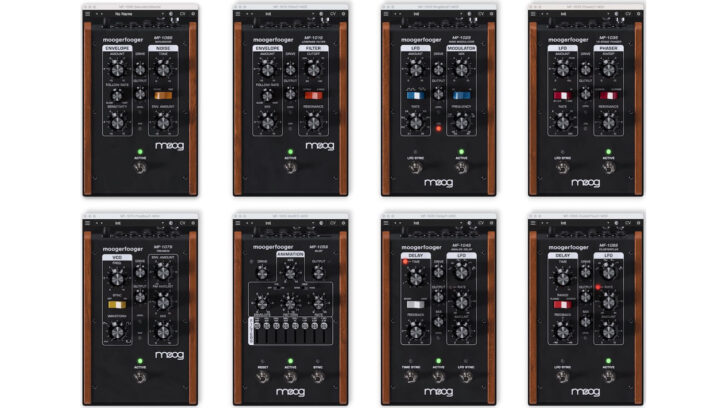
Moog's Moogerfooger Effects Plug-Ins.
Moog’s Moogerfooger Effects Plug-Ins replicate the functionality of their hardware predecessors and more.
MIX VERDICT: Moog Moogerfooger Effects Plug-ins
THE TAKEAWAY: “If you’re looking to take your effects processing to the next level, there’s no better value in the plug-in world than the Moogerfooger Effects Plug-Ins.”
COMPANY: Moog • www.Moogmusic.com
PRICE: $149
PROS:
• Plug-ins accurately emulate the Moogerfooger pedals.
• Exceptional sound quality.
• Excellent value.
• Drive circuit in each plug-in.
• Settings sections allow multiple options.
• CV inputs add numerous modulation choices.
CONS:
• Only 800 ms of delay time in MF-104S Delay plug-in.
• Some users might find the controls challenging.

The Moogerfooger Effects Plug-Ins series is a collection that includes seven digital emulations of Moog’s vaunted but discontinued Moogerfooger effects pedal series, along with one “plug-in only” effect.

COMMONALITIES

Before going into the details of the individual plug-ins, it’s important to note some of the features common to all seven. They’re all designed to look like the Moogerfooger pedals. Each has a vertical orientation, faux wood side pieces, and switches and knobs designed to look like those on the original pedals.

In addition to their effect-specific controls, each plug-in features Drive and Output knobs. The former, which resides after the input in the signal chain of each pedal, lets you dial in analog-modeled saturation. The latter lets you control the signal after the effects. Because some of the processing (for example, the Drive circuit) adds a lot of volume, having a master Output control is handy.

Each pedal also provides four or five “CV” (aka Modulation) inputs. They let you modulate critical parameters with a source from within your session. Choices include sidechain inputs or parameters from the plug-in itself (for example, the LFO) or other open Moogerfooger plug-ins.

The pulldown menu in the CV section shows you all the options, and you can configure as many as you want. Once you’ve selected a modulation source, you’ll see a moving indicator on the appropriate knob that shows the range or amount of the modulation applied.

Each also contains additional pedal-specific parameters, which you can access by pressing the gear-shaped Settings icon.

Finally, all the plug-ins feature a collection of about 25 presets, which are great for demonstrating what each effect is capable of.

MF-101S LOWPASS FILTER

This effect consists of a classic lowpass filter with envelope control. Moog divided it into two main sections: Envelope Follower and Filter. The former includes an Amount knob, which governs how much the amplitude from the incoming audio affects the opening or closing of the Filter. Other Envelope section controls include Follow Rate, which impacts smoothness, and a Mix knob.

The Filter section offers Cutoff and Resonance controls and a switch that toggles between 2- and 4-pole filter operation. With 4-Pole selected, the signal passes through the entire filter. With 2-Pole selected, only half of the filter gets used.

I found that the MF-101S worked excellently on a variety of sources. I used it to create a growly auto-wah effect on a bass track by turning the Cutoff way down, the Resonance up to full, and the Envelope Amount to about 2 o’clock. Making a drum loop sound more lo-fi or a synth patch fatter is also easy with the MF-101S.

MF-102S RINGMOD

This ring modulator plug-in features LFO and Modulator sections. A virtual-analog oscillator generates the LFO. The Amount Knob governs how much of that sine-like waveform will modulate the carrier signal, which comes from another voltage-controlled oscillator.

The Modulator side features Mix and Frequency knobs. The former adjusts the amount of ring-modulated signal that goes to the output. The Frequency knob controls the carrier oscillator. The Lo-Hi switch toggles between two frequency ranges: 0.6 Hz to 80 Hz and 30 Hz to 4 kHz.

Stepping through the presets gives you an idea of the range of effects. You can dial in everything from clean tremolo to that characteristic ringing sound to sci-fi-like extreme effects.

MF-103S PHASER

According to its manual (each plug-in has a separate manual, available from the GUI), this effect is a direct descendant of a 12-stage phaser on Moog modular synths. Plug-in-specific controls on the MF-103S include LFO and Phaser sections and an LFO Sync switch.

The LFO section lets you adjust the amount, rate and range of the LFO signal. The Phaser section’s Sweep knob lets you control its range. The Resonance knob controls the amount of resonance, whose frequency range depends on the Sweep knob’s setting. You can also switch between 6-and 12-stage operation.

The original MF-103 pedal offered only mono operation, but with the plug-in version, you get the choice of mono or stereo via switches in the back-panel Settings section, and as with all the plug-ins in the collection, you can create expansive stereo sounds. The MF-103S is an extremely versatile phase shifter.

MF-104S DELAY

This processor emulates the original pedal’s bucket-brigade circuitry. It features a Delay section with Time and Feedback knobs and a Short/Long switch that, in conjunction with the Time knob, lets you access the plug-in’s 40ms to 800ms range.

You can use delay only, or modulate it with the LFO section, which contains Waveshape, Rate and Amount controls. The Delay Time and LFO can be independently synced to the host tempo.

The Settings section offers a choice of Ping-Pong or Echo delay types, and Legacy, Analog or Modern tone, among other parameters.

It’s a luscious-sounding and flexible delay effect. My only wish would be for more maximum delay time, because it’s not capable of quarter-note delays at tempos below 75 bpm.

MF-105S MURF

The hardware version of this Multiple Resonant Filter Array was designed by Bob Moog and released back in 2004. The plug-in version features an Animation section with a built-in pattern sequencer and a Filter section. The former sports knobs for Mix, Envelope, Pattern and Rate—and a Freq switch that toggles between bass and midrange filter voicings.

The Pattern knob offers a choice of 12 preset patterns (user-editable) that you can apply to modulate the Filter array. The Filter section looks like a graphic EQ, with each band on an individual slider.

The Patterns allow you to add movement to any sound. I got good results by first experimenting with the different Patterns, then tweaking the Envelope and Rate knobs, and finally adjusting different Filter settings.

MF-107S FREQBOX

This unique effect lets you apply several modular synth functions to your audio. It even has an oscillator built-in, which generates various types of tones that you can blend with the source or replace entirely.

The VCO (voltage-controlled oscillator) section contains a frequency (Freq) knob, a switch to turn on and off Sync, and a Waveform selector where you can switch between triangle, sawtooth, square and rectangular waveforms, with gradations in between.

The basic idea is that you select a waveform and then modulate it. If you turn the Mix control fully up, you’ll only hear the VCO’s output. Lower settings combine it with the source audio. If you’re mixing the two, it’s often helpful to adjust the Frequency knob until it’s tuned to the source audio or harmonizing with it.

I used it to create drone notes under single-note synth parts and add heft and tonality to the kick in drum loops. Of all the plug-ins in the collection, it most closely replicates the experience of turning the knobs on a synth and experimenting until you find a sound you like.
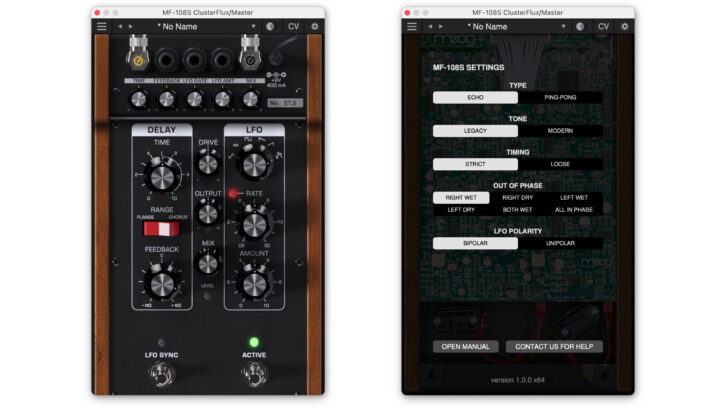
Each plug-in features a CV section (left at top) and Settings page (right) similar to these from the MF-108S ClusterFlux.

MF-108S CLUSTERFLUX

The MF-108S contains two main sections: Delay and LFO. The former features a bucket-brigade circuit emulation and provides Time and Feedback knobs and a Chorus/Flange mode switch.

The LFO offers a Waveform knob with six choices: Sine, Triangle, Square, Sawtooth, Ramp and Random Stepped. The Rate and Amount knobs control the LFO and give you significant sonic options. I was able to quickly dial in everything from lush choruses to deep flangers to vibrato and filter sweeps. It’s an effect you can use on guitars, basses, synths and samplers.

MF-109S SATURATOR

Moog recently added this plug-in, which is not a replication of a hardware pedal, to the Moogerfooger bundle. It takes the same Drive circuit included on all the pedals and adds Envelope control.

Featuring Envelope and Noise sections, it’s capable of everything from light crunch to heavy distortion. Using the Envelope controls, you can modulate the saturation to create a broader range of sounds.

OODLES OF EFFECTS

As you would expect from Moog, the Moogerfooger Effects Plug-ins sound uniformly excellent and offer bountiful creative possibilities. The back-panel setting options and virtual CV inputs add significantly to the breadth of these effects.

If you’re looking to take your effects processing to the next level—particularly if you’re producing music with electronic instruments—there’s no better value in the plug-in world than the Moogerfooger Effects Plug-Ins.

Universal Audio Dream ’65 Reverb Amplifier – A Real-World Review

You can create clean, crunchy and overdriven amp tones from the front-panel controls of the Universal Audio Dream ’65 Reverb Amplifier pedal.
MIX VERDICT: Universal Audio Dream ’65 Reverb Amplifier
THE TAKEAWAY: “No matter your workflow, you will surely be impressed with the authentic guitar amp sound and playing experience.”
COMPANY: Universal Audio • www.uaudio.com
PRICE: $399
PROS:
• Authentic touch and feel.
CONS:
• Amp knobs and switches can only be edited in accompanying app.

The Dream ’65 Reverb Amplifier is one of three amp-emulating pedals in Universal Audio’s UAFX effects line, its two siblings being the Ruby ’63 Top Boost Amplifier (based on a Vox AC30) and Woodrow ’55 Instrument Amplifier (based on a “tweed” Fender Deluxe). As the name hints, the new pedal is based on a ’65 Fender Deluxe Reverb.

The three pedals have many similar features, but each has a unique sound and control set. This review is specific to the Dream ’65 Reverb Amplifier. Although it offers many handy features for live use, I’ll concentrate here on its utility in the studio.

The Dream ’65 Reverb Amp is housed in a heavy-duty metal chassis. It runs on a 9V DC power supply, which is not included. It should run fine on a pedalboard’s 9V power supply.

The I/O features two 1/4-inch inputs and two outputs, so you can connect mono or stereo sources. Controls include Volume, Reverb, Output, Bass, Treble and Boost. The latter two also function as the Speed and Intensity for the gorgeous-sounding Vibrato effect.

The Volume knob governs input gain while the Output functions as a master volume. The higher the gain, the more overdrive. You can use the Boost knob to push the saturation further and change the overdrive characteristics depending on which of the three Amp Mod settings you choose.

The Reverb accurately re-creates the sound of an amp’s spring reverb. The Speaker switch lets you choose between emulations of different speaker cabinet configurations (each of which was modeled through a different mic). If you’re using the pedal connected to an actual guitar amp, you can turn off the cabinet simulation.

Universal Audio Sphere DLX, LX Modeling Mics Launch

You’ll get the most out of the Dream ’65 Reverb pedal if you register it on the UAD site and download the free UAFX control app (iOS and Android). You can use the pedal without the app, but it won’t have all its functionality.

The app communicates with the pedal over Bluetooth, and when open and paired, you get several benefits, including three additional speaker cabinet emulations. It also provides access to banks of Factory and Artist presets, along with a User category for saving your settings. I was disappointed to discover that you can’t edit any of the amp knobs and switches from the app, only from the pedal itself.

With the pedal connected to my audio interface, I found it easy to quickly dial in settings—both clean and overdriven—that sounded like they were from a well-miked vintage Deluxe Reverb. The touch and feel when playing guitar through the pedal are amazingly authentic—more so than with any amp modeling plug-in I’ve used.

Another advantage to recording direct through the Dream ’65 pedal is that you don’t have to worry about the volume from an actual guitar amp. Use it for late-night sessions or to avoid bleed when tracking a band in a single room. Because the pedal is creating the amp simulation, you can monitor with zero latency.

If you prefer recording dry DI guitar parts to keep your sound options open for the mix, you could always reamp them through the Dream ’65 pedal later, although you’ll need a separate reamp box to do so.

No matter your workflow, you will surely be impressed with the authentic guitar amp sound and playing experience that the Dream ’65 Reverb Amplifier pedal provides. It’s a potent new option for recording electric guitar.

Eventide H90 Harmonizer – Product of the Week

Eventide H90 Harmonizer

New York, NY (November 18, 2022)—Eventide, the company that makes the gold-standard H9000 hardware harmonizer, just announced the H90 Harmonizer ($899) pedal. The new unit offers I/O that’s switchable between instrument and line-level, allowing for both live and studio applications.

The H90 features the same ARM-based architecture as H9000 and contains 62 effects algorithms and countless patches based on them, both singly and in combination. Some of the unit’s effects utilize a new, low-latency, polyphonic pitch-shifting technology that Eventide calls SIFT for Spectral Instantaneous Frequency Tracking.

Eventide included a total of seven new effects in the H90:

Polyphony is a Pitch-shifting for chords that provides chorus and crystal-style effects and a Freeze function

Prism Shift lets you shift separate arpeggios from individual chord tones.

WeedWacker is an overdrive effect that Eventide says is sonically similar to a classic green pedal.

Wormhole offers modulated reverb capable of massive atmospheric textures.

Even-Vibe is a stereo Uni-Vibe emulation.

Head Space is a four-head tape delay effect.

Bouquet Delay features a bucket-brigade delay emulation with modulation, Lo-Fi and modern modes, and what Eventide calls “Pitch jump and Self-oscillation performance functions.”

MOTU M6 Audio Interface – Product of the Week

In addition, the H90 offers versions of three classic Eventide effects:

Instant Flanger is a modulation effect that Eventide describes as an “authentic emulation of the world’s first studio Flanger.”

Instant Phaser also emulates a breakthrough product, the first studio phaser from 1971, featured in the Led Zeppelin song “Kashmir.”

SP2016 Reverb offers lush reverb effects derived from the celebrated Eventide hardware unit of the same name.

The unit’s I/O includes four 1/4-inch TS inputs and outputs, switchable between line and instrument level. That allows for highly flexible routing options when using an amp or DAW. One powerful option is Dual Mode, which lets you simultaneously process two independent stereo signals.

Other features include Tap Tempo, a built-in Tuner, MIDI I/O on five-pin DIN connectors on the side of the pedal, a USB-C port for connecting to a Mac or PC when using the free H90 Control software, two expression pedal inputs and more.

Find out more at the Eventide Website.