| MIX VERDICT: Auto-Tune Vocal Compressor |
| THE TAKEAWAY: “If you need the pliability of mixing compressor engines and the comfort of clever settings, I might positively advocate Auto-Tune Vocal Compressor.” |
| COMPANY: Antares • www.antarestech.com PRICE: $179 (perpetual license, contains one yr of Auto-Tune Unlimited); $174.99/yr as a part of Auto-Tune Unlimited Subscription. PROS: • Handy two-stage structure. • Assist function supplies “clever” settings. • Three classic compressor emulations included. • Modern module affords clear operation and sidechain entry. • Auto-Tune Pitch Filter geese different tracks primarily based on a vocal’s pitch. CONS: • Can’t hear Assist settings till you hit Apply. • Assist settings usually embrace an excessive amount of achieve discount. |
With the discharge of the Auto-Tune Vocal Compressor plug-in (Mac/Windows), Antares goals its vocal-software experience on the crowded and aggressive compressor market. The plug-in is an modern dual-stage processor—that includes emulations of a number of basic {hardware} compressors—and employs machine-learning know-how for creating automated settings primarily based on the supply audio.
Although Antares makes use of “Vocal” within the product identify, this compressor can be well-suited for instrument tracks.
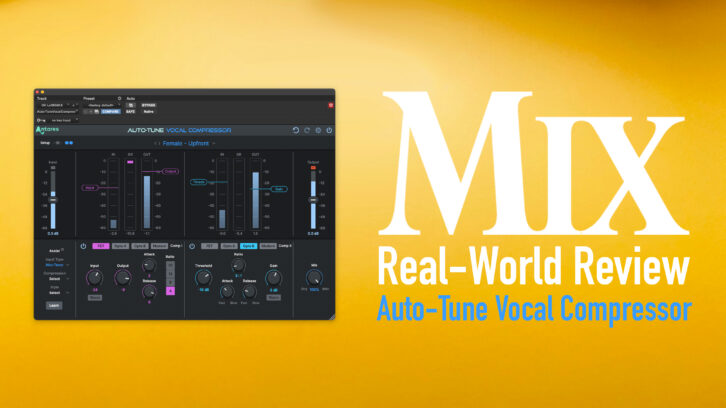
The plug-in’s GUI incorporates a slick, fashionable design. You can change between Dark and Light modes or set it to observe your system. You can freely resize the GUI by clicking and dragging on the decrease right-hand nook, making it significantly smaller or bigger than its default measurement, which is kind of useful.
Near the highest on the left aspect is the Setup part, the place you’ll be able to change between Dual and Single modes. Below is an Input achieve management and meter, together with the Assist part.
An Output degree management and meter are on the suitable, and beneath that could be a Mix knob, which lets you create parallel compression results in case you flip it beneath one hundred pc moist.
You additionally get commonplace Antares international controls for Undo and Redo, preferences and an on/off change.
THREE EMULATIONS
The plug-in defaults to Dual Mode, however you’ll be able to configure it to make use of only one compressor if most well-liked. In Dual Mode, the compressors you select—or those the plug-in chooses for you—get organized in a serial configuration.
You can populate every stage with one in every of 4 completely different compressors: FET Compressor emulates an 1176; Opto A an LA-2A; and Opto B a Tube-Tech CL1B. The fourth selection, Modern, is a digital compressor designed to sound clear. Each of the fashions has a unique management set. In the case of the emulations, the controls are carefully primarily based on the unique {hardware}.
The FET Compressor controls embrace Input, Output, Attack, Release and ratio buttons for 4:1, 8:1, 12:1 and 20:1, similar as discovered on an 1176. Faithful to the unique, the Input management governs the compression quantity. However, Attack and Release are usually not oriented backward as they’re in an precise 1176.
Opto A options Peak Reduction and Gain. Similar to an precise LA-2A, the quantity of compression is managed by the Peak Reduction setting, not the enter degree.
The management set on Opto B resembles that of a CL-1B, with Threshold, Ratio, Attack, Release and Gain controls.
All three of the emulations function an extra button labeled Warm. Modeled from FET transformers, the Warm impact is designed so as to add analog traits to the sign. On the FET and Opto B fashions, its degree is decided by the Input Level. On Opto A, Antares offered a degree knob for it.
Without query, the emulations seize the flavour and habits of the processors they mannequin. They don’t have fairly as a lot character as a few of the devoted plug-in emulations of these models, I discovered, however they had been fairly shut.
AND ONE FROM ANTARES
Controls for the Modern module embrace Threshold, Ratio, Knee, Attack, Release and Gain. Because of the dual-stage structure, you’ll be able to stack the Modern module earlier than or after one of many emulations. That manner, you’ll be able to benefit from its further parameter management whereas benefiting from the analog traits of any of the emulative modules.
The Modern setting additionally options sidechain entry, for which it affords a number of choices. These embrace high-pass and low-pass filters, which you’ll be able to assign to the interior sidechain or an exterior sign from one other observe. Antares doesn’t specify the frequencies at which these filters are set. I attempted the high-pass filter on a drum loop the place the kick drum primarily triggered the compressor. With the HPF on, the snare predominantly triggered the processing as an alternative, which was preferable.
The Auto-Tune Pitch Filter modifies the sidechain. (It took me a short while to determine easy methods to set it up, because the handbook doesn’t go into enough element.) With the compressor engaged on a vocal observe, the Auto-Tune Pitch Filter routinely tracks the vocal’s pitch. Then you probably have the compressor inserted on one other observe that’s in an identical vary to the vocal and is masking it barely, the sidechain sign will compress that observe primarily based on the pitch information it’s receiving from the occasion inserted on the vocal. The impact is fairly delicate, but it surely does assist your vocal observe stand out if it’s getting masked.
Despite the identify Auto-Tune Vocal Compressor, the Pitch Filter is the one space the place Auto-Tune know-how figures into the plug-in’s operation. I perceive the identify from a advertising perspective, and Antares certainly has a number of different plug-ins with “Auto-Tune” within the identify that don’t tune vocals. My guess is that some clients would possibly anticipate it to incorporate auto-tuning.
MAY I HELP YOU?
Machine studying comes into play with the Assist function. Like different “clever” plug-ins, it analyzes the supply observe and provides you a “start line” setting. To use Assist, you first should choose an Input Type from a selection of Soprano, Alto-Tenor, Low Male, Instrument and Bass Inst.
Next, you select Minimal, Controlled or Aggressive, which units the compression quantity. Minimal is 0 dB to -3 dB of achieve discount, Controlled -3 dB to -6 dB, and Aggressive -8 dB to -12 dB.
Finally, you specify whether or not so as to add saturation to the sign and the way a lot. Choosing Clean Vocals disables any saturation. Warm and Full affords a modest quantity, designed so as to add heat however not sound clearly distorted. Gritty Vocal supplies essentially the most saturation, for what Antares calls “an analog, energetic sound.”
After choosing these preliminary settings, play the observe and press the Learn button. You’ll see a countdown from 5 within the Assist part of the GUI. When it reaches 0, a pop-up window exhibits which compressors the Assist engine selected and their parameter settings. It offers you the choice to use the settings or not.
SPL MTC Mk2 Monitor Controller – A Mix Real-World Review
Unless you see one thing you don’t like within the offered parameter settings, you’ll in all probability wish to hit Apply usually, as you’ll be able to’t hear the setting’s impact till you do. If you don’t like what you hear, you’ll be able to run the Assist course of once more with completely different settings.
This workflow appears a bit clunky to me. I might have most well-liked to listen to the outcomes earlier than deciding whether or not to maintain them or strive the Assist course of once more.
I used Assist to create settings for lead and background vocals, in addition to drums, bass and guitar tracks. It at all times introduced me with a Dual mode setting. That didn’t shock me as a result of the stacking of two completely different compressors is among the handiest options of this plug-in, and it lets you do extra with the processing than you would with a single compressor.
The Assist function’s settings put me within the ballpark in virtually all circumstances. Sometimes I didn’t really feel the necessity to tweak them in any respect. My solely difficulty was that they tended to be a bit heavy-handed, and I usually needed to dial again the quantity of compression. Also, a couple of times the Assist setting decreased the amount significantly with out including make-up achieve. For essentially the most half, I appreciated having the choice to start out with an automated setting, particularly for combining two compressor varieties.
In addition to the Assist settings, the plug-in affords a modest assortment of presets of the Factory and Artist selection. The latter contains presets from Electropoint, Gloria Kaba, J-Ray and Jacquire King.
THE SUM OF ITS PARTS
Auto-Tune Vocal Compressor is an formidable and modern plug-in that mixes a number of {hardware} fashions with automated AI-based settings in a single product. The means to simply stack two compressors makes mixing compressor flavors and behaviors simple.
The plug-in can be fairly versatile and works properly on devices and vocals. If you’re trying strictly for a basic compressor emulation, I’d advocate a plug-in that does that completely—however if you need the pliability of mixing compressor engines and the comfort of clever settings, I might positively advocate Auto-Tune Vocal Compressor.
Auto-Tune Vocal Compressor is accessible via a perpetual license or by subscription to the Antares Auto-Tune Unlimited program, which incorporates the entire firm’s plug-ins for a low month-to-month cost.
Like many music software program builders, Antares is pushing its subscription program fairly exhausting, and in case you’re okay with getting your software program that manner, it’s actually a greater worth. Even in case you purchase fairly than subscribe, you get a free yr of Auto-Tune Unlimited, which is an effective deal. Either manner, a 14-day free trial can be provided, so you’ll be able to put it via its paces earlier than deciding whether or not it matches your wants.