Tag Archives: Review

Antares Auto-Tune Vocal Compressor – A Mix Real-World Review

Antares Auto-Tune Vocal Compressor

MIX VERDICT: Auto-Tune Vocal Compressor
THE TAKEAWAY: “If you need the pliability of mixing compressor engines and the comfort of clever settings, I might positively advocate Auto-Tune Vocal Compressor.”
COMPANY: Antares • www.antarestech.com
PRICE: $179 (perpetual license, contains one yr of Auto-Tune Unlimited); $174.99/yr as a part of Auto-Tune Unlimited Subscription.
PROS:
• Handy two-stage structure.
• Assist function supplies “clever” settings.
• Three classic compressor emulations included.
• Modern module affords clear operation and sidechain entry.
• Auto-Tune Pitch Filter geese different tracks primarily based on a vocal’s pitch.
CONS:
• Can’t hear Assist settings till you hit Apply.
• Assist settings usually embrace an excessive amount of achieve discount.

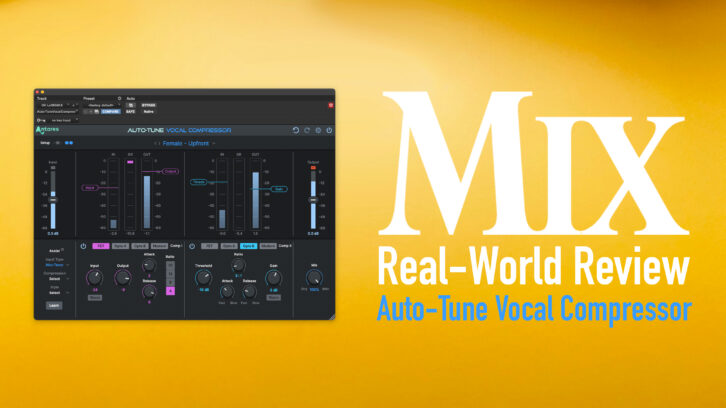
With the discharge of the Auto-Tune Vocal Compressor plug-in (Mac/Windows), Antares goals its vocal-software experience on the crowded and aggressive compressor market. The plug-in is an modern dual-stage processor—that includes emulations of a number of basic {hardware} compressors—and employs machine-learning know-how for creating automated settings primarily based on the supply audio.

Although Antares makes use of “Vocal” within the product identify, this compressor can be well-suited for instrument tracks.

The plug-in’s GUI incorporates a slick, fashionable design. You can change between Dark and Light modes or set it to observe your system. You can freely resize the GUI by clicking and dragging on the decrease right-hand nook, making it significantly smaller or bigger than its default measurement, which is kind of useful.

Near the highest on the left aspect is the Setup part, the place you’ll be able to change between Dual and Single modes. Below is an Input achieve management and meter, together with the Assist part.

An Output degree management and meter are on the suitable, and beneath that could be a Mix knob, which lets you create parallel compression results in case you flip it beneath one hundred pc moist.

You additionally get commonplace Antares international controls for Undo and Redo, preferences and an on/off change.

THREE EMULATIONS

The plug-in defaults to Dual Mode, however you’ll be able to configure it to make use of only one compressor if most well-liked. In Dual Mode, the compressors you select—or those the plug-in chooses for you—get organized in a serial configuration.

You can populate every stage with one in every of 4 completely different compressors: FET Compressor emulates an 1176; Opto A an LA-2A; and Opto B a Tube-Tech CL1B. The fourth selection, Modern, is a digital compressor designed to sound clear. Each of the fashions has a unique management set. In the case of the emulations, the controls are carefully primarily based on the unique {hardware}.

The FET Compressor controls embrace Input, Output, Attack, Release and ratio buttons for 4:1, 8:1, 12:1 and 20:1, similar as discovered on an 1176. Faithful to the unique, the Input management governs the compression quantity. However, Attack and Release are usually not oriented backward as they’re in an precise 1176.

Opto A options Peak Reduction and Gain. Similar to an precise LA-2A, the quantity of compression is managed by the Peak Reduction setting, not the enter degree.

The management set on Opto B resembles that of a CL-1B, with Threshold, Ratio, Attack, Release and Gain controls.

All three of the emulations function an extra button labeled Warm. Modeled from FET transformers, the Warm impact is designed so as to add analog traits to the sign. On the FET and Opto B fashions, its degree is decided by the Input Level. On Opto A, Antares offered a degree knob for it.

Without query, the emulations seize the flavour and habits of the processors they mannequin. They don’t have fairly as a lot character as a few of the devoted plug-in emulations of these models, I discovered, however they had been fairly shut.

AND ONE FROM ANTARES

Controls for the Modern module embrace Threshold, Ratio, Knee, Attack, Release and Gain. Because of the dual-stage structure, you’ll be able to stack the Modern module earlier than or after one of many emulations. That manner, you’ll be able to benefit from its further parameter management whereas benefiting from the analog traits of any of the emulative modules.

The Modern setting additionally options sidechain entry, for which it affords a number of choices. These embrace high-pass and low-pass filters, which you’ll be able to assign to the interior sidechain or an exterior sign from one other observe. Antares doesn’t specify the frequencies at which these filters are set. I attempted the high-pass filter on a drum loop the place the kick drum primarily triggered the compressor. With the HPF on, the snare predominantly triggered the processing as an alternative, which was preferable.

The Auto-Tune Pitch Filter modifies the sidechain. (It took me a short while to determine easy methods to set it up, because the handbook doesn’t go into enough element.) With the compressor engaged on a vocal observe, the Auto-Tune Pitch Filter routinely tracks the vocal’s pitch. Then you probably have the compressor inserted on one other observe that’s in an identical vary to the vocal and is masking it barely, the sidechain sign will compress that observe primarily based on the pitch information it’s receiving from the occasion inserted on the vocal. The impact is fairly delicate, but it surely does assist your vocal observe stand out if it’s getting masked.

Despite the identify Auto-Tune Vocal Compressor, the Pitch Filter is the one space the place Auto-Tune know-how figures into the plug-in’s operation. I perceive the identify from a advertising perspective, and Antares certainly has a number of different plug-ins with “Auto-Tune” within the identify that don’t tune vocals. My guess is that some clients would possibly anticipate it to incorporate auto-tuning.

MAY I HELP YOU?

Machine studying comes into play with the Assist function. Like different “clever” plug-ins, it analyzes the supply observe and provides you a “start line” setting. To use Assist, you first should choose an Input Type from a selection of Soprano, Alto-Tenor, Low Male, Instrument and Bass Inst.

Next, you select Minimal, Controlled or Aggressive, which units the compression quantity. Minimal is 0 dB to -3 dB of achieve discount, Controlled -3 dB to -6 dB, and Aggressive -8 dB to -12 dB.

Finally, you specify whether or not so as to add saturation to the sign and the way a lot. Choosing Clean Vocals disables any saturation. Warm and Full affords a modest quantity, designed so as to add heat however not sound clearly distorted. Gritty Vocal supplies essentially the most saturation, for what Antares calls “an analog, energetic sound.”

After choosing these preliminary settings, play the observe and press the Learn button. You’ll see a countdown from 5 within the Assist part of the GUI. When it reaches 0, a pop-up window exhibits which compressors the Assist engine selected and their parameter settings. It offers you the choice to use the settings or not.

SPL MTC Mk2 Monitor Controller – A Mix Real-World Review

Unless you see one thing you don’t like within the offered parameter settings, you’ll in all probability wish to hit Apply usually, as you’ll be able to’t hear the setting’s impact till you do. If you don’t like what you hear, you’ll be able to run the Assist course of once more with completely different settings.

This workflow appears a bit clunky to me. I might have most well-liked to listen to the outcomes earlier than deciding whether or not to maintain them or strive the Assist course of once more.

I used Assist to create settings for lead and background vocals, in addition to drums, bass and guitar tracks. It at all times introduced me with a Dual mode setting. That didn’t shock me as a result of the stacking of two completely different compressors is among the handiest options of this plug-in, and it lets you do extra with the processing than you would with a single compressor.

The Assist function’s settings put me within the ballpark in virtually all circumstances. Sometimes I didn’t really feel the necessity to tweak them in any respect. My solely difficulty was that they tended to be a bit heavy-handed, and I usually needed to dial again the quantity of compression. Also, a couple of times the Assist setting decreased the amount significantly with out including make-up achieve. For essentially the most half, I appreciated having the choice to start out with an automated setting, particularly for combining two compressor varieties.

In addition to the Assist settings, the plug-in affords a modest assortment of presets of the Factory and Artist selection. The latter contains presets from Electropoint, Gloria Kaba, J-Ray and Jacquire King.

THE SUM OF ITS PARTS

Auto-Tune Vocal Compressor is an formidable and modern plug-in that mixes a number of {hardware} fashions with automated AI-based settings in a single product. The means to simply stack two compressors makes mixing compressor flavors and behaviors simple.

The plug-in can be fairly versatile and works properly on devices and vocals. If you’re trying strictly for a basic compressor emulation, I’d advocate a plug-in that does that completely—however if you need the pliability of mixing compressor engines and the comfort of clever settings, I might positively advocate Auto-Tune Vocal Compressor.

Auto-Tune Vocal Compressor is accessible via a perpetual license or by subscription to the Antares Auto-Tune Unlimited program, which incorporates the entire firm’s plug-ins for a low month-to-month cost.

Like many music software program builders, Antares is pushing its subscription program fairly exhausting, and in case you’re okay with getting your software program that manner, it’s actually a greater worth. Even in case you purchase fairly than subscribe, you get a free yr of Auto-Tune Unlimited, which is an effective deal. Either manner, a 14-day free trial can be provided, so you’ll be able to put it via its paces earlier than deciding whether or not it matches your wants.

SPL BiG Stereo Stage Processor – A Real-World Review

SPL BiG Stereo Stage Processor
MIX VERDICT: SPL BiG Stereo Stage Processor
THE TAKEAWAY: “Carefully used, like any powerful processor, it can work wonders on non-correlated stereo audio and is magical!”
COMPANY: SPL • spl.audio
PRICE: $649
PROS:
• Very exacting stereo widening processor with specific parameters.
CONS:
• Takes time and some care when listening and adjusting.

SPL’s BiG is a dual-slot, 500 series stereo analog module that manipulates the stereo sound image, or stage. When used judiciously, the stereo width, presence and depth can be altered while maintaining accuracy and overall mix balance.

BiG, which is distributed by Focal-Naim America/Canada, works on the components of stereo audio that have little or no correlation between the left and right channels. Stereo L/R audio coming into BiG is algebraically summed [S=(L-R)] to produce a full-spectrum signal that contains only non-correlated information and phase anomalies, such as those generated by added reverb, room acoustics, multiple microphones and delays. This signal is fed into a highly modified, state-variable filter. A typical state-variable filter is capable of producing lowpass, highpass and bandpass outputs all at the same time, and all from a single audio input.

At the top of BiG’s front panel are the interactive Range and Stage controls, specifically designed controlling parameters for adjusting BiG’s state-variable filter. Range is the filter’s frequency control, with an operating range from 6 kHz, at full counter-clockwise (High), to 500 Hz at full clockwise (Open).

SPL of Germany MTC MK2 Monitor Controller Debuts

The larger Stage knob controls the filter’s bandwidth and slope. When the Stage control is fully CCW in the Back position, the center frequency of the Range control is 1.5 kHz. As Stage is turned clockwise, the Range frequency goes lower and lower—until about 110 Hz. Because of the filter’s design, the amount of phase shift and slope is identical in all positions.

With the Range control at High, turning the Stage control from “Back” to “Front” at full clockwise, the slope of the filter becomes increasingly steeper, with a concomitant phase shift. The sonic result is that stereo-panned instruments and voices become closer and louder to the “front of the stage” for the listener. As the Stage control reached the Front position, my auditory perception was that the stereo sound seemed to wrap around me.

The third control on SPL’s front panel is the large Bigness control knob that blends this processed audio back into the stereo output using a proprietary combining method.

The final section is a master EQ—a passive bell-shape equalizer for a 2 dB boost at 45 Hz and a 1.5 dB boost at 15 kHz. This EQ is based on the AirBass section of the SPL Iron Mastering Compressor.

MIXING WITH BIG

I found that BiG works most impressively on recordings that already have substantial, non-correlated acoustical ambiance recorded into them. Although any stereo audio can benefit greatly from BiG’s effect, mixes with many panned mono tracks, “stereo” synthesizers, and contrived L/R delays may not benefit as much.

I had a recording of Manhattan Transfer’s 50 album that has a cover of the Beach Boys’ song “God Only Knows.” This is a live orchestral and choir recording in a live hall using multiple microphones—there are no drums or percussion.

I loaded a copy of the stereo mix into Pro Tools with BiG inserted on the master bus. Listening on both my monitor speakers and headphones, I put a stereo instance of Nugen Audio’s Halo Vision plug-in on the master stereo bus/monitor to visually monitor phase and stereo correlation.

I kept the AirBass EQ on all the time and soon found that there is no wrong or bad way to set BiG except for maybe using way too much of its effect! Generally, the Bigness control only has to be about midway between off and straight up at 12 noon (“10” on the panel) to hear massive changes in the stereo imaging. Furthermore, you can expect a slight overall level increase through the unit with most settings.

DPA 4055 Kick Drum Mic – A Real-World Review

With the Stage control midway (5) in its range and the Range control at 2, I could use plenty of the Bigness control up to the point where the high frequencies started to get shrill at certain moments.

I found that juggling the Range and Bigness controls to dial in just the right balance worked great. I did check the Correlation Matrix window in Halo Vision and saw certain sections of the song were more non-correlated than others, but usually I could get a wide sound and still average way above -0.50, or the anti-correlation threshold where full mono capability is uncertain. This was a recording without the “centering and anchoring effect” of a kick drum or bass instrument.

Keeping the same Range and Bigness settings, rotating the Stage control toward the Front becomes a trade-off between excessive anti-correlation readings and actually altering the mix itself. This led me to try using BiG on individual stereo tracks in a mix.

SEPARATE TRACKS

I tried BiG on a stereo-synthesized harp pluck track that had lots of delay repeats and a little reverb. I kept the Bigness control at 6 or about one-third up, Range at just 2, and Stage at 2, or all the way back counter-clockwise. BiG has a way of making the harp sound overall brighter, panoramically wider and, if the Stage control is turned toward the Front, more immersive—all at the same time.

Listening in mono had close to the same sound as in stereo but lacked some of the low frequencies. In stereo—for this mix—this worked out well on the harp part; it now had a much wider presentation way on the “back wall,” behind the mix.

Next, I tried BiG on the reverb returns of LiquidSonics’ Cinematic Rooms. I liked what BiG did to the reverb sound, and by adjusting Range, Stage and Bigness, I was able to have a reverb wider than the other reverbs in the mix. By nature, reverberation is non-correlated anyway.

On an entire drum kit stem, I had Range at 3, Stage full counter-clockwise (Back), and Bigness at 2. My stereo room tracks came up considerably within the drum mix, and any reverb I had already added to the drums became more present! I also tried BiG directly on the drum overhead tracks without luck. For the drum tracks, I tried it on, the jury is still out.

The SPL BiG provides a good way to expand the stereo imaging of entire mixed tracks, individual stereo instrument and vocal tracks, or stems. Carefully used, like any powerful processor, it can work wonders on non-correlated stereo audio and is magical! Highly recommended. I love it!

“How Could He Betray Us?”

A few months ago, I was speaking on the phone with a manufacturer who was pitching me on the idea of the magazine reviewing the manufacturer’s ambitious new product. After learning about the product during the call, it was obvious that Jonathan Valin was the ideal reviewer. Jonathan has extensive experience in, and enthusiasm for, the category; he has a large reader following; and his writing ability and style would perfectly fit with this potentially groundbreaking product.

But when I proposed Jonathan for the review, the manufacturer balked. Why? Because Jonathan had favorably reviewed another product in the same category. The manufacturer assumed that Jonathan had some sort of allegiance to the other manufacturer. In the manufacturer’s mind, his product simply couldn’t get a fair shake. In fact, the manufacturer explicitly said he believed that even if his product were better than Jonathan’s reference, Jonathan would never say so out of loyalty to the other manufacturer. I tried to assure him that this wasn’t the case, but I couldn’t convince the manufacturer, who was sure that the deck was stacked against him. I suggested another reviewer, but I got the same response; the manufacturer said that the reviewer’s previous praise for a competing product disqualified him. This manufacturer’s new product remains unreviewed.

Fast forward a few months. I was speaking to the principle of a high-end company (“Company A”) who told me about a comment made to him by a long-time employee of the company. I had recently reviewed a product by Company A, followed by another review of a competing product by Company B. I decided to keep on extended loan the product from Company B as my reference, and return the review sample to Company A. When the employee of Company A learned of this development, he said to the principle at Company A, with a mixture of shock, anger, and outrage, “How could he betray us like that?”

Another example: I was speaking with a manufacturer about the company’s upcoming product introduction, a product perfectly suited to my interests and playback system. I proposed that I review the product, but the manufacturer hesitated. He said that I would be a good choice, “but now you’re a [company name redacted] guy,” naming the company whose product I had recently enthusiastically reviewed. Again, the manufacturer assumed that a previous positive review is tantamount to some loyalty to a brand that would preclude a glowing review for the newer product.

Finally, upon reading a less-than-stellar review I had written, the product’s manufacturer called me and exclaimed in an anguished voice “But I thought you were my friend!”

The common thread through these examples is a fundamental misunderstanding of the role of the reviewer and of the relationship between reviewer and manufacturer. Take the example of a manufacturer believing that reviewers have some loyalty to previously reviewed products. If that were the case, I’d still be listening to an 18Wpc Naim Nait 2 integrated amplifier, my first published review from 1989. If a product comes along that sounds better than what I had considered the state of the art (an inevitable turn of events, by the way, as that’s the nature of the industry), I’ll embrace that new product without reservation. The idea that I or any other TAS reviewer would discover a fabulous product but downplay its quality or shade our opinions in deference to a competing manufacturer is laughable. We rejoice in bringing great products to the attention of our readers, whoever the manufacturer might be. We have no dog in the fight.

What all these manufacturers don’t understand is that our allegiance is to our readership, not to their marketing plans. The perceived reviewer “loyalty” to certain manufacturers simply doesn’t exist. Of course, all reviewers have an affinity for certain brands that have a track record of creating great products that we happen to like. But if a better product comes along, we don’t hesitate to embrace it. The offended manufacturers’ feelings are of no concern. I learned a long time ago not to allow personal associations or manufacturer expectations to cloud our mission of reporting what we hear.

The industry marches forward, with TAS at the leading edge of reporting on what’s possible in reproduced music. As new gear comes along, old references will undoubtedly be supplanted. When they do, we’ll continue to report on them without fear or favor. 

The post “How Could He Betray Us?” appeared first on The Absolute Sound.

MAAT FiDef JENtwo – A Real-World Review

MAAT FiDef JENtwo
MAAT FiDef JENtwo plug-in.
MIX VERDICT: MAAT FIDEF JENTWO PLUG-IN
THE TAKEAWAY: “I now include FiDefJENtwo on almost all of my masters for the musicality and likability it seems to bring to the music.”
COMPANY: MAAT • www.maat.digital
PRICE: $129
PROS:
• Adds subtlety and definition.
CONS:
• That subtlety can sometimes be very subtle.

New York, NY (December 2, 2022)—In the often-hyperbolized world of audio, phrases such as “psychoacoustic process” and “no user controls” are enough to draw the lurking cynic out of hype-weary engineers, so when I heard about FideliQuests’s FiDef process being included in MAAT’s thEQblue plug-in equalizer, I wasn’t terribly intrigued. Now that MAAT is marketing FiDef JENtwo as a stand-alone plug-in (the newest update is a Universal Binary 2 version compatible with newer Macs/silicon processors), I became more interested, especially considering that a growing group of A-listers recommending the mysterious process for their masters and mixes.

The concept is that a broadband, sub-audible, correlated, dynamic, spectrally shaped signal, when added to the original signal, can increase the brain’s attention to the audio, revealing detail and making sounds more engaging and pleasurable to hear. The effect is initially subtle even as it grows more apparent over time; perception of the effect has been documented with laboratory tests of brain activity via neuro-imaging techniques.

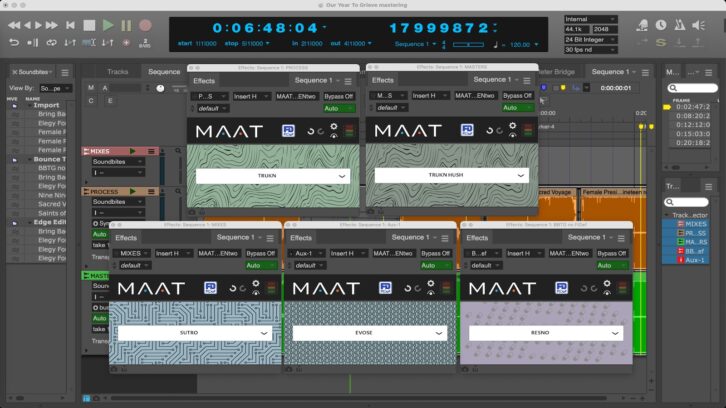
FDJ2 requires no adjustment or parameters, although five Profiles are offered to maximize versatility. Truckin is the subtle, most universal, default algorithm. Truckin Hush has a lower perception of the effect, best for solo performances (where the effect may become too audible) or frequent low-level dynamics. Sutro focuses more on higher-frequency enhancement, with Resno on upper-mids, and finally Evose, a more pronounced Resno.

Many users report success with FDJ2 inserted on instrument buses, vocals, whole mixes and multiple instances (at different settings) on masters, but I started out with a single FDJ2 inserted after my final limiter in a mastering session.

Using Truckin, I toggled bypass as I intently focused on the soundstage before me, only to find no benefit. I finally “got the assignment” and allowed myself to analytically disconnect and unfocus my intent until I heard the mix as a whole, revealing more inner detail and making it “more alive.” Now I could not only hear bypass clearly, but I could also discern Profile differences: Truckin was the most natural and subtle, Sutro was more defined and airy, Resno seemed quite vocally focused, and Evose was a bit too pronounced.

Youlean Loudness Meter 2 – A Real-World Review

PreSonus DM-7 Drum Mic Set – A Real-World Review

Subsequent tests with other songs/artists were typically quite similar, but sometimes yielded no apparent differences, or a difference that was no better, no worse. These inconsistencies were not genre-related, nor quality-related, and may have more to do with my mental variations. Null tests revealed noise akin to pink-noise, pulsing with the rhythm at about -45 to -50 dB LUFS. I tried subjecting my clients to blind A/B tests with their mixes, but the results were inconclusive.

Some users report low-end refinement, others claim more width and depth; I often found a “backlighting” effect. In photography, with a light behind your subjects, they will seem nearly outlined, with crisp edges and neat definition, each member in a group pleasingly highlighted. That approximates FDJ2’s effect upon my lead vocals, top-line instruments and the mix as a whole.

I now include FiDefJENtwo on almost all of my masters for the musicality and likability it seems to bring to the music. No, I cannot verify the improvement with blind tests or concrete proof, but my clients are requesting almost no master revisions lately, and anything that makes my work even a little bit more effective and entertaining is fine by me, user-controls or not.