Tag Archives: Studio One

Mix Real-World Review: PreSonus Studio One 6 Professional

PreSonus Studio One 6 Professional – Mix Real-World Review

MIX VERDICT: PreSonus Studio One 6 Professional
THE TAKEAWAY: “Studio One 6 Professional provides every thing you’d anticipate in a DAW and extra.”
COMPANY: PreSonus • www.presonus.com
PRICE: $399.95; $15.95/month; $199.95/12 months
PROS:
• Lyrics integration.
• Powerful new video options.
• New Fader Flip characteristic and plenty of different mixer enhancements.
• Customization Editor.
• Save and recall of Track Presets.
• User-organizable browser folders
CONS:
• Lyrics implementation could possibly be extra intuitive.
• Sliders in aux sends too small in unexpanded state.

Between its launch in 2009 and right now, Studio One has matured right into a workstation with an extremely sturdy characteristic set. The newest model, PreSonus Studio One 6 Professional, provides an enormous record of latest capabilities.

In this evaluate, I’ll cowl Studio One 6 Professional, the top-of-the-line model and the one you get for those who subscribe to the PreSonus Sphere subscription service. Space doesn’t enable me to cowl each new characteristic, however listed here are the highlights.
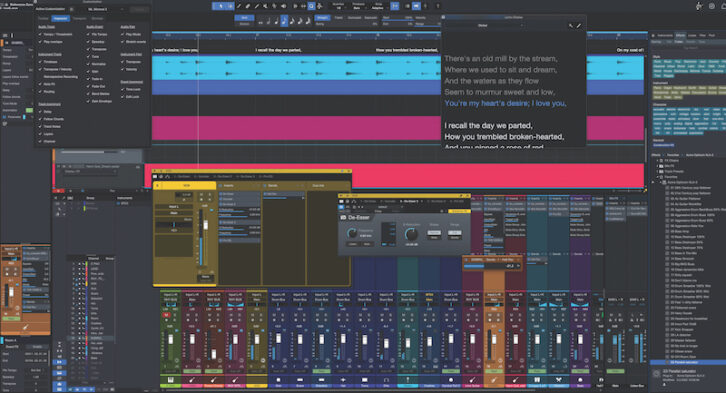
Lyrics, GUI customization and expanded channel views are some of the new features in PreSonus Studio One 6 Professional.
Lyrics, GUI customization and expanded channel views are among the new options in PreSonus Studio One 6 Professional.

NO LOSS FOR WORDS

Perhaps essentially the most vital and distinctive addition to Studio One 6 is the Lyrics Track. A Global Track, just like the Chords, Marker and Arranger Tracks (amongst others), opens just under the timeline on the Song or Show web page.

Click wherever within the Lyrics Track, and also you’ll get a immediate the place you can begin coming into phrases. Alternatively, you may drag and drop lyrics instantly onto the Lyrics Track. To modify the place phrases or phrases sit on the timeline, you may click on and drag them. Lyrics will even conform to the grid if it’s turned on.

The major space for viewing and modifying Lyrics is a separate window referred to as Lyrics Display. Anything entered within the Lyrics Track reveals up there (you too can enter and edit lyrics instantly within the Lyrics Display). The Lyrics Display is expandable, as is its font dimension.

The lyrics are synched to the timeline. As a track performs, they get highlighted in blue on the applicable time, like a “follow-the-bouncing-ball” impact. Moreover, the show scrolls, so the best phrases will all the time seem, even in lengthy songs.

After some experimentation, I noticed that it’s a lot quicker to line up the primary phrase of every line when coming into the lyrics for onscreen viewing. When the track performs, every line will get highlighted on the appropriate time.

You have the choice to assign lyrics to a selected (MIDI) Instrument Track. That is useful if you wish to file or program the melody onto that monitor after which use it to create a lead sheet to print or export from Studio One’s Score Editor.

Once you’ve got an Instrument Track with the melody, it’s a breeze to assign lyrics in order that they line up with every be aware head, which is crucial for a lead sheet. Using the Lyrics software, you choose a be aware for the primary syllable and sort it in. Next, press the area bar, and the cursor advances to the next be aware.

It took me a while to determine easy methods to use the Lyrics Track. Its implementation is advanced and must be extra intuitive in sure facets, however when you study its capabilities and instructions, it’s highly effective and versatile.

YOU OUGHT TO BE IN PICTURES

The Video Track is one other new Global Track in Studio One 6 Professional. It considerably improves on the minimal video capabilities of earlier variations. For instance, you may load as many video clips as you need into the timeline through drag and drop (Studio One’s assist of drag-and-drop all through the appliance is first-rate). The audio tracks from the video clips present up as separate, editable tracks.

Most notably, the Video Track permits primary reduce/ copy/paste modifying. No, it gained’t change a devoted video editor, however it does will let you shortly assemble video clips or work on including audio to a number of clips in the identical session. When completed, you may export the video in a number of codecs, together with MPEG-4, M4V and QuickTime.

MIXER MANIA

Of all of the areas in Studio One, the Console acquired essentially the most enhancements, and Fader Flip is the good of those new options. Based on comparable performance in outboard digital mixers, Fader Flip permits you to quickly use the primary faders to regulate the degrees of any FX, bus or cue combine ship.

For instance, say you’ve got a reverb ship that you just’re utilizing on a number of tracks, and also you wish to examine and tweak its ranges throughout the combination. Right-click or control-click on a ship, choose Flip Faders (or press the Fader Flip button on the left aspect of the Console) and the primary faders on all of the mixer channels grow to be controls for the ship ranges. It offers you a comparative view of the ship ranges on each monitor, and you’ll modify them with larger decision in Fader Flip mode. When you’ve completed tweaking, flip them again.

Also new and helpful are Expandable Send and Pan controls. In earlier variations, the Sends had been arduous to regulate due to the small dimension of their horizontal sliders. Now, you may double-click on a ship or panner and get a a lot bigger model.

PreSonus AudioBox Go – A Real-World Review

You can develop all of the controls for a mixer channel (one channel at a time) by clicking the Mixer Channel Overview button, situated on each channel strip and plug-in window. Doing so opens a large devoted window containing the channel controls, together with quantity, pan, sends and inserts.

Whether you’re in Mixer Channel Overview or simply trying on the mixer at its common dimension, the Micro View Controls now provide you with controls for any third-party plug-in for important parameters from a channel insert, adjustable proper within the channel strip (or the Mixer Channel Overview). If you click on on an insert within the channel, its Micro View Controls open. They’re fairly small in an everyday channel strip, however extra comfy while you swap to a Mixer Channel Overview.

PreSonus additionally added two extra stereo panning modes, adjustable per monitor. You can now swap any stereo channel from the default Balance panner to both Dual or Binaural mode. A Dual panner permits you to management all sides individually. The Binaural panner permits side-to-side panning and makes use of mid-side processing to regulate the perceived width between 0 % and 200 %.

HAVE IT YOUR WAY

Studio One 6 provides many new methods to customise the GUI and your information. Right-clicking within the Toolbar space brings up the Customize button. Pressing it opens the Customization Editor, a separate window with classes for the Toolbar, Inspector, Transport controls and Browser. In every class, you may take away the controls you don’t wish to see, then save your settings as a preset.

The new Track Presets characteristic permits you to save monitor and channel settings for single or a number of tracks and channels.

The Browser Favorites and Folders characteristic permits you to manage your results and instrument plug-ins within the Browser. Any plug-in you mark as a Favorite will get mechanically deposited within the Favorites folder, and you’ll create your personal folders and organize your plug-ins nevertheless you need. Especially when you’ve got lots of third-party plug-ins, customized folders might be fairly useful.

New folder-organizing options had been additionally added to the Start Page for customizing the way you view your Studio One Documents earlier than opening them.
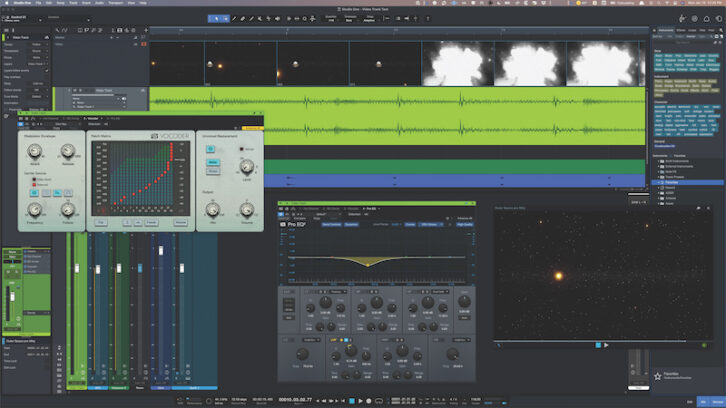
The new video window with the Vocoder and PRO EQ3 open in PreSonus Studio One 6 Professional.

PLUG AND PLAY

Besides all of the consumer interface and mixer enhancements, PreSonus additionally launched a few plug-ins—De-Esser and Vocoder—and up to date the prevailing PRO EQ.

The De-Esser is straightforward however efficient, with controls for Frequency and S-Reduction, adjusting the filter form and vary, and soloing the filtered sign.

The retro-looking Vocoder makes it simple to create basic robot-voice results and extra. It incorporates a matrix within the middle the place you may graphically edit the degrees and I/O routings of the filters. You can swap to Sidechain mode after which use a MIDI instrument to regulate the pitch of the vocoded supply.

PRO EQ3 provides dynamic EQ performance to every band of an already stellar plug-in. If you activate Dynamic mode for a band, you may set Threshold and Range and even set off it from a sidechain. The sidechain performance is compelling as a result of you may set one other monitor to set off the enhance or reduce.

For instance, when you’ve got a vocal that’s getting masked by a rhythm guitar half that in any other case sounds nice and well-balanced, you may set a delicate however broad attenuation on the guitar that solely is available in when the vocal is current.

OPEN SESAME

The new Smart Templates characteristic offers you beginning factors for the assorted Studio One actions (I might have stated “initiatives,” however in Studio One world, that phrase refers explicitly to mastering).

On the left aspect of the New Document window, you’ll see a colourful record of Smart Templates similar to Record Now, Play Now, Rehearse and Perform, Produce Beats, Master and Release, Create Content Import Files and extra. When you open one, it’s populated with tracks, plug-ins and different options applicable to its objective.

For instance, Produce Beats opens with digital drums, synth bass and one other synth sound with Step Record chosen for every. The Record Now template opens to an audio monitor able to file (nice for capturing these surprising track concept inspirations).

Many of the Smart Templates comprise devoted floating assist home windows aimed toward novice customers, which offer a step-by-step tutorial of the elements and workflow in that template.

ONE FOR ALL

Unless you’re engaged on multichannel audio, which isn’t supported, PreSonus Studio One 6 Professional provides every thing you’d anticipate in a DAW and extra. With its separate workspaces for recording/mixing, mastering and dwell efficiency, it’s extremely sturdy and appropriate for any music style.

Thanks to the brand new Lyrics and Video Tracks, the enhancements within the Console, and the customization choices, it’s extra complete than ever.

PreSonus Debuts Retro Mix Legends Plug-Ins

PreSonus Retro Mix Legends Plug-Ins

Baton Rouge, LA (June 2, 2021)—PreSonus has dropped Retro Mix Legends, a new set of Mix Engine Effects plug-ins for the Studio One DAW. Available separately and as a bundle, the three plugs— Alpine Desk, Brit Console, and Porta Cassette—work within the company’s Mix Engine FX architecture

The Alpine Desk plug-in aims to emulate the sonic textures of a popular American console. Unique to Alpine Desk is a variable output transformer that lets users switch from a 1:1 to 3:1 gain ratio for higher drive settings.

Meanwhile, Brit Console is intended to recreate the general sound of a well-known UK analog console. Brit Console features three Style options: Vintage, Super, and Modern. Vintage offers a bit of top-end roll-off and a 1980s vibe; Super gets more clean, and Modern provides a variable harmonic distortion that yields a gentle bass boost.

PreSonus Revelator USB Microphone – A Real-World Review

Lastly, Porta Cassette aims to recreate the sound of four-track cassette recorders of the 1980s and ’90s. Its character control includes low settings that govern the amount of console coloration, while taking things higher introduces tape wow and flutter. A Pitch control allows users to detune or up-tune every element as well.

The Retro Mix Legends bundle is currently available at $79.95, while they can each be purchased individually for $29.95. All three Mix Engine Effects plug-ins is included in PreSonus Sphere memberships.

PreSonus • www.presonus.com

Studio One ’70s roots music collected in new Soul Jazz compilation

Featuring Freddie McGregor, The Gladiators, Horace Andy, The Viceroys, and more.

Soul Jazz is releasing a new compilation, titled Fire Over Babylon: Dread, Peace and Conscious Sounds at Studio One, on 2xLP this May.

The compilation aims to shine a light on Studio One’s roots music output during the 1970s.

In doing so, Fire Over Babylon brings together tracks by The Gladiators, Freddie McGregor, Horace Andy, The Viceroys, Trevor Clarke, Wailing Souls, The Silvertones and more.

It follows Soul Jazz’ release of Trees Speak’s new album, PostHuman, this May.

Pre-order Fire Over Babylon: Dread, Peace and Conscious Sounds at Studio One here in advance of its 28th May release, check out the artwork and tracklist below.

Tracklist:

1. Freddie McGregor – I Am a Revolutionist
2. The Silvertones – Burning In My Soul
3. Wailing Souls – Without You
4. Devon Russell – Jah Jah Fire
5. Trevor Clarke – Sufferation
6. The Gladiators – Sonia
7. Judah Eskender Tafari – Always Trying
8. The Viceroys – Ya Ho
9. Im and Count Ossie – Give Me Back Me Language And Me Culture
10. The Gladiators – Serious Thing
11. The Prospectors – Glory For I
12. Wailing Souls – Things and Time
13. Pablove Black – Inner Peace
14. The Gladiators – Peace
15. Horace Andy – Mr. Jolly Man
16. Wailing Souls – Rock But Don’t Fall
17. Albert Griffiths and The Gladiators – Righteous Man
18. The Viceroys – So Many Problems

Photo by: Thomas Euler

PreSonus Studio One V5.2 Debuts

PreSonus has released Studio One 5 Professional V5.2, marking the second feature update to its long-running DAW.

Baton Rouge, LA (March 10, 2021)—PreSonus has released Studio One 5 Professional V5.2, marking the second feature update to its long-running DAW. The new edition adds more than 30 new features and improvements.

Studio One 5.2’s new Sound Variations is intended for use corralling complex virtual instruments and orchestral libraries. Central to it is a mapping editor that provides tools for managing complex articulation maps. Each Sound Variation can be customized with its own name and color, and can be dragged-and-dropped in any order and placed into custom folders. Sound Variations can be triggered by key switches, as well as from remote commands, including hardware controllers, keyboard shortcuts, custom macros and more. All Synchron-enabled Vienna Symphonic Instruments, as well as instruments from UJAM fully support dynamic  Sound Variations mapping with Studio One, and a new API allows third-party developers to enable their VST2 and VST3 instruments’ articulations to be queried by Studio One so that Sound Variation maps are automatically generated.

The Score View has been updated with the addition of drum notation and tablature. Users can choose between viewing standard notation with tablature or select tablature only to print lead sheets and more. A new drum-map interface lets users add both the drum and note names to a corresponding notated pitch. A General MIDI map is included for quick setup. New symbols in the Score View allow open/closed/half-open techniques to be added as well. A new Voices icon allows up to four voices per staff to be created.

PreSonus Debuts Eris Sub8 Subwoofer

For performers, the relatively new Show Page has gained a new feature—the Arranger Track—letting users experiment on the fly with new arrangements. Each Arranger section in every Setlist item has five playback mode options: Continue, Stop at End, Skip, Loop, or Loop and Continue; the latter can repeat any section for a specific number of times before playback continues to the next Arranger Section, aiding impromptu extended solos and breakdowns on stage. The new Arranger Track also supports patch changes mid-song.

Version 5.2 adds a number of other features, including the ability to create multiple clip versions, allowing the user to apply clip-based edits in Gain Envelopes or Melodyne independently to Events sharing the same audio; a new “Smart” tool for editing Note Events in the Piano Roll editor; and deeper integration with both ATOM SQ and FaderPort-series controllers. PreSonus Sphere workspaces are also now available directly from the Studio One Browser for bidirectional file transfer. And Studio One is now officially supported for Apple Silicon ARM processors in Rosetta 2 compatibility mode.

Studio One 5.2 is a free update to all registered Studio One 5 customers and is available free to PreSonus Sphere members.

PreSonus • www.presonus.com

PreSonus Studio One 5 Launches with New Features, Live Performance Focus

The new Show Page in PreSonus Studio One 5
The new Show Page in PreSonus Studio One 5.

Baton Rouge, LA (July 7, 2020) — PreSonus Studio One 5 was introduced today, incorporating new elements into its long-running DAW including the introduction of Show Page, a new live performance environment; an extensive revamping of the Native Effects plug-in set; expanded mixer scenes; and more.

The Show Page environment allows users to essentially run a show from a single computer, combining tracks playback with patch management for virtual and real instrument players inside a single window. Studio One Song channel strips, mixdowns, and virtual instrument patches can be directly exported to the Show, while setlist items can be arranged and reworked in the moment. Providing a full-screen performance view, adaptive real-time controls and a large meter, the Show Page is intended to help users play with backing tracks, control virtual instruments, run plug-ins as a virtual effects rack and more.

Studio One’s Native Effects plug-in set under version 5 adds new features and improvements for many effects, along with a new interface with separate dark and light themes. All dynamics effects now have sidechain inputs, and plug-ins with a filter option now have the filter added to the sidechain input as well, enabling more control over the sidechain signal and eliminating the need to add a separate filter up front. Several plug-ins with a Drive parameter now have a State Space Modeled drive stage, aiming to provide analog-sounding saturation. The Pro EQ plug-in adds a linear-phase low-cut filter, 12th-octave spectrum display, and input and output meters with adjustable range and peak hold. Several other plug-ins have received have been updated to improve sound and/or usability.

PreSonus Studio One 5
Native Effects plug-ins have undergone a major revision, including new features and a new modern interface with separate dark and light themes.

Snapshots of the entire mixer can now be taken at any time, and can be recalled in a variety of different ways with various options. In addition to limiting scene recall to specific parameters, recalling a scene may be limited to selected channels only. A dedicated Listen bus has been added, letting users monitor Solo signals through a separate output channel or tune their room using calibration plug-ins while leaving the main mix unaffected.

Other new features include audio Clip Gain Envelopes, providing additional gain control to an audio clip. Meanwhile, aux inputs now allow external audio sources to be fed directly into the mixer without requiring an associated track, so external instruments can be used like virtual instruments within Studio One. Version 5 also adds support for key switch articulations, chasing external timecode (MTC), MPE and MIDI Poly Pressure support, recording in 64-bit floating-point WAV format, and cross-platform support for hardware-accelerated graphics.

PreSonus Eris E8XT Studio Monitors Review

A new dedicated Score View for the Note Editor, based on PreSonus’ Notion music composition and notation software, is available on its own or as a companion side-by-side view with the Piano and Drum views, allowing users to enter, view, and edit notes in standard music notation.

Studio One 5 Professional is available with a street price of $399.95; updates from Studio One 4 Professional are $149.95. For those subscribing to PreSonus Sphere, the new Version 5 is readily available as one of the numerous offerings there. Sphere membership rates are available at monthly ($14.95 U.S.) or annually ($164.95) rates.

Studio One Artist (Street price $99.95; update price: $49.95) now has built-in support for VST and AU plug-ins, ReWire, and PreSonus’ Studio One Remote control software for iPad and Android tablets. These features were formerly available for Studio One Artist only as separate Add-ons.

PreSonus • www.presonus.com